
Introduction
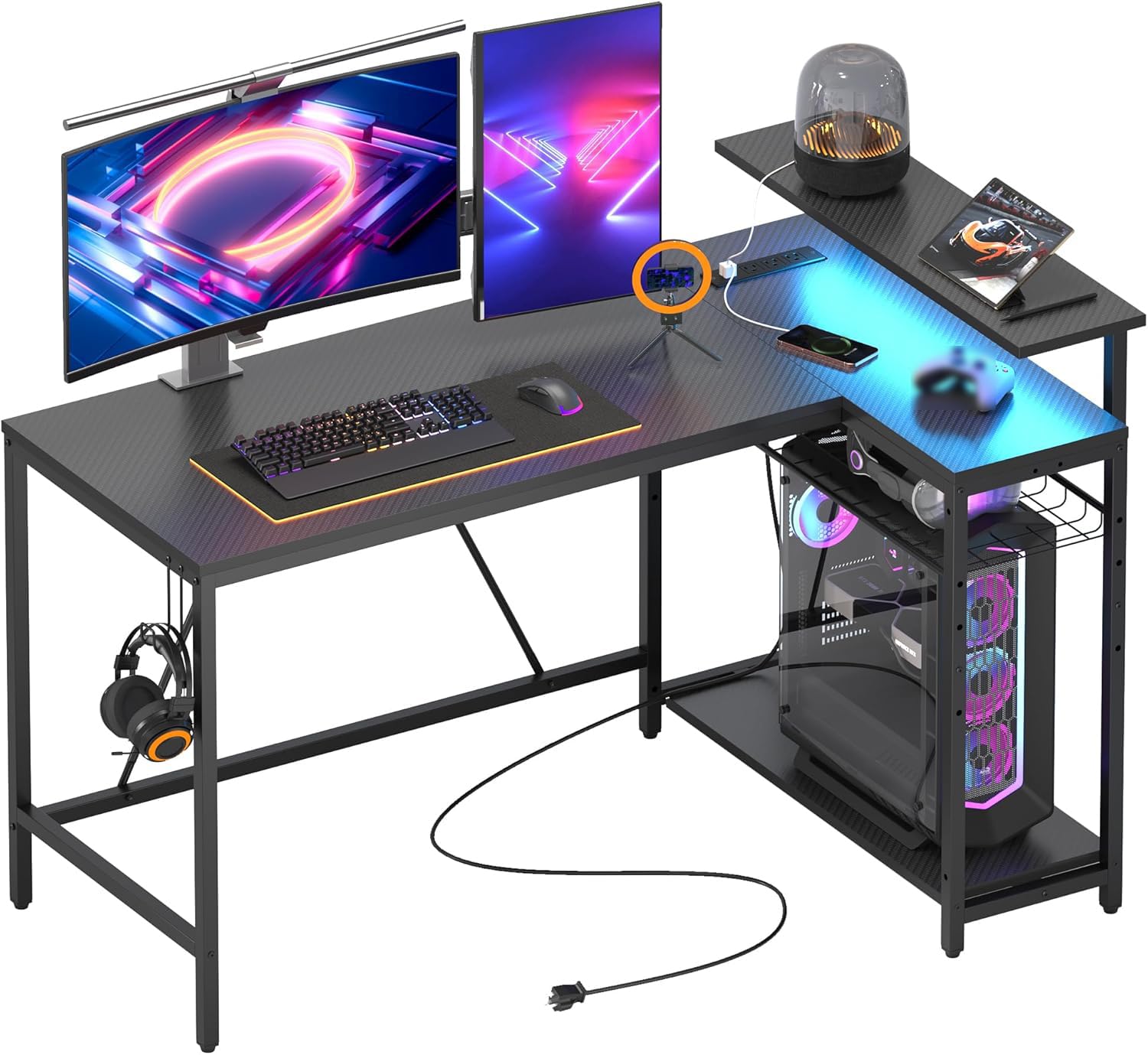
The Bestier 52-inch L-Shaped Gaming Desk is designed to enhance your workspace with integrated power solutions, customizable lighting, and flexible storage. This manual provides essential information for assembly, operation, and maintenance to ensure optimal use and longevity of your desk.
Safety Information
Please read all safety warnings before assembly and use.
- Handle with care due to heavy and potentially sharp components.
- Ensure proper assembly and stability, especially when using the reversible feature.
- Do not overload the desk or shelves beyond their stated weight capacities.
- Keep liquids away from electrical outlets and USB ports.
- Ensure all electrical connections are secure and meet local safety standards.
Product Features
Integrated Power Outlets & USB Ports
The desk includes a built-in power strip with 3 AC outlets (120V/12A, 1500W rated power) and 2 USB charging ports (5V 2.2A). This allows for convenient charging of phones, computers, gaming consoles, and other accessories directly from your desk. The power cord length is 6.5 feet.

Versatile Reversible L-Shaped Design
This L-shaped desk offers a reversible configuration, allowing the storage shelves to be positioned on either the left or right side to best suit your room layout and personal preference. This flexibility helps maximize space utilization.

Vibrant LED Lighting
The desk features integrated LED lighting with 20 static colors and 22 dynamic modes. This allows you to customize the ambiance of your workspace for various activities, from gaming to working or relaxing.

Durable Carbon Fiber Texture & Headset Hook
The desk surface is crafted from durable P2 particle board with a sleek carbon fiber texture, providing both style and resilience. An included hook offers a convenient place to hang headphones or a bag, helping to keep your workspace organized.

Adjustable Storage Shelves
The desk features flexible storage shelves. The central metal grid panel has three adjustable height options and can be angled. The storage area can be configured into a 4-tier shelf with adjustable height open shelves, providing ample space for files, books, or gaming accessories.

Setup and Assembly
Assembly of the Bestier L-shaped gaming desk is designed to be straightforward. The package includes clear, user-friendly instructions and all parts are numbered for easy identification. While one person can assemble the desk, two people are recommended for quicker and safer setup. All necessary tools are typically included.
Operating Instructions
Using the Power Outlets and USB Ports
- Plug the desk's main power cord into a standard wall outlet.
- Insert AC power plugs into the 3 available outlets for devices like monitors, computers, or lamps.
- Connect USB charging cables to the 2 USB ports to charge compatible devices.
- Ensure devices do not exceed the rated power capacity of 1500W for the AC outlets.
Controlling the LED Lighting
The LED strip is controlled via an inline controller or remote (if included). Refer to the specific instructions provided with the LED kit for detailed operation. Generally, buttons allow you to:
- Turn the lights ON/OFF.
- Cycle through 20 static colors.
- Select from 22 dynamic lighting modes.
- Adjust brightness levels.
Maintenance
To maintain the appearance and longevity of your Bestier gaming desk, follow these simple maintenance guidelines:
- Cleaning: Wipe the desk surface and frame with a soft, damp cloth. Avoid using abrasive cleaners or harsh chemicals, as these can damage the carbon fiber texture and finish.
- Spills: Immediately wipe up any spills to prevent staining or damage to the engineered wood material.
- Heat: While the desk is heat-resistant, it is advisable to use coasters for hot beverages and pads for hot dishes to prevent potential damage.
- Stability: Periodically check all screws and fasteners to ensure they remain tight. Retighten if necessary to maintain desk stability.
Troubleshooting
If you encounter any issues with your Bestier gaming desk, consider the following common solutions:
- Wobbly Desk: Ensure all screws are securely tightened. Check that the desk is placed on a level surface. Adjustable feet (if present) can be used to compensate for uneven floors.
- LED Lights Not Working: Verify that the LED strip is properly connected to its power source (USB port) and that the power source is active. Check the inline controller or remote for battery issues or proper function.
- Power Outlets/USB Ports Not Functioning: Confirm the desk's main power cord is securely plugged into a working wall outlet. Check if the wall outlet itself is receiving power. Ensure devices are correctly plugged into the outlets/ports.
- Missing Parts/Damaged Components: If you find any parts missing or damaged upon unboxing, do not proceed with assembly. Contact Bestier customer support immediately for assistance.
Specifications
| Feature | Detail |
|---|---|
| Brand | Bestier |
| Model Number | H10061 |
| Shape | L-Shape |
| Product Dimensions (D x W x H) | 82D x 132.5W x 91.5H Centimetres |
| Color | Carbon Fiber Black |
| Material | P2 Engineered Wood |
| Item Weight | 18.57 Kilograms |
| Power Outlets | 3 AC Outlets (120V/12A, 1500W) |
| USB Ports | 2 USB Ports (5V 2.2A) |
| Power Cord Length | 6.5 feet |
| LED Lighting | 20 Static Colors, 22 Dynamic Modes |
| Special Features | Adjustable, Built-In USB Outlet, Monitor Stand, Reversible, Headphone Hook |
| Assembly Required | Yes (Recommended 2 people) |
Warranty and Support
Bestier stands behind the quality of this product. For any concerns, questions, or support needs regarding assembly, missing parts, or product functionality, please reach out to Bestier customer service. Contact information can typically be found on the Bestier official website or through your purchase platform.


