
CATCHFACE C6-Silver
CATCHFACE C6-Silver Smart Lock User Manual
Model: C6-Silver
Introduction
This manual provides detailed instructions for the installation, operation, and maintenance of your CATCHFACE C6-Silver Smart Lock. This advanced keyless entry system offers multiple access methods, including fingerprint recognition, TTLock app control, password, IC card, and traditional mechanical key.

Image: Overview of the CATCHFACE C6-Silver Smart Lock and its included accessories, such as IC cards and mechanical keys.
Setup and Installation
The CATCHFACE C6-Silver Smart Lock is designed for easy installation and fits standard door preparations. It can be installed on both left and right-handed doors.
Package Contents:
- Smart Lock Unit (Front and Rear Handles)
- IC Cards (5 included)
- Mechanical Keys (2 included)
- Installation Hardware and Tools
Installation Steps:
- Prepare the Door: Ensure your door has a standard spherical lock hole with a width of 55-75mm and a thickness of 35-55mm.
- Install the Latch: Insert the latch into the door edge and secure it with screws.
- Install the Exterior Assembly: Route the cable through the door and position the exterior handle assembly.
- Install the Interior Assembly: Connect the cable to the interior handle assembly and secure it to the door using the provided screws. Ensure the internal bar is oriented correctly (usually marked "THIS SIDE UP").
- Insert Batteries: The lock requires 4 AAA alkaline batteries (not included). Insert them into the battery compartment.
- Test Operation: After installation, test the mechanical key and ensure the handle operates smoothly.

Image: Illustration of door compatibility, showing the required dimensions for installation and examples of compatible door handles.

Image: Visual guide demonstrating the adaptability of the smart lock for both left and right-opening doors.
Operating Instructions
Your CATCHFACE C6-Silver Smart Lock offers multiple convenient ways to unlock your door.
1. TTLock App Control:
The TTLock app allows for comprehensive management of your smart lock. Download the app from your device's app store (iOS/Android).
- Pairing: Follow the in-app instructions to pair your lock via Bluetooth.
- Remote Unlock: Unlock the door remotely via the app (requires a compatible gateway, sold separately, for Wi-Fi remote access).
- Generate Passcodes: Create permanent, timed, one-time, or recurring passcodes for guests or service providers.
- Manage Fingerprints & IC Cards: Add, modify, or delete registered fingerprints and IC cards directly from the app.
- View Operation Logs: Access a record of all lock and unlock events, including method and time.
- Auto-Lock Feature: Configure the lock to automatically lock after a set delay.
- Passage Mode: Set the lock to remain unlocked for specific periods, useful for gatherings.
- Silent Mode: Adjust or mute the lock's sound prompts.

Image: Detailed view of the TTLock application interface, illustrating features such as remote unlocking, temporary password generation, and activity log review.
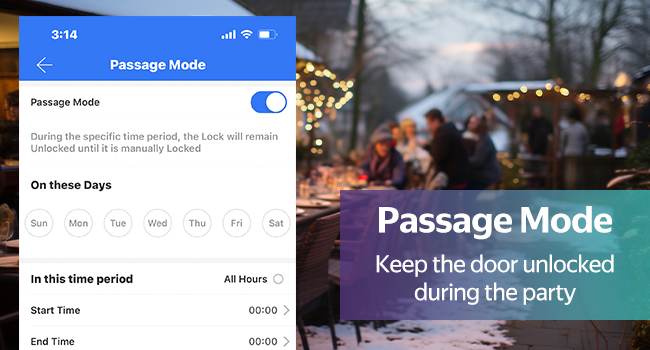
Image: The TTLock app's Passage Mode setting, which allows the lock to remain unlocked for a specified duration.

Image: The TTLock app's Lock Sound settings, enabling users to adjust the volume of voice prompts.
2. Fingerprint Recognition:
The built-in semiconductor fingerprint sensor provides fast and accurate recognition (0.5s verification). Place your registered finger on the sensor for quick access.

Image: Detailed view of the smart lock's fingerprint identification area and the anti-peeping virtual password feature.
3. Password Entry:
Enter your registered password on the backlit keypad. The lock features anti-peeping technology, allowing you to enter random digits before or after your actual code to prevent others from guessing your entry.
4. IC Card Access:
Tap a registered IC card to the designated sensing area on the lock to unlock the door. This is convenient for family members, and lost cards can be easily deleted via the app.

Image: Demonstrates the use of an encrypted smart IC card to unlock the door, highlighting its ease of use and security features.
5. Mechanical Key:
For emergency situations or as a backup, use the provided mechanical keys to unlock the door.

Image: Comprehensive infographic detailing the multiple unlock methods available for the smart lock, including app, fingerprint, password, IC card, and mechanical key.
Maintenance
Battery Replacement:
The CATCHFACE C6-Silver Smart Lock is powered by 4 AAA alkaline batteries. When the battery level is low, the lock will provide a low battery alarm. Replace all four batteries promptly to ensure continuous operation.

Image: Illustrates the battery compartment for 4 AAA batteries and emergency power options, including mechanical key and USB power outlet.
In case of complete battery depletion, you can use the mechanical key for emergency unlocking or connect a power bank to the USB power outlet on the lock for temporary power.
Cleaning:
Wipe the lock surface with a soft, dry cloth. Avoid using abrasive cleaners or solvents that may damage the finish or electronic components.
Troubleshooting
| Problem | Possible Cause | Solution |
|---|---|---|
| Lock does not respond. | Low or dead batteries. | Replace all 4 AAA batteries. Use mechanical key or USB power for emergency access. |
| Fingerprint not recognized. | Finger is dirty, wet, or not properly placed; unregistered fingerprint. | Ensure finger is clean and dry. Place entire pad of finger on sensor. Re-register fingerprint if issue persists. |
| Password not working. | Incorrect password entered; anti-peeping feature misunderstood. | Verify the correct password. Remember you can enter random digits before or after the actual code. |
| IC card not working. | Unregistered IC card; card damaged. | Ensure the IC card is registered in the TTLock app. Try another registered card. |
| Cannot connect to TTLock app. | Bluetooth is off; lock is out of range; app issue. | Ensure Bluetooth is enabled on your phone. Move closer to the lock. Restart the app or your phone. |
| Lock does not auto-lock. | Auto-lock feature is disabled or passage mode is active. | Check auto-lock settings in the TTLock app. Disable passage mode if not needed. |
If you encounter issues not listed here, please refer to the TTLock app's help section or contact customer support.
Specifications
| Brand | CATCHFACE |
| Model Name | C6 TTLock Smart Lock Silver |
| Color | C6-Silver |
| Lock Type | Biometric, Deadbolt, Silver smart door lock with handle |
| Material | Zinc |
| Item Dimensions (L x W x H) | 2.5 x 5.8 x 2.8 inches |
| Item Weight | 2.6 pounds (1.18 Kilograms) |
| Special Features | Alarm, Anti-Peeping Password, Auto-Lock, Back-Lit Keypad, One-Touch Lock |
| Controller Type | Amazon Alexa, Android, Google Assistant, iOS (via TTLock app and gateway) |
| Control Method | App, Remote, Touch |
| Power Source | 4 x AAA Alkaline Batteries (not included) |
| Included Components | Smart Lock *1, IC card *5 |
| Recommended Uses | Door Lock (suitable for Home, Bedroom, Office, Apartment) |

Image: Technical diagram showing the dimensions and key components of the CATCHFACE C6-Silver Smart Lock.

Image: Examples of application scenarios for the smart lock, demonstrating its versatility for universal left and right doors in various environments.
Warranty and Support
For specific warranty information regarding your CATCHFACE C6-Silver Smart Lock, please refer to the documentation included with your purchase or visit the official CATCHFACE website. Warranty terms typically cover manufacturing defects and may vary by region.
Customer Support:
If you require technical assistance, have questions about your product, or need to report an issue, please contact CATCHFACE customer support. Contact details can usually be found on the manufacturer's website or within the TTLock app's help section.
When contacting support, please have your product model (C6-Silver) and purchase details ready to facilitate a quicker resolution.
Related documentsC6-Silver


Ask a question about this manual
Ask about setup, troubleshooting, compatibility, parts, safety, or missing instructions. Manuals+ will review the question and use this page’s manual context to help answer it.