
Introduction
This manual provides essential instructions for the safe and efficient use of your EF ECOFLOW DELTA 2 Max Power Station Extra Battery. Please read this manual thoroughly before operating the product and retain it for future reference. This extra battery is designed to expand the capacity of compatible EF ECOFLOW power stations, such as the DELTA 2 Max, providing extended power duration for various applications.

The EF ECOFLOW DELTA 2 Max Extra Battery, a compact power storage unit designed to expand the capacity of compatible power stations.
Safety Instructions
Always observe the following safety precautions to prevent injury or damage to the product:
- Do not expose the battery to extreme temperatures, direct sunlight, or high humidity.
- Keep the battery away from flammable materials and liquids.
- Ensure proper ventilation during use and charging to prevent overheating.
- Do not disassemble, puncture, or modify the battery in any way.
- Use only official EF ECOFLOW cables and accessories for connection and charging.
- Keep out of reach of children and pets.
- In case of fire, use a dry powder fire extinguisher. Water may cause further damage or electric shock.
Setup
1. Unpacking
Carefully remove the DELTA 2 Max Extra Battery from its packaging. Verify that all components are present: the extra battery unit and the extra battery cable.
2. Connecting to a Compatible Power Station
- Ensure both the DELTA 2 Max Extra Battery and your main EF ECOFLOW power station (e.g., DELTA 2 Max) are powered off.
- Locate the extra battery port on both units. On the DELTA 2 Max Extra Battery, this is typically on the side.
- Connect one end of the extra battery cable to the extra battery port on the DELTA 2 Max Extra Battery.
- Connect the other end of the cable to the extra battery port on your main EF ECOFLOW power station.
- Once connected, power on your main power station. The extra battery will be automatically recognized and integrated into the system.

This image illustrates various recharging methods for the DELTA 2 Max Extra Battery, including solar panel connection and standard AC wall outlet charging. It also shows the battery connected to a main power station.
Operating Instructions
1. Powering On/Off
The extra battery is controlled by the main power station it is connected to. To power on or off the entire system, use the power button on your main EF ECOFLOW power station.
2. Monitoring Battery Status
The DELTA 2 Max Extra Battery features an LCD screen that displays essential information, including remaining battery percentage, input/output wattage, and estimated charge/discharge time. This information is also accessible via the EF ECOFLOW app when connected to your main power station.
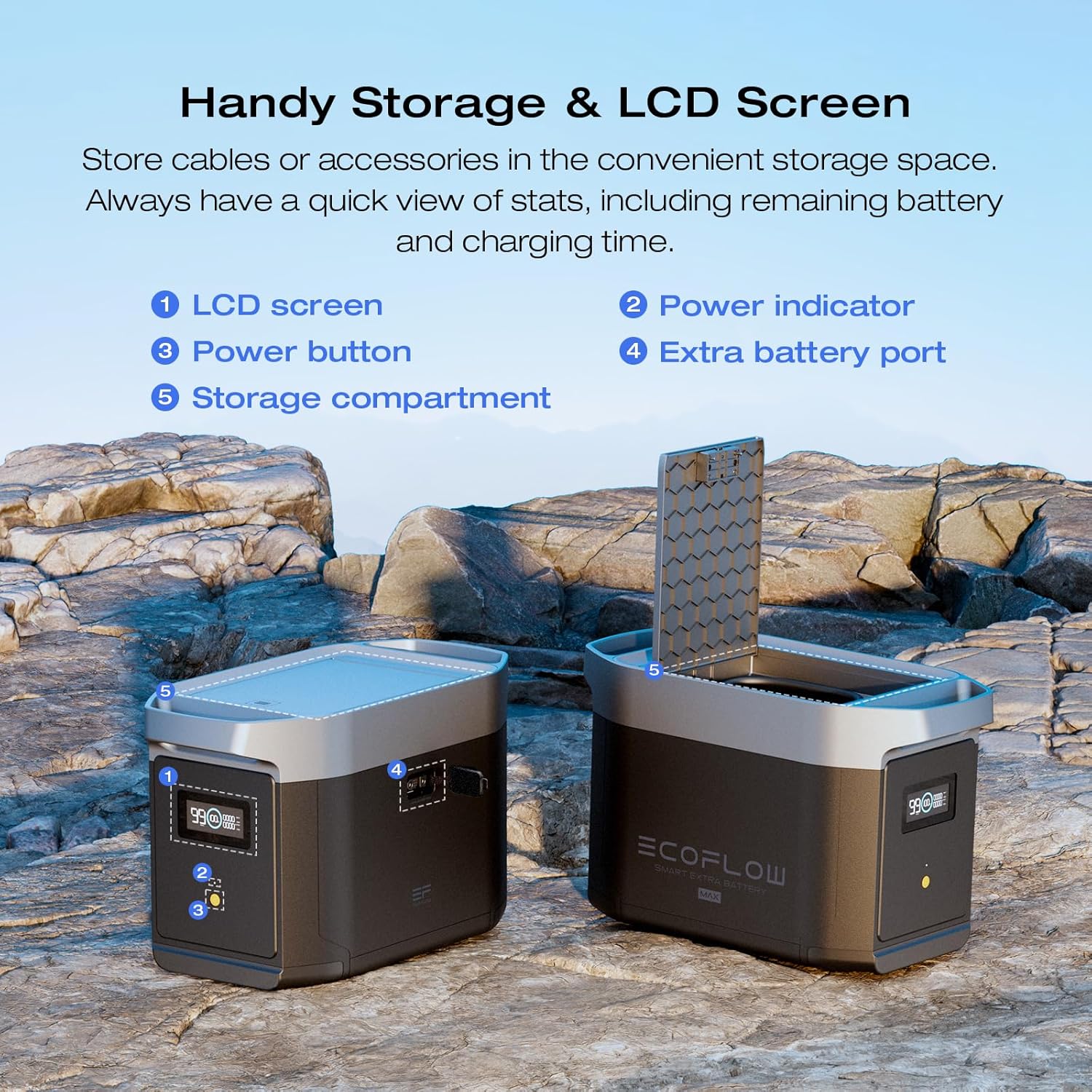
A detailed view of the DELTA 2 Max Extra Battery, pointing out key features such as the LCD screen for status display, the power button, the port for connecting to the main power station, and a storage compartment for cables or accessories.
3. Recharging the System
When the extra battery is connected, it charges and discharges in conjunction with the main power station. You can recharge the entire system using the charging methods available on your main power station:
- AC Wall Outlet: Connect your main power station to a standard AC wall outlet for fast recharging. The system will charge to 80% in approximately 68 minutes with an 1800W AC input.
- Solar Panels: Connect compatible solar panels to your main power station. The system supports up to 1000W solar input.
- Car Charger: Use the car charger port on your main power station for charging on the go.
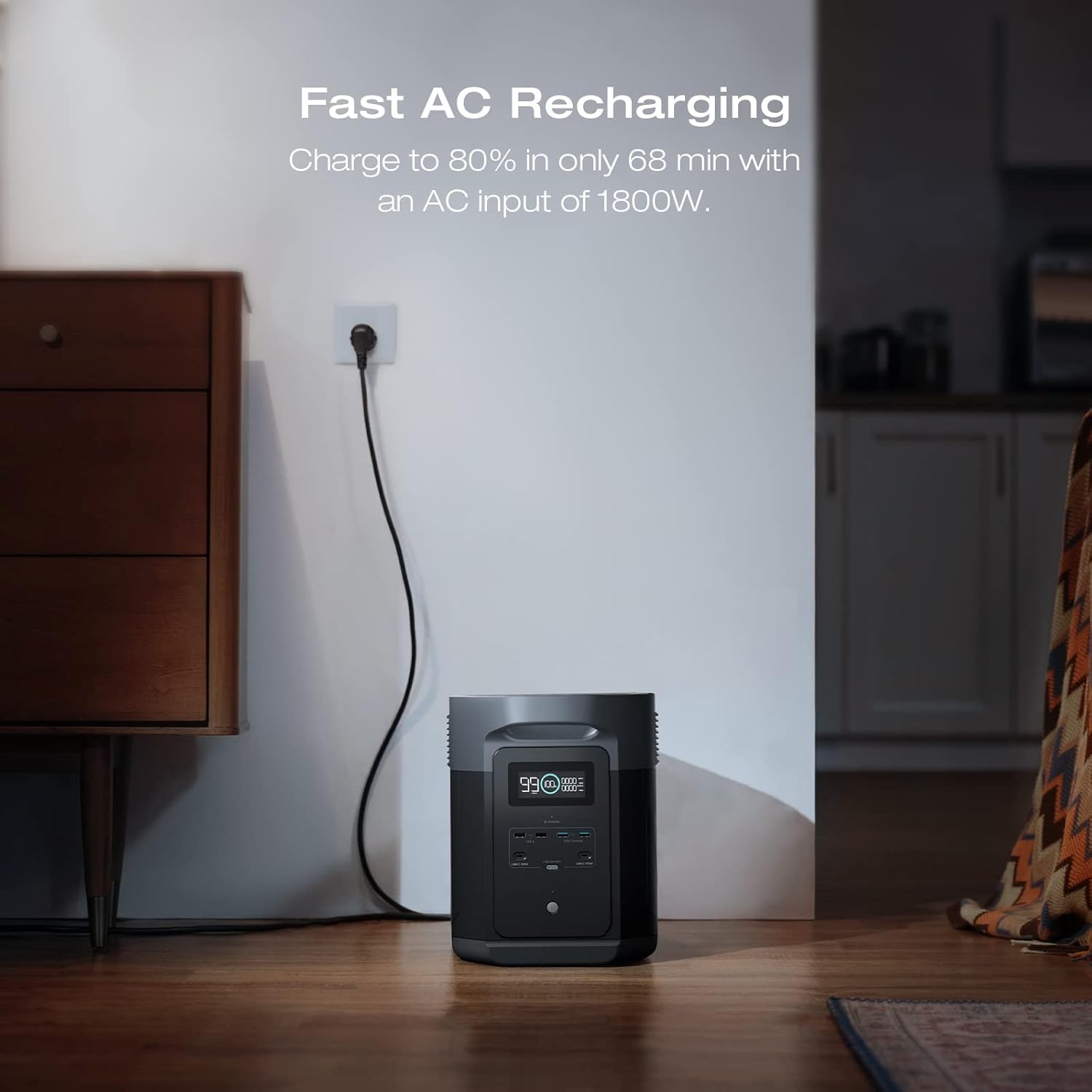
The DELTA 2 Max Extra Battery being recharged rapidly via a standard AC wall outlet, illustrating its fast charging capability.
4. Emergency Power Supply (EPS)
When connected to a main power station with EPS functionality, the extra battery contributes to providing an ultra-fast backup switch. In the event of a power outage, the system can automatically switch to battery power in less than 30 milliseconds, ensuring your connected appliances continue to run.

The DELTA 2 Max Extra Battery integrated into a home or office setup, providing uninterrupted power to electronic devices during an outage, demonstrating its Emergency Power Supply (EPS) capability.
Maintenance
1. Battery Longevity
The DELTA 2 Max Extra Battery utilizes LiFePO4 (Lithium Iron Phosphate) battery chemistry, which offers a long lifespan of over 3000 cycles to 80% of its original capacity. This translates to approximately 10 years of daily use.

This graphic highlights the long lifespan of the LiFePO4 battery chemistry, indicating it can last up to 10 years with over 3000 charge cycles.
2. Storage
When storing the battery for extended periods, ensure it is charged to approximately 50-80% and stored in a cool, dry place away from direct sunlight and extreme temperatures. Recharge the battery every 3-6 months to maintain its health.
3. Cleaning
Use a dry, soft cloth to clean the exterior of the battery. Do not use liquid cleaners or immerse the unit in water.
Troubleshooting
If you encounter issues with your DELTA 2 Max Extra Battery, refer to the following common problems and solutions:
- Battery not recognized by main power station: Ensure the extra battery cable is securely connected to both units. Power cycle both the extra battery and the main power station.
- Battery not charging: Verify that the main power station is charging correctly. Check all cable connections. Ensure the ambient temperature is within the recommended charging range.
- Unusual noises or odors: Immediately power off the unit and disconnect it from the main power station. Contact customer support.
For more complex issues, consult the full user manual of your main EF ECOFLOW power station or contact customer support.
Specifications
| Feature | Specification |
|---|---|
| Brand | EF ECOFLOW |
| Model Name | EcoFlow DELTA 2 Max |
| Item Model Number | EFD350 |
| Wattage | 2048 Watt-hours |
| Battery Type | LiFePO4 (Lithium Iron Phosphate) |
| Cycle Life | 3000+ cycles to 80% capacity |
| Item Weight | 42 Pounds |
| Product Dimensions | 11"L x 9"W x 18"H |
| Color | Black/Grey |
| Special Feature | Expandable capacity |
| Included Components | EcoFlow DELTA Max Extra Battery |

A diagram providing the physical dimensions of the DELTA 2 Max Extra Battery: 11 inches long, 9 inches wide, and 18 inches high.
Warranty Information
The EF ECOFLOW DELTA 2 Max Power Station Extra Battery comes with a 1-year manufacturer's warranty. This warranty covers defects in materials and workmanship under normal use. Please retain your proof of purchase for warranty claims. For detailed terms and conditions, refer to the warranty documentation included with your product or visit the official EF ECOFLOW website.
Customer Support
If you have any questions, require technical assistance, or need to make a warranty claim, please contact EF ECOFLOW customer support through one of the following methods:
- Website: Visit the official EF ECOFLOW website for FAQs, support articles, and contact forms.
- Email: Refer to your product packaging or the official website for the customer support email address.
- Phone: Check the official EF ECOFLOW website for regional customer service phone numbers.
When contacting support, please have your product model (EFD350) and purchase information readily available.