
1. Introduction
The NARWAL Freo X Ultra is an advanced robot vacuum and mop designed to provide comprehensive and effortless floor cleaning. This intelligent device combines powerful suction with innovative mopping technology, featuring an all-in-one self-cleaning station for minimal user intervention. It is ideal for homes with pets and children, ensuring immaculate floors with ease.
2. Safety Information
Please read all safety instructions carefully before using the NARWAL Freo X Ultra. Keep this manual for future reference.
- Ensure the robot and charging station are placed on a stable, level surface.
- Keep children and pets away from the robot during operation.
- Do not use the robot on wet surfaces or in areas with standing water.
- Avoid using the robot near open flames or flammable materials.
- Only use the original power adapter and accessories provided by NARWAL.
- Do not attempt to repair or modify the robot or its components yourself. Contact customer support for assistance.
3. Package Contents
Verify that all items are present in the package:
- NARWAL Freo X Ultra Robot Vacuum and Mop
- All-in-One Docking Station
- Power Adapter
- Floor Brush
- Filter
- Mop Pads (pre-installed or separate)
- Detergent (sample or full bottle)
- Dust Bag (pre-installed or separate)
- User Manual
4. Product Overview
4.1 Robot Unit
The robot unit is equipped with various sensors, a powerful vacuum, and rotating mop pads for thorough cleaning. It features a zero-tangle brush and advanced obstacle avoidance.
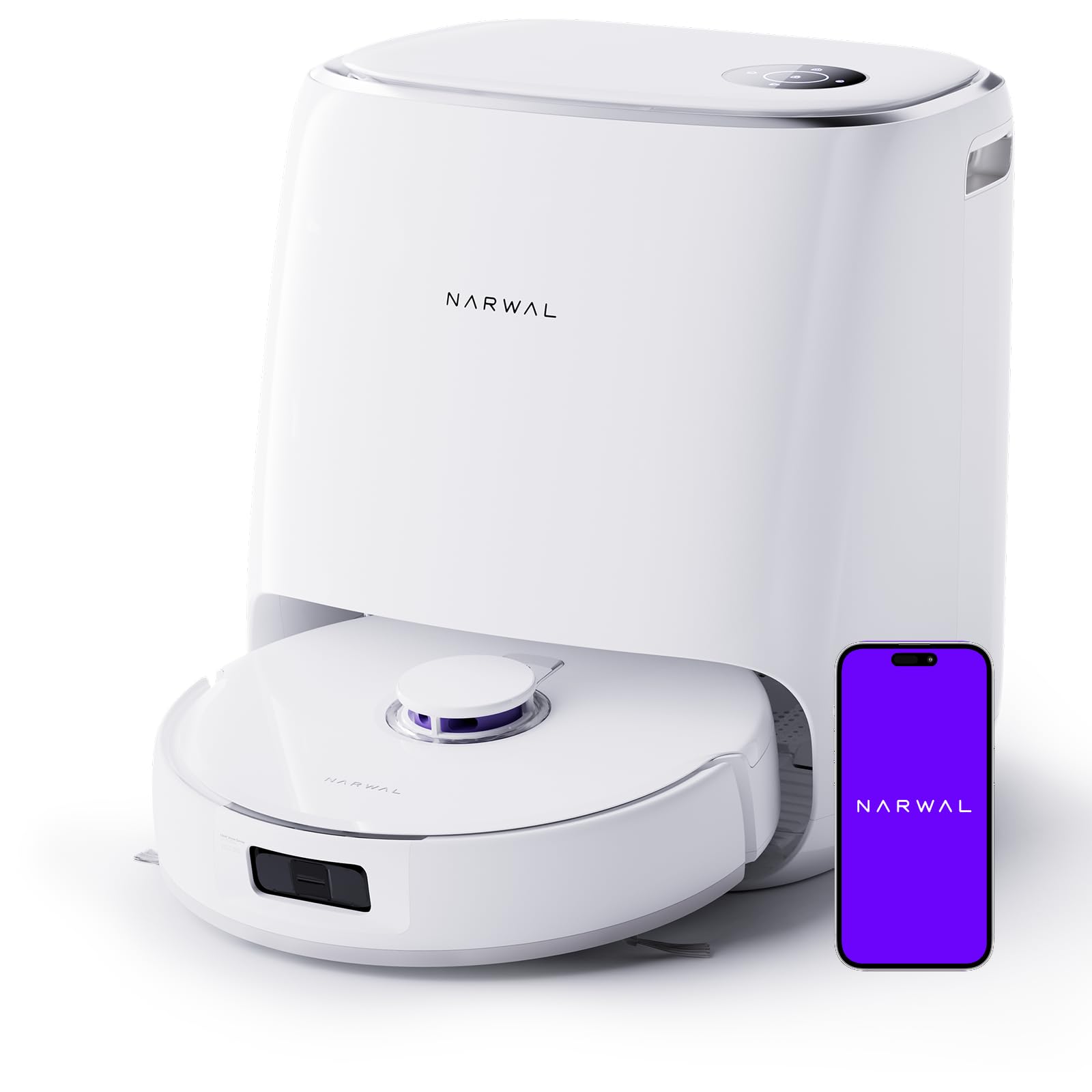
Image: The NARWAL Freo X Ultra robot unit, showcasing its compact design and cleaning capabilities.
4.2 All-in-One Station
The docking station serves as a central hub for charging, automatic mop washing and drying, detergent dispensing, and dust collection. It minimizes manual maintenance.

Image: The NARWAL Freo X Ultra All-in-One Station, illustrating its various automatic functions like mop washing, drying, and detergent distribution.
5. Setup
5.1 Station Placement
- Place the All-in-One Station against a wall in an open area, ensuring at least 0.5 meters of clear space on both sides and 1.5 meters in front.
- Ensure there is a power outlet nearby.
5.2 Initial Charging
- Connect the power adapter to the station and plug it into a wall outlet.
- Place the robot onto the charging contacts of the station. The robot will automatically begin charging.
- Allow the robot to fully charge before its first use (approximately 2-4 hours).
5.3 Water Tanks and Detergent
- Fill the clean water tank with tap water.
- Insert the provided detergent bottle into its designated slot in the station. The system will automatically dispense detergent as needed.
- Ensure the dirty water tank is empty before starting a cleaning cycle.
5.4 App Installation and Wi-Fi Connection
- Download the NARWAL app from your smartphone's app store.
- Follow the in-app instructions to create an account and add your Freo X Ultra robot.
- Connect the robot to your home Wi-Fi network. Note: The robot is compatible only with 2.4 GHz Wi-Fi networks.
5.5 Initial Mapping
- Once connected, initiate a mapping run through the app. The robot will navigate your home to create a detailed map.
- Clear any obstacles from the floor during the initial mapping for best results.
6. Operating Instructions
6.1 Starting and Stopping Cleaning
- Start: Press the 'Clean' button on the robot or use the NARWAL app to start a cleaning cycle.
- Pause: Press the 'Clean' button again or use the app to pause cleaning.
- Return to Station: Press the 'Home' button on the robot or use the app to send the robot back to its station.
6.2 Cleaning Modes
The Freo X Ultra offers multiple cleaning modes, selectable via the app:
- Vacuum & Mop: Simultaneous vacuuming and mopping for efficient cleaning.
- Vacuum Only: For dry debris collection on all surfaces, including carpets. Features 8200 Pa suction power.
- Mop Only: For wet cleaning hard floors. The robot applies 12N downward pressure and rotates mop pads at 180 RPM.
- Deep Cleaning: Enhanced suction and mopping for heavily soiled areas.

Image: The robot demonstrating its 8200 Pa suction power, effectively removing embedded pet hair, food, and crumbs from various surfaces.

Image: The robot utilizing DirtSense Technology to detect and eliminate stubborn stains, ensuring floors are thoroughly cleaned.
6.3 Smart Features
- DirtSense™ Technology: Automatically detects dirt levels and adjusts cleaning intensity.
- EdgeSwing™ Cleaning: Extends mop pads to clean close to walls and edges (within 5mm).
- Obstacle Avoidance: Triple laser sensors detect and avoid objects as small as 1cm.
- LIDAR Navigation: Creates precise maps and plans efficient cleaning paths.
- No-Go Zones: Set virtual boundaries in the app to restrict cleaning areas.
- Voice Control: Compatible with Alexa and Siri for hands-free operation.

Image: The robot demonstrating its triple laser obstacle avoidance, navigating around small objects with precision.
7. Maintenance
Regular maintenance ensures optimal performance and extends the lifespan of your NARWAL Freo X Ultra.
7.1 Dust Collection System
- The robot features an autonomous dust treatment system that compresses dust, allowing for up to 7 weeks of maintenance-free cleaning with a disposable dust bag.
- Replace the dust bag when indicated by the app or when full. A standard dust container is also available for use.

Image: The robot's self-emptying system, highlighting the 7-week maintenance-free dust collection and the disposable dust bag.
7.2 Mop Pads
- The station automatically washes and dries the mop pads after each cleaning cycle.
- Periodically remove and hand-wash or machine-wash the mop pads to ensure thorough cleaning.
- Replace mop pads every 1-3 months depending on usage.
7.3 Brushes
- The innovative conical brush design is certified tangle-free, preventing hair from wrapping around it.
- Inspect the main brush and side brushes regularly for debris and remove any tangled hair or threads.
- Replace brushes as recommended by the app or when visibly worn.

Image: Comparison of the NARWAL Freo X Ultra's tangle-free brush with a traditional brush, showing its effectiveness in preventing hair entanglement.
7.4 Water Tanks and Station Cleaning
- Empty the dirty water tank after each cleaning cycle to prevent odors and bacterial growth.
- Rinse both clean and dirty water tanks periodically.
- The station also features an automatic self-cleaning function for its base.
7.5 Sensors and Filter
- Wipe the robot's sensors (LIDAR, cliff, obstacle avoidance) with a clean, dry cloth regularly to ensure accurate navigation.
- Clean the filter (sponge type) as instructed in the app or when visibly dirty. Replace the filter periodically.
8. Troubleshooting
If you encounter issues with your NARWAL Freo X Ultra, refer to the following common solutions:
| Problem | Possible Cause | Solution |
|---|---|---|
| Robot does not start | Low battery; Not on charging station; Power adapter disconnected. | Ensure robot is fully charged; Place robot on station correctly; Check power connections. |
| Poor cleaning performance | Dirty brushes/mop pads; Full dustbin; Clogged filter; Low water in clean tank. | Clean/replace brushes and mop pads; Empty dustbin; Clean/replace filter; Refill clean water tank. |
| Robot gets stuck frequently | Too many obstacles; Sensors are dirty. | Clear floor of small objects; Clean all sensors on the robot. |
| App connectivity issues | Incorrect Wi-Fi password; Not connected to 2.4 GHz Wi-Fi; Router issues. | Verify Wi-Fi password; Ensure router is broadcasting 2.4 GHz; Restart router and robot. |
| Unpleasant odor from station | Dirty water tank not emptied; Mop pads not cleaned/dried properly. | Empty and rinse dirty water tank regularly; Ensure mop pads are washed and dried. |
For more detailed troubleshooting or persistent issues, please refer to the NARWAL app or contact customer support.
9. Specifications
| Feature | Specification |
|---|---|
| Brand | NARWAL |
| Model Name | Freo X Ultra (YJCC015) |
| Item Model Number | narwal |
| Product Dimensions (L x W x H) | 37 x 43.4 x 41.5 cm |
| Item Weight | 12.75 Kilograms |
| Suction Power | 8200 Pa |
| Mop Pad Pressure | 12 Newtons |
| Mop Pad Rotation Speed | 180 RPM |
| Battery Type | Lithium-ion |
| Power Source | Battery Powered |
| Voltage | 220 Volts (AC) |
| Wi-Fi Compatibility | 2.4 GHz only |
| Control Method | Touch, Remote Control, App, Voice (Alexa, Siri) |
| Surface Recommendation | Multi-surface (hard floors, carpets) |
| Dust Collection Capacity | Up to 7 weeks (with disposable bag) |
10. Warranty Information
The NARWAL Freo X Ultra comes with a limited manufacturer's warranty. Please refer to the warranty card included in your package or visit the official NARWAL website for detailed terms and conditions regarding warranty coverage, duration, and claims process.
11. Customer Support
For technical assistance, product inquiries, or warranty claims, please contact NARWAL customer support through one of the following methods:
- NARWAL App: Access support features directly within the application.
- Official Website: Visit the NARWAL official website for FAQs, troubleshooting guides, and contact information.
- Email Support: Refer to your warranty card or the official website for the customer support email address.
When contacting support, please have your product model (Freo X Ultra) and serial number ready.


