
Important Safety Information
Please read all instructions carefully before assembly and use. Failure to follow these instructions may result in injury or damage to the product.
- For safe use, ensure the desk is not loaded with more than 176 pounds (80 kg).
- Always follow the assembly instructions and use appropriate tools.
- Stabilize the desk properly before use.
- Do not use the desk if any parts are missing or damaged.
- Keep hands and fingers away from moving parts during assembly and adjustment.
- Ensure the desk is not placed near any tripping hazards or unstable objects.
- In case of any issues or concerns, contact SANODESK's customer support.
Product Overview
The SANODESK Standing Desk is an electric height-adjustable desk designed for home and office use. It features a robust 4-leg lift system powered by dual motors, providing stable and smooth height transitions. The integrated digital keypad allows for easy adjustment and includes memory presets for convenience.

Image: The SANODESK Standing Desk, showcasing its spacious black desktop and sturdy black legs, suitable for multiple monitors and office equipment.
Key Features:
- Electric Height Adjustable: Smooth and quiet operation for seamless transitions between sitting and standing.
- Dual Motor 4-Leg Lift System: Ensures stability and a high load capacity.
- Memory Presets: Store your preferred sitting and standing heights for quick adjustments.
- Anti-collision System: Detects and prevents collisions to improve safety during height adjustments.
- Durable Construction: Strong steel frame structure for enhanced stability.
- Protective Edge: Rounded corners designed to protect against bumps and scratches.
Specifications
| Feature | Detail |
|---|---|
| Brand | SANODESK |
| Model Number | QS2 |
| Model Name | QS2B |
| Product Dimensions | 63"D x 71"W x 28.3"H (Note: Current product is 63x28, dimensions may vary by variant) |
| Color | Black |
| Style | Modern |
| Base Material | Metal (Leg) |
| Top Material Type | Engineered Wood |
| Maximum Weight Recommendation | 176 Pounds (80 kg) |
| Maximum Height | 47.5 Inches |
| Required Assembly | Yes |
| Included Components | Cable Management Tray |

Image: Detailed dimensions of the SANODESK Standing Desk, including height range and desktop measurements.
Package Contents
Before beginning assembly, please verify that all parts are present and undamaged. If any parts are missing or damaged, do not proceed with assembly and contact customer support.
- Desktop sections (typically two pieces for larger sizes)
- Desk legs (4 units)
- Crossbars/Frame components
- Dual motors
- Control box
- Digital keypad controller
- Power adapter and cable
- Cable management tray
- Assembly hardware (screws, bolts, washers, etc.)
- Tools for assembly (e.g., Allen wrench)
- User Manual (this document)
Setup and Assembly
Assembly of the SANODESK Standing Desk requires careful attention to detail. It is recommended to have two people for assembly to ensure stability and ease of handling, especially for the desktop. Please refer to the official Installation Manual for detailed, step-by-step instructions.
Download Official Installation Manual (PDF)
General Assembly Steps (Refer to PDF for details):
- Unpack all components and verify against the package contents list.
- Assemble the desk frame, attaching the legs to the crossbars.
- Install the dual motors and connect them to the control box.
- Attach the desktop sections to the assembled frame. Ensure proper alignment if the desktop is in multiple pieces.
- Mount the digital keypad controller to the underside of the desktop.
- Connect all necessary cables (motor to control box, control box to keypad, power adapter to control box).
- Install the cable management tray.
- Plug the power adapter into a suitable power outlet.
- Perform initial calibration as per the manual (if required).
Ensure all screws are tightened securely before placing any items on the desk.
Operating Instructions
The SANODESK Standing Desk features an intuitive digital keypad for easy height adjustment and memory functions.
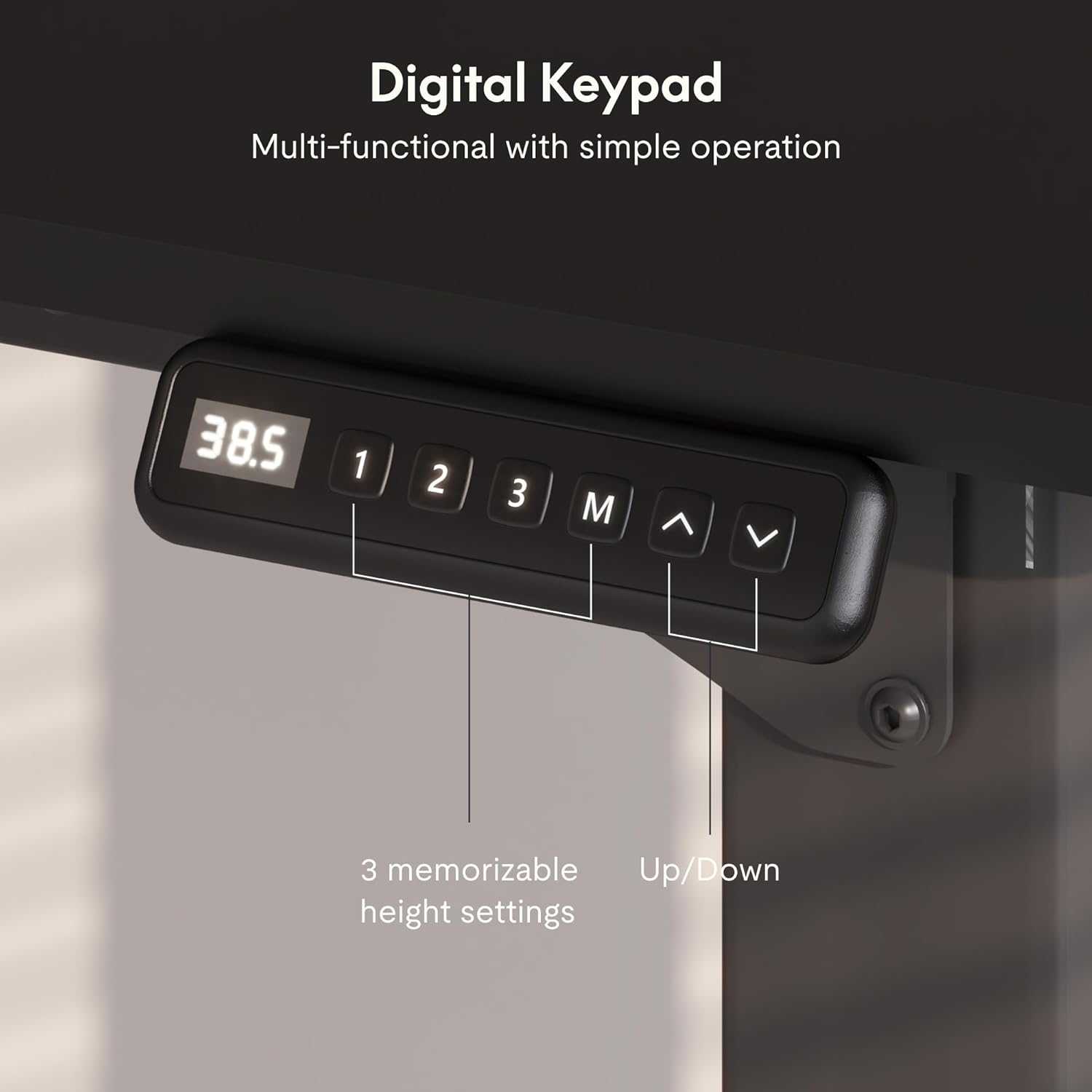
Image: The digital keypad controller, showing the display and buttons for height adjustment and memory presets.
Height Adjustment:
- Press the Up (^) arrow button to raise the desk.
- Press the Down (v) arrow button to lower the desk.
- Release the button at your desired height. The current height will be displayed on the digital screen.
Setting Memory Presets:
The desk allows you to save up to three preferred height settings.
- Adjust the desk to your desired height using the Up/Down buttons.
- Press the "M" button. The display will show "S-" followed by a number.
- Within 3 seconds, press one of the numbered preset buttons ("1", "2", or "3") to save the current height to that preset.
- The display will confirm the saved preset (e.g., "S-1").
Using Memory Presets:
- Simply press the corresponding numbered preset button ("1", "2", or "3"). The desk will automatically move to the saved height.
Anti-Collision System:
The desk is equipped with an anti-collision system. If the desk encounters an obstacle during adjustment, it will automatically stop and reverse slightly to prevent damage. Remove any obstacles before attempting to adjust the height again.

Image: Visual representation of the anti-collision system, showing the desk stopping and reversing upon encountering an obstacle.
Maintenance
Regular maintenance helps ensure the longevity and optimal performance of your SANODESK Standing Desk.
- Cleaning: Wipe the desktop and frame with a soft, damp cloth. Avoid abrasive cleaners or harsh chemicals that could damage the finish.
- Cable Management: Periodically check and organize cables to prevent tangles and ensure smooth operation. Utilize the included cable management tray.
- Fasteners: Occasionally check all screws and bolts to ensure they remain tight. Retighten if necessary.
- Motor Care: The dual motors are designed for long-term use and generally require no special maintenance. Keep the motor areas free from dust and debris.
- Weight Limit: Adhere strictly to the maximum weight recommendation of 176 pounds (80 kg) to prevent strain on the motors and frame.
Troubleshooting
If you encounter issues with your SANODESK Standing Desk, refer to the following common troubleshooting steps. If the problem persists, contact customer support.
| Problem | Possible Cause | Solution |
|---|---|---|
| Desk does not move. | Power cable disconnected; control box error; overload. | Check power connections. Unplug and replug the power cable. Reduce weight on the desk. Refer to the manual for error codes if displayed. |
| Desk moves unevenly or makes unusual noise. | Loose connections; uneven weight distribution; motor issue. | Ensure all frame connections are tight. Distribute weight evenly. If noise persists, contact support. |
| Memory presets not working. | Presets not saved correctly; power cycle needed. | Re-save the memory presets following the operating instructions. Unplug the desk for 30 seconds and plug back in. |
| Anti-collision system triggers frequently. | Obstacles in the path; sensitivity setting. | Ensure there are no obstacles above or below the desk during movement. Consult the full manual for potential sensitivity adjustments (if applicable). |
Warranty Information
SANODESK products typically come with a limited warranty covering manufacturing defects. For specific details regarding your product's warranty period and terms, please refer to the warranty card included with your purchase or contact SANODESK customer support directly. Keep your proof of purchase for warranty claims.
- Warranty Type: Limited
Customer Support
For any questions, assistance with assembly, troubleshooting, or warranty claims, please contact SANODESK customer support.
- Online Support: Visit the official SANODESK website for FAQs and support resources.
- Email Support: Refer to your product packaging or the official website for the customer service email address.
- Phone Support: Refer to your product packaging or the official website for customer service phone numbers.
Please have your model number (QS2B) and purchase date ready when contacting support.


