
Introduction
This manual provides detailed instructions for the assembly, operation, and maintenance of your Yaheetech Queen Size Bed Frame. Please read carefully before beginning assembly and retain for future reference.
Safety Information
- Ensure all parts are present and undamaged before assembly. Do not use if any parts are missing or broken.
- Assemble on a soft, clean surface to prevent scratches.
- Do not overtighten screws during assembly to avoid damaging components.
- Maximum weight capacity: 800 lb. Do not exceed this limit.
- Keep small parts away from children during assembly.
- Regularly check all connections to ensure they remain tight.
Product Overview & Dimensions
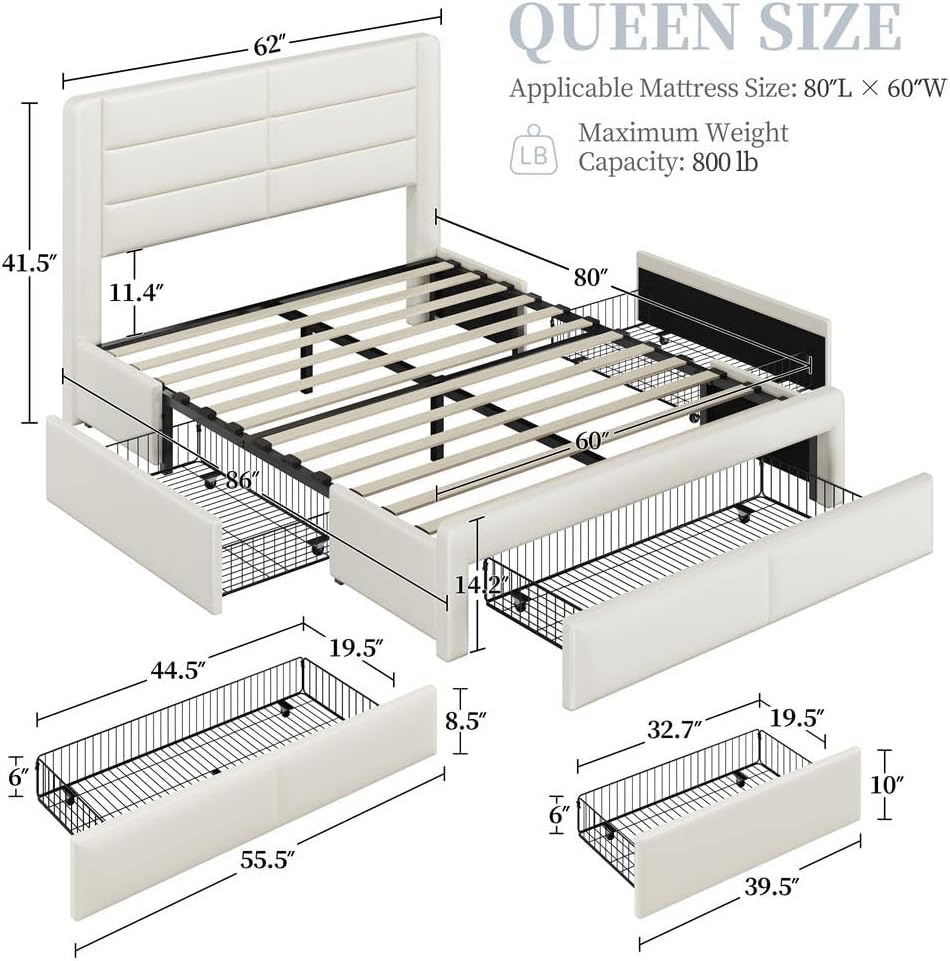
Image: Overall dimensions and key features of the Yaheetech Queen Size Bed Frame. The diagram shows the headboard height (41.5"), bed length (86"), bed width (62"), and drawer dimensions.
The Yaheetech Queen Size Bed Frame features an upholstered headboard, integrated USB charging station, and three storage drawers. It is designed for a Queen size mattress (80"L x 60"W).
- Overall Dimensions: 86"L x 63.5"W x 41.5"H
- Applicable Mattress Size: 80"L x 60"W
- Maximum Weight Capacity: 800 lb
- Side Drawer Dimensions: 32.7"L x 19.5"W x 6"H (each)
- Foot Drawer Dimensions: 44.5"L x 19.5"W x 6"H
Assembly Instructions
Follow these steps carefully to assemble your bed frame. It is recommended to have two people for assembly.
Step 1: Prepare Components
Unpack all components and lay them out on a clean, soft surface. Verify all parts are present against the parts list provided in your package.
Step 2: Assemble the Bed Frame Structure
Video: This video demonstrates the general installation process for an upholstered bed frame, including connecting frame components and attaching the headboard. Refer to your specific manual for detailed part numbers and steps.
Begin by connecting the main metal frame components. Ensure all bolts are securely tightened using the provided Allen wrench. Attach the headboard to the main frame, aligning the pre-drilled holes.

Image: Visual guide for connecting the bed frame components. Follow the numbered steps in your physical manual for precise assembly.
Step 3: Install Slats

Image: Detailed view of how to attach the plastic parts to the outer slats and fix the slats onto the bed frame. This system is designed to minimize movement and noise.
Place the wooden slats across the bed frame. Secure them using the provided plastic caps and screws. Ensure all slats are evenly spaced and firmly attached to provide optimal mattress support.
Step 4: Assemble Storage Drawers
Video: This video provides a quick overview of the bed frame with storage drawers, highlighting their functionality. For detailed assembly of the drawers, refer to your manual.
Assemble the three storage drawers according to the instructions in your manual. Attach the wheels to the bottom of each drawer. The drawers are designed to slide smoothly and can be easily detached.

Image: The bed frame with its three storage drawers extended, showcasing the ample space available for bedding and other items.
Operating Instructions
USB Charging Station

Image: A close-up of the integrated power outlet on the headboard, featuring two USB-A and two USB-C ports for convenient device charging.
The bed frame includes a built-in power outlet on the side of the headboard. This station features two USB-A ports and two USB-C ports. Simply plug the bed frame's power cord into a wall outlet to activate the charging station. This allows for convenient charging of your electronic devices directly from your bed.
Storage Drawers
Video: This video demonstrates the operation of the storage drawers, showing how they slide in and out. The drawers are designed for easy access and can be removed if needed.
The three storage drawers are located beneath the bed frame. They are equipped with wheels for smooth operation. To open, gently pull the drawer handle. To close, push the drawer back until it is flush with the bed frame. The drawers are detachable for easy cleaning or reorganization.
Maintenance
- Cleaning: Wipe the upholstered surfaces with a dry or slightly damp cloth. Avoid harsh chemicals that may damage the material.
- Hardware Check: Periodically inspect all screws and bolts to ensure they are tight. Retighten as necessary to maintain stability.
- Drawer Care: Keep the drawer wheels free of debris to ensure smooth operation.
Troubleshooting
- Squeaking Noise: If the bed frame makes squeaking noises, check all slat connections and frame bolts. Ensure they are securely tightened.
- Drawers Not Sliding Smoothly: Inspect the drawer wheels for any obstructions or damage. Clean the wheels and tracks if necessary.
- USB Ports Not Working: Ensure the bed frame's power cord is securely plugged into a functional wall outlet. Check for any loose connections in the charging station.
Specifications
| Size | Queen |
| Product Dimensions | 86"L x 63.5"W x 41.5"H |
| Material | Engineered Wood, PU Leather |
| Color | Beige |
| Weight Capacity | 800 lb |
| Item Weight | 111.2 pounds |
| Special Features | Adjustable Headboard, Squeak Resistant, Sturdy, 2 USB-A Ports, 2 USB-C Ports, 3 Storage Drawers |
| Assembly Required | Yes |
| Model Number | 6019921 |
Warranty and Support
Your Yaheetech Queen Size Bed Frame comes with a 30-day easy return policy. For customer support, missing parts, or warranty inquiries, please contact Yaheetech directly through their official channels or the retailer where the product was purchased.
Visit the Yaheetech Store for more information.


