
Introduction
Thank you for choosing PocBuds K6 Bluetooth Headphones. This manual provides detailed instructions to help you set up, operate, and maintain your new wireless earbuds. Please read this manual carefully before use to ensure optimal performance and longevity of your device.
What's in the Box
- PocBuds K6 Wireless Earbuds
- Wireless Charging Case
- User Manual
Note: A USB-C charging cable is not included. Please use a compatible USB-C cable for wired charging.
Product Overview
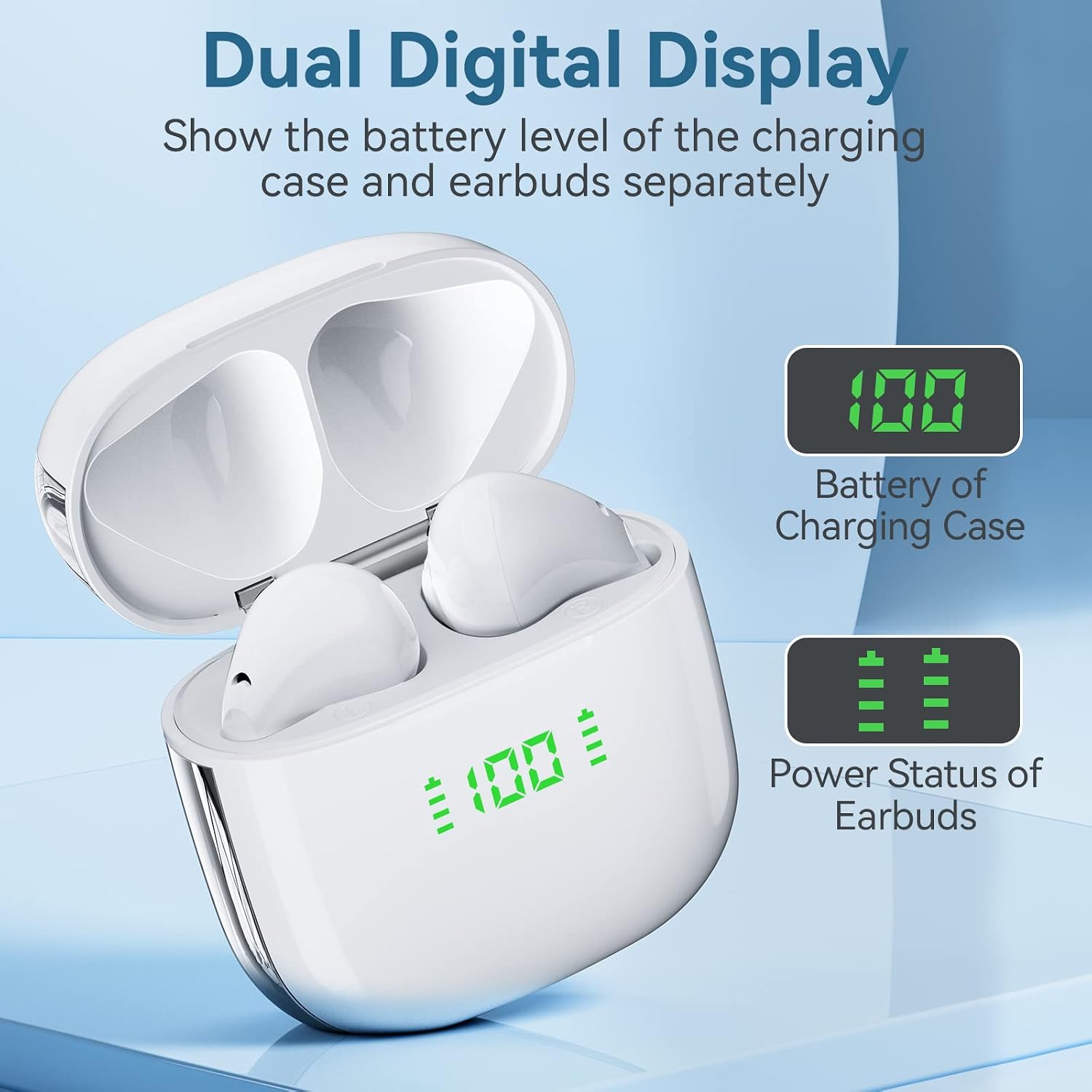
Image: PocBuds K6 Wireless Earbuds inside their charging case. This image shows the overall design of the earbuds and the charging case.
The PocBuds K6 features two wireless earbuds and a compact charging case. The charging case includes a digital display to show the battery levels of both the case and the individual earbuds.
Setup
1. Charging the Case and Earbuds
Before first use, fully charge the charging case and earbuds. The charging case supports both USB-C wired charging and wireless charging.

Image: The PocBuds K6 charging case being charged via a USB-C cable and wirelessly on a charging pad. This illustrates the two available charging methods.
- USB-C Charging: Connect a USB-C cable (not included) to the charging port on the case and to a power source.
- Wireless Charging: Place the charging case on a compatible wireless charging pad.

Image: The PocBuds K6 charging case with its lid open, showing the digital display indicating battery levels for the charging case and individual earbuds. The display shows "100" for the case and full bars for the earbuds.
The digital display on the charging case will show the battery percentage of the case and the charging status of each earbud. A full charge provides approximately 50 hours of total playtime with the charging case.
2. Pairing with Your Device
The PocBuds K6 headphones feature one-step pairing for convenience.
- Ensure your device's Bluetooth is turned on.
- Open the lid of the charging case. The earbuds will automatically power on and enter pairing mode.
- On your device, search for Bluetooth devices and select "K6" from the list.
- Once connected, you will hear a confirmation tone, and the earbuds will be ready for use.

Image: A hand holding the PocBuds K6 charging case with the lid open, next to a smartphone screen showing "K6" in the Bluetooth device list as "Connected". This demonstrates the one-step pairing process.
Note: After initial pairing, the earbuds will automatically connect to the last paired device when the case lid is opened, provided Bluetooth is enabled on the device.
Operating Instructions
1. Smart Touch Control
The PocBuds K6 earbuds feature touch-sensitive controls for easy management of calls and music playback. The touch controls are designed to minimize pressure on your ears.

Image: A diagram illustrating the various touch control functions for the PocBuds K6 earbuds, including Answer, Hang Up, Assistant, Reject, Play/Pause, Next Track, Volume +, and Volume -.
| Function | Action |
|---|---|
| Answer Call | Single tap on either earbud |
| Hang Up Call | Single tap on either earbud during a call |
| Reject Call | Press and hold either earbud for 2 seconds |
| Play/Pause Music | Single tap on either earbud |
| Next Track | Double tap on the right earbud |
| Volume Up | Triple tap on the right earbud |
| Volume Down | Triple tap on the left earbud |
| Activate Voice Assistant | Press and hold either earbud for 2 seconds |
2. Wearing the Earbuds
Gently insert the earbuds into your ears. Adjust them for a comfortable and secure fit to ensure optimal sound quality and to prevent them from falling out during activity.
Maintenance
Proper maintenance ensures the longevity and performance of your PocBuds K6 headphones.
- Cleaning: Regularly clean the earbuds and charging case with a soft, dry, lint-free cloth. Do not use harsh chemicals or abrasive materials.
- Storage: When not in use, store the earbuds in their charging case to protect them and keep them charged.
- Avoid Water: The earbuds are not waterproof. Avoid exposure to water, moisture, or extreme temperatures.
- Charging: Charge the device regularly, even if not in frequent use, to maintain battery health.
Troubleshooting
If you encounter issues with your PocBuds K6 headphones, please refer to the following common solutions:
- Earbuds not pairing or connecting:
- Ensure both earbuds are charged.
- Make sure Bluetooth is enabled on your device.
- Place the earbuds back into the charging case, close the lid, wait a few seconds, then open the lid to re-initiate pairing mode.
- Forget "K6" from your device's Bluetooth settings and attempt to pair again.
- Try pairing with a different device to rule out device-specific issues.
- Only one earbud is working:
- Ensure both earbuds are charged.
- Place both earbuds back into the charging case, close the lid, and then open it again. This often resets the connection between the two earbuds.
- Clean the charging contacts on both the earbuds and inside the case.
- Earbuds not charging:
- Ensure the charging case itself is charged. Check the digital display.
- Verify that the earbuds are correctly seated in the charging case and that the charging contacts are clean.
- If using USB-C, try a different cable and power adapter.
- If using wireless charging, ensure the case is properly aligned on the charging pad.
- Poor sound quality:
- Ensure the earbuds are properly seated in your ears for a good seal.
- Clean any earwax or debris from the earbud nozzles.
- Move closer to your paired device to avoid Bluetooth interference.
- Check the audio settings on your connected device.
Specifications
| Feature | Detail |
|---|---|
| Model Number | K6 |
| Brand | PocBuds |
| Connectivity Technology | Wireless (Bluetooth) |
| Ear Placement | In Ear |
| Form Factor | In Ear |
| Control Type | Touch Control |
| Special Feature | Built In Voice Assistant |
| Item Weight | 1.5 Ounces |
| Product Dimensions | 2.12 x 1.05 x 1.89 inches |
| Batteries | 1 Lithium Ion batteries required (included) |
| Included Components | User Manual, Wireless Charging Case |
| Cable Feature | Without Cable |

Image: The PocBuds K6 earbuds in their open charging case, set against a piano keyboard, highlighting the "Hi-Fi Stereo Sound" and "12mm speakers". This image illustrates a key audio feature.
The PocBuds K6 headphones are equipped with 12mm speakers, designed to deliver clear stereo sound.
Warranty Information
For detailed warranty information regarding your PocBuds K6 Bluetooth Headphones, please refer to the product packaging or visit the official PocBuds website. Warranty terms and conditions may vary by region.
Customer Support
If you require further assistance or have questions not covered in this manual, please contact PocBuds customer support. You can typically find contact information on the official PocBuds website or through your purchase platform.
Official Website: PocBuds Store on Amazon


