
Welcome
Thank you for choosing the boAt Stone 352 Bluetooth Speaker. This manual provides essential information for setting up, operating, and maintaining your device. Please read it carefully before use.
What's in the Box
- boAt Stone 352 Bluetooth Speaker
- Charging Cable
- User Manual
- Warranty Card
Key Features
- 10W RMS Stereo Sound: Experience powerful and clear audio.
- IPX7 Water Resistance: Designed to withstand splashes and water immersion.
- True Wireless Stereo (TWS) Feature: Connect two Stone 352 speakers for an enhanced stereo experience.
- Up to 12 Hours Playtime: Enjoy extended music playback on a single charge.
- Multi-Compatibility Modes: Connect via Bluetooth, AUX, or TF Card.
- Integrated Controls: Easy access to playback and volume adjustments.

Figure 1: Overview of boAt Stone 352 Key Features

Figure 2: boAt Stone 352 Bluetooth Speaker
Setup Guide
Charging the Speaker
- Connect the provided charging cable to the speaker's charging port.
- Connect the other end of the cable to a compatible USB power adapter (not included).
- The LED indicator will show charging status. A full charge takes approximately 1.5-2 hours.
Note: Ensure the charging port is dry before connecting the cable to prevent damage.

Figure 3: Charging the boAt Stone 352 Speaker
Powering On/Off
- To power on, press and hold the power button until the LED indicator lights up.
- To power off, press and hold the power button until the LED indicator turns off.

Figure 4: Speaker Controls
Operating Instructions
Bluetooth Pairing
- Ensure the speaker is powered on and in Bluetooth pairing mode (LED will blink).
- On your device (smartphone, tablet), enable Bluetooth and search for "Stone 352".
- Select "Stone 352" from the list of available devices to pair.
- Once paired, the LED indicator will stop blinking and remain solid.
The speaker has a Bluetooth range of up to 10 meters.
True Wireless Stereo (TWS) Function
The TWS feature allows you to connect two boAt Stone 352 speakers for a synchronized stereo audio experience.
- Ensure both Stone 352 speakers are powered on and not connected to any other Bluetooth device.
- On one speaker (this will be the primary speaker), press and hold the TWS button (refer to speaker diagram for exact button).
- The speakers will search for each other and automatically pair. A confirmation tone will sound once connected.
- Connect your device to the primary speaker via Bluetooth as described above.
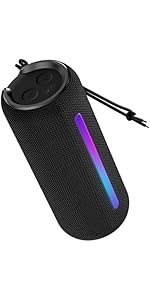
Figure 5: TWS Pairing for Enhanced Stereo Sound
Using AUX Mode
- Connect one end of a 3.5mm AUX cable (not included) to the speaker's AUX port.
- Connect the other end to the audio output jack of your device.
- The speaker will automatically switch to AUX mode.
Using TF Card Mode
- Insert a TF (microSD) card with audio files into the designated slot on the speaker.
- The speaker will automatically detect the card and begin playing music.

Figure 6: Connectivity Ports and Controls
Controls
- Power Button: Press and hold to power on/off.
- Volume Up (+): Short press to increase volume. Long press for next track.
- Volume Down (-): Short press to decrease volume. Long press for previous track.
- Play/Pause Button: Press to play or pause music. Press to answer/end calls.
- Mode Button (M): Press to switch between Bluetooth, AUX, and TF Card modes.

Figure 7: Portable Design and Easy-to-Access Controls
Care and Maintenance
- Keep the speaker away from extreme temperatures and direct sunlight.
- Clean the speaker with a soft, damp cloth. Do not use abrasive cleaners or solvents.
- Ensure all ports are dry before charging or connecting cables, especially after exposure to water.
- Store the speaker in a cool, dry place when not in use for extended periods.
- Avoid dropping or subjecting the speaker to strong impacts.
Water Resistance (IPX7)
The boAt Stone 352 is IPX7 rated, meaning it can be immersed in water up to 1 meter for 30 minutes. However, it is not designed for continuous underwater use. Always ensure the charging port cover is securely closed before exposing the speaker to water.
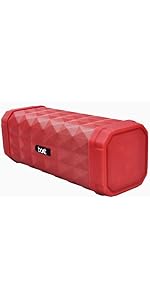
Figure 8: IPX7 Water Resistance
Troubleshooting
| Problem | Solution |
|---|---|
| Speaker does not power on | Ensure the battery is charged. Connect the charging cable and try again. |
| Cannot pair via Bluetooth | Make sure the speaker is in pairing mode. Disable and re-enable Bluetooth on your device. Ensure no other devices are connected to the speaker. Move closer to the speaker. |
| No sound | Check volume levels on both the speaker and your connected device. Ensure the correct input mode (Bluetooth, AUX, TF Card) is selected. |
| Poor sound quality | Move the speaker closer to your device to reduce interference. Check for obstacles between the speaker and device. |
| TWS pairing fails | Ensure both speakers are fully charged and not connected to any other device. Try resetting both speakers and repeating the TWS pairing process. |
For further assistance, please refer to the Warranty and Support section.
Product Specifications
| Feature | Detail |
|---|---|
| Model Name | Stone 352 |
| Speaker Output Power | 10 Watts RMS |
| Connectivity | Bluetooth, Auxiliary, TF Card |
| Bluetooth Version | 5.0 |
| Bluetooth Range | 10 meters |
| Audio Output Mode | Stereo |
| Water Resistance | IPX7 |
| Playtime | Up to 12 hours (at 60% volume) |
| Charging Time | Approximately 1.5-2 hours |
| Battery Capacity | 2200 mAh |
| Control Method | Buttons |
| Dimensions (D x W x H) | 9D x 9W x 11H Centimeters |
| Weight | 550 Grams |
| Compatible Devices | Smartphone, Tablet |

Figure 9: Speaker Dimensions
Warranty and Support
Warranty Information
The boAt Stone 352 comes with a 1-year warranty from the date of purchase. Please retain your purchase receipt and the warranty card for any warranty claims. The warranty covers manufacturing defects.
Customer Support
For technical assistance, service requests, or further inquiries, please contact boAt customer support.
Manufacturer Contact Information: Boat, Imagine Marketing Ltd.
Importer Contact Information: Imagine Marketing Ltd.
Address: Imagine Marketing Limited Unit no. 204 & 205, 2nd floor, D-wing & E-wing, Corporate Avenue, Andheri Ghatkopar Link Road, Mumbai, Maharashtra-400093, India.
You can also visit the official boAt website for more information and support resources: boAt Official Website

Figure 10: boAt Hearables App QR Code
Download the boAt Hearables App for additional features and user guides: Download App


