
1. Safety Information
Please read and understand all instructions before assembly and use. Keep this manual for future reference.
- Ensure all parts are present and undamaged before assembly. Do not use if any parts are missing or broken.
- Assemble the unit on a soft, clean surface to prevent scratches.
- Do not overtighten screws during assembly to avoid damaging the material.
- For safety, it is recommended to attach the console table to a wall using the provided anti-tipping hardware, especially if children or pets are present.
- Do not exceed the maximum weight recommendations for the tabletop and shelves.
- Keep liquids away from the power outlets and USB ports to prevent electrical hazards.
2. Product Overview
The Yaheetech Console Table (Model YT-00119492-001) is a versatile furniture piece designed for various living spaces. It features a sturdy metal frame, engineered wood shelves, a convenient drawer, and integrated power outlets with USB ports.

Image: The Yaheetech Console Table in a living room setting, showcasing its design and functionality.
Key Features:
- Integrated Power Outlets & USB Ports: Equipped with 2 AC outlets and 2 USB ports for convenient charging of electronic devices.
- Ample Storage: Features a spacious drawer and two open shelves for organizing and displaying items.
- Durable Construction: Made with CARB P2-certified MDF and a high-quality metal frame with X-shaped structures for enhanced stability.
- Water-Resistant Surface: The tabletop and shelves have a water-resistant coating for easy cleaning and durability.

Image: A collage highlighting the key features: power outlet with hook & loop, storage shelves, X-shape structure, water-resistant surface, and metal frame.
Dimensions:

Image: Diagram showing the console table's dimensions: 39.5" L x 12" W x 32" H. Top shelf capacity: 198 lbs, middle/bottom shelf capacity: 55 lbs, drawer capacity: 22 lbs.
- Overall Dimensions: 39.5" L × 12" W × 32" H
- Tabletop Weight Capacity: 198 lbs
- Shelf Weight Capacity: 55 lbs each
- Drawer Weight Capacity: 22 lbs
3. Assembly Instructions
Assembly is required. All necessary accessories and illustrated instructions are included in the package. For a visual guide, please refer to the official installation video below.
Video: Official Yaheetech Console Table Installation Video. This video provides a step-by-step visual guide for assembling the console table, including attaching drawer slides, constructing the drawer, and securing the frame components.
General Assembly Steps:
- Prepare Components: Unpack all parts and hardware. Identify each component using the provided parts list.
- Assemble Drawer Slides: Attach the drawer slides to the side panels of the drawer and the main frame according to the instructions. Ensure they are correctly oriented for smooth operation.
- Construct Drawer: Assemble the drawer box using the designated screws and panels. Attach the drawer pulls.
- Assemble Frame: Connect the metal frame components and wooden shelves using the provided hardware. The X-shaped structures should be securely fastened.
- Install Drawer: Carefully insert the assembled drawer into the main frame, aligning it with the drawer slides.
- Attach Power Outlet: Secure the power outlet unit to the designated shelf using the provided screws.
- Final Tightening: Once all components are in place, gently tighten all screws to ensure stability.
- Anti-Tipping Hardware: For added safety, install the anti-tipping hardware to secure the console table to a wall.
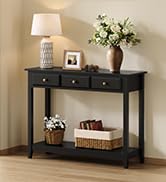
Image: Illustration of attaching the console table to the wall with anti-tipping hardware to prevent wobbling.
4. Operating Instructions
Using the Power Outlets and USB Ports:
The console table includes a built-in power strip with 2 standard AC outlets and 2 USB ports. This feature allows for convenient charging of various electronic devices.

Image: Detail view of the integrated power strip with two AC outlets and two USB ports, along with a wire arrangement hook and loop for cable management.
- Plug the console table's main power cord into a wall outlet.
- Use the AC outlets for devices requiring standard power (e.g., lamps, laptops).
- Use the USB ports for charging smartphones, tablets, and other USB-powered devices.
- Utilize the integrated hook and loop strap for neat cable management.
Drawer Operation:
The drawer is equipped with ball-bearing slides for smooth and quiet operation.

Image: Close-up showing the ball-bearing drawer slides, designed for smooth and strong movement with a buffer function to prevent falling off.
- Pull the drawer handle gently to open.
- Push the drawer firmly to close.
- Avoid placing excessive weight in the drawer to ensure smooth operation and longevity of the slides.
Video: Official Yaheetech Industrial Console Table with Drawer and Storage Shelves. This video demonstrates the features of the console table, including the smooth operation of the drawer and the ample storage space provided by the shelves.
5. Maintenance
Proper care will extend the life and appearance of your console table.
- Cleaning: Wipe the surface with a damp cloth for general cleaning. For spills, wipe immediately with a dry cloth. Avoid harsh chemicals or abrasive cleaners.
- Dusting: Regularly dust with a soft, dry cloth.
- Inspection: Periodically check all screws and connections to ensure they remain tight. Retighten if necessary.
- Avoid Direct Sunlight: Prolonged exposure to direct sunlight can cause fading or damage to the finish.
- Heat Protection: Use coasters or mats under hot items to prevent heat damage to the surface.
6. Troubleshooting
If you encounter any issues with your Yaheetech Console Table, please refer to the following common solutions:
- Wobbly Table: Ensure all screws are securely tightened. Verify that the table is on a level surface. If necessary, adjust the leveling feet (if present) or place shims under the legs. Consider installing the anti-tipping hardware.
- Drawer Not Sliding Smoothly: Check that the drawer slides are properly aligned and free of obstructions. Ensure all screws attaching the slides are tight.
- Power Outlets Not Working: Verify that the main power cord is securely plugged into a functional wall outlet. Check the power strip's circuit breaker or reset button (if applicable). Ensure the devices being charged are functioning correctly.
For further assistance, please contact Yaheetech customer support.
7. Specifications
| Feature | Specification |
|---|---|
| Brand | Yaheetech |
| Model Number | YT-00119492-001 |
| Product Dimensions | 12"D x 39.5"W x 32"H |
| Item Weight | 43.5 Pounds |
| Maximum Weight Recommendation (Tabletop) | 198 Pounds |
| Maximum Weight Recommendation (Shelves) | 55 Pounds each |
| Frame Material | Metal |
| Top Material Type | Engineered Wood (CARB P2-certified MDF) |
| Number of Drawers | 1 |
| Power Outlets | 2 AC Outlets |
| USB Ports | 2 USB Ports |
| Color | Grey |
| Included Components | Assembly Guide, Installation Tool |
| Product Care Instructions | Wipe with Damp Cloth, Wipe with Dry Cloth |
8. Warranty and Support
For warranty information, product support, or to report missing/damaged parts, please contact Yaheetech customer service directly. Refer to the contact information provided with your purchase or visit the official Yaheetech website.
Manufacturer: Dongguan baiyou electronic co.,ltd


