
1. Introduction
Thank you for choosing the Baseus Super Energy Air Car Jump Starter. This device is a versatile and essential tool for any vehicle owner, combining the functionality of a powerful car jump starter with a portable power bank. It is designed to provide reliable emergency starting power for 12V vehicles and can also charge your electronic devices on the go. Please read this manual carefully before use to ensure safe and optimal performance.

Image: The Baseus Super Energy Air Car Jump Starter unit, showing the main power bank, smart clamps, and a USB charging cable.
2. Package Contents
- Baseus Super Energy Air Car Jump Starter Unit
- Smart Jump Starter Clamps (Red for positive, Black for negative)
- USB Charging Cable (Type-C)
- User Manual (This document)

Image: The retail packaging for the Baseus Super Energy Air Car Jump Starter, indicating the product inside.
3. Product Overview
Familiarize yourself with the components of your jump starter:
- Main Unit: Contains the battery, control circuitry, and charging ports.
- Power Button: Activates the device and checks battery level.
- LED Display: Shows battery percentage.
- USB-A Output Port: For charging external devices (5V/2.4A Max).
- USB-C Input/Output Port: For charging the jump starter or external devices (5V/2.4A Max).
- Jump Start Port: Connects to the smart clamps.
- Emergency LED Light: Built-in flashlight function.
- Smart Clamps: Red (+) and Black (-) clamps with built-in safety features.
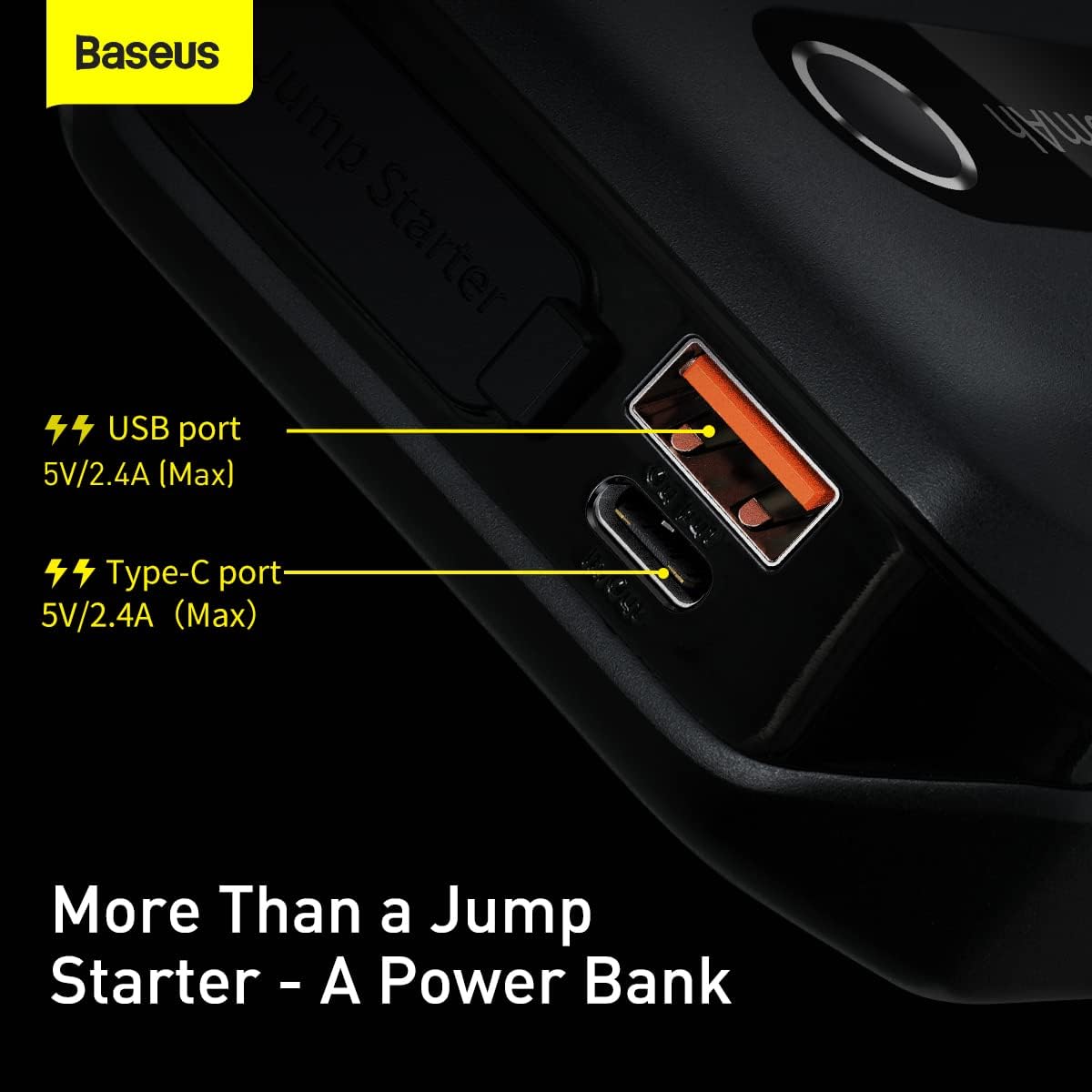
Image: A detailed view of the Baseus Jump Starter's side, highlighting the USB-A and USB-C ports for charging external devices and the unit itself.
4. Charging the Jump Starter
Before first use, fully charge the jump starter. It is recommended to keep the unit charged above 50% for optimal performance and longevity.
- Connect the provided USB-C charging cable to the USB-C input port on the jump starter.
- Connect the other end of the USB-C cable to a USB wall adapter (not included) or a car charger.
- The LED display will show the charging progress. The unit is fully charged when the display shows 100%.
A full charge typically takes several hours depending on the power source.
5. Operating Instructions: Vehicle Jump Starting
This device is designed to jump start 12V vehicles with dead batteries, even in low temperatures.

Image: The Baseus Jump Starter connected to a car battery, demonstrating its ability to jumpstart even at -20°C.
Steps to Jump Start Your Vehicle:
- Ensure Safety: Park your vehicle in a safe location, engage the parking brake, and turn off all electrical accessories.
- Connect Clamps to Jump Starter: Insert the blue plug of the smart clamps into the jump start port on the main unit. Ensure it is fully inserted.
- Connect Clamps to Battery:
- Connect the RED (+) clamp to the positive (+) terminal of your vehicle's battery.
- Connect the BLACK (-) clamp to the negative (-) terminal of your vehicle's battery.
Ensure a good connection. The smart clamps have indicator lights that will show connection status.
- Start Vehicle: Once the clamps are correctly connected and the indicator light on the smart clamps is solid green, start your vehicle's engine.
- Remove Clamps: As soon as the engine starts, immediately remove the smart clamps from the vehicle battery, then disconnect the clamps from the jump starter unit.
If the vehicle does not start on the first attempt, wait at least 30 seconds before trying again. Do not attempt more than 3 consecutive jump starts without allowing the unit to cool down.
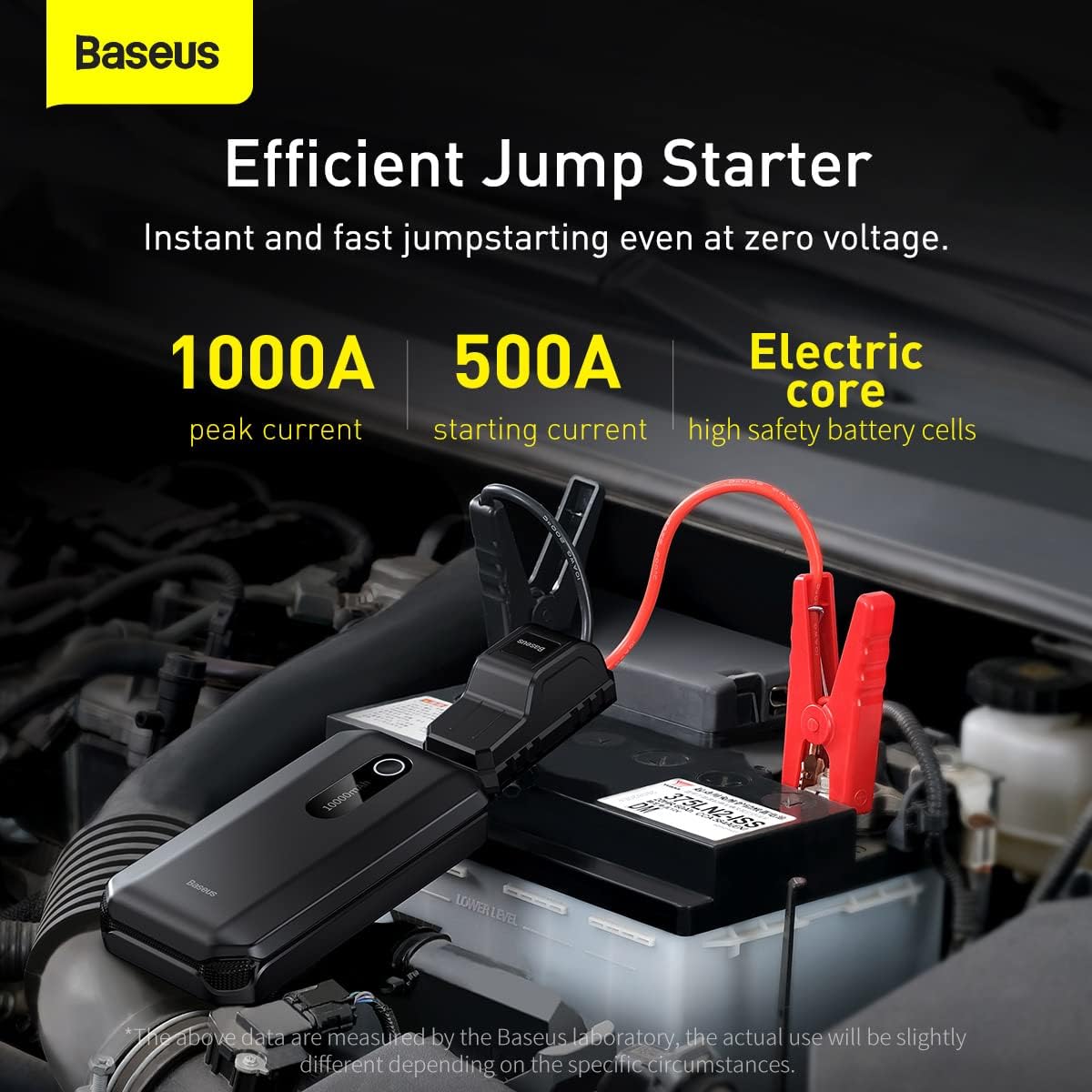
Image: The Baseus Jump Starter connected to a car battery, illustrating its efficient jumpstarting capabilities with 1000A peak current and 500A starting current.
6. Operating Instructions: Power Bank Function
The Baseus Super Energy Air Car Jump Starter can also function as a portable power bank to charge your electronic devices.
- Connect your device's USB charging cable to either the USB-A or USB-C output port on the jump starter.
- The jump starter will automatically begin charging your device.
- To stop charging, simply disconnect your device.
The unit provides 5V/2.4A (Max) output from both USB-A and USB-C ports.
7. Safety Precautions
Please observe the following safety guidelines:
- Do not short-circuit the jump starter.
- Do not disassemble the unit.
- Do not expose the unit to extreme temperatures (above 60°C or below -20°C).
- Do not immerse the unit in water.
- Keep out of reach of children.
- Ensure proper polarity when connecting to a vehicle battery (Red to +, Black to -). Reverse polarity can damage the unit and/or vehicle.
- Do not use the jump starter if it is damaged or swollen.
- Remove the jump starter from the vehicle battery immediately after the engine starts.
8. Maintenance and Storage
- Charging: Recharge the unit every 3-6 months, even if not used, to maintain battery health.
- Cleaning: Wipe the unit with a dry, soft cloth. Do not use harsh chemicals or abrasive cleaners.
- Storage: Store the jump starter in a cool, dry place, away from direct sunlight and flammable materials.

Image: A close-up view of the internal battery layers, illustrating the long-lasting battery design of the Baseus Jump Starter.
9. Troubleshooting
| Problem | Possible Cause | Solution |
|---|---|---|
| Vehicle does not start. | Low battery on jump starter; Incorrect clamp connection; Vehicle battery completely dead. | Ensure jump starter is fully charged; Check clamp connections for proper polarity and secure contact; Try again after 30 seconds. If battery is completely dead, it may require professional assistance. |
| Jump starter not charging. | Faulty charging cable or adapter; Loose connection. | Try a different USB-C cable and/or wall adapter; Ensure cable is securely plugged into both the jump starter and power source. |
| Smart clamps indicator light is red/flashing. | Reverse polarity; Short circuit; Over-temperature. | Disconnect immediately and re-connect clamps with correct polarity; Check for any metal objects causing a short; Allow unit to cool down if it's hot. |
10. Specifications
- Model: CGNL020101
- Brand: Baseus
- Peak Current: 1000A
- Starting Current: 500A
- Battery Type: Lithium Polymer
- Input (USB-C): 5V/2.4A Max
- Output (USB-A): 5V/2.4A Max
- Output (USB-C): 5V/2.4A Max
- Product Dimensions: 3.94 x 1.97 x 1.18 inches (approx.)
- Item Weight: 1.1 pounds (approx.)
- Operating Temperature: -20°C to 60°C
11. Warranty and Support
Baseus products are designed and manufactured to the highest quality standards. For warranty information, technical support, or service inquiries, please refer to the warranty card included with your product or visit the official Baseus website. Please retain your proof of purchase for warranty claims.
Manufacturer: Baseus
Model Number: CGNL020101
Date First Available: June 5, 2024


