
SANODESK EP1W-EU-FR2
SANODESK EZ1 Electric Height Adjustable Desk User Manual
Model: EP1W-EU-FR2
Brand: SANODESK
Important Safety Warnings
WARNING: This electrically height-adjustable desk may pose a risk if not used correctly. Follow the assembly instructions and use with care to avoid injuries. This product requires assembly; ensure you follow the provided assembly instructions to guarantee the desk's stability and safety.
- Keep children and pets away from the desk during operation.
- Ensure no obstacles are in the desk's path when adjusting height.
- Do not overload the desk beyond its maximum weight capacity of 70 kg.
- Disconnect power before cleaning or maintenance.
Product Overview
The SANODESK EZ1 Electric Height Adjustable Desk frame offers a versatile and ergonomic solution for your workspace. Designed for stability and durability, it features a robust alloy steel construction and a powerful, quiet motor.
The desk frame allows for continuous height adjustment, enabling seamless transitions between sitting and standing positions. It includes a smart control panel with memory presets and integrated USB charging ports for enhanced convenience and productivity.

Figure 1: SANODESK EZ1 Electric Height Adjustable Desk Frame (Tabletop not included)
Setup and Assembly
The SANODESK EZ1 desk frame is designed for easy assembly. Please refer to the detailed assembly instructions included in your product packaging for step-by-step guidance. Ensure all components are present before beginning assembly.
- Unpack all components and verify against the parts list in the manual.
- Assemble the desk frame according to the provided diagrams and instructions.
- Attach your compatible tabletop (length 100-140 cm, depth 50-70 cm) securely to the frame.
- Connect the power cable to a suitable power outlet.

Figure 2: Example of desk assembly components and process.
Operating Instructions
Height Adjustment
The desk's height can be continuously adjusted from 71 cm to 116 cm.
- Press the Up (^) arrow button to raise the desk.
- Press the Down (v) arrow button to lower the desk.
- Release the button at your desired height.

Figure 3: Desk height adjustment range.
Memory Presets
The control panel allows you to store up to four different height settings for quick recall.
- Adjust the desk to your desired height using the Up/Down buttons.
- Press the "M" (Memory) button. The display will show "S-".
- Within 3 seconds, press one of the numbered buttons (1, 2, 3, or 4) to save the current height to that preset. The display will show the corresponding number to confirm.
- To recall a saved height, simply press the corresponding numbered button (1, 2, 3, or 4). The desk will automatically move to the saved position.
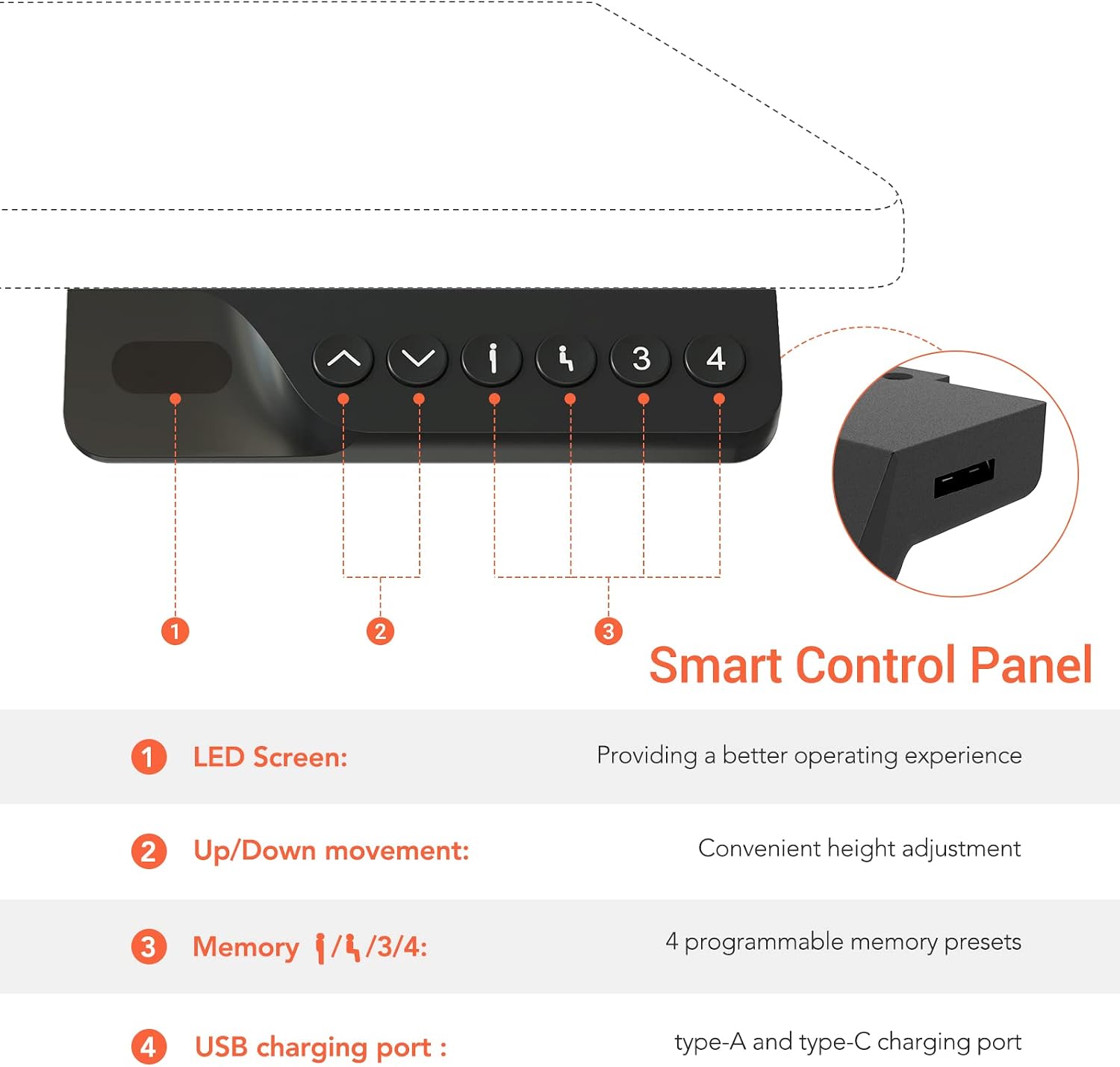
Figure 4: Smart Control Panel functions.
Child Safety Lock
To activate or deactivate the child safety lock, refer to your specific control panel instructions. This feature prevents accidental height adjustments.
Key Features
Anti-Collision System
The built-in anti-collision system ensures safety by detecting obstacles during height adjustment. If a counter-pressure is detected, the desk frame will move slightly in the opposite direction and stop to prevent damage or injury.
- The system has adjustable sensitivity levels (0: deactivated, 1: low, 3: high). Refer to your control panel manual for adjustment instructions.

Figure 5: Anti-Collision System in action.
Integrated USB Charging Ports
The control panel features integrated USB-A and USB-C charging ports, providing convenient and fast charging for your electronic devices directly from your desk.

Figure 6: USB Charging Ports on the control panel.
Robust and Stable Construction
The SANODESK EZ1 features a robust alloy steel frame with wide T-shaped feet for superior stability. It is designed to support a weight capacity of up to 70 kg and operates with a low noise level of less than 50dB. The lifting speed is approximately 15mm/s.

Figure 7: Enhanced Structure details.

Figure 8: 2-Stage Column Design for smooth height adjustment.
Maintenance
Regular maintenance ensures the longevity and optimal performance of your SANODESK EZ1.
- Cleaning: Wipe the desk frame with a soft, damp cloth. Avoid abrasive cleaners or solvents.
- Connections: Periodically check all screws and connections to ensure they are tight. Retighten if necessary.
- Cable Management: Ensure cables are neatly managed and do not interfere with the desk's movement.
- Lubrication: No special lubrication is required for the motor or lifting mechanism.
Troubleshooting
| Problem | Possible Cause | Solution |
|---|---|---|
| Desk does not move. | Power cable disconnected; Child safety lock activated; Overload. | Check power connection. Deactivate child safety lock. Reduce weight on desk. |
| Anti-collision system frequently triggers. | Obstacle in path; Sensitivity set too high. | Clear path. Adjust anti-collision sensitivity (refer to control panel manual). |
| Desk moves unevenly or makes unusual noise. | Loose connections; Damaged component. | Check and tighten all assembly screws. If problem persists, contact customer support. |
| Memory presets not working. | Incorrect programming. | Re-program the memory presets following the "Operating Instructions" section. |
Specifications
| Feature | Detail |
|---|---|
| Brand | SANODESK |
| Model Number | EP1W-EU-FR2 |
| Color | Matte White |
| Material | Alloy Steel |
| Height Adjustment Range | 71 cm to 116 cm (without tabletop) |
| Compatible Desktop Size | Length: 100 cm to 140 cm, Depth: 50 cm to 70 cm |
| Weight Capacity | 70 kg |
| Lifting Speed | 15 mm/s |
| Noise Level | < 50 dB |
| Control Panel | LED display, Up/Down buttons, 4 Memory Presets, USB-A & USB-C charging ports |
| Safety Features | Anti-collision system, Child safety lock |
| Product Dimensions (L x W x H) | 60 x 85 x 71 cm (frame only) |
| Item Weight | 14.3 Kilograms |

Figure 9: Desk Measurements and Compatibility.
Warranty and Support
SANODESK offers a worry-free warranty for your EZ1 Electric Height Adjustable Desk. For specific warranty terms and conditions, please refer to the documentation included with your purchase or visit the official SANODESK website.
If you have any questions, require assistance with assembly, operation, or troubleshooting, please do not hesitate to contact SANODESK customer support. We are committed to providing you with the best possible shopping experience and support.
Contact Information: Please refer to your product packaging or the official SANODESK website for the most up-to-date contact details.
Related documentsEP1W-EU-FR2


Ask a question about this manual
Ask about setup, troubleshooting, compatibility, parts, safety, or missing instructions. Manuals+ will review the question and use this page’s manual context to help answer it.