
1. Introduction
Thank you for choosing the WOLFANG GA100 Action Camera. This manual provides essential information for setting up, operating, and maintaining your camera to ensure optimal performance and longevity. The GA100 is designed to capture your adventures in stunning 4K video and high-resolution photos, featuring robust waterproofing, electronic image stabilization, and versatile recording modes.
2. What's in the Box
Your WOLFANG GA100 Action Camera package includes the following items:
- 1x GA100 Action Camera
- 1x Waterproof Case
- 1x External Microphone
- 1x Remote Control
- 2x 1050mAh Batteries
- 1x USB Cable
- 1x Bicycle Mount
- 1x Helmet Mount
- 1x Extension Mount
- 1x J-hook Mount
- 1x Dust cover
- 1x Frame
- 1x Long Thumbscrew
- 1x Short Thumbscrew
- 1x 360° Rotating Screw
- 1x Backpack Clip
- 2x Adhesive Pads
- 2x Flat Adhesive Pads
- 4x Bandage
- 1x Release Buckle
- 1x Insurance Tether
- 1x User Manual

Figure 1: All accessories included with the WOLFANG GA100 Action Camera.
3. Setup
3.1. Battery Installation and Charging
- Open the battery compartment cover on the bottom of the camera.
- Insert the provided 1050mAh battery, ensuring correct orientation.
- Close the battery compartment cover securely.
- Connect the camera to a power source using the included USB cable for charging. The charging indicator will illuminate.
3.2. Micro SD Card Installation
The camera requires a Micro SD card (not included) for storing photos and videos. A Class 10 or higher Micro SD card up to 64GB is recommended for optimal performance.
- Locate the Micro SD card slot on the side of the camera.
- Insert the Micro SD card with the gold contacts facing the back of the camera until it clicks into place.
- To remove, gently push the card until it springs out.
3.3. Initial Power On and Basic Settings
- Press and hold the Power/Mode button on the front of the camera to turn it on.
- The camera will automatically prompt you to set the date and time. Use the navigation buttons to adjust and confirm.
- It is recommended to format the Micro SD card upon first use to ensure compatibility and optimal performance. Navigate to the settings menu to find the format option.
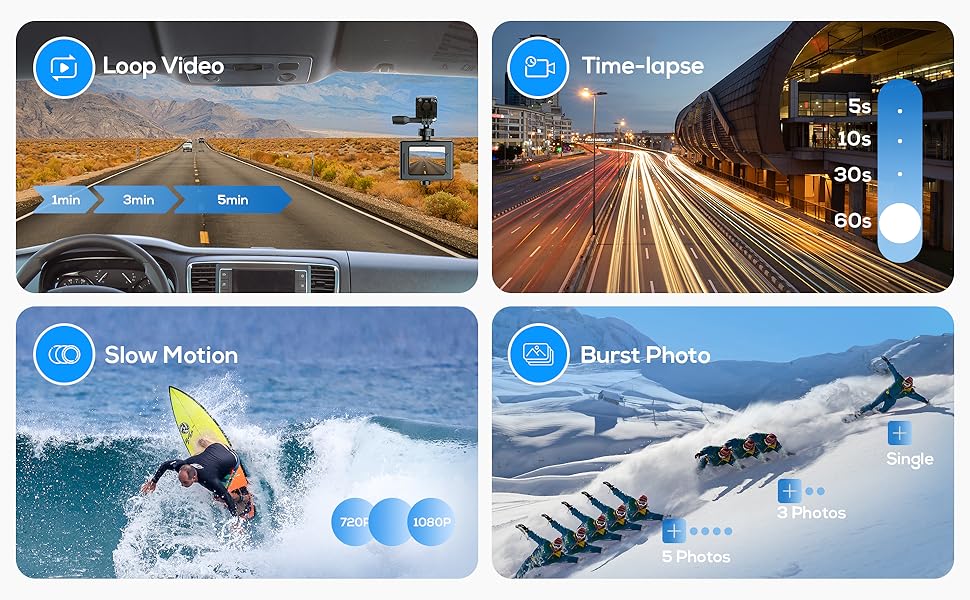
Figure 2: Guide for connecting the WOLFANG GA100 to the mobile app.
4. Operating the Camera
4.1. Video and Photo Modes
The WOLFANG GA100 offers various video resolutions including 4K 30fps, 2.7K 30fps, 1080P 60fps, 1080P 30fps, and 720P 120fps. Photo resolutions include 20MP, 16MP, 12MP, and 8MP.
- Use the Mode button to switch between Video Recording, Photo Shooting, Playback, and Settings modes.
- In Video or Photo mode, press the Shutter/OK button to start/stop recording or take a photo.
4.2. Electronic Image Stabilization (EIS)
The EIS Anti-shake function significantly improves video stability and smoothness. It is recommended to keep EIS enabled for most action shots.

Figure 3: Visual comparison of video footage with EIS enabled versus disabled.
4.3. Waterproof Functionality
The included waterproof housing is sturdy and durable, allowing the camera to be submerged up to 40 meters (131 feet). Ensure the housing is properly sealed before any underwater use.

Figure 4: The WOLFANG GA100 in its waterproof housing, suitable for underwater activities.
Video 1: Official demonstration of WOLFANG GA100 underwater photography capabilities.
4.4. Multi-Mode Recording
The GA100 supports various recording modes to suit different needs:
- Loop Recording: Records video continuously, overwriting older files when the memory card is full. Ideal for dashcam use.
- Time-Lapse Recording: Captures photos at set intervals and stitches them into a video.
- Slow Motion: Records video at a higher frame rate for slow-motion playback.
- Burst Photo: Takes multiple photos in quick succession.

Figure 5: Visual representation of Loop Video, Time-lapse, Slow Motion, and Burst Photo modes.
4.5. WiFi Sharing and App Control
Connect your GA100 to your smartphone via the "Live DV" app for remote control, real-time video preview, and easy sharing of content to social platforms.
Video 2: Official video demonstrating the WOLFANG GA100 Action Camera's features, including app connectivity.
4.6. Webcam and Dashcam Functionality
- Webcam: Connect the camera to your computer via USB to use it as a webcam for video calls, online learning, or conferences.
- Dashcam: Utilize the loop recording feature and car mode settings to use the GA100 as a dashcam to record driving conditions.

Figure 6: The WOLFANG GA100 can be easily set up as a webcam for various uses.
5. Maintenance
- Keep the camera and accessories clean. Use a soft, dry cloth to wipe the camera body.
- After using the waterproof case, rinse it with fresh water and dry thoroughly to prevent salt or chlorine buildup.
- Store the camera in a cool, dry place away from direct sunlight and extreme temperatures.
- Regularly format your Micro SD card (at least once a month) to maintain optimal performance and prevent data corruption.
6. Troubleshooting
- Camera not turning on: Ensure the battery is charged. Try charging for at least 3 hours.
- Micro SD card error: Format the Micro SD card in the camera's settings. Ensure it is a Class 10 or higher card.
- Wi-Fi connection issues: Ensure your smartphone's cellular data is turned off when connecting to the camera's Wi-Fi.
- Poor audio quality: Ensure the external microphone is properly connected. If using the waterproof case, audio will be muffled.
- Missing accessories: If any accessories were missing upon receipt, please contact WOLFANG customer support.
7. Specifications
| Feature | Detail |
|---|---|
| Brand | WOLFANG |
| Model Number | GA100 |
| Item Weight | 1.52 ounces |
| Product Dimensions | 0.98 x 2.36 x 1.65 inches |
| Video Capture Resolution | 4K 30fps, 2.7K 30fps, 1080P 60fps, 1080P 30fps, 720P 120fps |
| Photo Sensor Technology | CMOS |
| Flash Memory Type | Micro SD |
| Screen Size | 2 Inches |
| Connectivity Technology | USB |
| Batteries | 2 Lithium Metal batteries required (included) |
8. Warranty and Support
WOLFANG action camera team provides a 1-year warranty and 1-month free return policy. For any additional support or inquiries, please contact us via email at: support@wolfang.co.


