
1. Introduction
Thank you for choosing the Yaheetech TV Stand with Power Outlet. This versatile 3-tier entertainment center is designed to accommodate TVs up to 75 inches and features a built-in charging station for your convenience. Please read this manual thoroughly before assembly and use to ensure safe and proper operation.
Video: An overview of the Yaheetech TV Console with Power Outlet, showcasing its design and features in a home setting.
2. Important Safety Information
Ensure the TV stand is placed on a flat, stable surface and is not overloaded beyond the specified weight capacity to prevent tipping or damage. Keep out of reach of children due to potential small parts or sharp edges. Always follow electrical safety guidelines when using the integrated power outlet. Do not expose the unit to excessive moisture or direct heat sources.
3. Product Specifications
| Feature | Detail |
|---|---|
| Model Number | YT-00109962TS |
| Brand | Yaheetech |
| Color | Grey |
| Materials | Particle Board & Iron |
| Overall Dimensions (L x W x H) | 63" x 16" x 24.5" (160 cm x 40 cm x 61.5 cm) |
| Suitable TV Size | Up to 75 inches |
| Top Board Max Weight Capacity | 132 lb (60 kg) |
| Each Shelf Max Weight Capacity | 88 lb (40 kg) |
| Power Outlet | Built-in 4-AC ports, 1500W rated power, 6.5 ft (2m) double-insulated round wire, 3-plug, with switch and hook-loop for cable management. |
| Item Weight | 54 pounds |
| Product Care Instructions | Wipe with Dry Cloth |
Note: Please verify dimensions and weight capacities before placing heavy items.

Image: Detailed diagram showing the dimensions (63" L x 16" W x 24" H) and weight capacities (Top board: 132 lb, Each shelf: 88 lb) of the Yaheetech TV Stand.
4. Package Contents
Before assembly, please ensure all parts listed below are present and undamaged. If any parts are missing or damaged, please contact customer support.
- Wooden Boards: Top board (1), Middle shelves (2), Bottom shelves (2)
- Metal Frames: Side frames (2, X-shaped), Middle support frames (2), Horizontal support bars (4)
- Hardware: Various screws (short, medium, long), Allen wrench, Adjustable feet (4)
- Power Outlet Unit: 4-AC power strip with switch, USB ports, and power cord.

Image: The assembled Yaheetech TV Stand in a living room setting, showcasing its three tiers and integrated power outlet.
5. Assembly Instructions
Follow these steps carefully for proper assembly. It is recommended to have two people for assembly.
- Prepare the Base: Lay out the bottom wooden boards and attach the horizontal support bars using the appropriate screws. Ensure the pre-drilled holes align.
- Connect Middle Section: Join the two bottom sections together using the middle support frame and screws.
- Attach Side Frames: Secure the X-shaped side frames to the assembled base using screws.
- Install Middle Shelves: Place the middle wooden shelves onto the support bars and secure them with screws.
- Install Top Board: Place the top wooden board and secure it to the top metal frames.
- Install Power Outlet: Insert the power outlet unit into the designated cutout on one of the middle shelves and secure it with screws.
- Attach Adjustable Feet: Screw the adjustable feet into the bottom of the stand.
For a visual guide, please refer to the official installation video below:
Video: Official Yaheetech TV Stand with Power Outlet Installation Video. This video demonstrates the step-by-step assembly process for the TV stand.

Image: A close-up view of the Yaheetech TV Stand's sturdy metal frame with X-shaped supports, highlighting the robust construction.
6. Operating the Power Outlet
Your Yaheetech TV Stand includes a convenient built-in power outlet for your electronic devices.
- Power On/Off: Use the red switch on the power strip to turn the power on or off to all connected AC outlets and USB ports.
- AC Outlets: The unit features 4 standard AC outlets (125V/12A, 1500W Max) for powering your TV, media players, and other appliances.
- USB Ports: Two USB ports are provided for charging smaller devices like smartphones or tablets.
- Cable Management: Utilize the included hook-loop fastener to organize power cords and keep your entertainment area tidy.

Image: A detailed view of the integrated power outlet, showing the 4 AC sockets, USB ports, and the power switch.
7. Maintenance and Care
To ensure the longevity and appearance of your TV stand, follow these simple care instructions:
- Cleaning: Wipe the surfaces with a dry, soft cloth. Avoid using harsh chemicals or abrasive cleaners, which can damage the finish.
- Spills: Immediately wipe up any spills to prevent water damage or staining.
- Heat and Moisture: Keep the stand away from direct sunlight, excessive heat, and high humidity to prevent warping or discoloration.
- Weight Distribution: Distribute weight evenly across the shelves and avoid placing excessively heavy items on any single point.
- Stability: Periodically check all screws and connections to ensure they remain tight and secure.
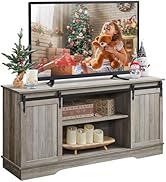
Image: An icon indicating the water-resistant and easy-to-clean surface of the TV stand.
8. Troubleshooting
If you encounter any issues with your TV stand, please consider the following common solutions:
- Wobbly Stand: Ensure all screws are fully tightened. Check that the adjustable feet are properly leveled on an even surface.
- Power Outlet Not Working: Verify that the power cord is securely plugged into a functional wall outlet. Check the power switch on the power strip to ensure it is in the "On" position. If the issue persists, try plugging another device into the wall outlet to confirm power supply.
- Missing Parts: Double-check the packaging and all contents against the parts list. If parts are genuinely missing, contact customer support immediately.
9. Warranty and Customer Support
Yaheetech is committed to providing quality products. For any warranty claims, missing parts, or technical assistance, please contact Yaheetech customer service directly through the retailer where you purchased the product or visit the official Yaheetech website for support information.
Please retain your purchase receipt as proof of purchase for warranty purposes.


