
1. Introduction
Thank you for purchasing the Yaheetech Computer Desk. This manual provides detailed instructions for the assembly, operation, maintenance, and troubleshooting of your new desk. Please read this manual carefully before assembly and retain it for future reference.
This computer desk features a compact design with three storage shelves, a sliding keyboard tray, and four wheels (two with brakes) for mobility and stability. It is constructed from durable particle board and a metal frame, designed for home office or study use.
2. Safety Information
- Always assemble the desk on a soft, clean surface to prevent scratches.
- Ensure all screws and fasteners are securely tightened before use. Periodically check and re-tighten as necessary.
- Do not overload the shelves. Refer to the 'Specifications' section for weight capacities.
- Keep small parts and packaging materials away from children and pets to prevent choking hazards.
- Use the desk on a level surface to prevent tipping. Engage the wheel brakes when the desk is in a stationary position.
- Avoid placing hot items directly on the desk surface without protection.
3. Package Contents
Before beginning assembly, verify that all components listed below are present and undamaged. If any parts are missing or damaged, please contact customer support.

Figure 1: Exploded View of Desk Components
This image illustrates the main components of the computer desk, including the top shelf, main desk surface, keyboard tray, small mobile storage shelf, lower storage shelf, and the metal frame structure with wheels.
- Main Desk Surface Panel
- Top Shelf Panel
- Lower Storage Shelf Panel
- Small Mobile Storage Shelf Panel
- Sliding Keyboard Tray Panel
- Metal Frame Components (Vertical supports, horizontal bars)
- Casters (4 pieces, 2 with brakes)
- Hardware Pack (Screws, bolts, nuts, Allen wrench, screwdriver)
- Keyboard Tray Rails (2 pieces)
4. Setup (Assembly Instructions)
Follow these steps carefully to assemble your Yaheetech Computer Desk. It is recommended to have two people for assembly.
- Attach Casters to Base Frame: Secure the four casters to the bottom metal frame components. Ensure the two lockable casters are positioned at the front for easy access.
- Assemble the Main Metal Frame: Connect the vertical and horizontal metal frame components using the provided screws and Allen wrench. Do not fully tighten all screws until the desk is mostly assembled to allow for minor adjustments.
- Install Lower Storage Shelf: Place the lower storage shelf panel onto the designated supports on the metal frame and secure it with screws.
- Attach Main Desk Surface: Position the main desk surface panel onto the upper frame supports and fasten it securely.
- Install Keyboard Tray Rails: Attach the sliding rails to the underside of the main desk surface and to the keyboard tray panel. Then, slide the keyboard tray into place.
- Attach Top Shelf: Mount the top shelf panel to the upper vertical supports of the metal frame. Secure it firmly.
- Install Small Mobile Storage Shelf: Attach the small mobile storage shelf to the side of the desk as desired. This shelf is designed to be adjustable or removable.
- Final Tightening: Once all components are in place, go back and fully tighten all screws and fasteners.

Figure 2: Caster Wheel Detail
This image shows a close-up of one of the four caster wheels. Note the locking mechanism, which should be engaged when the desk is stationary to prevent movement.

Figure 3: Extendable Keyboard Shelf
This image highlights the sliding mechanism of the keyboard tray, designed for convenient storage and access to your keyboard and mouse.

Figure 4: Top Shelf Detail
This image shows the top shelf, suitable for a printer, speakers, or other accessories, with a metal handle for stability or aesthetic purposes.

Figure 5: Small Mobile Storage Shelf
This image displays the compact, adjustable storage shelf, ideal for small items like stationery or external hard drives.
5. Operating Instructions
Your Yaheetech Computer Desk is designed for ease of use and versatility.
- Mobility: To move the desk, unlock the two front casters by flipping their levers. Gently push the desk to its desired location.
- Stability: Once the desk is in position, engage the brakes on the two front casters to prevent unintended movement.
- Keyboard Tray: The keyboard tray slides in and out smoothly. Pull it out for use and push it in to save space when not in use.
- Storage Shelves: Utilize the top shelf for monitors, printers, or speakers. The lower shelf is suitable for a computer tower or larger items. The small side shelf provides convenient access for smaller accessories.

Figure 6: Assembled Computer Desk in Use
This image shows the Yaheetech Computer Desk fully assembled and in a typical usage scenario, demonstrating its functionality and storage capabilities.
6. Maintenance
Proper care will extend the life and appearance of your computer desk.
- Cleaning: Wipe surfaces with a soft, damp cloth. Avoid harsh chemicals or abrasive cleaners, which can damage the finish.
- Spills: Clean up spills immediately to prevent staining or damage to the particle board.
- Fasteners: Periodically check all screws and bolts to ensure they remain tight. Re-tighten as needed to maintain stability.
- Casters: Keep casters free of debris (hair, dust) to ensure smooth movement.
7. Troubleshooting
If you encounter any issues with your desk, refer to the following common problems and solutions:
- Desk is wobbly: Ensure all screws and bolts are fully tightened. Check that the desk is on a level surface. Adjust the casters if necessary.
- Keyboard tray does not slide smoothly: Check the rails for any obstructions or debris. Ensure the rails are properly aligned and securely attached.
- Casters are difficult to move: Check for debris (e.g., hair, dust) wrapped around the wheels. Clean the casters if necessary. Ensure the brakes are disengaged.
- Missing parts: Double-check the packaging. If parts are genuinely missing, contact Yaheetech customer support with your model number and purchase information.
8. Specifications
Detailed specifications for the Yaheetech Computer Desk (Model YA-00108395).
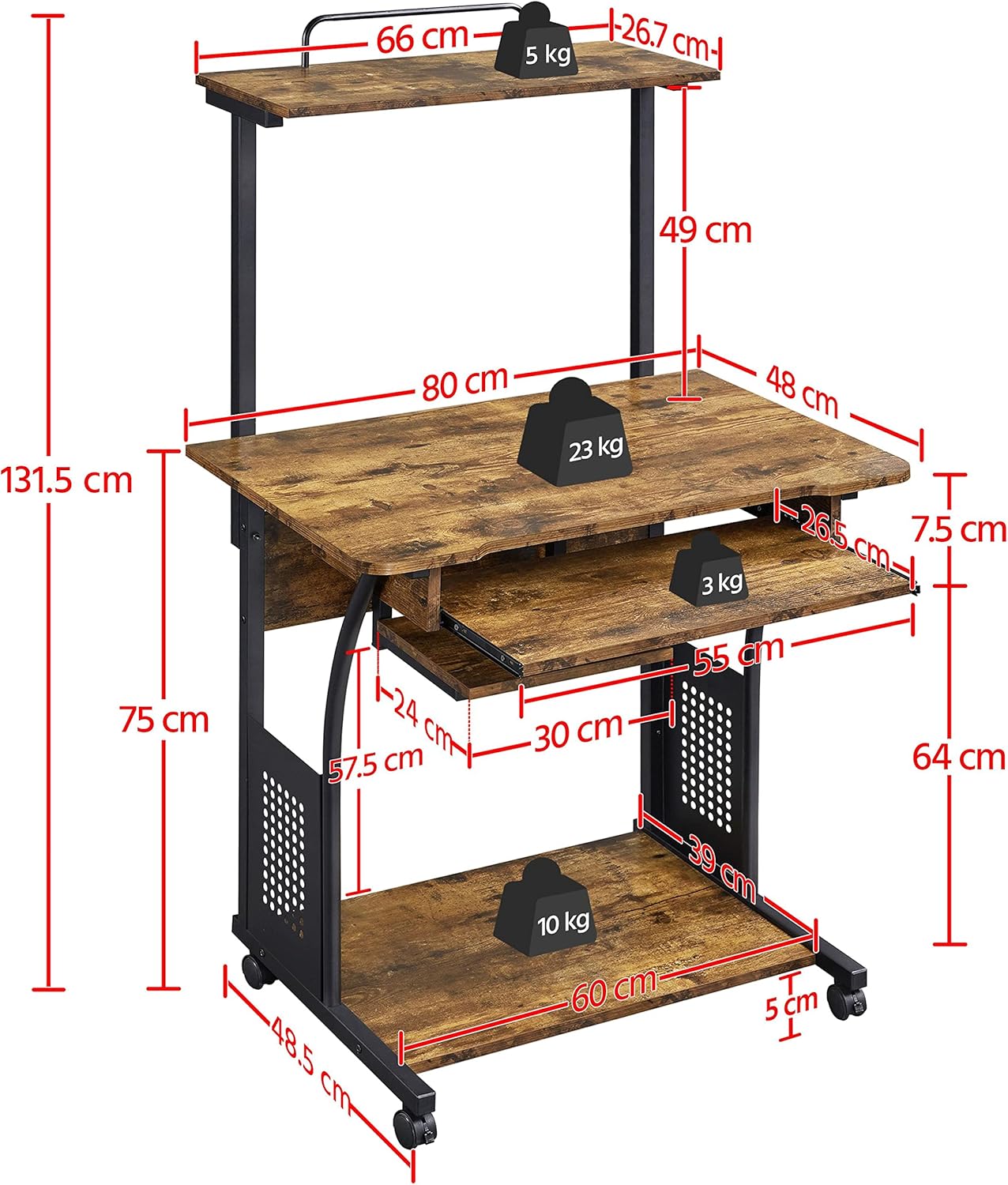
Figure 7: Product Dimensions
This diagram provides a comprehensive overview of the desk's measurements, including height, width, depth, and individual shelf dimensions.
| Feature | Detail |
|---|---|
| Model Number | YA-00108395 |
| Overall Dimensions (L x W x H) | 80 cm x 50.5 cm x 131.5 cm (31.5 in x 19.9 in x 51.8 in) |
| Main Desk Surface Dimensions | 80 cm x 48 cm (31.5 in x 18.9 in) |
| Top Shelf Dimensions | 66 cm x 26.7 cm (26 in x 10.5 in) |
| Lower Shelf Dimensions | 60 cm x 39 cm (23.6 in x 15.4 in) |
| Keyboard Tray Dimensions | 55 cm x 26.5 cm (21.7 in x 10.4 in) |
| Material | Engineered Wood (Particle Board), Metal Frame |
| Color | Rustic Brown |
| Item Weight | 19 kg (41.9 lbs) |
| Max. Load Capacity (Main Desk Surface) | 23 kg (50.7 lbs) |
| Max. Load Capacity (Top Shelf) | 5 kg (11 lbs) |
| Max. Load Capacity (Lower Shelf) | 10 kg (22 lbs) |
| Max. Load Capacity (Keyboard Tray) | 3 kg (6.6 lbs) |
| Special Features | Portable, 4 Casters (2 lockable), 3 Storage Shelves, Sliding Keyboard Tray |
9. Warranty and Support
Yaheetech products are manufactured to high-quality standards. For warranty information, missing parts, or technical support, please contact Yaheetech customer service through the retailer where the product was purchased or visit the official Yaheetech website. Please have your model number (YA-00108395) and purchase details ready when contacting support.


