
Altec Lansing IMW1300-RYB-STK-2
Altec Lansing HydraBlast Wireless Portable Bluetooth Speaker
Model: IMW1300-RYB-STK-2
Introduction
The Altec Lansing HydraBlast is a robust and versatile wireless portable Bluetooth speaker designed for various environments, from outdoor parties to everyday use. It features IP67 Everything Proof protection, ensuring it is waterproof, shockproof, snowproof, and dustproof. With a long-lasting battery, built-in phone charging capabilities, and dynamic LED lights, the HydraBlast delivers powerful audio and convenience wherever you go.

Figure 1: Front view of the Altec Lansing HydraBlast speaker in Royal Blue.
What's in the Box
- Altec Lansing HydraBlast Bluetooth Speaker
- USB-C Charging Cable
- Carabiner Clip
- User Manual (this document)
Product Features
- Bold Bass and Clear Audio: Experience HD audio with immersive bass for a rich listening experience.
- IP67 Everything Proof: Designed to be waterproof, shockproof, snowproof, and dustproof, making it suitable for any environment.

Figure 2: The HydraBlast speaker demonstrating its water resistance.
- 20 Hours of Playtime: Enjoy extended music playback on a single charge.
- Built-in Phone Charger: Features both wireless (Qi) charging and wired USB-C output to charge your devices.

Figure 3: Wireless charging a smartphone on the speaker's top surface.
- LED Light Modes: Multiple LED light modes to enhance your listening experience and create a party atmosphere.

Figure 4: The speaker features 11 distinct LED light modes, including strobe effects.
- Portable Design: Lightweight and includes a built-in carabiner hook for easy transport and attachment.

Figure 5: The included carabiner clip allows for easy portability, attaching to bags or gear.
- Bluetooth 5.0: Provides a stable wireless connection up to 100 feet.
- True Wireless Pairing: Connect two HydraBlast speakers for a stereo sound experience.
Controls Overview

Figure 6: Top panel controls of the HydraBlast speaker.
- Power On/Off Button: Press and hold to power the speaker on or off.
- Link Button: Used for True Wireless Pairing with another HydraBlast speaker.
- Color Change Button: Cycles through different LED light modes.
- Wireless Qi Charger: Integrated charging pad for compatible devices.
- Volume Down / Previous Track Button (-): Short press for volume down, long press for previous track.
- Voice Assistant / Answer Calls Button: Activates voice assistant or answers/ends calls.
- Volume Up / Next Track Button (+): Short press for volume up, long press for next track.
Setup
1. Initial Charging
Before first use, fully charge your HydraBlast speaker. Locate the USB-C charging port on the side of the speaker (protected by a waterproof flap). Connect the provided USB-C cable to the speaker and the other end to a USB power adapter (not included) or a computer's USB port. The charging indicator light will show charging status.
2. Bluetooth Pairing
- Ensure the speaker is powered off.
- Press and hold the Power On/Off button until you hear an audible prompt and the Bluetooth indicator light begins to flash, indicating pairing mode.
- On your smartphone or Bluetooth-enabled device, navigate to the Bluetooth settings.
- Select "Altec Lansing HydraBlast" from the list of available devices.
- Once connected, you will hear a confirmation tone, and the Bluetooth indicator light will become solid.
3. True Wireless Pairing (Pairing Two Speakers)
To achieve a stereo sound experience, you can pair two HydraBlast speakers together:
- Ensure both HydraBlast speakers are powered on and not connected to any other Bluetooth devices.
- On one speaker (this will be your primary speaker), press the Link button. The speaker will enter True Wireless Pairing mode.
- On the second speaker, also press the Link button.
- The two speakers will automatically connect to each other. You will hear a confirmation tone once connected.
- Now, connect your Bluetooth device to the primary speaker as described in the "Bluetooth Pairing" section above. Audio will play through both speakers in stereo.
Operating Instructions
Playing Audio
- After successful Bluetooth pairing, open your preferred music application on your device and begin playback.
- Use the Volume Up (+) and Volume Down (-) buttons on the speaker to adjust the volume.
- Long press the Volume Up (+) button for the next track, and long press the Volume Down (-) button for the previous track.
Managing Calls
- When a call comes in, press the Voice Assistant / Answer Calls button to answer.
- To end a call, press the same button again.
- To reject an incoming call, press and hold the Voice Assistant / Answer Calls button.
Using LED Light Modes
Press the Color Change button to cycle through the available LED light modes. Continue pressing until you find your desired light pattern or turn the lights off.
Charging External Devices
- Wireless Charging: Place your Qi-compatible smartphone or device on the designated wireless charging area on top of the speaker. Ensure proper alignment for charging to begin.
- Wired Charging: Open the waterproof flap on the side of the speaker to access the USB-A output port. Connect your device's charging cable to this port to charge it.
Maintenance
- Cleaning: Use a soft, damp cloth to clean the speaker's exterior. Avoid using harsh chemicals or abrasive cleaners.
- Water Resistance: While the speaker is IP67 rated, ensure the charging port flap is securely closed before exposing it to water or dust. Do not submerge the speaker for extended periods or at depths greater than 1 meter.
- Storage: Store the speaker in a cool, dry place when not in use. Avoid extreme temperatures.
- Battery Care: For optimal battery life, avoid fully discharging the speaker frequently. Charge it regularly, even if not in constant use.
Troubleshooting
| Problem | Possible Cause / Solution |
|---|---|
| Speaker won't turn on. | Battery may be depleted. Connect to a power source using the USB-C cable and charge for at least 30 minutes before attempting to power on again. |
| Cannot pair via Bluetooth. |
|
| No sound or low volume. |
|
| Wireless charging not working. |
|
| Sound distortion. |
|
Specifications
| Feature | Detail |
|---|---|
| Brand | Altec Lansing |
| Model Name | HydraBlast (IMW1300-RYB-STK-2) |
| Connectivity Technology | Bluetooth, USB |
| Wireless Communication Technology | Bluetooth 5.0 |
| Bluetooth Range | 100 Feet |
| Speaker Type | Outdoor |
| Special Feature | Portable, Waterproof, Built-in Phone Charger, LED Lights |
| Water Resistance Level | IP67 (Waterproof, Shockproof, Snowproof, Dustproof) |
| Battery Life | Up to 20 Hours |
| Power Source | Battery Powered |
| Charging Port | USB-C |
| Audio Output Mode | Stereo |
| Speaker Maximum Output Power | 6 Watts |
| Product Dimensions | 8.7"D x 4.4"W x 5.5"H |
| Item Weight | 1.9 pounds |
| Material | Durable Plastic / Rubberized Plastic |
| Included Components | Bluetooth Speaker |
| UPC | 021331023704 |
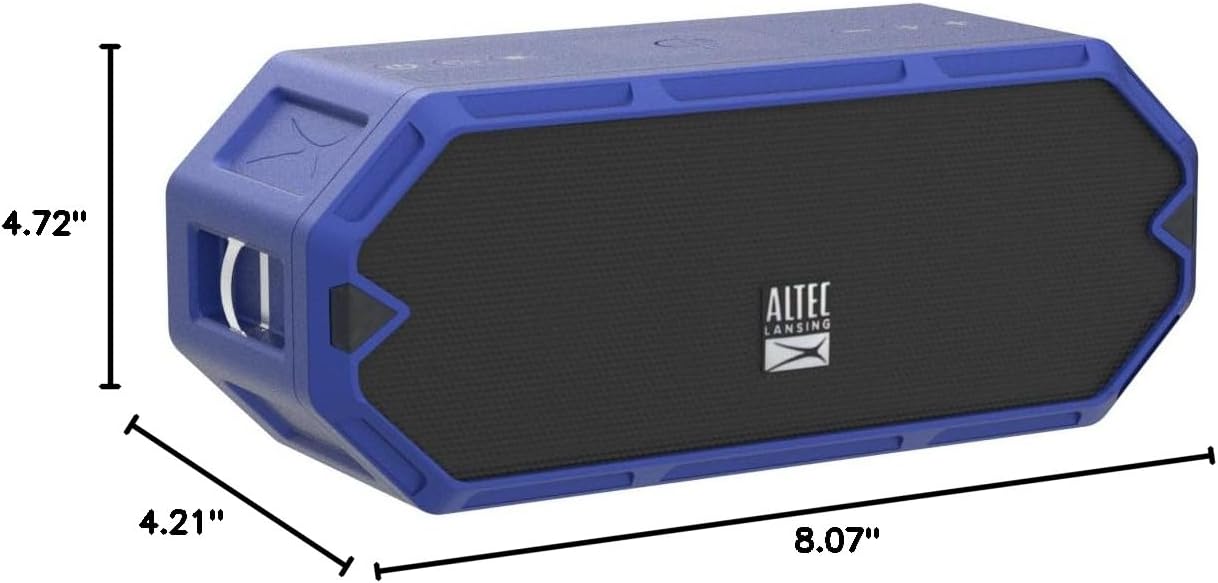
Figure 7: Dimensions of the HydraBlast speaker.
Warranty and Support
The Altec Lansing HydraBlast speaker comes with a Limited Warranty. For specific warranty terms, conditions, and duration, please refer to the warranty card included with your product or visit the official Altec Lansing website.
For technical support, troubleshooting assistance, or warranty claims, please contact Altec Lansing Customer Service:
- Website: alteclansing.com/support
- Phone: Refer to the product packaging or website for regional contact numbers.
Please have your product model number (IMW1300-RYB-STK-2) and proof of purchase ready when contacting support.
Related documentsIMW1300-RYB-STK-2


Ask a question about this manual
Ask about setup, troubleshooting, compatibility, parts, safety, or missing instructions. Manuals+ will review the question and use this page’s manual context to help answer it.