
1. Introduction
This manual provides instructions for the Mi-Light MiBoxer FUT007 RF Remote Control. This remote is designed to manage MiBoxer LED receivers for both monocolor and Dual White lighting systems across 4 independent zones. It operates using 2.4G RF transmission technology, offering a control range of up to 30 meters.

Image 1: Mi-Light MiBoxer FUT007 Remote Control and its product packaging.
2. Product Features
- Dimensions: 110.5 x 53 x 22 mm.
- Control Zones: 4 independent zones, with the ability to control all zones simultaneously.
- Control Range: Up to 30 meters via 2.4G RF transmission.
- Functions:
- On/Off control.
- Dual White color temperature adjustment (2700K-6500K).
- Brightness adjustment (10%-100%).
- Night light mode (5% brightness).
- Note: Available functions depend on the connected LED product. For example, a monocolor LED cannot utilize Dual White CCT Kelvin control.
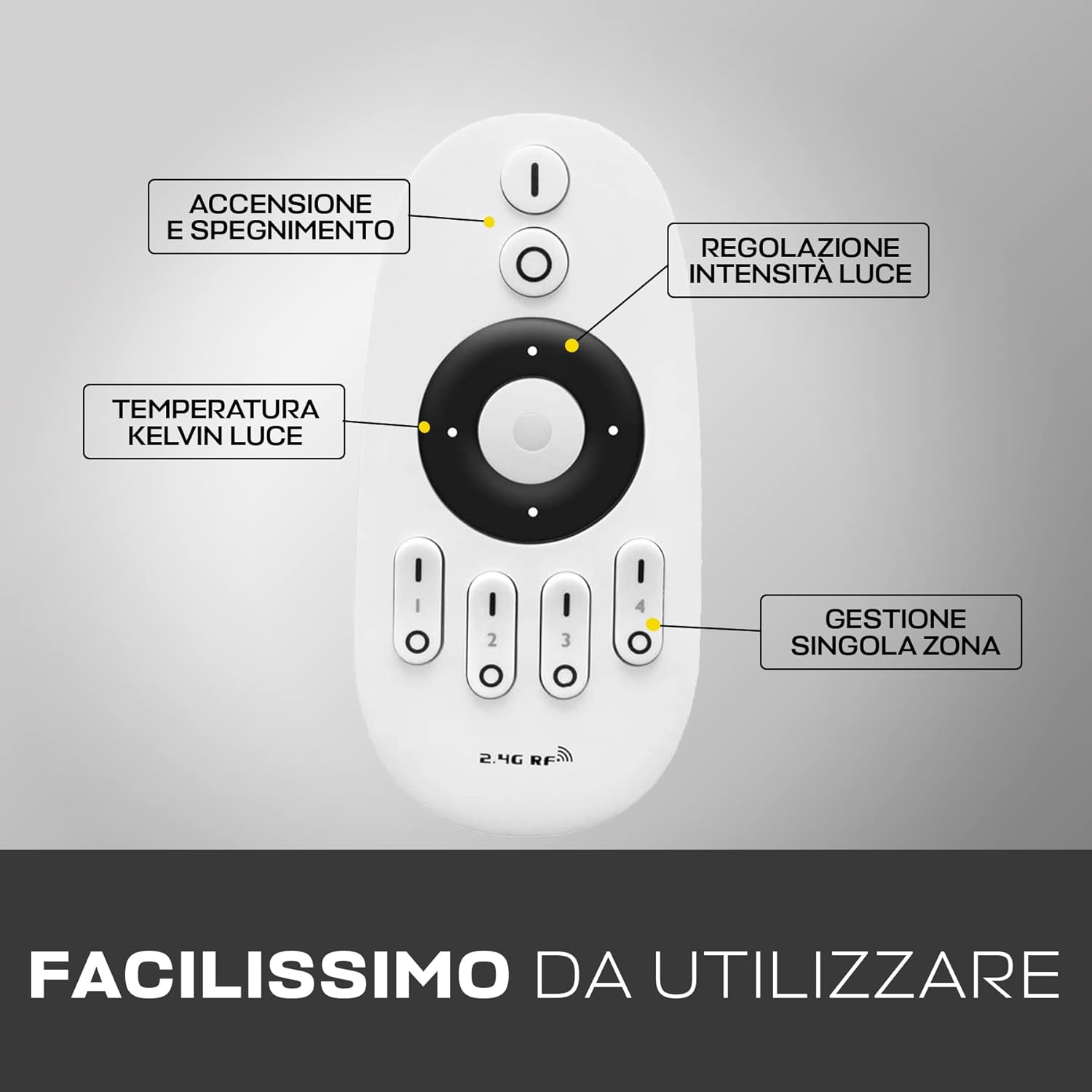
Image 2: Mi-Light MiBoxer FUT007 Remote Control with its various buttons and their functions labeled.
3. Setup
3.1 Battery Installation
The FUT007 remote control requires two AAA batteries (not included). To install the batteries:
- Open the battery compartment cover on the back of the remote control.
- Insert two AAA batteries, ensuring correct polarity (+/-).
- Close the battery compartment cover securely.

Image 3: The Mi-Light MiBoxer FUT007 Remote Control with its battery compartment open, showing where to insert two AAA batteries.
3.2 Pairing / Synchronization
To link the remote control with your MiBoxer LED device (receiver), follow these steps:
- Ensure the appropriate MiBoxer LED device is installed and connected.
- Turn off the power to the LED device (e.g., via a wall switch or by unplugging it).
- Turn on the power to the LED device.
- Within 3 seconds of the LED device turning on, repeatedly press (at least once per second) one of the 'I' icons (zone selection buttons 1-4) at the bottom of the remote control. Select the zone you wish to link.
- The LED device will flash multiple times to indicate successful synchronization.
Repeat this process for each zone you wish to control independently.
4. Operating Instructions
The FUT007 remote control allows for intuitive management of your MiBoxer LED lighting. Below are the primary functions:
4.1 Power On/Off
- Press the 'I' button (top button) to turn on the lights for the selected zone(s).
- Press the 'O' button (second from top) to turn off the lights for the selected zone(s).
4.2 Zone Selection
The remote features four zone buttons labeled 1, 2, 3, and 4 at the bottom. Each button has an 'I' (On) and 'O' (Off) symbol.
- To control a specific zone, press the 'I' button for that zone (e.g., 'I' for Zone 1).
- To turn off a specific zone, press the 'O' button for that zone.
- To control all zones simultaneously, ensure no specific zone is selected, or press the master 'I' button at the top.
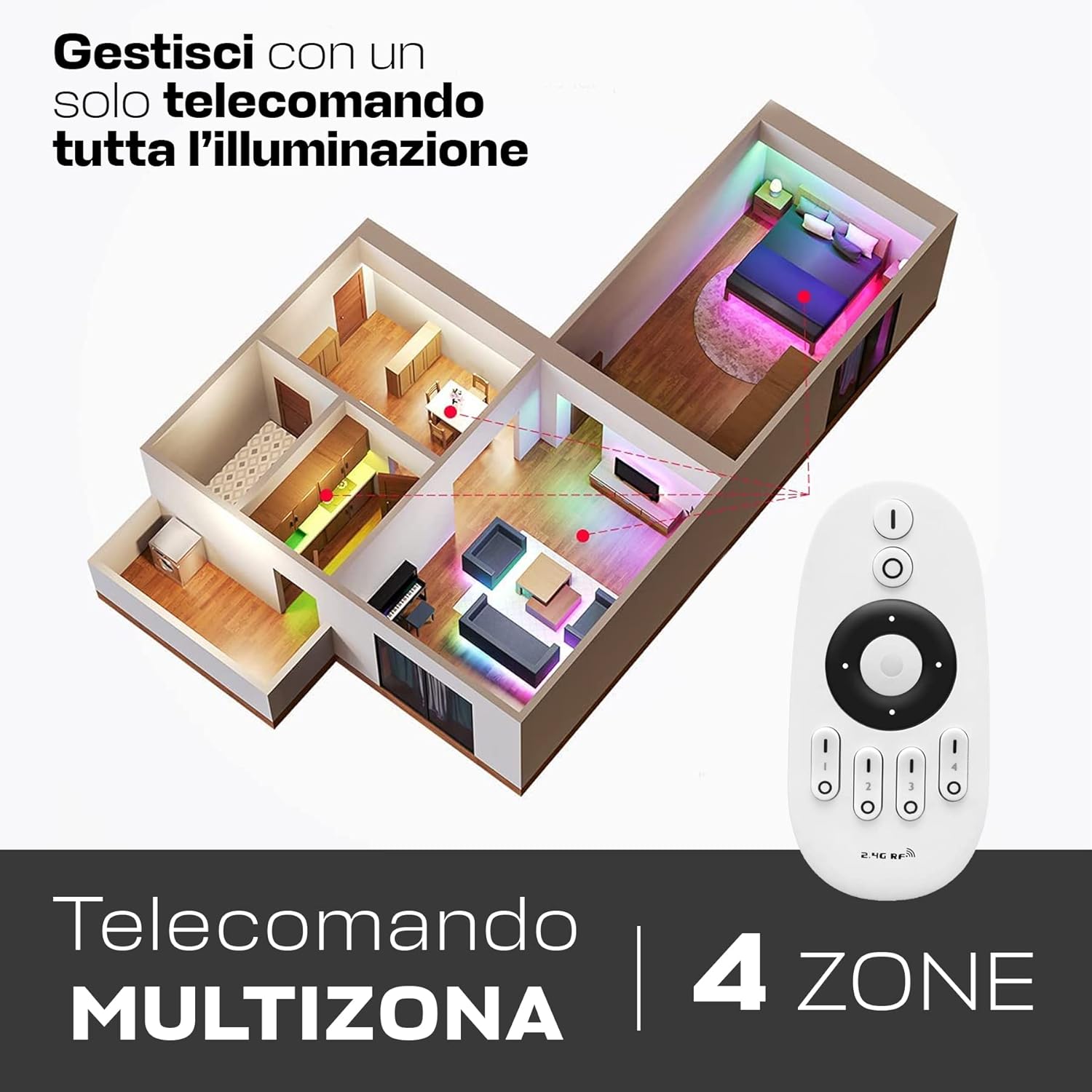
Image 4: The Mi-Light MiBoxer FUT007 Remote Control demonstrating its ability to manage lighting in four distinct zones within a home layout.
4.3 Brightness Adjustment
Use the central ring to adjust brightness:
- Touch the top part of the central ring to increase brightness.
- Touch the bottom part of the central ring to decrease brightness.
- Brightness can be adjusted from 10% to 100%.
4.4 Color Temperature Adjustment (Dual White)
For Dual White compatible LED devices, use the central ring to adjust color temperature:
- Touch the left part of the central ring to shift towards warmer white (lower Kelvin, e.g., 2700K).
- Touch the right part of the central ring to shift towards cooler white (higher Kelvin, e.g., 6500K).
4.5 Night Light Mode
To activate the night light mode (5% brightness), press and hold the 'O' (Off) button for the selected zone or the master 'O' button.
5. Compatibility
The MiBoxer FUT007 remote control is compatible with a range of MiBoxer LED receivers and devices. Ensure your device is listed below for proper functionality.
5.1 Compatible MiBoxer Receivers for LED Strips:
- WL5
- LS2
- LS4
- FUT036
- FUT036S
5.2 Compatible MiBoxer Dual White Receivers and Devices:
- FUT035
- FUT035S
- LS3
- PL1
5.3 Smartphone and Voice Control Integration:
For smartphone and voice control capabilities, the MiBoxer WL-Box1 module is required (not included). This remote control provides an alternative control method if the WL-Box1 connection is unavailable.
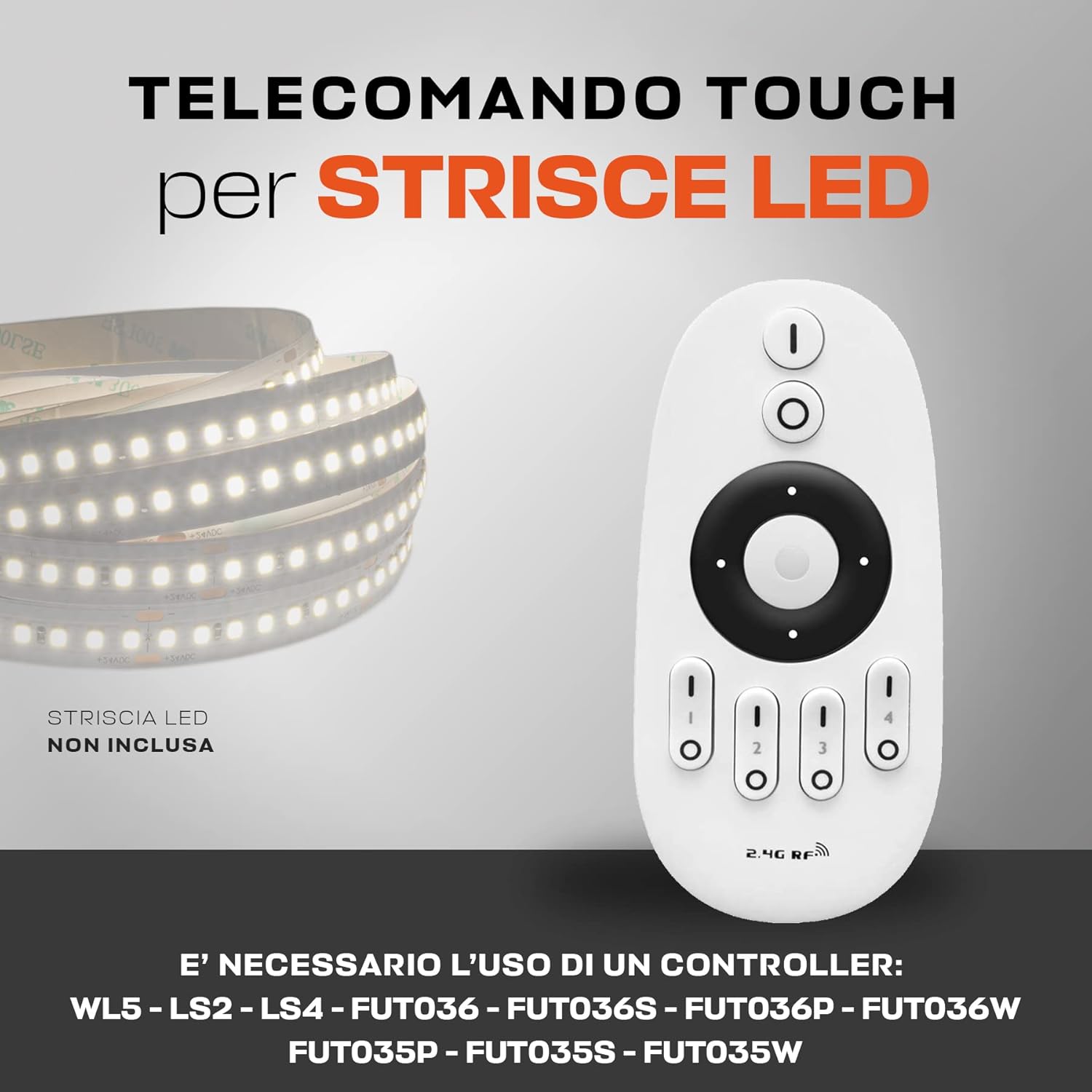
Image 5: The Mi-Light MiBoxer FUT007 Remote Control shown alongside an LED strip, with a list of compatible MiBoxer controllers.
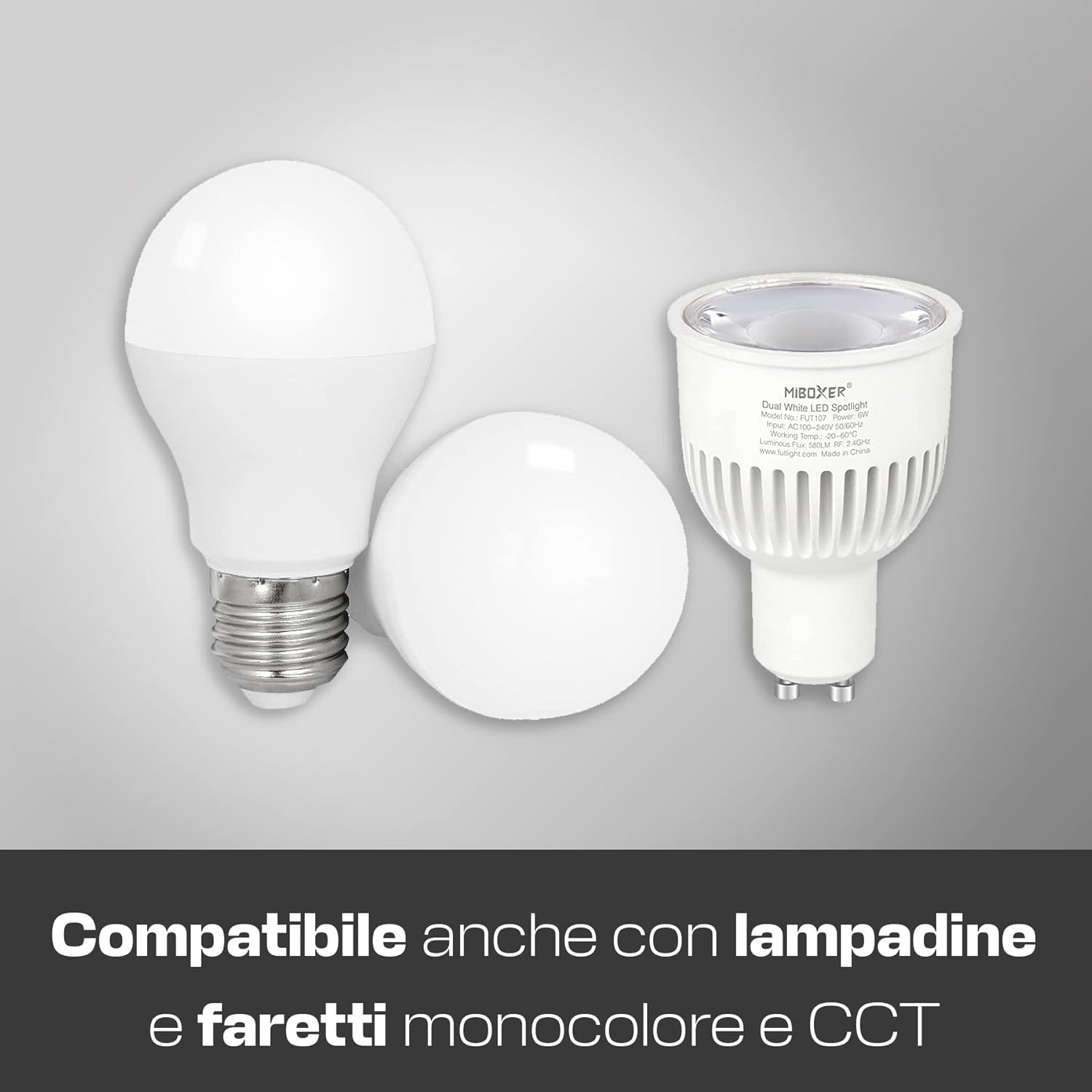
Image 6: The Mi-Light MiBoxer FUT007 Remote Control is compatible with different types of monocolor and CCT (Dual White) bulbs.
6. Specifications
| Model Name: | FUT007 |
| Brand: | Mi Light |
| Dimensions: | 110.5 x 53 x 22 mm (4.35 x 2.09 x 0.87 inches) |
| Weight: | 50 g (excluding batteries) |
| Connectivity Technology: | 2.4G Radio Frequency (RF) |
| Maximum Range: | 30 meters (98 feet) |
| Number of Zones: | 4 |
| Battery Type: | 2 x AAA batteries (not included) |
| Special Feature: | Ergonomic design |

Image 7: The Mi-Light MiBoxer FUT007 Remote Control highlighting its effective control range of up to 30 meters.
7. Troubleshooting
- Remote not responding:
- Check if the batteries are correctly inserted and have sufficient charge. Replace if necessary.
- Ensure the remote is within the 30-meter operating range of the receiver.
- Verify that the remote is properly paired with the LED device (refer to Section 3.2).
- LED device not flashing during synchronization:
- Ensure the LED device was powered off and then on again immediately before attempting synchronization.
- Press the 'I' button for the desired zone repeatedly and quickly within the 3-second window after powering on the LED device.
- Confirm compatibility of your LED device with the FUT007 remote (refer to Section 5).
- Specific functions (e.g., Dual White) not working:
- Verify that your connected LED device supports the specific function. For example, monocolor LEDs do not support Dual White CCT adjustment.
8. Maintenance
- Keep the remote control clean by wiping it with a soft, dry cloth.
- Avoid exposing the remote to moisture, extreme temperatures, or direct sunlight.
- If the remote will not be used for an extended period, remove the batteries to prevent leakage.
9. Warranty and Support
This product typically comes with a manufacturer's warranty. Please refer to your purchase documentation or contact your retailer for specific warranty terms and conditions. For technical support or further assistance, please contact Mi Light customer service or your authorized dealer.
Note: King LED is an official distributor of Mi Light MiBoxer products.


