
Introduction
This manual provides essential information for the safe and efficient operation of your Blackview BV6300 Pro rugged smartphone. Please read this manual thoroughly before using your device to ensure proper functionality and to prevent damage.
What's in the Box
Verify that all items are present in your product packaging:
- Blackview BV6300 Pro Smartphone
- USB Cable
- Power Adapter
- Earbuds
- SIM Ejector Tool
- Screen Protector (pre-applied)
- Spare Screen Protector

Image: The Blackview BV6300 Pro retail box contents, showing the smartphone, USB cable, power adapter, earbuds, SIM ejector tool, and screen protectors.
Setup
1. SIM Card Installation
- Power off the device.
- Locate the SIM card tray on the side of the phone.
- Insert the SIM ejector tool into the small hole next to the tray and press firmly until the tray pops out.
- Place your Nano-SIM cards (up to two) and/or a microSD card into the designated slots on the tray. Ensure the metal contacts face downwards.
- Carefully push the tray back into the phone until it is flush with the device body.
2. Initial Charging
Before first use, fully charge your Blackview BV6300 Pro. Connect the USB cable to the phone's Type-C port and the power adapter, then plug the adapter into a wall outlet. The charging indicator will appear on the screen.

Image: The Blackview BV6300 Pro being charged via its USB-C port and also demonstrating wireless charging capability on a pad.
3. Power On/Off
- To power on: Press and hold the Power button (located on the right side) until the Blackview logo appears.
- To power off: Press and hold the Power button, then select "Power off" from the options on the screen.
Operating Instructions
1. Android 10 System Overview
Your Blackview BV6300 Pro runs on Android 10, offering an intuitive user experience with features like Gesture Navigation, Dark Mode, Grayscale, Privacy Protect, and a new interface. Explore the settings menu to customize your device.

Image: Various screens of the Blackview BV6300 Pro showcasing the Android 10 operating system, including settings, home screen, and feature icons like Gesture Navigation and Dark Mode.
2. Camera Usage
The Blackview BV6300 Pro is equipped with a 16MP HDR Quad Rear Camera and a 13MP Front Camera. Open the Camera app to access various shooting modes.
- Rear Camera: Features a 16MP main sensor, an 8MP 120° ultra-wide angle lens, and additional macro and depth sensors.
- Front Camera: A 13MP sensor for high-resolution selfies and video calls.
- Shooting Modes: Includes Night Mode for low-light conditions, Slow Motion for dynamic video, and Macro for close-up shots.

Image: A visual representation of the Blackview BV6300 Pro's camera system, highlighting its quad rear cameras and front camera, along with examples of photos taken using different modes such as Ultra-Wide Angle, Night Mode, Mono, Slow Motion, and Macro.
3. Security Features
Your device supports Face Unlock and Fingerprint Unlock for secure access.
- Face Unlock: Register your face in the security settings for quick and convenient unlocking.
- Fingerprint Unlock: The fingerprint sensor is located on the rear of the device. Register your fingerprints in the security settings for secure access.
4. Connectivity
The BV6300 Pro supports Dual SIM 4G VoLTE for enhanced call quality and network coverage. It also includes NFC for contactless payments and data transfer.
Video: An official Blackview video showcasing the BV6300 Pro's features, including its slim body, IP68/IP69K water and MIL-STD-810G drop resistance, quad rear cameras, 13MP front camera, 5.7-inch display, NFC, fingerprint unlock, MediaTek Helio P70 processor, 6GB RAM, 128GB ROM, Type-C port, 4380mAh battery with 18W wired and 10W wireless fast charge, Dual 4G VoLTE, global bands, and Android 10 Dark Theme.
Video: An official Blackview video highlighting the BV6300 Pro's ruggedness, slim design, and key specifications such as IP68 & IP69K, MIL-STD-810G, MediaTek Helio P70, 6GB RAM, 128GB ROM, Samsung 16MP Quad Camera, and 4380mAh Battery.
Maintenance
To ensure the longevity and optimal performance of your Blackview BV6300 Pro, follow these maintenance guidelines:
- Cleaning: Use a soft, dry cloth to clean the device. Avoid chemical solvents or abrasive materials.
- Water Resistance: The device is IP68/IP69K rated for water and dust resistance. Ensure all port covers are securely closed before exposing the phone to water. Do not intentionally submerge the device in corrosive liquids.
- Battery Care: Avoid extreme temperatures. Do not disassemble or puncture the battery. Use only the provided charger or compatible power sources.
- Impact Protection: While rugged, avoid unnecessary drops or impacts. The MIL-STD-810G rating indicates resistance to certain drops, but extreme force can still cause damage.
Troubleshooting
If you encounter issues with your Blackview BV6300 Pro, refer to the following common solutions:
- Device Freezing/Unresponsive: Press and hold the Power button for approximately 10-15 seconds to force a restart.
- Charging Issues: Ensure the USB cable and power adapter are securely connected. Try a different outlet or charging accessory. Check the charging port for any debris.
- Network Connectivity Problems: Check if your SIM card is properly inserted. Verify that mobile data is enabled in settings. If issues persist, restart the device or contact your network provider.
- Camera Quality: Ensure the camera lenses are clean and free of smudges. For optimal results, use appropriate lighting and experiment with different camera modes.
Specifications
| Brand | Blackview |
| Model Name | BV6300 Pro |
| Memory Storage Capacity | 128 GB |
| Wireless Carrier | T-Mobile |
| Cellular Technology | 2G, 3G, 4G |
| Connectivity Technology | Bluetooth, Wi-Fi |
| SIM Card Slot Count | Dual SIM |
| Connector Type | 3.5mm Jack, USB Type C |
| Battery Capacity | 4380 Milliamp Hours |
| Biometric Security Feature | Face Recognition |
| Water Resistance Level | Waterproof (IP68/IP69K) |
| Rear Facing Camera Photo Sensor Resolution | 16 MP |
| Optical Sensor Resolution | 16.0, 8.0 MP |
| Shooting Modes | Night Mode, Slow Motion |
| Model Year | 2020 |

Image: An illustration of the Blackview BV6300 Pro's internal components, highlighting the CPU (MediaTek Helio P70), 6GB RAM, and 128GB ROM, with an indication for an optional 128GB SD card.
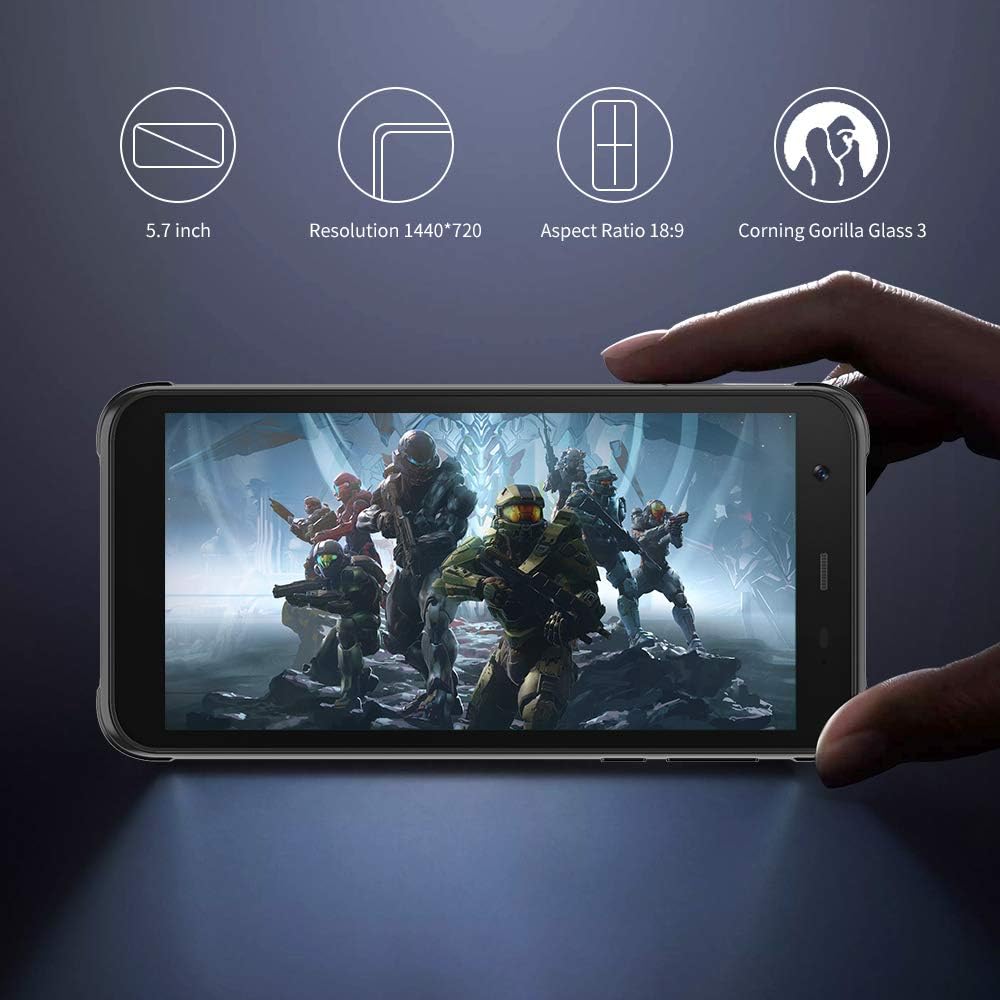
Image: The Blackview BV6300 Pro held in a hand, displaying its 5.7-inch screen with a resolution of 1440x720, an 18:9 aspect ratio, and Corning Gorilla Glass 3 protection.

Image: Technical drawing of the Blackview BV6300 Pro showing its dimensions: 159.6mm height, 78.2mm width, and 11.6mm thickness.
Warranty and Support
For warranty information and customer support, please refer to the documentation included with your purchase or visit the official Blackview website. Keep your proof of purchase for warranty claims.