
XIAOMI TWSEJ05LS
Xiaomi Redmi AirDots S TWSEJ05LS Bluetooth Earbuds User Manual
Model: TWSEJ05LS | Brand: Xiaomi
1. Introduction
This manual provides essential information for the proper use and maintenance of your Xiaomi Redmi AirDots S TWSEJ05LS Bluetooth Earbuds. Please read these instructions carefully before using the product to ensure optimal performance and longevity.
2. Package Contents
Verify that all items are present in your product package:
- 1 x Charging Case
- 2 x Earbuds (Left and Right)
- 2 x Pairs of Eartips (Sizes S/M/L, with M pre-installed)
- 1 x User Manual
3. Product Overview
The Xiaomi Redmi AirDots S are compact, wireless in-ear earbuds designed for daily use, hands-free communication, and music playback. They feature Bluetooth 5.0 connectivity for stable audio transmission.

Figure 3.1: Redmi AirDots S Earbuds and Charging Case
This image displays the black charging case with its lid open, revealing the slots for the earbuds. One earbud is shown outside the case, highlighting its compact design.
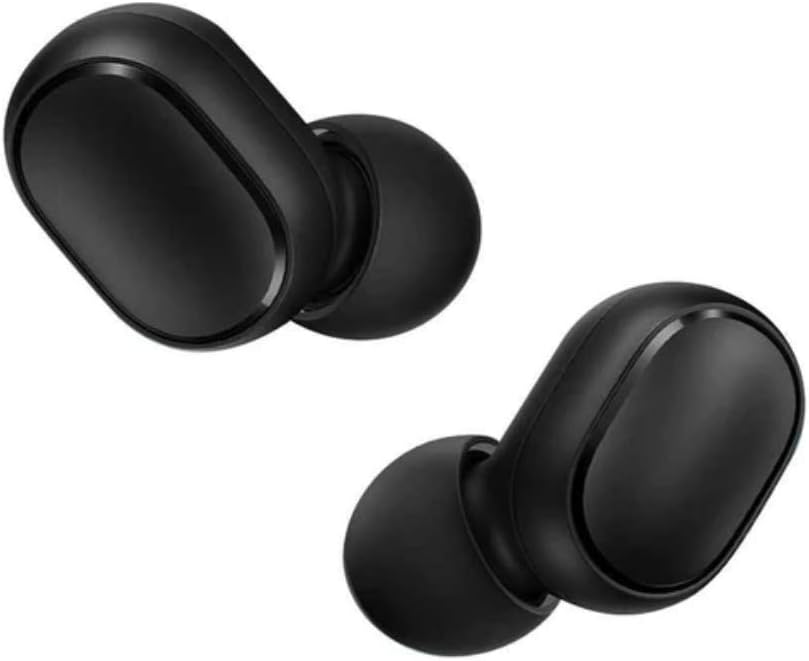
Figure 3.2: Individual Earbuds
A detailed view of the left and right earbuds, showcasing their smooth, black finish and the in-ear design.

Figure 3.3: Earbud in Use
This image illustrates how the earbud fits comfortably within the ear canal, providing a secure and discreet listening experience.
4. Setup
4.1 Charging the Earbuds and Case
Before first use, ensure both the earbuds and the charging case are fully charged.
- Place the earbuds into the charging case. Ensure they are correctly seated in their respective slots.
- Connect the charging case to a power source using a compatible USB cable (not included).
- The indicator light on the case will show charging status. A full charge typically takes approximately 2 hours.
4.2 First-Time Pairing
Follow these steps to pair your Redmi AirDots S with a new device:
- Remove both earbuds from the charging case. They will automatically power on.
- On your mobile device (smartphone, tablet, etc.), navigate to the Bluetooth settings.
- Refresh the list of available Bluetooth devices.
- Select "Redmi Airdots S" from the list to initiate the connection.
- Once connected, you will hear an audible confirmation, and the earbud indicator lights will turn off or flash slowly.
Note: When you place the earbuds back into the charging case, they will show a red light and automatically disconnect from your device. When removed, a white light will appear, and they will automatically attempt to reconnect to the last paired device.
4.3 Single Earbud Mode
You can use either the left or right earbud independently. Simply remove one earbud from the case, and it will connect to your device. The other earbud can remain in the case or be powered off.
5. Operating Instructions
The Redmi AirDots S feature a multi-function touch control button on each earbud.
| Action | Function |
|---|---|
| Single Press (either earbud) | Play/Pause music, Answer/End call |
| Double Press (either earbud) | Activate voice assistant (e.g., Siri, Google Assistant) |
| Press and Hold (during call) | Reject incoming call |
Note: Volume control and track skipping typically need to be managed directly from your connected device.
6. Maintenance
6.1 Cleaning
- Regularly clean the earbuds and charging case with a soft, dry, lint-free cloth.
- Do not use abrasive cleaners, alcohol, or chemical solvents.
- Gently remove any earwax or debris from the earbud mesh and eartips using a small, soft brush or cotton swab.
6.2 Storage
- When not in use, always store the earbuds in their charging case to protect them and keep them charged.
- Store the product in a cool, dry place, away from direct sunlight, extreme temperatures, and humidity.
7. Troubleshooting
7.1 Resetting the Earbuds
If you experience pairing issues or other functional problems, resetting the earbuds may resolve the issue:
- Press and hold the multi-function button on both earbuds for approximately 15 seconds.
- Release the button when the red and white indicator lights flash alternately 3 times and then turn off. This indicates a successful reset.
- On your phone's Bluetooth settings, forget or unpair "Redmi AirDots S" from the device list.
- Place the earbuds back into the charging case, then remove them to initiate a new pairing process as described in Section 4.2.
7.2 Common Issues and Solutions
- Earbuds not pairing with each other: Ensure both earbuds are removed from the case simultaneously and are fully charged. Perform a reset if necessary.
- Only one earbud working: Try placing both earbuds back in the case, then removing them again. Check if the single earbud mode is active. Perform a reset if the issue persists.
- No sound or low volume: Check the volume level on your connected device. Ensure the earbuds are properly seated in your ears. Clean any debris from the earbud mesh.
- Connection drops frequently: Ensure there are no significant obstacles between the earbuds and your device. Keep the device within the effective Bluetooth range (typically 10 meters).
8. Specifications
| Feature | Detail |
|---|---|
| Model Name | TWSEJ05LS |
| Brand | XIAOMI |
| Connectivity Technology | Wireless (Bluetooth 5.0) |
| Ear Placement | In-Ear |
| Form Factor | In-Ear |
| Special Features | Built-in Microphone |
| Control Method | Touch Control |
| Noise Isolation | Passive (In-ear design provides some noise reduction) |
| Charging Time | Approximately 2 hours |
| Battery Composition | Lithium-polymer |
| Item Weight | 60 Grams |
| Material | Plastic |
| Compatible Devices | Smartphones, tablets, laptops, desktop computers, smart speakers |
| Recommended Uses | Calling, Exercising, Video Gaming |
9. Warranty and Support
Information regarding product warranty is typically provided with your purchase documentation or can be found on the official Xiaomi website. For technical support, troubleshooting assistance beyond this manual, or warranty claims, please refer to the official Xiaomi support channels or contact your retailer.
Note: Spare parts availability and software update guarantees are not explicitly provided in the product information.
10. Video Resources
No official product videos from the seller were found in the provided data. For additional visual guides, please check the manufacturer's official website or authorized support channels.
Related documentsTWSEJ05LS


Ask a question about this manual
Ask about setup, troubleshooting, compatibility, parts, safety, or missing instructions. Manuals+ will review the question and use this page’s manual context to help answer it.