
Introduction
Thank you for choosing the eufy Security Wi-Fi Video Doorbell (Model E8201). This 1080p HD video doorbell offers advanced features such as local storage, human detection, and a wireless chime, providing enhanced security and convenience for your home. This manual will guide you through the setup, operation, and maintenance of your new device.

Image: eufy Security Wi-Fi Video Doorbell (Model E8201) - Front view of the sleek black doorbell unit.
What's in the Box
Please ensure all the following components are included in your package:
- Video Doorbell 2K (Wired) - Note: This model is 1080p-grade, despite the 2K label on some packaging.
- Electronic Doorbell Chime
- Mounting Bracket
- 15° Wedge (for angled installation)
- Screw Hole Positioning-Card
- Jumper for Existing Chime
- Extension Wires
- Screw Packs
- Doorbell Detaching Pin
- Doorbell Power Pin
- Quick Start Guide
Setup and Installation
Before you begin, ensure you have existing doorbell wires (16-24 VAC, 30 VA or above) and a stable 2.4GHz Wi-Fi connection. Installation experience is required.
1. Prepare for Installation
- Check Existing Wiring: Verify your existing doorbell wires are working. If not, consult a professional electrician.
- Recommended Height: For an optimal view, install the doorbell at approximately 48 inches (1.2 meters) from the ground.
- Power Off: Locate your home's circuit breaker and switch off the power to your doorbell circuit. If unsure, switch off the main power to your house.
2. Bypass Your Existing Chime
Your eufy doorbell requires a direct power connection. You will need to bypass your existing indoor chime using the provided jumper cable.
- Find your existing doorbell chime in your house and take off its cover.
- Locate the terminals marked 'FRONT' and 'TRANS' (or the ones with wire connections).
- Use the provided jumper for existing chime to connect both terminals. This will bypass the chime, ensuring continuous power to your new video doorbell.

Image: Existing doorbell wiring with a note on 16-24 VAC, 30 VA transformer requirement.
3. Mount the Video Doorbell
- Remove your existing doorbell button at your front door.
- Use the provided Screw Hole Positioning Card to mark where you need to drill holes for the mounting bracket.
- Drill holes using a quarter-inch (6.35mm) drill bit. If mounting on stucco, brick, or concrete, insert the provided anchors. For wood, anchors are not needed.
- If you wish to see more on a specific side, you may use the 15° Wedge. The bigger side should face outward.
- Connect the doorbell wires to the terminals on the doorbell, then tighten the terminal screws. If wires are too short, use the extension wires.
- Hook the doorbell on top of the bracket, and then press the doorbell bottom to the bracket until you hear a "click" sound.
4. Set Up the Video Doorbell and Chime
- Switch on the power to your house at the circuit breaker.
- Download the eufySecurity App from the App Store or Google Play.
- Sign up or log into the App.
- Scan the QR Code on the back of the documentation folder or the back of the doorbell unit to add the device.
- Follow the in-app instructions to set up the video doorbell. When the doorbell ring pulses yellow, it's ready for setup. If it shows steady red, the transformer isn't delivering sufficient power (requires 16-24 VAC, 30 VA or above).
- Insert the power pin to the electronic doorbell chime and turn it clockwise. Plug the chime into a power socket where you want to be notified.
Video: Official eufy Security installation guide for the Wi-Fi Video Doorbell. This video demonstrates the step-by-step process of installing and setting up the doorbell, including wiring and app configuration.
Operating Your Video Doorbell
HD Video for Clear Viewing
The 1080p-grade resolution, combined with advanced HDR and Distortion Correction, ensures video is recorded in crisp clarity. The 4:3 aspect ratio provides an expanded field of view, allowing you to see visitors from head to toe and packages on the ground.

Image: Expanded Field of View - A comparison showing eufy's 1600x1200 4:3 aspect ratio with HDR capturing more vertical space than a standard 1920x1080 16:9 view.
Human Detection
With AI technology and a sophisticated algorithm, the camera intelligently detects body shape and face patterns. This ensures you are only alerted when a human is at the door, reducing false alarms from pets or passing vehicles.
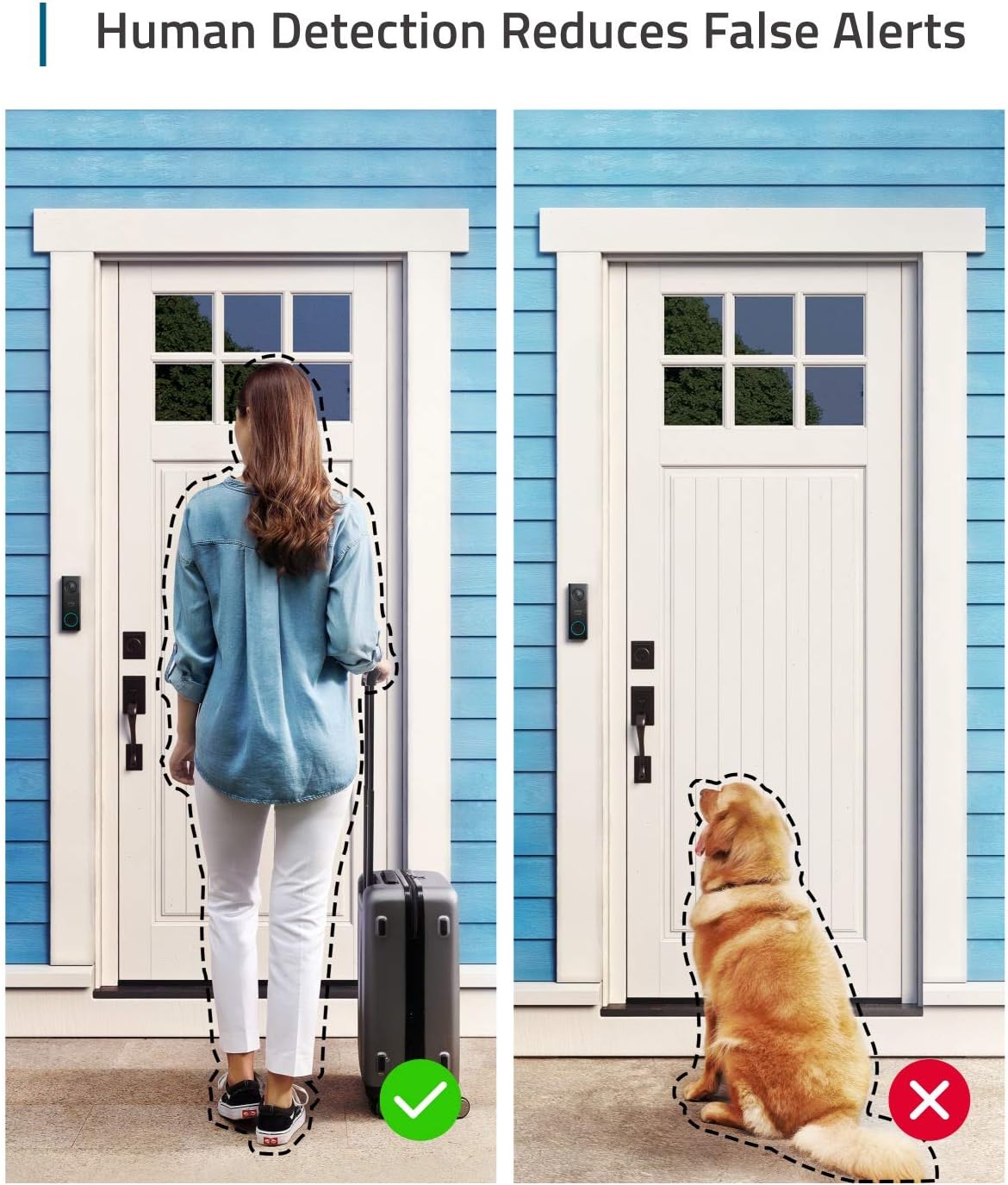
Image: Human Detection Reduces False Alerts - Illustrates the doorbell accurately detecting a person while ignoring a dog, preventing unnecessary notifications.
Two-Way Audio and Quick Responses
Speak directly to anyone who approaches your front door via two-way audio. You can also use pre-recorded quick responses for common situations.

Image: Real-Time Response - A person interacting with a visitor at the door using the doorbell's two-way audio feature.
Instant Notifications and Activity Zones
Receive instant alerts on your smartphone when motion is detected or the doorbell is pressed. You can customize activity zones within the app to define specific areas for motion detection, ignoring busy streets or public walkways.
Night Vision
The doorbell features low light technology for clear visibility even in dark conditions.
Wireless Chime
The included electronic chime supports 8 fun and holiday-themed ringtones with adjustable volume levels. It plugs into any standard power socket in your home.
Maintenance
- Cleaning: Regularly wipe the camera lens and doorbell surface with a soft, damp cloth to ensure clear video quality. Avoid abrasive cleaners.
- Firmware Updates: Keep your doorbell's firmware updated through the eufySecurity app to ensure optimal performance and access to new features.
- Environmental Protection: The doorbell has an IP54 international protection rating, meaning it is protected from dust and splashing water. However, it is not fully waterproof.
Troubleshooting
- Doorbell Ring Pulses Yellow: This indicates the doorbell is ready for setup via the eufySecurity app.
- Doorbell Shows Steady Red: Your doorbell transformer is not delivering sufficient power. Ensure your transformer provides 16-24 VAC, 30 VA or above. An upgrade may be necessary.
- No Continuous Recording: This model does not support continuous recording. It records based on motion detection and doorbell presses.
- Not Compatible with Apple HomeKit or Existing Wired Chimes: The eufy doorbell is not compatible with Apple HomeKit or existing wired chimes. The provided electronic chime must be used.
- Poor Wi-Fi Connection: Ensure your doorbell is within range of your 2.4GHz Wi-Fi router. Consider a Wi-Fi extender if necessary.
Specifications
| Model Number | E8201 |
| Video Capture Resolution | 1080p-grade |
| Field of View | 160° Diagonal |
| Power Source | Requires existing doorbell wires (16-24 VAC, 30 VA or above) |
| Connectivity Protocol | Wi-Fi (2.4GHz) |
| Local Storage | Yes, no monthly fee |
| Human Detection | AI technology for body shape and face pattern detection |
| Two-Way Audio | Yes |
| Night Vision | Low light technology |
| International Protection Rating | IP54 |
| Dimensions (L x W x H) | 5.12 x 1.69 x 0.94 inches |
| Item Weight | 1.04 pounds |
Warranty and Support
For warranty information, technical support, or any questions regarding your eufy Security Wi-Fi Video Doorbell, please visit the official eufy Security website or contact their customer service directly. You can also find additional resources and FAQs on their support pages.
eufy Security is committed to privacy and protection. Both are integral to their daily operations, ensuring your data is always safe.
Note: If you choose to use cloud-based features such as cloud storage or push notifications with thumbnail previews, videos or thumbnail previews will be sent to the cloud as needed to provide your selected features. Push notifications with thumbnail previews require thumbnail preview images to be temporarily stored in the cloud.


