
Introduction
The Orbit Buddy Max 1 Faucet Timer is designed to simplify your watering schedule with its large digital display, easy programming, and simple controls. Constructed with high-quality materials and a water-resistant build, it ensures years of reliable service. Simply attach the timer to any standard outdoor hose faucet and program it to water at your convenience. Schedule watering during ideal times to minimize evaporation, saving you time and money while helping your garden flourish.

Image: Front view of the Orbit Buddy Max 1 Faucet Timer, showing the digital display and control knob.
Product Features
- Easy installation with a large, easy-to-read digital display.
- Interval programming: water every 1, 3, 6, 12 hours or from 1 to 7 days.
- Watering duration from 1 to 360 minutes.
- Rain delay options from 1 to 7 days.
- Manual option for instant use.
Package Contents
Please check the package to ensure all components are present:
- Orbit Buddy Max 1 Faucet Timer
- User Manual (this document)
- (Batteries are not included and must be purchased separately. Requires 2x AA Alkaline batteries.)
Setup
1. Battery Installation
- Locate the battery compartment on the back of the timer.
- Slide the battery cover open.
- Insert two (2) new AA alkaline batteries, ensuring correct polarity (+/-).
- Close the battery cover securely.
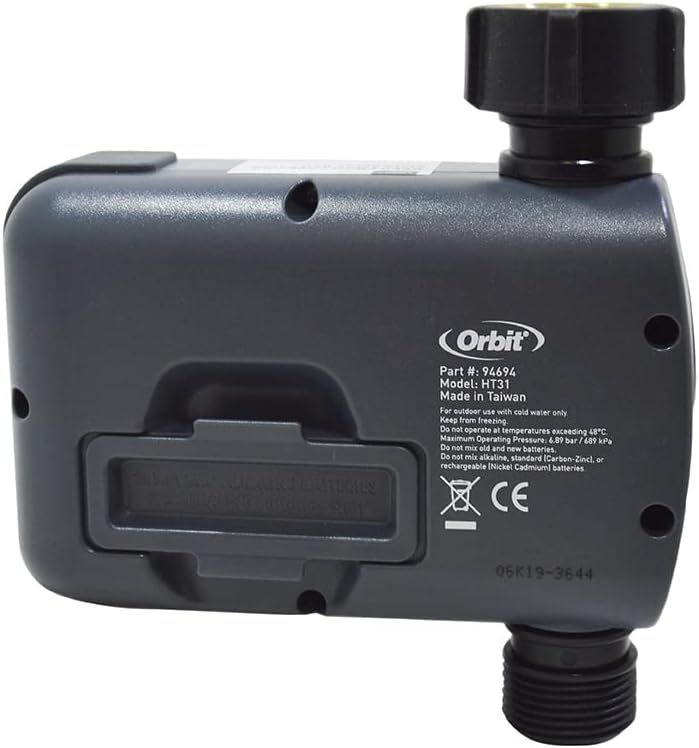
Image: Rear view of the timer, highlighting the battery compartment. Ensure to use alkaline batteries only.
2. Attaching to Faucet
- Ensure the faucet is clean and free of debris.
- Screw the timer onto any standard outdoor hose faucet. Hand-tighten only. Do not overtighten.
- Attach your garden hose or watering system to the bottom outlet of the timer.
- Turn on the faucet fully. The timer requires full water pressure to operate correctly.

Image: Close-up of the timer's top connector, showing the integrated filter screen. This screen helps prevent debris from entering the timer.

Image: The Orbit Buddy Max 1 Faucet Timer shown installed on an outdoor faucet, ready for use.
Operating Instructions
The large dial allows you to navigate through the programming options. Turn the dial to select a setting, and press the button to confirm or move to the next step.
1. Setting the Clock (SET CLOCK)
- Turn the dial to "SET CLOCK".
- Use the knob to adjust the current time. The display will show AM/PM.
- Press the knob to set the time and move to the next setting.
2. Setting Start Time (START TIME)
- Turn the dial to "START TIME".
- Use the knob to set the desired time for watering to begin.
- Press the knob to confirm.
3. Setting How Long (HOW LONG)
- Turn the dial to "HOW LONG".
- Use the knob to set the duration of watering, from 1 to 360 minutes.
- Press the knob to confirm.
4. Setting How Often (HOW OFTEN)
- Turn the dial to "HOW OFTEN".
- Use the knob to select the frequency: every 1, 3, 6, 12 hours, or every 1 to 7 days.
- Press the knob to confirm.
5. Manual Operation (AUTO/MANUAL)
- Turn the dial to "AUTO/MANUAL".
- Press the knob once to activate manual watering. The display will show a flashing "ON".
- Use the knob to set the desired manual watering duration.
- Press the knob again to start manual watering. To stop manual watering, press the knob again or turn the dial to "OFF".
6. Rain Delay Function (Hold for Rain Delay)
- Turn the dial to "AUTO/MANUAL".
- Press and hold the knob for 3-5 seconds until "RAIN DELAY" appears on the screen.
- Use the knob to select the desired delay duration (1 to 7 days).
- Press the knob to confirm. The timer will resume its programmed schedule after the delay period.
- To cancel rain delay, press and hold the knob again until "RAIN DELAY" disappears.
7. Turning Off the Timer (OFF)
- Turn the dial to "OFF". This will stop all automatic and manual watering.
Maintenance
- Battery Replacement: Replace batteries when the low battery indicator appears on the display or if the timer stops functioning. Always use new AA alkaline batteries.
- Filter Screen Cleaning: Periodically check the filter screen located in the top connector of the timer for debris. Remove and rinse if necessary to ensure proper water flow.
- Winterization: Before freezing temperatures occur, remove the timer from the faucet. Drain any water from the timer and store it indoors in a dry, protected area. Freezing water can damage the internal components.
- Cleaning: Wipe the timer with a damp cloth. Do not use abrasive cleaners or solvents.
Troubleshooting
| Problem | Possible Cause | Solution |
|---|---|---|
| Timer does not turn on/display is blank. | Dead or incorrectly installed batteries. | Replace batteries with new AA alkaline batteries, ensuring correct polarity. |
| Timer does not water at scheduled time. | Incorrect programming; Faucet not fully open; Low water pressure; Rain delay active. | Verify programming (start time, duration, frequency). Ensure faucet is fully open. Check water pressure. Cancel rain delay if active. |
| Water leaks from connections. | Loose connection; Worn washer; Damaged threads. | Hand-tighten connections. Check and replace rubber washer if worn. Ensure threads are not damaged. |
| Timer continuously waters. | Stuck valve; Timer set to manual mode indefinitely. | Turn dial to "OFF" to stop watering. Remove batteries for 30 seconds to reset. If problem persists, contact support. |
| Display is dim or flickering. | Low battery. | Replace batteries. |
Specifications
| Brand | Orbit |
| Model Number | 94694 |
| Color | Gray |
| Material | Plastic |
| Product Dimensions (L x W x H) | 6.2 x 18.4 x 21.8 cm (2.44 x 7.24 x 8.58 inches) |
| Item Weight | 459 grams (1.01 lbs) |
| Power Source | 2 x AA Alkaline Batteries (not included) |
| Operating Temperature | Do not operate at temperatures exceeding 48°C (120°F) or below freezing (0°C / 32°F). |
| Maximum Operating Pressure | 6.89 bar / 689 kPa (100 PSI) |
| UPC | 046878946941 |
Warranty and Support
Orbit products are manufactured to high-quality standards. This product is covered by a limited warranty against defects in materials and workmanship for a period of two (2) years from the original date of purchase. For warranty claims or technical support, please visit the official Orbit website or contact their customer service department. Please retain your proof of purchase for warranty purposes.
Contact Information:
- Website: www.orbitonline.com
- Refer to the product packaging or Orbit's official website for the most current support contact details.


