
SKYRC SK-500023-01
SKYRC GNSS Performance Analyzer User Manual
Model: SK-500023-01 | Brand: SKYRC
Introduction
The SKYRC GNSS Performance Analyzer (GSM020) is a compact, app-enabled device designed for comprehensive performance assessment of RC vehicles and aircraft. It utilizes both GPS and GLONASS systems to provide accurate data for various metrics, including acceleration, G-force, speed, time, distance, and vertical velocity. This manual provides essential information for setting up, operating, and maintaining your GNSS Performance Analyzer.
What's in the Box
- 1 x GNSS Performance Analyzer (GSM020)
- 1 x USB-C Charging Cable
- 1 x Instruction Manual
Product Overview and Features

Figure 1: SKYRC GNSS Performance Analyzer (GSM020) and USB-C cable.

Figure 2: Compact size of the GNSS Performance Analyzer (40x40x17mm, 38g).
The SKYRC GNSS Performance Analyzer is engineered for precision and portability. Key features include:
- Precision Performance Tracking: Utilizes dual GPS and GLONASS systems for pinpoint accuracy in measuring speed, acceleration, and other metrics.
- Continuous Data Capture: Integrated 1M memory automatically replaces old records, ensuring uninterrupted data logging.
- Reliable Longevity: Onboard LiPo battery provides up to 5 hours of continuous use.
- Effortless Connectivity: Syncs with the "RC Gears App" via Bluetooth 4.0 for immediate data analysis.
- Ultra-Portable Design: Compact dimensions (40mm x 40mm x 17mm) and lightweight design ensure minimal impact on vehicle performance.
Setup
1. Charging the Device
Before first use, ensure the GNSS Performance Analyzer is fully charged. Connect the provided USB-C cable to the device and a compatible USB power source. The device features an internal LiPo battery providing up to 5 hours of operation. It is recommended to charge the device regularly, as it slowly consumes battery power even in standby mode while searching for a Bluetooth signal.

Figure 3: The device's internal LiPo battery provides up to 5 hours of use.
2. App Installation and Connection
The GNSS Performance Analyzer requires the "RC Gears App" for operation and data analysis. Download the app from your smartphone's app store (available for both iOS and Android). Once installed:
- Enable Bluetooth on your mobile device.
- Open the "RC Gears App".
- Select "GNSS Performance Analyzer (GSM020)" from the list of available devices to connect. The device's Bluetooth LED indicator will turn blue when connected.

Figure 4: The device utilizes both GPS and GLONASS for enhanced accuracy.
Operating Modes
The RC Gears App offers different operating modes tailored for various RC activities:
1. Track Race Mode
Ideal for tracking performance on a race track. This mode provides data such as:
- Distance
- Time elapsed
- Average Speed
- Max Speed

Figure 5: RC Gears App interface for Track Race Mode.
2. Drag Race Mode
Designed for measuring acceleration and speed during drag races. Metrics include:
- Acceleration (G-force) Chart
- Speed Chart
- User-definable measurement windows

Figure 6: Example data visualization for Drag Race Mode.
3. Flying Mode
For RC aircraft, this mode captures flight dynamics, providing:
- Distance and Altitude
- Time elapsed
- Average Speed
- Max Speed

Figure 7: RC Gears App interface for Flying Mode.
Visual LED Indicators
The device features LED indicators to show its current status:
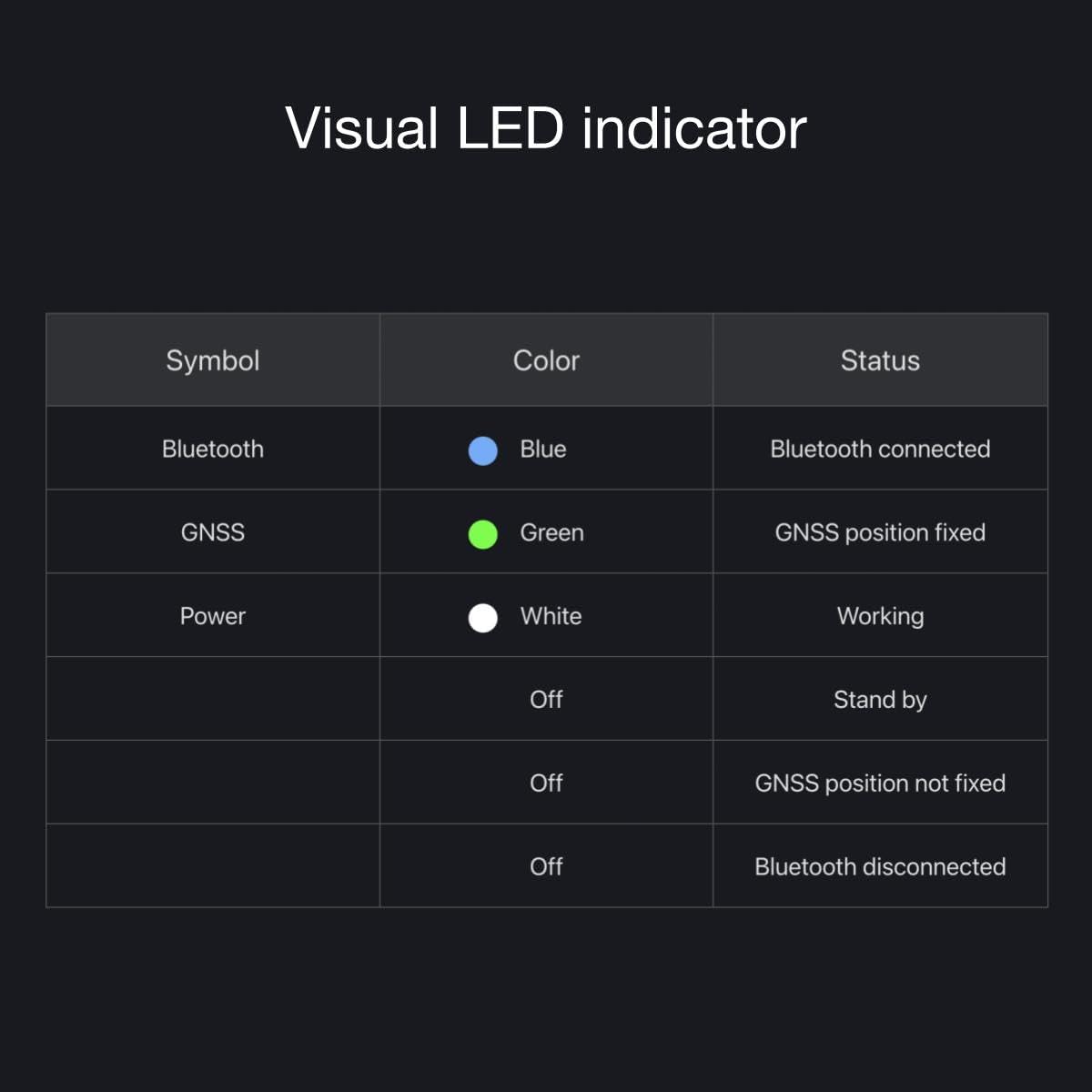
Figure 8: LED indicator status guide.
| Symbol | Color | Status |
|---|---|---|
| Bluetooth | Blue | Bluetooth connected |
| GNSS | Green | GNSS position fixed |
| Power | White | Working |
| Power | Off | Stand by |
| GNSS | Off | GNSS position not fixed |
| Bluetooth | Off | Bluetooth disconnected |
Specifications
| Attribute | Value |
|---|---|
| Item Weight | 2.89 ounces |
| Product Dimensions | 1.57 x 1.54 x 0.63 inches |
| Item Model Number | SK-500023-01 |
| Display Size | 3 inches (App Interface) |
| Battery Life | 5 Hours |
| Voice Command | Buttons (referring to app interface) |
| Connectivity Technology | Bluetooth |
| Map Type | Satellite (for GNSS) |
| Manufacturer Recommended Age | 14 years and up |
| Mounting Type | Dashboard Mount (as found in image, user-applied) |
Maintenance
To ensure the longevity and optimal performance of your SKYRC GNSS Performance Analyzer, follow these maintenance guidelines:
- Regular Charging: Charge the device regularly, even when not in active use, to prevent battery depletion due to standby power consumption.
- Cleaning: Use a soft, dry cloth to clean the device. Avoid using harsh chemicals or abrasive materials.
- Storage: Store the device in a cool, dry place away from direct sunlight and extreme temperatures.
- Protection: Consider using a protective case or mounting solution to prevent physical damage during use, especially in high-impact RC environments.

Figure 9: The compact design allows for easy mounting on RC vehicles.
Troubleshooting
If you encounter issues with your GNSS Performance Analyzer, refer to the following common problems and solutions:
| Problem | Possible Cause / Solution |
|---|---|
| Device does not turn on or respond. |
|
| Cannot connect to the "RC Gears App" via Bluetooth. |
|
| Inaccurate or no GNSS (GPS/GLONASS) signal. |
|
| RC Gears App freezes or crashes. |
|
Warranty and Support
For warranty information and technical support, please refer to the official SKYRC website or contact their customer service directly. Keep your purchase receipt as proof of purchase for any warranty claims.
Related documentsSK-500023-01


Ask a question about this manual
Ask about setup, troubleshooting, compatibility, parts, safety, or missing instructions. Manuals+ will review the question and use this page’s manual context to help answer it.