
1. Introduction
This manual provides instructions for the Altec Lansing Mini LifeJacket Jolt Bluetooth Speaker. This portable speaker features Bluetooth connectivity, Qi wireless charging, a built-in USB charging port, and a durable, waterproof design. Please read this manual thoroughly before using the device to ensure proper operation and longevity.

Figure 1: Front view of the Altec Lansing Mini LifeJacket Jolt Bluetooth Speaker.
2. Package Contents
Verify that all items are present in your package:
- Altec Lansing Mini LifeJacket Jolt Bluetooth Speaker
- Charging Cable (USB-C to USB-A)
- Quick Start Guide (not included in this digital manual)
3. Product Overview
Familiarize yourself with the speaker's components and controls.

Figure 2: Top view of the speaker, highlighting control buttons and the Qi wireless charging pad.
3.1. Control Buttons
- Power Button: Press and hold to power on/off.
- Bluetooth Pairing Button: Initiates Bluetooth pairing mode.
- Volume Up (+): Increases volume.
- Volume Down (-): Decreases volume.
- Play/Pause Button: Plays or pauses audio. Also answers/ends calls.
- Voice Assistant Button: Activates your device's voice assistant (Siri, Google Assistant).
- House Party Pairing Button: Connects multiple Altec Lansing speakers.
3.2. Ports and Indicators

Figure 3: Side view of the speaker, showing the protected charging port.
- USB-C Charging Port: For charging the speaker's internal battery.
- USB-A Output Port: For charging external devices.
- LED Indicator: Displays power, charging, and Bluetooth status.
- Qi Wireless Charging Pad: Located on the top surface for wireless charging compatible devices.
4. Setup
4.1. Charging the Speaker
Before first use, fully charge the speaker. The speaker provides up to 16 hours of playback on a single charge.

Figure 4: The speaker offers up to 16 hours of play time.
- Open the protective flap on the side of the speaker to access the USB-C charging port.
- Connect the provided USB-C cable to the speaker's charging port.
- Connect the other end of the USB-C cable to a USB power adapter (not included) or a computer's USB port.
- The LED indicator will show charging status and turn off when fully charged.
4.2. Powering On/Off
- To power on, press and hold the Power Button until you hear an audible prompt and the LED indicator illuminates.
- To power off, press and hold the Power Button again until you hear an audible prompt and the LED indicator turns off.
4.3. Bluetooth Pairing
The speaker can connect to your device via Bluetooth 4.2, offering a range of up to 100 feet.
- Ensure the speaker is powered on. The LED indicator will flash, indicating it is in pairing mode.
- On your smartphone, tablet, or other Bluetooth-enabled device, navigate to the Bluetooth settings.
- Select "Mini LifeJacket Jolt" from the list of available devices.
- Once paired, the LED indicator will glow solid, and you will hear a confirmation tone.
- If pairing fails, turn off the speaker and your device's Bluetooth, then repeat the steps.
5. Operating Instructions
5.1. Audio Playback
- Play/Pause: Press the Play/Pause Button once.
- Volume Control: Press the Volume Up (+) or Volume Down (-) buttons.
- Skip Track: Press and hold Volume Up (+) for next track, or Volume Down (-) for previous track.
5.2. Qi Wireless Charging
The speaker features a Qi wireless charging pad on its top surface to charge compatible devices.
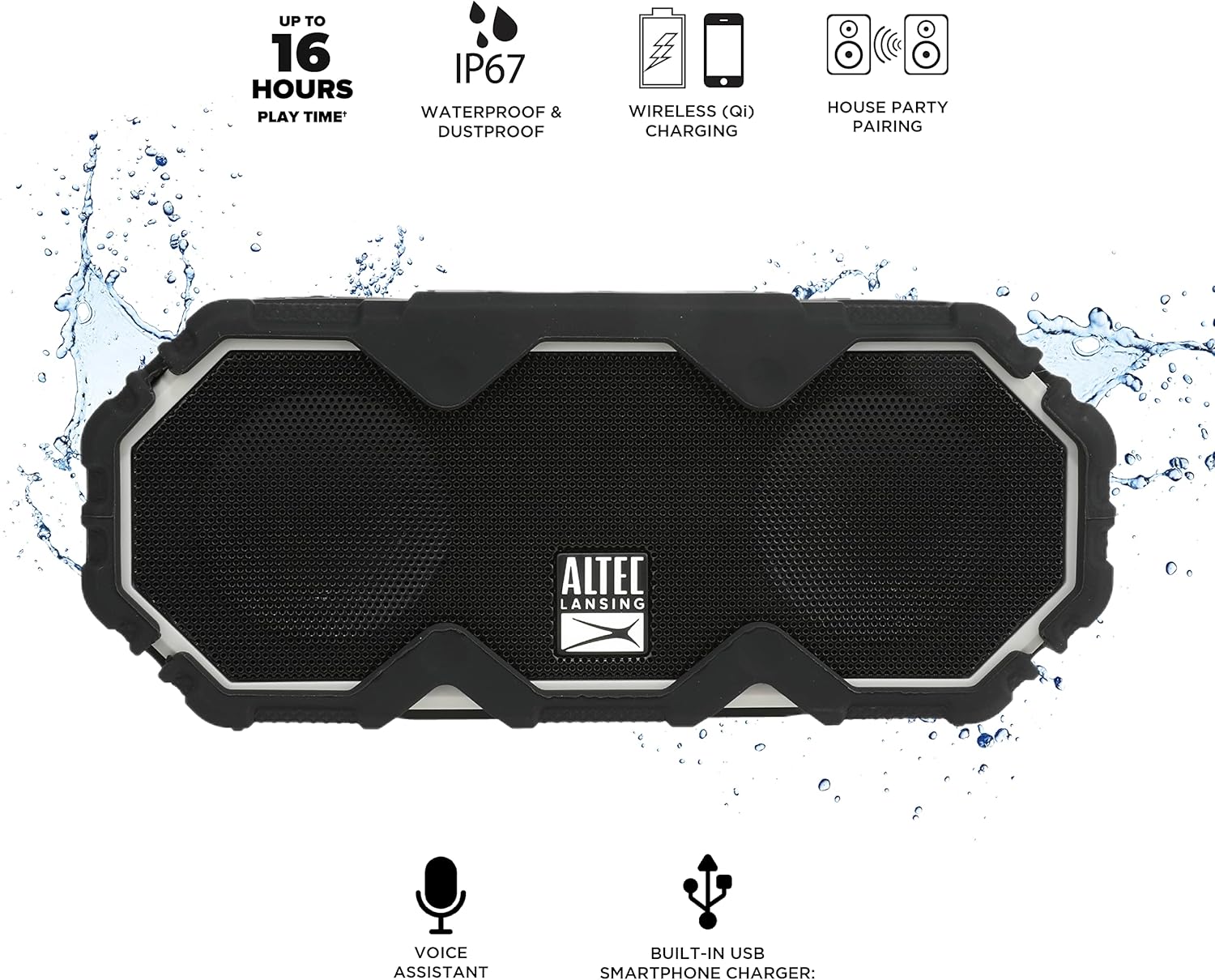
Figure 5: A smartphone being charged wirelessly on the speaker's Qi pad.
- Ensure the speaker is powered on.
- Place your Qi-enabled device directly on the charging pad located on the top of the speaker.
- The device should begin charging automatically. Adjust its position if charging does not start immediately.
5.3. USB Device Charging
Use the built-in USB-A port to charge other devices via a cable.

Figure 6: The speaker's USB-A port can charge external devices.
- Ensure the speaker is powered on.
- Open the protective flap on the side of the speaker.
- Connect your device's USB charging cable to the USB-A output port on the speaker.
- Your device will begin charging.
5.4. Voice Assistant Integration
Access your smartphone's voice assistant directly through the speaker.

Figure 7: The speaker supports voice assistant integration.
- Ensure the speaker is paired with your smartphone.
- Press the Voice Assistant Button on the speaker.
- Speak your command into the speaker's microphone.
5.5. House Party Pairing
Connect multiple Altec Lansing speakers for a synchronized audio experience.

Figure 8: Multiple speakers can be paired for a wider sound experience.
- Ensure both speakers are powered on and not connected to any Bluetooth device.
- On the first speaker, press the House Party Pairing Button. The LED indicator will flash.
- On the second speaker, press the House Party Pairing Button.
- The speakers will connect automatically. Once connected, the LED indicators will glow solid.
- Now, connect your device to one of the paired speakers via Bluetooth. Audio will play through both speakers.
6. Durability Features
The Mini LifeJacket Jolt is designed for rugged use with an IP67 rating, making it waterproof, shockproof, snowproof, and dustproof.

Figure 9: The speaker is designed to withstand water exposure.
- Waterproof: Can be submerged in water up to 1 meter for 30 minutes. Ensure all port covers are securely closed before exposure to water.
- Shockproof: Designed to withstand drops and impacts.
- Snowproof: Operates reliably in snowy conditions.
- Dustproof: Protected against dust ingress.
Important: Always ensure the protective flap covering the charging ports is securely closed when using the speaker near water or in dusty environments.
7. Maintenance
- Cleaning: Use a soft, damp cloth to clean the speaker. Avoid abrasive cleaners or solvents.
- Storage: Store the speaker in a cool, dry place away from direct sunlight and extreme temperatures.
- Battery Care: To prolong battery life, avoid fully discharging the battery frequently. Charge the speaker regularly, even if not in use for extended periods.
8. Troubleshooting
8.1. Speaker Not Powering On or Charging
If your speaker stops working or does not charge, a connection issue or a system freeze might be the cause. This procedure requires careful handling and may void your warranty if not performed correctly. Proceed with caution.
- Remove the Rubber Exterior: Gently pry off the rubberized outer casing. It is designed to snap off at the seams around the speaker mesh.
- Access Internal Components: Using a small flat-head tool, carefully insert it between the speaker mesh and the main body, particularly on the back of the speaker. Slowly work your way around to loosen the mesh.
- Locate and Remove Screws: You will find six small Phillips head screws deep inside the holes. Use a long, thin Phillips screwdriver to remove them. Keep track of these screws.
- Separate the Casing: Gently pull the front and back sections of the speaker apart along the seam that becomes visible after removing the rubber protector.
- Inspect Internal Connections: Inside, you will see the motherboard, buttons, wires, and the cylindrical battery. Locate the battery holder and remove any screw securing it.
- Reset Battery Connection: Carefully disconnect the battery's wiring connector from the motherboard. Ensure you pull the entire plastic insert, not just the wires, to avoid damage.
- Reconnect and Test: Reconnect the battery connector firmly. Press the power button. If you hear the "Welcome to Altec Lansing!" prompt, the issue may be resolved.
- Reassemble: If the speaker functions, carefully re-adjust any wires to ensure they have sufficient slack and are not pinched. Ensure the battery is centered and not clinging to speaker magnets. Re-secure the battery holder, then carefully align and re-screw the casing. Finally, reattach the speaker mesh and the rubber exterior.
This process can reset the motherboard and address issues caused by loose internal connections. If the problem persists after these steps, contact customer support.
8.2. Bluetooth Connection Issues
- Ensure the speaker is within the 100-foot Bluetooth range of your device.
- Verify that the speaker is in pairing mode (flashing LED).
- Forget the speaker from your device's Bluetooth settings and attempt to re-pair.
- Restart both the speaker and your Bluetooth device.
9. Specifications

Figure 10: Product dimensions.
| Feature | Detail |
|---|---|
| Model Name | Mini LifeJacket Jolt |
| Brand | Altec Lansing |
| Connectivity Technology | Bluetooth, USB |
| Wireless Communication | Bluetooth 4.2 |
| Bluetooth Range | Up to 100 feet |
| Power Source | Battery Powered (1 Lithium Ion battery, included) |
| Battery Life | Up to 16 hours |
| Special Features | Waterproof (IP67), Shockproof, Snowproof, Dustproof, Qi Wireless Charging, USB Charging Output, Voice Assistant Integration, House Party Pairing |
| Speaker Type | Outdoor |
| Audio Output Mode | Stereo |
| Product Dimensions | 7.2"D x 3"W x 4.3"H |
| Item Weight | 1.52 pounds |
| Material | Rubber or Silicone |
10. Warranty and Support
The Altec Lansing Mini LifeJacket Jolt Bluetooth Speaker comes with a Limited Warranty. For specific warranty terms and conditions, please refer to the documentation included with your product or visit the official Altec Lansing website.
For further assistance or technical support, please visit the Altec Lansing Brand Store on Amazon or consult the official User Manual (PDF).


