
1. Introduction
Thank you for purchasing the iTOMA CKS508 / iR508 Digital FM Alarm Clock Radio. This device is designed to provide reliable timekeeping, alarm functions, FM radio entertainment, and convenient USB charging. Please read this manual carefully to ensure proper use and to fully understand its features.
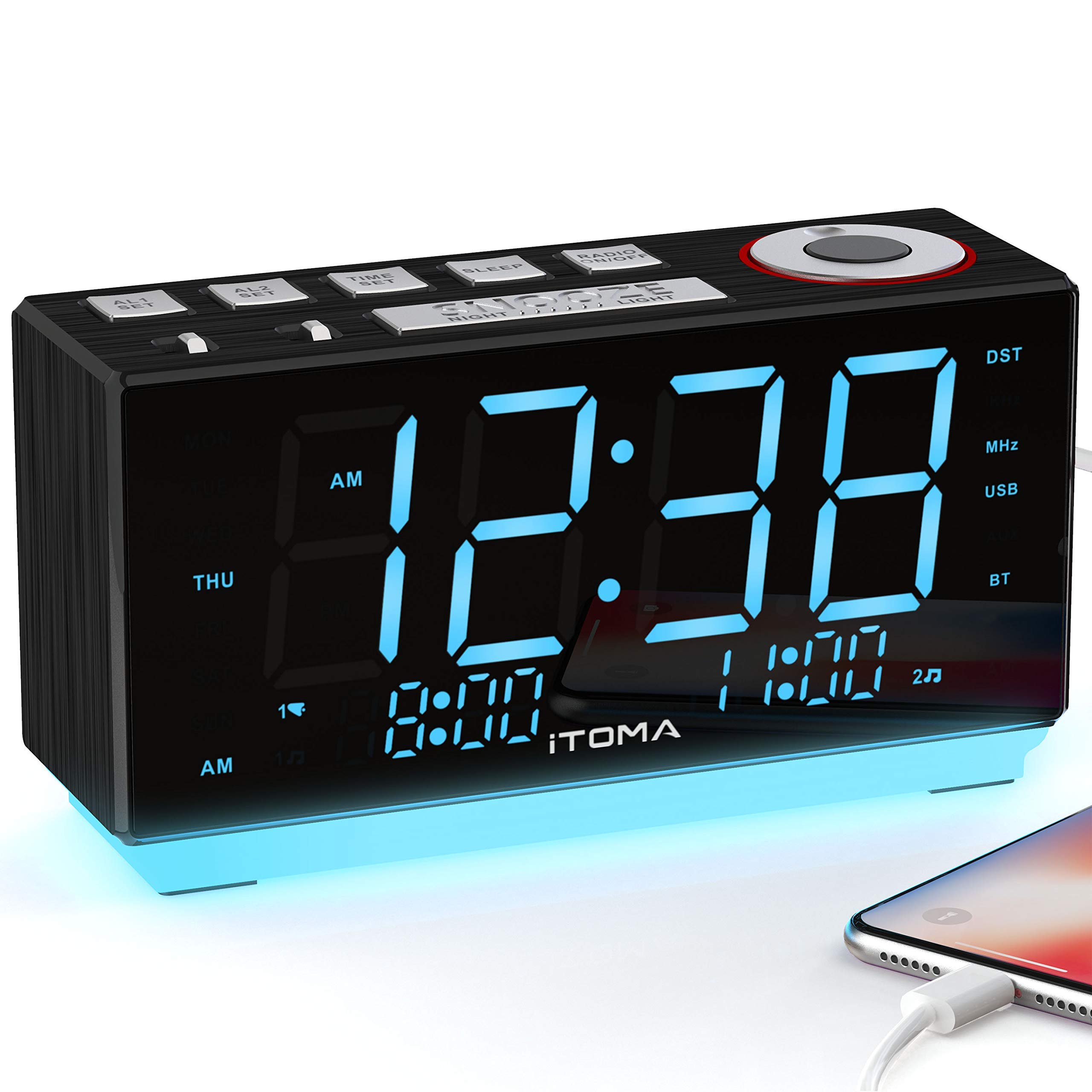
Image 1.1: Front view of the iTOMA CKS508 / iR508 Digital FM Alarm Clock Radio.
2. Key Features
- 6-in-1 Functionality: Combines digital clock, dual alarm, FM radio, night light, manual dimmer control, and USB charging port.
- Large 1.8-inch LED Display: Clear, easy-to-read blue ice LED display without flickering.
- Dual Alarm Control: Set two independent alarms for different wake-up times.
- FM Radio: Digital tuning FM radio with 20 programmable preset stations. Includes a 1m external FM wire antenna for improved reception.
- Night Light: One-touch on/off warm blue ice night light for ambient illumination.
- Brightness Dimmer: Manual control to adjust the LED display brightness to your preference.
- USB Charging Port: 1A/5V USB port for safely charging mobile devices.
- Auxiliary Input: Connect external audio devices.
- Headphone Jack: For private listening.
- Battery Backup: Maintains time and alarm settings during power outages (requires 1 Lithium-metal battery, included).
3. Setup
3.1 Power Connection
- Unpack the alarm clock radio and all accessories.
- Connect the AC adapter to the DC IN jack on the back of the unit.
- Plug the AC adapter into a standard wall outlet. The display will light up.
- Ensure the backup battery is installed to preserve settings during power interruptions.
3.2 Initial Time Setting
Upon first power-up, the clock may display a default time or flash. Refer to the 'Setting Time' section for detailed instructions.
4. Operating Instructions
4.1 Setting Time
- Press and hold the TIME SET button until the time display flashes.
- Use the VOL/MEM dial or +/- buttons to adjust the hour.
- Press TIME SET again to confirm the hour and move to minutes.
- Use the VOL/MEM dial or +/- buttons to adjust the minutes.
- Press TIME SET one more time to save the time.
4.2 Setting Alarms (Alarm 1 & Alarm 2)
- Press and hold either AL1 SET or AL2 SET button until the alarm time flashes.
- Use the VOL/MEM dial or +/- buttons to adjust the alarm hour.
- Press the respective AL SET button again to confirm the hour and move to minutes.
- Use the VOL/MEM dial or +/- buttons to adjust the alarm minutes.
- Press the respective AL SET button again to select the alarm source (Buzzer or FM Radio).
- Press the respective AL SET button one more time to save the alarm setting.
- To activate/deactivate an alarm, press the AL1 ON/OFF or AL2 ON/OFF button. The alarm indicator will appear/disappear on the display.
4.3 FM Radio Operation

Image 4.3.1: The clock radio displaying FM radio functionality.
- Press the RADIO ON/OFF button to turn on the FM radio.
- To manually tune, use the VOL/MEM dial or +/- buttons to change the frequency.
- To auto-scan for stations, press and hold the VOL/MEM dial or +/- buttons. The radio will scan and stop at the next strong station.
- To save a preset station: Tune to your desired station, then press and hold the MEM button until the preset number flashes. Use the VOL/MEM dial or +/- buttons to select a preset number, then press MEM again to save.
- To recall a preset station: Press the MEM button repeatedly to cycle through saved stations.
- Adjust the volume using the VOL/MEM dial.
- To turn off the radio, press the RADIO ON/OFF button.
4.4 Night Light Function

Image 4.4.1: The clock radio with its blue night light illuminated.
Press the NIGHT LIGHT button to turn the night light on or off.
4.5 Display Brightness Control (Dimmer)

Image 4.5.1: Comparison of the clock radio display at different brightness settings (bright, medium, dim).
Press the DIMMER button repeatedly to cycle through different brightness levels for the LED display.
4.6 USB Charging

Image 4.6.1: The clock radio providing USB charging to a mobile device.
Connect your mobile device's USB charging cable to the USB port on the back of the clock radio. The port provides 5V/1A output for charging.
4.7 Snooze Function
When an alarm sounds, press the SNOOZE button to temporarily silence the alarm for a few minutes (default snooze time is typically 9 minutes). The alarm will sound again after the snooze period.
4.8 Sleep Timer
The sleep timer allows you to fall asleep to the radio, which will automatically turn off after a set period. Press the SLEEP button repeatedly to cycle through available sleep timer durations (e.g., 10, 20, 30, 60, 90 minutes, or OFF).
5. Maintenance
- Cleaning: Wipe the unit with a soft, dry cloth. Do not use abrasive cleaners or solvents.
- Placement: Place the unit on a stable, flat surface. Avoid direct sunlight, excessive heat, or moisture.
- Battery Replacement: If the backup battery needs replacement, ensure the unit is connected to AC power, then replace the Lithium-metal battery according to the polarity markings in the battery compartment.
6. Troubleshooting
| Problem | Possible Cause | Solution |
|---|---|---|
| No power / Display off | AC adapter not connected or power outlet faulty. | Ensure AC adapter is securely plugged into the unit and a working wall outlet. |
| Alarm does not sound | Alarm not activated, alarm volume too low, or incorrect alarm time set. | Check if AL1/AL2 ON/OFF indicator is lit. Adjust alarm volume. Verify alarm time. |
| Poor FM radio reception | FM antenna not extended or poor signal area. | Fully extend the FM wire antenna. Reposition the unit for better reception. |
| USB charging not working | Device not compatible, cable faulty, or unit not powered. | Ensure the unit is powered. Try a different USB cable or device. |
| Display too bright/dim | Dimmer setting needs adjustment. | Press the DIMMER button to adjust brightness. |
7. Specifications
- Model: iR508 / CKS508
- Brand: iTOMA
- Display Type: Digital LED (1.8-inch, blue ice)
- Power Source: AC Cable Electric
- Backup Battery: 1 x Lithium-metal battery (included)
- Special Features: Dual Alarm, Auto-dimmable, Snooze, Night Light, FM Radio, USB Charging
- USB Charging Output: 5V / 1A
- Material: ABS
- Item Weight: Approximately 1.1 Pounds (0.5 kg)
- Mounting Type: Tabletop
- Dimensions: Refer to Image 7.1.1 for detailed measurements.
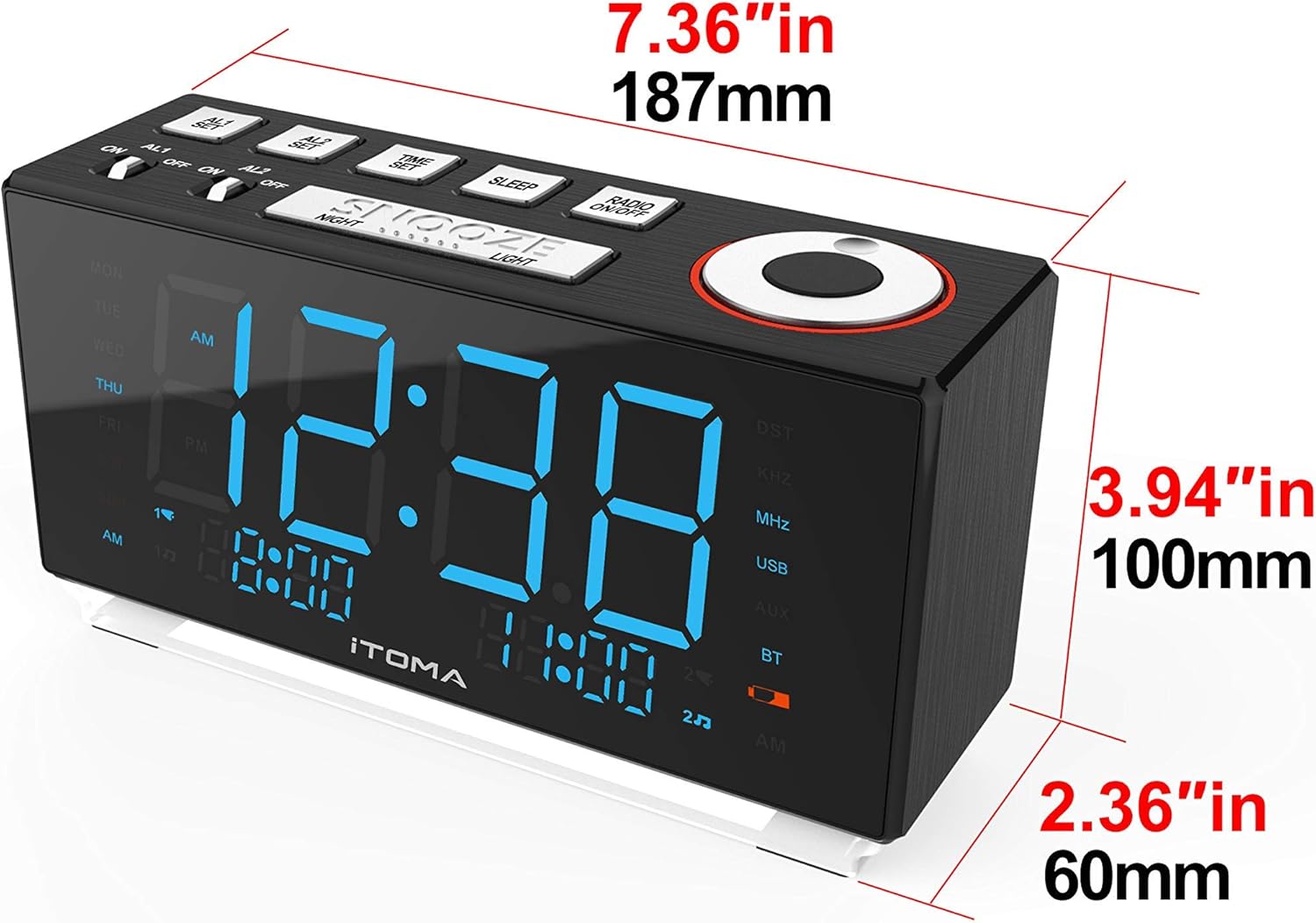
Image 7.1.1: Dimensions of the iTOMA CKS508 / iR508 Digital FM Alarm Clock Radio.
8. Warranty and Support
For warranty information and customer support, please refer to the documentation included with your purchase or visit the official iTOMA website. Keep your purchase receipt as proof of purchase for any warranty claims.


