
Introduction
This manual provides essential instructions for the safe and efficient operation of your Singing Machine Kids Pedestal Karaoke System. Please read this manual thoroughly before use and retain it for future reference.
The Singing Machine Kids Pedestal Karaoke System is designed to provide an engaging and interactive karaoke experience. It features an adjustable height, detachable main unit for tabletop use, multiple voice-changing effects, and connectivity options for external devices.
Package Contents
- Singing Machine Kids Pedestal (SMK1010)
- 2 Wired Microphones
- AC Adapter
Setup
1. Assembly
Carefully remove all components from the packaging. Ensure all parts listed in the 'Package Contents' section are present.
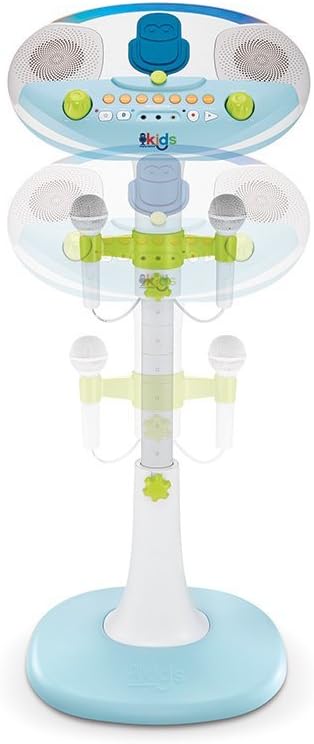
Image: The various components of the karaoke system laid out, ready for assembly.
Connect the adjustable pole to the base unit. Ensure it clicks securely into place. Then, attach the main karaoke unit to the top of the pole, aligning the connectors and pressing firmly until it locks.

Image: Illustration of the main pole being inserted into the base of the karaoke system.
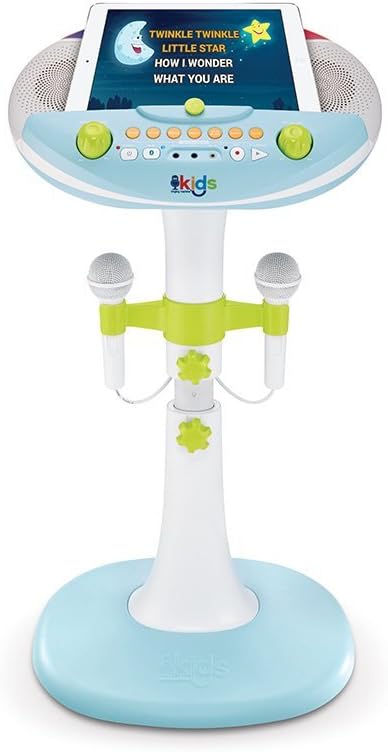
Image: The top unit of the karaoke system being placed onto the assembled pedestal stand.
The system's height is adjustable. Loosen the adjustment knobs on the pole, set to the desired height, and tighten the knobs to secure. The main unit can also be detached from the pedestal for tabletop use.
2. Power Connection
Connect the included AC adapter to the DC IN jack on the back of the main unit and plug it into a standard wall outlet. Alternatively, the unit can be powered by 4 C batteries (not included) for portable use.
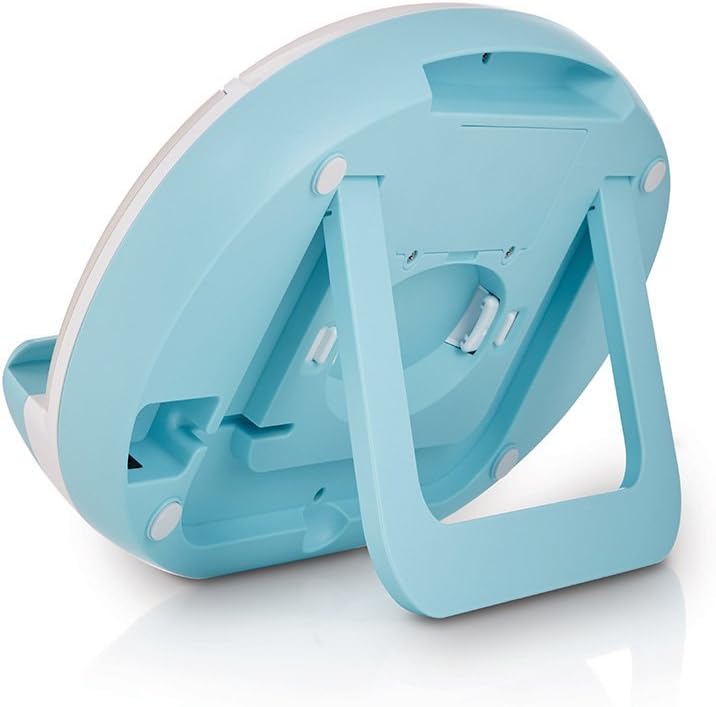
Image: A close-up of the back of the main unit, highlighting the power input and other connection ports.
3. Microphone Connection
Plug the two wired microphones into the MIC1 and MIC2 jacks on the front panel of the main unit.
4. Device Placement
Place your tablet or smartphone securely in the non-skid device holder on the main unit. This allows for easy viewing of lyrics or music selection.

Image: A tablet resting in the device holder of the karaoke system, showing how it can be used to display content.
5. Visual Guide: Unboxing and Assembly
Video: This video demonstrates the unboxing and assembly process of the Singing Machine Kids Pedestal Karaoke System, showing how to put together the base, pole, and main unit.
Operating Instructions
1. Power On/Off
Press the POWER button to turn the unit on or off. The LED lights will illuminate when the unit is on.
2. Volume Control
Adjust the MASTER VOLUME knob to control the overall sound output. Use the MIC VOLUME knob to adjust the microphone volume independently.
3. Bluetooth Connectivity
Press the PAIR button to activate Bluetooth pairing mode. On your device, search for 'Singing Machine' and connect. Once paired, you can stream music wirelessly through the system's speakers.
4. Line-In Connection
For non-Bluetooth devices, connect an audio cable (not included) from your device's headphone jack to the LINE IN jack on the main unit.
5. Voice Effects
Experiment with the six built-in voice-changing effects: NONE, ECHO, FEMALE, MALE, CHIPMUNK, ROBOT, and RADIO. Press the corresponding button to activate an effect.
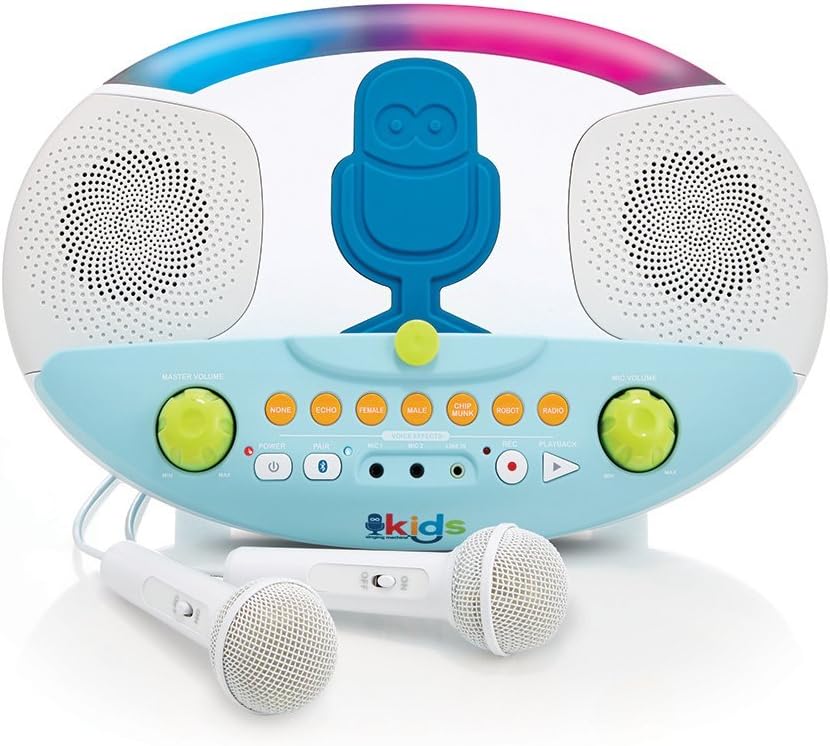
Image: A detailed view of the control panel, highlighting the various voice effect buttons and volume knobs.
6. Recording and Playback
Press the REC button to record your performance. Press the PLAYBACK button to listen to your recorded audio.
Maintenance
1. Cleaning
Wipe the unit with a soft, dry cloth. Do not use abrasive cleaners or solvents. Ensure the unit is unplugged before cleaning.
2. Storage
When not in use, store the karaoke system in a cool, dry place away from direct sunlight and extreme temperatures. Disconnect all cables and remove batteries if storing for an extended period.
Troubleshooting
- No Power: Ensure the AC adapter is securely connected to both the unit and a working power outlet. If using batteries, check that they are inserted correctly and are not depleted.
- No Sound: Check the Master Volume and Microphone Volume knobs. Ensure your connected device's volume is also turned up. If using Bluetooth, confirm the device is properly paired. If using Line-In, ensure the cable is fully inserted.
- Microphone Not Working: Verify the microphone is securely plugged into its jack. Check the Microphone Volume knob. Test with the other microphone if available to isolate the issue.
- Bluetooth Pairing Issues: Make sure the unit is in pairing mode (blue LED blinking). Turn off Bluetooth on other nearby devices to avoid interference. Try restarting both the karaoke system and your Bluetooth device.
Specifications
| Item Weight | 6.8 pounds |
| Product Dimensions | 5.12 x 14.96 x 16.93 inches |
| Item Model Number | SMK1010 |
| Power Source | Battery Powered (4 C batteries, not included) or AC Adapter |
| Voltage | 6 Volts (DC) |
| Speaker Count | 1 |
| Connectivity | Bluetooth, 3.5 mm Jack (Line-In) |
| Special Features | Six Voice-Changing Effects, Record and Playback Function, Dedicated Microphone Volume Control, Auto Shut Off |
Warranty and Support
For warranty information or technical support, please refer to the documentation included with your product or contact Singing Machine customer service directly. Keep your proof of purchase for warranty claims.


