
Product Overview
The iRV Technology IRV31 is a versatile and powerful entertainment system designed specifically for recreational vehicles. This unit integrates AM/FM radio, CD/DVD playback, and advanced connectivity options including Bluetooth, USB, and HDMI. It features a 2-zone audio output, allowing for flexible sound management within your RV. The IRV31 is engineered for easy installation and serves as an ideal upgrade or replacement for existing RV audio systems, including direct compatibility with Furrion DV3100, DV3200, and DV3300 models.

Setup and Installation
Before beginning installation, ensure the RV's power supply is disconnected to prevent electrical hazards. The IRV31 is designed for wallmount installation and requires specific dimensions for proper fitting.
Package Contents
Verify that all components are present in the box:
- iRV31 RV Stereo Unit
- Left & Right Mounting End Caps
- Remote Control
- Wiring Harness
- User Manual (this document)

Mounting Dimensions
The unit's faceplate measures 7-4/5 inches in width, 5-1/2 inches in height, and 3/4 inches in depth. The mounting dimensions are 6-4/5 inches in width, 4-1/6 inches in height, and 7-1/4 inches in depth. Ensure your mounting location accommodates these measurements. If replacing a single DIN unit, cabinet modification may be necessary.

Wiring Connections
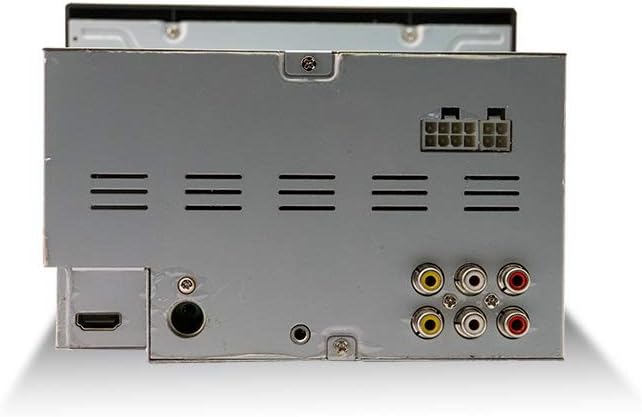
The IRV31 comes with a standard wiring harness. When replacing an existing unit, especially Furrion models, you will need to connect the new harness wire-for-wire to your RV's existing wiring. Refer to the wiring diagram provided with the unit for detailed connections. The unit requires two 12V power sources: one constant and one switched. For RV applications without an ignition switch, both can be connected to a constant 12V supply, or a separate switch can be installed for the switched power line for complete power off.
Operating Instructions
Power On/Off
Press the POWER button on the unit or remote control to turn the system on or off.
Source Selection
Press the MODE button to cycle through available sources: AM/FM, CD/DVD, USB, AUX IN, Bluetooth, and HDMI.
Radio Operation (AM/FM)
- Press AM/FM to select the radio band.
- Use the TUNE +/- buttons to manually tune or SEEK to automatically find stations.
- Press and hold preset buttons (1-6) to save a station, or briefly press to recall a saved station.
CD/DVD Playback
- Insert a CD or DVD into the disc slot. The unit will automatically switch to CD/DVD mode.
- Use the PLAY/PAUSE, STOP, SKIP, and FAST FORWARD/REWIND buttons for media control.
- The unit supports standard DVDs, not Blu-ray discs.
Bluetooth Connectivity
The IRV31 features Bluetooth 2.1 for wireless audio streaming from your smartphone or other Bluetooth-enabled devices.
- Press the BT/- button to enter Bluetooth pairing mode.
- On your device, search for "IRV31" and select to pair.
- For quick pairing, tap your NFC-enabled device to the NFC label on the unit.
USB and AUX IN
- Connect USB drives to the front USB port for MP3/MP4 playback. This port also provides 5V charging for Android and Apple devices.
- Use the front AUX IN port to connect external audio devices via a 3.5mm cable.
HDMI Connectivity
The unit includes HDMI input and output ports.
- HDMI Input: Connect external devices such as Blu-ray players, Xbox, or PS4 consoles to the HDMI input for audio and video playback through the IRV31.
- HDMI Output: Connect the HDMI output to your RV's TV for quick video display from the IRV31's media sources.
Speaker Zones
The IRV31 supports 2 independent speaker zones. Use the SPEAKER ZONE buttons (1 and 2) to control which speaker sets are active (e.g., indoor vs. outdoor speakers). This allows for separate audio control in different areas of your RV.
Remote Control and App Control
- The included remote control provides full functionality for the unit. Ensure batteries are correctly installed.
- A dedicated app is available for free on Android and Apple devices, transforming your smartphone into a wireless remote control for the IRV31.
Maintenance
To ensure optimal performance and longevity of your iRV31 unit, follow these maintenance guidelines:
- Cleaning: Use a soft, dry cloth to clean the unit's exterior. For stubborn marks, a slightly damp cloth can be used, followed by a dry one. Avoid abrasive cleaners, solvents, or strong detergents.
- Disc Slot: Keep the disc slot free of dust and debris. Do not insert foreign objects into the slot.
- Ventilation: Ensure the unit has adequate ventilation. Do not block any ventilation openings on the sides or rear of the unit.
- Power Supply: Periodically check the power connections for any loose wires or signs of corrosion.
Troubleshooting
If you encounter issues with your iRV31 unit, refer to the following common problems and solutions:
| Problem | Possible Cause | Solution |
|---|---|---|
| Unit does not power on. | No power supply; Blown fuse; Loose wiring. | Check RV's power source. Inspect the unit's fuse and replace if necessary. Verify all wiring harness connections are secure. |
| Remote control not working. | Dead batteries; Obstruction; Remote not pointed at IR sensor. | Replace remote control batteries. Ensure no objects are blocking the line of sight between the remote and the unit's IR sensor. |
| No audio output. | Volume too low; Mute activated; Incorrect speaker zone selected; Loose speaker wires. | Increase volume. Deactivate mute. Ensure the correct speaker zone(s) are enabled. Check speaker wire connections at the unit and speakers. |
| Bluetooth pairing fails. | Unit not in pairing mode; Device too far; Interference. | Ensure the unit is in Bluetooth pairing mode. Move your device closer to the unit. Turn off other Bluetooth devices to reduce interference. |
| Disc playback issues (skipping, not reading). | Dirty or scratched disc; Incorrect disc type; Unit lens dirty. | Clean the disc or try a different disc. Ensure it is a standard CD/DVD (not Blu-ray). If issues persist, the unit may require servicing. |
Specifications
- Model Number: IRV31
- Product Dimensions: 7.8 x 5.5 x 7 inches
- Item Weight: 4.19 pounds
- Frequency: 108 MHz (FM)
- Wireless Communication Technologies: AM/FM, Bluetooth, IR
- Connectivity Technologies: Bluetooth, Auxiliary, IR
- Special Features: ARC (Audio Return Channel)
- Other Display Features: Wireless
- Controller Type: Push Button
- Compatible Devices: Game Console, Speaker
- Total HDMI Ports: 2 (1 Input, 1 Output)
- Connector Type: RCA, HDMI
- Audio Encoding: Stereo
- Audio Output Mode: Surround, Stereo
- Surround Sound Channel Configuration: 2
Warranty and Support
For warranty information and technical support, please contact the manufacturer, ATP Products, Inc. Refer to the contact details provided in your product packaging or visit the official iRV Technologies website for the most up-to-date support information.
Manufacturer: ATP Products, Inc.
Date First Available: April 8, 2018


