
1. Introduction
This manual provides essential instructions for the proper setup, operation, and maintenance of your TELECO TXP433A04N Gate Remote Control. Please read this manual thoroughly before using the device to ensure correct functionality and to prevent damage.
The TELECO TXP433A04N is a 4-button rolling code remote control designed for operating gate and garage door systems compatible with the TELECO 433.92 MHz frequency.
2. Product Overview
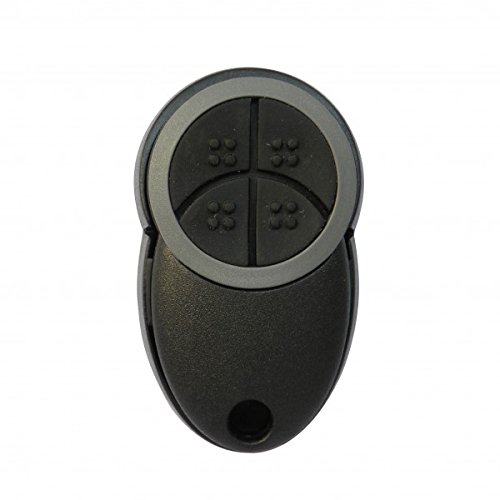
Figure 1: TELECO TXP433A04N Gate Remote Control. This image displays the black remote control with a grey trim around its four circular, textured buttons. The bottom part of the remote features a small hole for a keyring.
Key Features:
- Brand: TELECO
- Model: TXP433A04N
- Code Type: Rolling Code for enhanced security
- Number of Buttons: 4 independent buttons for controlling multiple devices or functions
- Frequency: 433.92 MHz
- Battery Type: CR2032 (included)
3. Setup and Programming
The TELECO TXP433A04N remote control utilizes a rolling code system, which requires programming directly to your gate or garage door receiver unit. The exact programming procedure varies depending on the specific model of your receiver. Always refer to the instruction manual of your gate or garage door opener for detailed programming steps.
General Programming Steps (Consult Receiver Manual for Specifics):
- Access the Receiver: Locate the control unit of your gate or garage door opener. This unit typically has a "Learn" or "Program" button.
- Activate Learning Mode: Press and release the "Learn" or "Program" button on your receiver. An indicator light (LED) on the receiver will usually illuminate or flash, indicating it is in learning mode.
- Transmit Code: Within a few seconds (the exact time varies by receiver), press and hold the desired button on your new TELECO TXP433A04N remote control.
- Confirmation: The receiver's indicator light may change (e.g., flash rapidly, turn solid, or turn off) to confirm successful programming. Release the remote control button.
- Test Operation: After programming, wait a few seconds, then test the remote control by pressing the programmed button. The gate or garage door should respond.
Note: If you encounter difficulties, ensure the receiver is powered on and that you are following the specific instructions for your gate/garage door opener model. Some receivers may require multiple presses or a longer hold time.
4. Operating Instructions
Once programmed, operating your TELECO TXP433A04N remote control is straightforward:
- Single Press: Press the programmed button once to activate the associated function (e.g., open/close gate, open/close garage door).
- Multiple Functions: If you have programmed different buttons for different functions or devices, press the corresponding button for the desired action.
- Range: Ensure you are within the operational range of your receiver for the remote control to function effectively.
5. Maintenance and Battery Replacement
Cleaning:
Wipe the remote control with a soft, dry cloth. Do not use abrasive cleaners or solvents.
Battery Replacement (CR2032):
When the remote's range decreases significantly or it stops responding, the battery may need replacement.
- Open the Casing: Carefully open the remote control casing. This usually involves prying it open along the seam with a small flat-head screwdriver or a similar tool.
- Remove Old Battery: Locate the CR2032 coin cell battery. Note its polarity (+/-). Gently remove the old battery.
- Insert New Battery: Insert a new CR2032 battery, ensuring the positive (+) side faces the same direction as the old battery.
- Close Casing: Carefully snap the remote control casing back together, ensuring it is securely closed.
- Test: Test the remote control to ensure it functions correctly with the new battery.
Caution: Dispose of used batteries responsibly according to local regulations. Keep batteries out of reach of children.
6. Troubleshooting
| Problem | Possible Cause | Solution |
|---|---|---|
| Remote does not work. | Battery is dead or inserted incorrectly. | Replace the CR2032 battery, ensuring correct polarity. |
| Remote has short range. | Low battery. Obstruction between remote and receiver. Interference. | Replace battery. Ensure clear line of sight. Check for sources of radio interference. |
| Remote not programming. | Incorrect programming procedure. Receiver not in learning mode. Incompatible receiver. | Refer to your gate/garage door opener's manual for specific programming steps. Ensure the receiver is in learning mode. Verify compatibility with your system. |
| Gate/door opens unexpectedly. | Button accidentally pressed. Interference. | Ensure remote is not being pressed inadvertently. Check for strong radio interference sources. |
7. Specifications
- Brand: TELECO
- Model: TXP433A04N
- Frequency: 433.92 MHz
- Number of Buttons: 4
- Code Type: Rolling Code
- Battery: 1x CR2032 (3V)
- Operating Temperature: Information not available (typical range for electronics)
- Dimensions: Information not available (standard compact remote size)
8. Warranty and Support
For warranty information, please refer to the terms and conditions provided by your retailer at the time of purchase. Specific warranty details are typically provided with the product packaging or available from the point of sale.
For technical support or further assistance, please contact the retailer where you purchased the TELECO TXP433A04N remote control or visit the official TELECO website for contact information.


