
Urmet 1122/50
Urmet Mikra Housing Installation Manual
Model: 1122/50
Introduction
This manual provides comprehensive instructions for the installation, operation, and maintenance of the Urmet Mikra Housing, Model 1122/50. This product is designed for embedding audio kits, ensuring a secure and aesthetically integrated solution for your intercom system. Please read this manual thoroughly before installation and use to ensure proper function and safety.
Safety Information
Always observe the following safety precautions:
- Installation should only be performed by qualified personnel in accordance with local electrical codes and regulations.
- Ensure power is disconnected before beginning any installation or maintenance work.
- Do not expose the product to excessive moisture or extreme temperatures beyond its specified operating conditions.
- Use only original Urmet accessories and components.
- Keep packaging materials out of reach of children.
Product Overview
The Urmet Mikra Housing 1122/50 consists of a durable plastic housing designed for embedding and a naturally anodized aluminum cover frame. It is specifically engineered for the integration of Urmet audio kits.
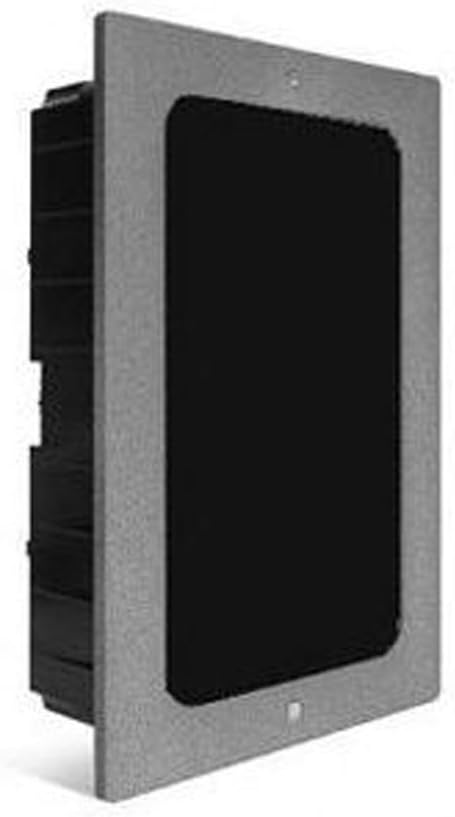
Figure 1: Front view of the Urmet Mikra Housing 1122/50, showing the gray aluminum frame and the black recessed area for audio kit installation. The housing is designed for flush mounting.
Key features include:
- Plastic Housing: Provides the main structure for embedding.
- Aluminum Cover Frame: Naturally anodized for durability and aesthetic appeal.
- IP44 Rating: Offers protection against solid objects larger than 1mm and splashing water from any direction.
Setup and Installation
Follow these steps for proper installation of the Urmet Mikra Housing 1122/50:
- Prepare the Opening: Create a recess in the wall or mounting surface with dimensions suitable for the housing. The required dimensions for the embedded part are approximately 207 mm (Height) x 113 mm (Width) x 50 mm (Depth).
- Install the Plastic Housing: Insert the plastic housing into the prepared opening. Ensure it is level and securely fixed within the recess.
- Integrate Audio Kit: Install the compatible Urmet audio kit (e.g., 1122/31, 1122/61, 1122/501) into the plastic housing according to the audio kit's specific instructions.
- Attach Cover Frame: Secure the aluminum cover frame over the installed audio kit and plastic housing. The frame dimensions are 222 mm (Height) x 133 mm (Length) x 5 mm (Thickness). Ensure all mounting points are fastened securely.
- Test Functionality: After installation, test the audio kit and overall system functionality to ensure correct operation.
Compatibility: This housing is compatible with the following Urmet audio kits:
- Villa compatible Audio 2-wire OEM: 1122/31
- Audio 2-wire hands-free OEM: 1122/61
- Audio 5-wire OEM: 1122/501
Operating Instructions
The Urmet Mikra Housing 1122/50 serves as an enclosure for Urmet audio kits. Its operation is directly tied to the functionality of the audio kit installed within it. Refer to the specific instruction manual for your Urmet audio kit for detailed operating procedures, including call initiation, door release, and volume adjustments.
Once the audio kit is properly installed within the housing, its controls and indicators will be accessible through the opening in the cover frame. Ensure no obstructions are present that might hinder the audio kit's functionality.
Maintenance and Care
To ensure the longevity and proper appearance of your Urmet Mikra Housing, follow these maintenance guidelines:
- Cleaning: Use a soft, damp cloth to wipe the aluminum cover frame and plastic housing. Avoid abrasive cleaners, solvents, or harsh chemicals, as these can damage the finish.
- Inspection: Periodically inspect the housing and frame for any signs of damage, loose connections, or wear. Address any issues promptly.
- Environmental Protection: While the product has an IP44 rating, prolonged exposure to extreme weather conditions should be minimized where possible to extend its lifespan.
Troubleshooting
Most issues related to the overall intercom system will stem from the audio kit itself or the wiring. The housing primarily provides physical protection and aesthetic integration.
- Issue: Audio kit does not fit or is misaligned.
Solution: Verify the audio kit model number against the compatibility list. Ensure the wall opening dimensions match the housing specifications. Re-check the installation steps. - Issue: Cover frame is loose or does not sit flush.
Solution: Ensure all mounting screws are tightened. Check for any obstructions behind the frame or within the wall recess. - Issue: Visible damage to the housing or frame.
Solution: If damage affects functionality or IP rating, consider replacing the affected component or the entire unit. Contact Urmet support for replacement parts.
For issues related to the audio functionality (e.g., no sound, distorted audio, door release failure), refer to the troubleshooting section of your specific Urmet audio kit manual.
Specifications
| Feature | Detail |
|---|---|
| Brand | Urmet |
| Model Number | 1122/50 |
| Product Type | Housing for Audio Kits |
| Material | Plastic Housing, Anodized Aluminum Cover Frame |
| IP Rating | IP44 |
| Cover Frame Dimensions (H x L x E) | 222 mm x 133 mm x 5 mm |
| Housing Dimensions (H x W x D) | 207 mm x 113 mm x 50 mm |
| Weight | 200 Kilograms (Note: This weight is as per provided product data and may be a data entry error.) |
| First Available Date | March 18, 2018 |
Warranty and Support
For information regarding the warranty terms and conditions for your Urmet product, please refer to the documentation provided with your purchase or visit the official Urmet website. Warranty coverage typically applies to manufacturing defects and material faults.
For technical support, spare parts, or service inquiries, please contact Urmet customer service or your authorized Urmet dealer. When contacting support, please have your product model number (1122/50) and purchase details readily available.
Manufacturer: URMET
Related documents1122/50


Ask a question about this manual
Ask about setup, troubleshooting, compatibility, parts, safety, or missing instructions. Manuals+ will review the question and use this page’s manual context to help answer it.