
1. Safety Information
Please read all instructions carefully before assembly and use. Keep this manual for future reference.
- Weight Limit: Do not exceed the product's maximum weight limit of 800 pounds.
- Intended Use: This bed frame is intended for bedroom and hotel use only.
- Assembly: Ensure all parts are correctly assembled and tightened before use. Periodically check and re-tighten all connections.
- Children: Keep small parts away from children during assembly to prevent choking hazards.
- Electrical Components: Ensure USB ports and LED light connections are properly secured and not exposed to moisture. Disconnect power before cleaning or maintenance of electrical components.
2. Product Overview
The VECELO Queen Size Bed Frame is designed for comfort and convenience, featuring an upholstered headboard with integrated LED lighting and charging ports. It provides a sturdy foundation for your mattress without the need for a box spring.
Key Features:
- Integrated LED Lighting: The headboard includes LED lights with over 16 million colors, 20+ preset effects, and various modes (music, microphone, timer) controllable via app or remote.
- USB Charging Station: Equipped with USB-A and Type-C ports for convenient device charging.
- Adjustable Headboard: The velvet-padded headboard can be adjusted to three height levels (43.6, 45.6, 47.6 inches) to accommodate mattresses of 8, 10, or 12 inches.
- Durable Construction: Features a sturdy metal frame and 12 wooden slats with Velcro and noise-free strips for strong support and quiet operation.
- No Box Spring Needed: Designed to support your mattress directly.
- Under-Bed Storage: Provides approximately 7.9 inches of clearance for storage.

Image: The VECELO Queen Size Bed Frame, showcasing its upholstered headboard with integrated LED lighting and overall modern design.
3. Setup and Assembly
The bed frame is designed for easy assembly and arrives in one box with all necessary parts and tools. Follow the included step-by-step instructions for proper setup.
3.1 Unpacking and Part Identification
- Carefully unpack all components and lay them out on a clean, soft surface to prevent scratches.
- Verify that all parts listed in the instruction manual are present. If any parts are missing or damaged, contact VECELO customer support.
3.2 Assembly Steps (General Guidelines)
- Assemble the Headboard: Attach the headboard components as per the manual. Ensure the LED strip and charging ports are correctly positioned and secured.
- Connect Side Rails: Attach the side rails to the headboard and footboard using the provided hardware. Do not fully tighten bolts until all connections are made.
- Install Center Support: Secure the center support beam(s) and legs to the frame.
- Attach Wooden Slats: Lay the wooden slats across the frame. The slats feature Velcro strips for secure attachment and noise reduction. Ensure they are evenly spaced and firmly pressed onto the Velcro.
- Final Tightening: Once all components are in place, systematically tighten all bolts and screws. Do not overtighten.
- Connect Power: Plug the power adapter for the LED lights and USB ports into a wall outlet.

Image: Detailed view of the bed frame's construction, highlighting the Velcro strips for slat attachment, sturdy wooden slats, and the high-quality metal frame for durability.
4. Operating Instructions
4.1 LED Lighting System
The integrated LED lights in the headboard can be controlled via a remote control or a dedicated mobile application.
- Remote Control: Use the provided remote to power on/off, change colors, adjust brightness, and select preset lighting effects. Refer to the remote's specific instructions for detailed functions.
- Mobile App Control: Download the recommended mobile application (details typically found in the included manual or on the product packaging). Pair your device with the bed frame's LED system via Bluetooth. The app offers advanced features such as:
- Custom color selection (over 16 million options)
- Dynamic lighting effects (e.g., flashing, wave)
- Music synchronization mode (lights react to audio)
- Microphone mode (lights react to ambient sound)
- Timer mode for scheduled on/off times

Image: The bed frame's LED lights illuminating the headboard, demonstrating synchronization with music beats. The image also displays options for app control and remote control.
4.2 USB Charging Ports
The headboard includes one USB-A and one Type-C charging port. These ports are active when the bed frame is plugged into a power outlet.
- Connect your electronic devices (smartphones, tablets, etc.) to the appropriate USB-A or Type-C port using their charging cables.
- Ensure the bed frame's power cord is securely plugged into a functional wall outlet for the charging ports to operate.
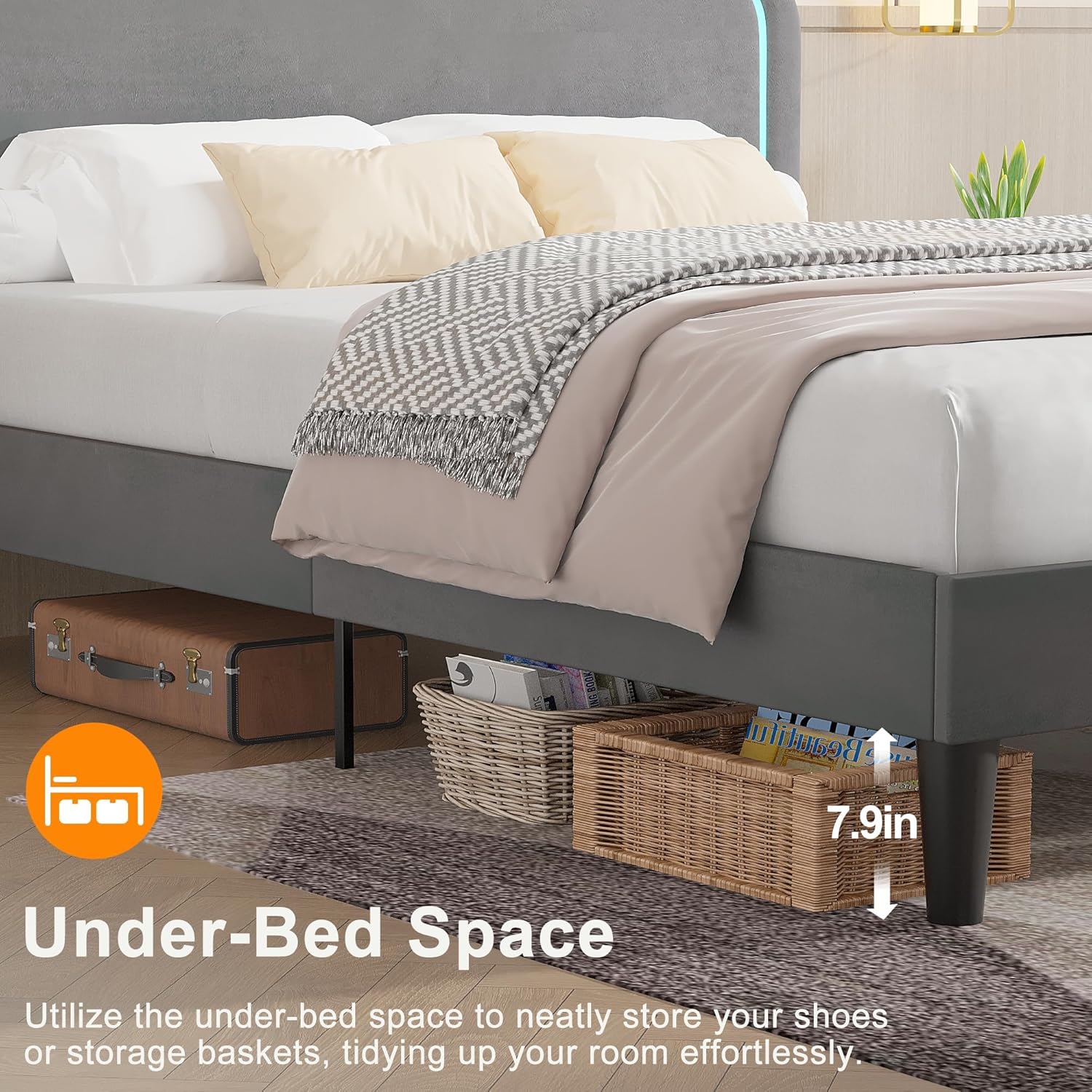
Image: Close-up of the headboard showing the USB-A and Type-C charging ports, with devices connected and charging.
4.3 Adjustable Headboard
The headboard offers three adjustable height settings to accommodate different mattress thicknesses.
- The headboard can be set to approximately 43.6, 45.6, or 47.6 inches from the floor.
- To adjust the height, loosen the bolts connecting the headboard to the side rails, slide the headboard to the desired height, and then re-tighten the bolts securely. It is recommended to have two people for this adjustment.
- Recommended mattress thicknesses for each level are 8, 10, and 12 inches, respectively.

Image: Diagram illustrating the three adjustable height settings of the headboard, ranging from 43.6 to 47.6 inches, and corresponding mattress thickness recommendations.
5. Maintenance and Care
- Upholstery Care: The velvet headboard material should be dry cleaned only. Do not use liquid cleaners or abrasive materials.
- Frame Cleaning: Wipe the metal and wooden components with a soft, damp cloth. Avoid harsh chemicals.
- Regular Checks: Periodically inspect all bolts and connections to ensure they remain tight. Re-tighten as necessary to maintain stability and prevent noise.
- Electrical Components: Keep the LED strip and USB ports free from dust and debris. Disconnect power before cleaning any electrical parts.
6. Troubleshooting
6.1 LED Lights Not Working
- Check Power: Ensure the bed frame's power cord is securely plugged into a functional wall outlet.
- Remote/App Battery: Replace batteries in the remote control if applicable. Ensure your mobile device's Bluetooth is on and correctly paired with the LED system.
- Connections: Verify that all LED strip connections within the headboard are secure.
6.2 USB Charging Ports Not Functioning
- Check Power: Confirm the bed frame is plugged into a live power outlet.
- Cable Integrity: Try a different charging cable and device to rule out issues with your personal accessories.
- Overload: Avoid connecting high-power devices that might exceed the port's capacity.
6.3 Squeaking or Noise
- Tighten Bolts: Systematically check and tighten all assembly bolts and screws on the frame, headboard, and support legs.
- Slat Placement: Ensure all wooden slats are properly seated and firmly attached to the Velcro strips.
- Level Surface: Verify the bed frame is on a level surface. Uneven floors can cause stress on the frame and lead to noise.
7. Specifications
| Model Number | KHD-QB10-GRY |
| Size | Queen |
| Material | Metal, Wood, Velvet |
| Product Dimensions (L x W x H) | 83"L x 62.8"W x 47.6"H |
| Adjustable Headboard Height | 43.6", 45.6", 47.6" |
| Under-Bed Clearance | Approx. 7.9 inches |
| Weight Capacity | 800 Pounds |
| Charging Ports | 1x USB-A, 1x Type-C |
| Assembly Required | Yes |
| Box Spring Required | No |
| Color | Grey |
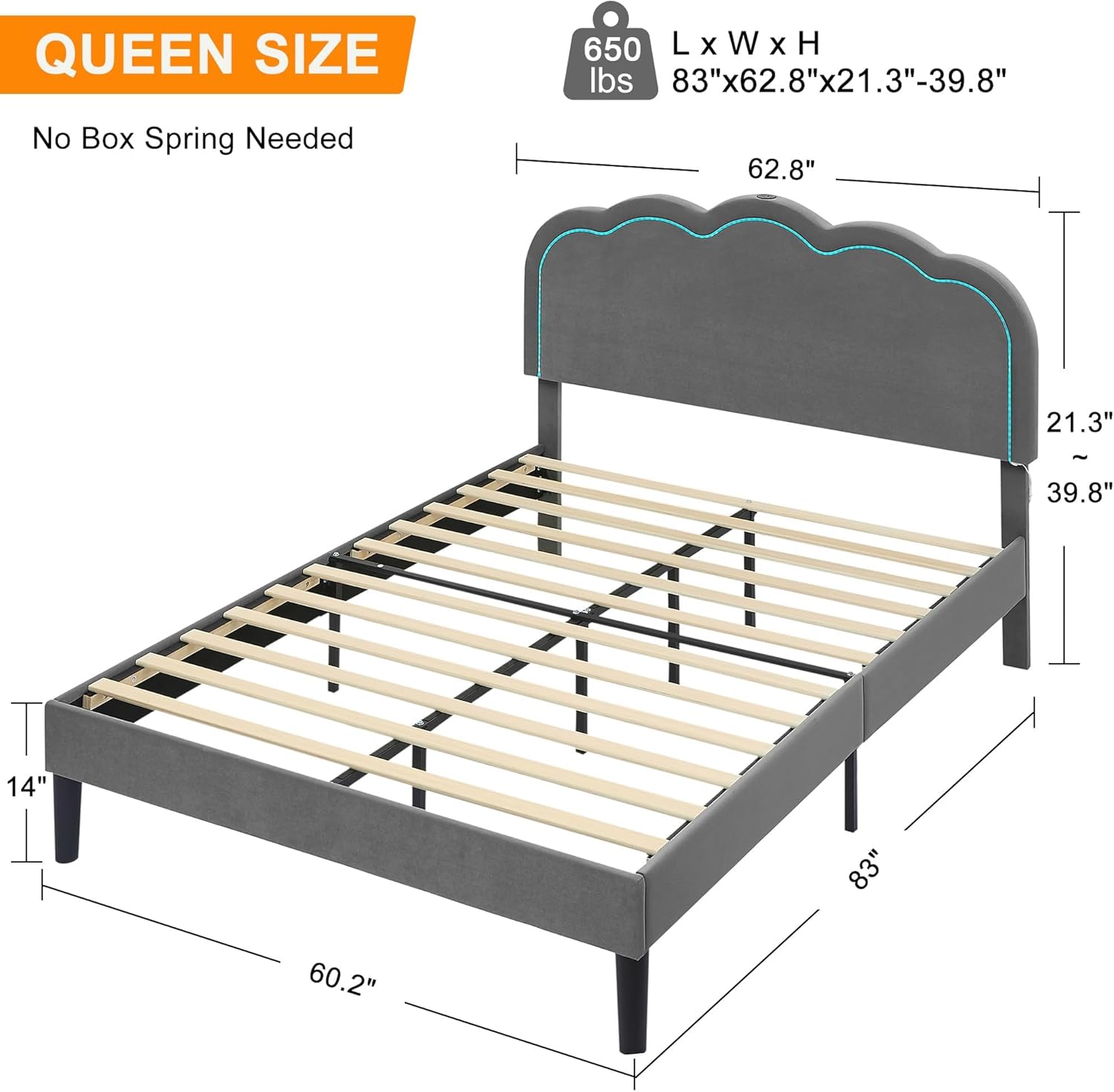
Image: Dimensional diagram of the VECELO Queen Size Bed Frame, illustrating length, width, height, and under-bed clearance.

Image: Illustration of the under-bed space, demonstrating its utility for storing items like shoes or storage baskets.
8. Warranty and Customer Support
For warranty information, missing parts, or any questions regarding your VECELO bed frame, please contact VECELO customer support directly.
- Refer to the contact information provided in your product packaging or on the official VECELO website.
- Please have your model number (KHD-QB10-GRY) and purchase details ready when contacting support.


