
1. Introduction
This manual provides essential information for the safe and effective use of your LIGE EF18 Smartwatch. Please read it thoroughly before using the device and retain it for future reference. The LIGE EF18 is a versatile smartwatch designed for daily wear, fitness tracking, and communication, compatible with both iOS and Android smartphones.
2. Package Contents
Verify that all items are present in your package:
- LIGE EF18 Smartwatch (with 1 stainless steel band attached)
- 2 x Silicone Bands (additional)
- Charging Cable (USB-A)
- Charging Cable (USB-C)
- Band Adjustment Tool (for stainless steel band)
- User Manual

Image: The LIGE EF18 Smartwatch, showing its large round display, accompanied by two additional silicone bands, two charging cables (USB-A and USB-C), and a band adjustment tool.
3. Product Overview
The LIGE EF18 Smartwatch features a robust design with a 1.85-inch high-definition touch display. It includes physical buttons for navigation and quick access to features.
3.1. Watch Components
- Display: 1.85-inch LCD touchscreen with 2000 nits peak brightness.
- Buttons: Side buttons for power, menu navigation, and LED flashlight activation.
- Sensors: Heart rate, blood oxygen, accelerometer, sleep tracker.
- Speaker & Microphone: For Bluetooth calling and voice assistant.
- Charging Ports: Magnetic charging pins on the back.
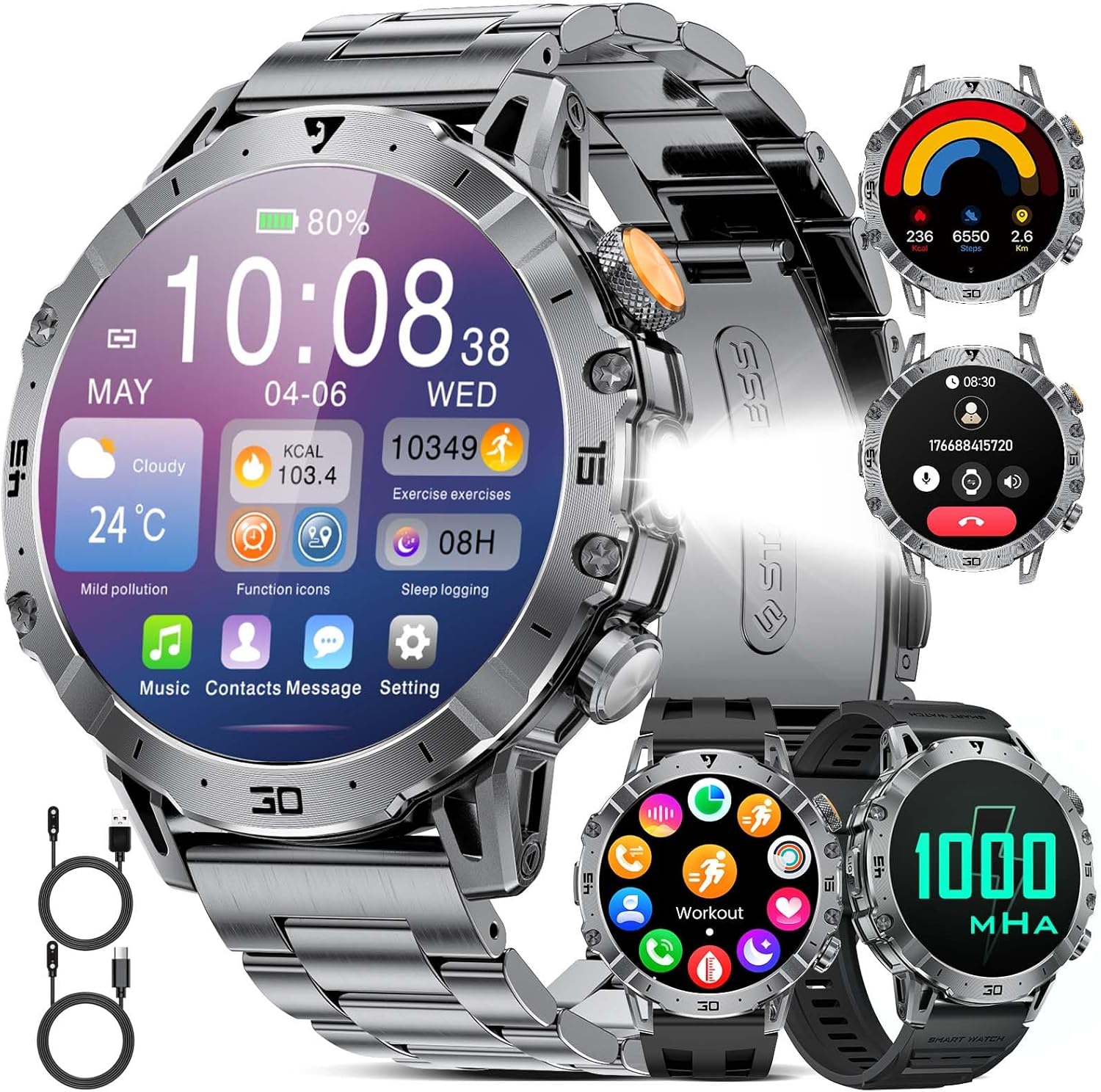
Image: A close-up of the LIGE EF18 Smartwatch, highlighting its large 1.85-inch display, metallic casing, and side buttons. The screen shows various health metrics and time.
4. Setup
4.1. Charging the Smartwatch
Before first use, fully charge your smartwatch. Connect the magnetic charging cable to the charging pins on the back of the watch and plug the USB end into a power adapter (not included) or a computer USB port. A full charge takes approximately 3 hours.

Image: The LIGE EF18 Smartwatch connected to its magnetic charging cable, illustrating the charging process. The screen displays a charging animation.
4.2. App Installation and Pairing
- Scan the QR code in the manual or on the watch screen to download the companion app (e.g., FitCloudPro).
- Install the app on your iOS (11.0 or higher) or Android (5.0 or higher) smartphone.
- Open the app and follow the on-screen instructions to create an account and set up your profile.
- Enable Bluetooth on your smartphone.
- In the app, search for your LIGE EF18 device and pair it. Ensure the watch is powered on and near your phone.
- For Bluetooth calling functionality, ensure your iOS device is running iOS 13 or higher and follow any additional pairing prompts for call audio.
4.3. Band Installation and Adjustment
The smartwatch comes with one stainless steel band and two silicone bands. You can easily swap them to suit your style or activity.
- Changing Bands: Use the quick-release pins to detach the current band and attach a new one.
- Adjusting Stainless Steel Band: Use the provided band adjustment tool to remove or add links for a comfortable fit.

Image: The LIGE EF18 Smartwatch displayed with its three interchangeable bands: a sleek stainless steel band and two flexible silicone bands, offering versatility for different occasions.
5. Operating Instructions
5.1. Basic Operations
- Power On/Off: Press and hold the power button on the side.
- Screen Wake: Raise your wrist or press any button.
- Navigation: Swipe left/right, up/down on the touchscreen to navigate menus. Press the side buttons for quick access or to return to the previous screen.
- Watch Faces: Customize your watch face through the app or by long-pressing the watch screen. Over 200 online watch faces are available.

Image: The LIGE EF18 Smartwatch showcasing a selection of its over 200 customizable watch faces, allowing users to personalize their device's appearance.
5.2. Bluetooth Calling
Once paired with your smartphone, you can make and receive calls directly from your smartwatch.
- Making Calls: Access the dial pad or contact list on the watch.
- Receiving Calls: Answer or reject incoming calls directly from the watch screen.

Image: The LIGE EF18 Smartwatch worn on a wrist, showing an active incoming call notification on its display, demonstrating its Bluetooth calling capability.
5.3. Notifications
Receive real-time notifications from various apps (LINE, email, SMS, SNS) directly on your watch. Manage which app notifications appear via the companion app settings.

Image: The LIGE EF18 Smartwatch screen showing multiple notification icons from popular messaging and social media applications, indicating its notification feature.
5.4. Sports Modes
The smartwatch supports over 100 sports modes, including walking, running, cycling, strength training, yoga, and more. It automatically records your activity data such as steps, distance, and calories burned.
- Select your desired sport mode from the watch menu to start tracking.
- Review your exercise records and progress in the companion app.

Image: A LIGE EF18 Smartwatch on a user's wrist during a cycling activity, with the screen showing real-time exercise data such as duration, calories, and distance.
5.5. Health Monitoring
The EF18 smartwatch provides comprehensive health monitoring features:
- Sleep Monitor: Tracks your sleep patterns, including deep sleep, light sleep, and awake times. View detailed analysis in the app.
- Pedometer & Calorie Counter: Automatically counts your steps and estimates calories burned throughout the day.
- Heart Rate: Monitors your heart rate continuously or on demand.
- Blood Oxygen: Measures your blood oxygen saturation levels.
- Sedentary Reminder: Alerts you to move after periods of inactivity.
- Drink Water Reminder: Prompts you to drink water at regular intervals.

Image: A user sleeping with the LIGE EF18 Smartwatch on their wrist, illustrating the device's sleep tracking capabilities and displaying sleep data on the screen.
5.6. LED Light
The smartwatch is equipped with a built-in LED flashlight for convenience in dark environments.
- Activate the LED light via a dedicated button or menu option.
- Useful for night activities, finding items in the dark, or as an emergency light.

Image: The LIGE EF18 Smartwatch with its powerful LED flashlight turned on, projecting a beam of light, useful for outdoor activities or in emergencies.
5.7. Other Functions
The LIGE EF18 Smartwatch offers a variety of additional features:
- Weather Forecast: Displays current weather and forecasts when connected to your phone.
- Music Control: Control music playback on your smartphone (play, pause, skip tracks).
- Remote Camera Control: Use your watch as a remote shutter for your phone's camera.
- Find Phone: Helps locate your paired smartphone by making it ring.
- Alarm Clock: Set multiple alarms with vibration alerts.
- Calculator: Basic calculator function.
- Voice Assistant: Access your phone's voice assistant (e.g., Siri, Google Assistant) through the watch.
- Do Not Disturb Mode: Mutes notifications during specified times.

Image: The LIGE EF18 Smartwatch showcasing its multi-functional capabilities, including weather display, music control interface, and remote camera activation, among others.
6. Water Resistance (IP68)
The LIGE EF18 Smartwatch is IP68 rated, meaning it is resistant to dust and can withstand immersion in water up to 1.5 meters for 30 minutes. It is suitable for daily use such as hand washing, rain, and splashes during sports activities.
Important Note:
- Do not use the watch for prolonged periods underwater.
- Not suitable for diving, hot water, seawater, or sauna environments.
- Water resistance may decrease over time with normal wear and tear.

Image: The LIGE EF18 Smartwatch with water splashing on it, visually representing its IP68 water-resistant design, suitable for everyday exposure to water.
7. Battery Life
The LIGE EF18 is equipped with a 1000mAh ultra-large capacity lithium polymer battery, offering extended usage times.
- Average Usage: Up to 10-20 days depending on feature usage.
- Standby Time: Over 40 days.
- Charging Time: Approximately 3 hours for a full charge.

Image: The LIGE EF18 Smartwatch with a prominent graphic emphasizing its 1000mAh battery, illustrating its long-lasting power for extended use.
8. Maintenance
To ensure the longevity and optimal performance of your LIGE EF18 Smartwatch, follow these maintenance guidelines:
- Keep the watch clean and dry. Wipe it with a soft, dry cloth regularly.
- Avoid exposing the watch to extreme temperatures, direct sunlight for prolonged periods, or harsh chemicals.
- Clean the charging contacts periodically to ensure proper charging.
- If the bands become dirty, clean them according to their material type (e.g., mild soap and water for silicone, dry cloth for stainless steel).
9. Troubleshooting
If you encounter issues with your LIGE EF18 Smartwatch, refer to the following common solutions:
| Problem | Possible Solution |
|---|---|
| Watch does not turn on | Ensure the watch is fully charged. Press and hold the power button for several seconds. |
| Cannot pair with smartphone | Ensure Bluetooth is enabled on your phone. Make sure the watch is within range. Restart both the watch and phone. Check app permissions. |
| Notifications not received | Check app notification settings on your phone and in the smartwatch app. Ensure the watch is connected via Bluetooth. Disable 'Do Not Disturb' mode. |
| Inaccurate health data | Ensure the watch is worn snugly on your wrist. Clean the sensor on the back of the watch. Note that smartwatch data is for reference and not for medical use. |
| Short battery life | Reduce screen brightness, turn off unnecessary features, limit frequent heart rate monitoring. Ensure background app usage is optimized. |
10. Specifications
| Feature | Detail |
|---|---|
| Model | EF18 (AK80) |
| Display | 1.85-inch LCD Touchscreen, 2000 nits max brightness |
| Battery Capacity | 1000 mAh Lithium Polymer |
| Average Battery Life | 10-20 days (usage), 40+ days (standby) |
| Charging Time | Approx. 3 hours |
| Connectivity | Bluetooth (BT4.0) |
| Water Resistance | IP68 |
| Operating System | AsteroidOS |
| Memory Storage | 512 MB |
| Compatible Devices | iOS 11.0+ (iOS 13+ for calls), Android 5.0+ |
| Band Material | Stainless Steel, Silicone |
| Case Material | Metal |
| Features | LED Flashlight, Bluetooth Call, 100+ Sports Modes, Health Monitoring (Sleep, Steps, Calories, Heart Rate, Blood Oxygen), Notifications, Weather, Music Control, Remote Camera, Find Phone, Alarm, Calculator, Voice Assistant, Drink Water Reminder, Sedentary Reminder, Do Not Disturb Mode |
11. Warranty and Support
LIGE provides comprehensive support for your EF18 Smartwatch:
- Warranty: 24-month (2-year) limited warranty from the date of purchase.
- Online Support: 24-hour online customer support is available.
- Return Service: 6-month return service is offered.
If you encounter any issues with parts, quality, operation, or charging, please contact customer support within 24 hours for a resolution.

Image: A graphic displaying the LIGE brand logo and details about their customer service, including 24-hour online support, 6-month return service, and a 2-year quality warranty.


