
1. Introduction and Safety Information
Thank you for choosing the Reboot RBM2000 5-in-1 Multi-Process Welder. This manual provides essential instructions for safe operation, setup, and maintenance of your welding machine. Please read it thoroughly before use.
General Safety Precautions
- Always wear appropriate personal protective equipment (PPE), including a welding helmet with proper shade, flame-resistant clothing, welding gloves, and safety shoes.
- Ensure adequate ventilation in your work area to avoid inhaling welding fumes.
- Keep a fire extinguisher nearby and be aware of fire hazards.
- Do not operate the welder in damp or wet conditions.
- Disconnect power before performing any maintenance or changing accessories.
- Keep children and unauthorized personnel away from the welding area.
2. Package Contents
The Reboot RBM2000 welder comes with the following components:
- Reboot RBM2000 Multi-Process Welder
- Spool Gun (factory-matched)
- Electrode Holder
- Ground Clamp
- Gas Hose
- Flux Cored Wire (sample)
- Power Cable
- Welding Tips and Consumables
- User Manual (this document)
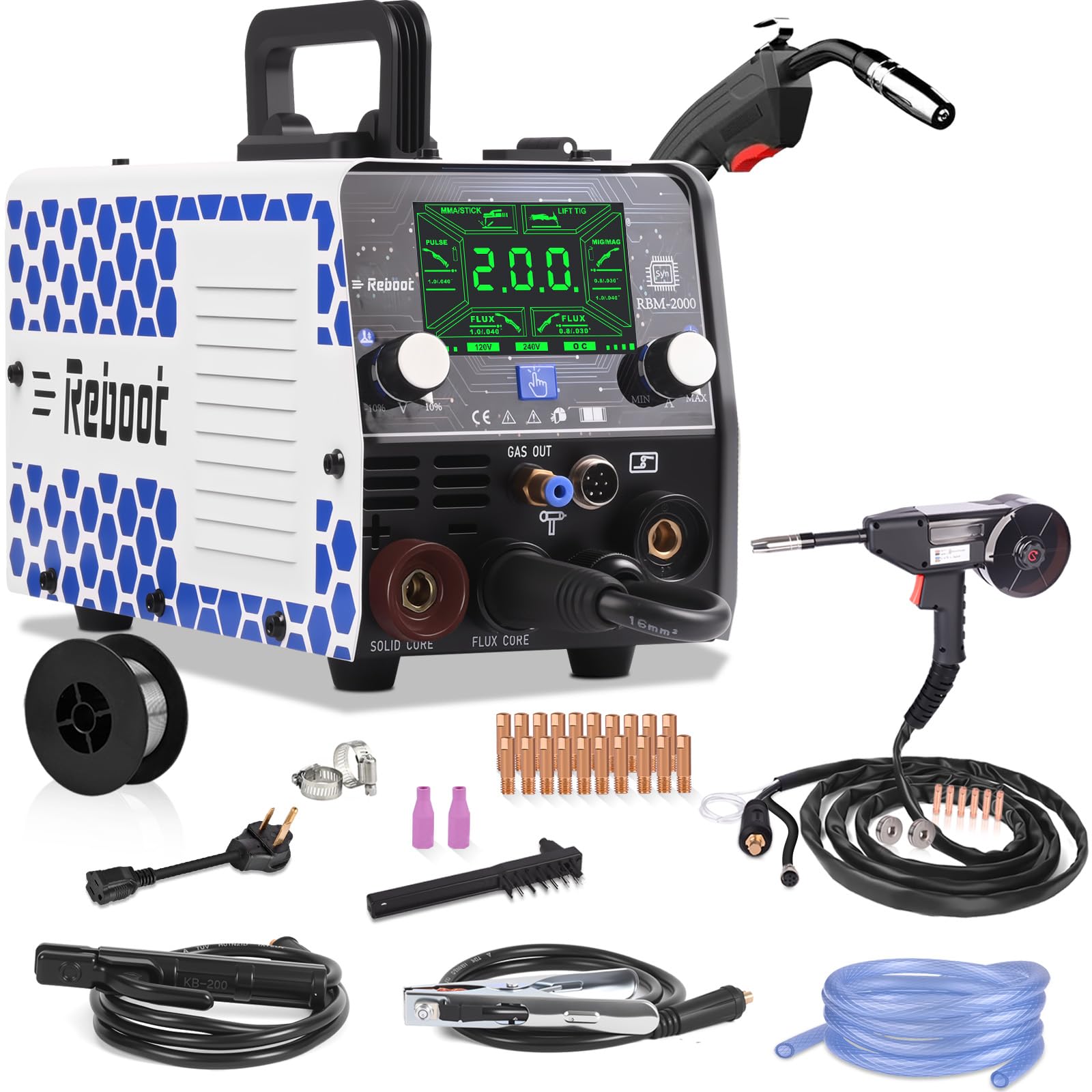
Image: The Reboot RBM2000 5-in-1 Multi-Process Welder shown with all included accessories, including the spool gun, cables, and consumables.
Video: An unboxing video demonstrating the contents of the Reboot RBM2000 package, including the welder and all accessories.
3. Setup
3.1 General Connections
- Connect the ground clamp cable to the appropriate terminal on the welder (usually positive for MIG/Flux Core, negative for Stick/Lift TIG, refer to specific mode instructions). Secure the clamp to the workpiece.
- Connect the electrode holder or welding torch to its designated terminal.
- If using gas-shielded welding, connect the gas hose from your gas cylinder regulator to the 'GAS OUT' port on the welder.
- Ensure all connections are secure before powering on the machine.

Image: A detailed view of the RBM2000 welder's front panel, showing connection points for cables and the gas hose, emphasizing robust construction.

Image: Visual guide illustrating the correct cable and torch connections for Gas MIG, Flux Core MIG, MMA, Lift TIG, and Spool Gun welding modes.
3.2 Spool Gun Installation and Wire Feeding
- Open the lid of the spool gun.
- Install the wire feed drive roller, ensuring it matches your wire size.
- Feed the welding wire from the wire spool into the wire feeder port.
- Close the lid and tighten the nut to secure the spool.
- Connect the spool gun's three connectors to the corresponding ports on the RBM2000 welder.

Image: A four-step visual guide demonstrating how to open the spool gun, install the wire feed roller, feed the wire, and close the lid.

Image: A detailed technical diagram illustrating the wire feeding mechanism and installation steps for the spool gun.
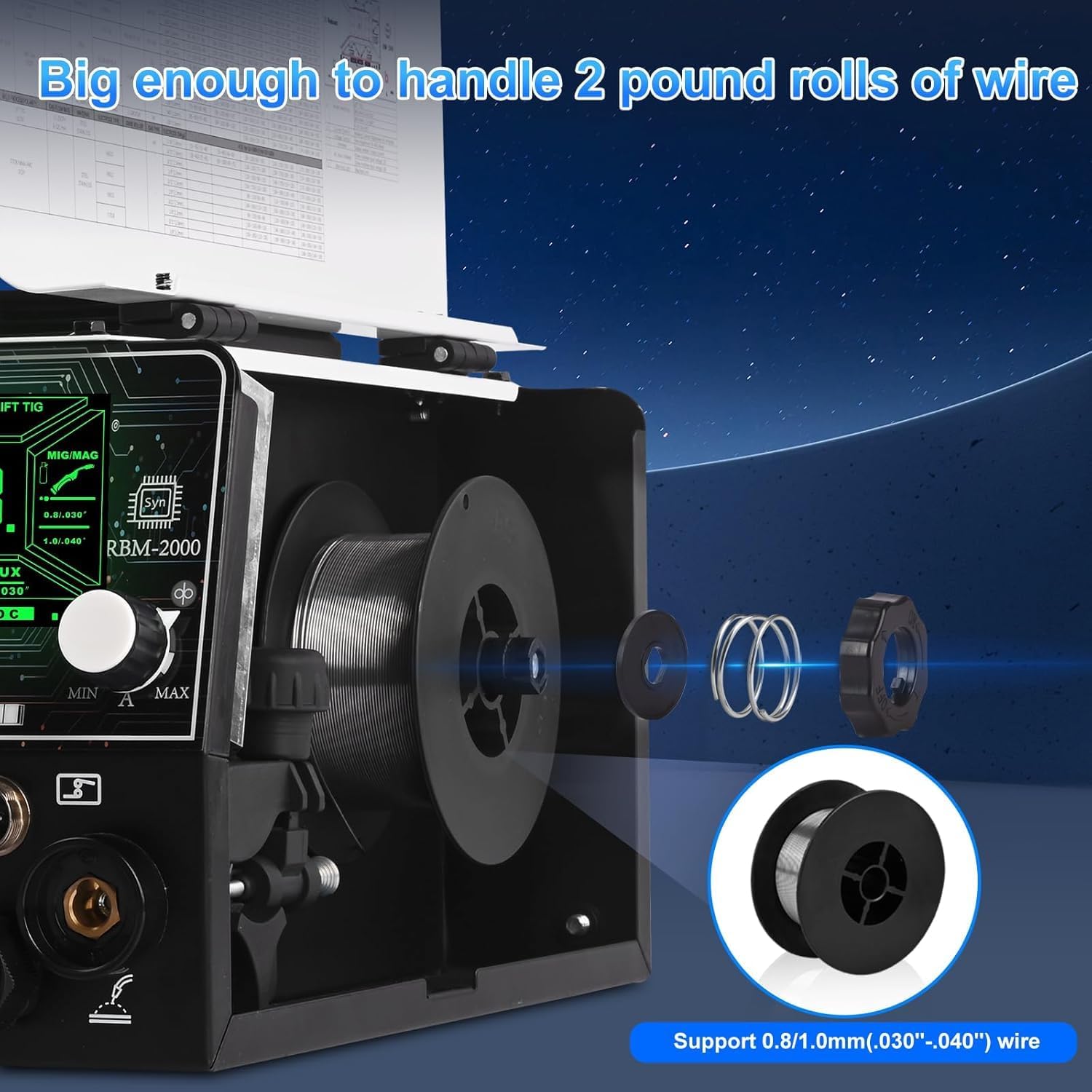
Image: The internal wire feeding mechanism of the RBM2000, demonstrating its capacity for 2-pound wire rolls and compatibility with 0.8mm/1.0mm wire.
Video: A step-by-step guide on how to install the new-version spool gun, including wire threading.
4. Operating Modes
The Reboot RBM2000 offers 5-in-1 multi-process welding capabilities:
- MIG (Gas): For welding steel, stainless steel, and aluminum with shielding gas.
- Flux Core (Gasless): For welding steel without external shielding gas.
- Stick (MMA): For welding with coated electrodes.
- Lift TIG: For precise welding of various metals (TIG torch not included).
- Aluminum Spool Gun Welding: Dedicated mode for aluminum welding with the included spool gun.

Image: A visual representation of the RBM2000's five welding functions: Gas MIG, Flux Core MIG, MMA, Lift TIG, and Spool Gun.

Image: A collage showcasing the various welding processes supported by the RBM2000, including spool gun, flux MIG, gas MIG, stick, and lift TIG.
4.1 Aluminum Welding with Spool Gun (PULSE Mode)
The RBM2000 features a dedicated PULSE mode preset for aluminum welding, optimized for 2-4mm thickness. This mode is factory-calibrated for stable, high-quality aluminum welds.
- Select 'PULSE' mode on the control panel.
- Use ER5356 or ER4043 aluminum welding wire (1.0mm / .040").
- Recommended settings:
- For 2mm / .079" (14ga) aluminum: 120V: ±3V / 150A; 240V: ±3V / 200A
- For 3mm / .118" (11ga) aluminum: 120V: ±2V / 150A; 240V: ±2V / 200A
- Note: PULSE mode is for aluminum setup only; PULSE MIG is not supported.

Image: A welder using the RBM2000 with a spool gun to weld aluminum, with a display showing recommended settings for different aluminum thicknesses and voltages.

Image: A close-up of the RBM2000's digital control panel, highlighting the 'PULSE' mode specifically designed for aluminum welding.
Video: Demonstrates the operation settings for aluminum welding with the RBM2000, including parameter adjustments.
Video: Shows the RBM2000 performing aluminum welding with the spool gun in action.
4.2 Gasless MIG Welding (Flux Core)
For welding steel without external shielding gas, using flux-cored wire.
- Select 'FLUX CORE' mode.
- Ensure the correct polarity is set (usually DCEN - Direct Current Electrode Negative).
- No gas tube connection is needed for this mode.
Video: Demonstrates the operation settings for Gasless MIG welding with the RBM2000.
4.3 Gas MIG Welding
For welding with external shielding gas (e.g., CO2 or Argon/CO2 mix) and solid wire.
- Select 'MIG/MAG' mode.
- Connect the gas hose from your gas cylinder to the welder's 'GAS OUT' port.
- Ensure the correct polarity is set (usually DCEP - Direct Current Electrode Positive).
Video: Demonstrates the operation settings for Gas MIG welding with the RBM2000.
4.4 Stick (MMA) Welding
For welding with various types of coated electrodes.
- Select 'MMA/STICK' mode.
- Connect the electrode holder and ground clamp according to the electrode manufacturer's recommendations for polarity.

Image: A welder performing Stick/MMA welding, illustrating its use for robust applications like outdoor maintenance.
4.5 Lift TIG Welding
For precise welding with a TIG torch (not included).
- Select 'LIFT TIG' mode.
- Connect a compatible TIG torch and gas supply (Argon).
- Initiate the arc by gently touching the tungsten electrode to the workpiece and lifting it slightly.

Image: A close-up of Lift TIG welding being performed on stainless steel, showcasing the precision of this welding method.
5. Maintenance
Regular maintenance ensures the longevity and optimal performance of your RBM2000 welder.
- Cleaning: Periodically clean the welder's exterior with a dry cloth. Use compressed air to clear dust from internal components, ensuring the machine is unplugged.
- Cable Inspection: Regularly inspect all cables, torches, and clamps for damage, fraying, or loose connections. Replace damaged components immediately.
- Consumables: Check and replace welding tips, nozzles, and drive rollers as they wear out to maintain consistent weld quality.
- Storage: Store the welder in a clean, dry environment away from excessive dust and moisture.
6. Troubleshooting
This section provides general guidance for common issues. For complex problems, contact customer support.
Common Issues and Solutions:
- No Power: Check power cord connection, circuit breaker, and ensure the power switch is on.
- No Arc: Verify ground clamp connection, ensure correct polarity, check for proper wire feed (MIG/Flux Core), or electrode contact (Stick/TIG).
- Poor Weld Quality: Adjust voltage and wire speed settings, ensure proper gas flow (MIG), check for contaminated workpiece, or replace worn consumables.
- Wire Feeding Issues: Check wire spool installation, tension on drive rollers, ensure correct drive roller size, and clear any blockages in the liner.
7. Specifications
| Feature | Detail |
|---|---|
| Manufacturer | Reboot |
| Item Weight | 21 pounds |
| Package Dimensions | 15.5 x 13 x 11 inches |
| Item Model Number | RBM2000 S 2026 |
| Material | METAL |
| Power Source | AC |
| Voltage | 120V/240V |
| First Available | April 13, 2026 |
8. Warranty and Support
Reboot provides a 1-year warranty for the RBM2000 welder. For detailed warranty information and support, please refer to the official Reboot website or contact customer service.
For additional support, you may refer to the official User Manual (PDF).
Extended Protection Plans
Extended protection plans are available for purchase to provide additional coverage beyond the standard warranty:
- 3-Year Protection Plan: One-time payment of $33.99.
- 4-Year Protection Plan: One-time payment of $44.99.
- Complete Protect: Monthly billing of $16.99, covering all eligible past and future purchases.


