
UGREEN DXP2800GT
UGREEN DXP2800 GT 2-Bay NAS User Manual
Model: DXP2800GT
Introduction
This manual provides detailed instructions for setting up, operating, maintaining, and troubleshooting your UGREEN DXP2800 GT 2-Bay Network Attached Storage (NAS) device. The DXP2800 GT is designed for smart home enthusiasts, creators, and freelancers, offering high-speed data access, robust storage capacity, and versatile application support.
Please read this manual thoroughly before using the device to ensure proper functionality and to maximize your user experience.
Setup Guide
Setting up your UGREEN DXP2800 GT NAS is a straightforward process, designed to get you storing data quickly.
Step 1: Preparation
Ensure all components are present and accounted for. The package typically includes the NAS unit, power adapter, Ethernet cable, and screws for drive installation. Drives are not included and must be purchased separately.

Image: All components included with the UGREEN DXP2800 GT NAS, ready for setup.
Step 2: Hardware Installation
- Install Hard Drives: Open the drive bays and slide your 3.5-inch or 2.5-inch SATA HDDs/SSDs into the provided trays. Secure them with the included screws.
- Install M.2 SSDs (Optional): For enhanced performance or caching, install M.2 NVMe SSDs into the dedicated slots inside the unit. Refer to the internal diagram for exact placement.
- Connect Power: Plug the power adapter into the NAS and then into a power outlet.
- Connect to Network: Connect the NAS to your router or network switch using the Ethernet cable. For optimal performance, use the 10GbE port if your network supports it.

Image: A user installing a hard drive into one of the bays of the UGREEN DXP2800 GT NAS.
Step 3: Software Activation
Download the UGREEN NAS app on your smartphone or visit the UGREEN website to access the web interface. Follow the on-screen instructions to initialize your NAS, create storage pools, and set up user accounts.

Image: A smartphone displaying the UGREEN NAS app interface for guided software activation.
Video: This video demonstrates the 10GbE speed capabilities of the UGREEN DXP2800 GT NAS, highlighting its benefits for content creators and smart home enthusiasts.
Operating Your UGREEN DXP2800 GT NAS
The UGREEN DXP2800 GT offers a range of features for data management, media streaming, and smart home integration.
Key Features and Performance
- 10GbE Speed: Equipped with 10GbE networking, the DXP2800 GT accelerates backups, large file transfers, media streaming, and multi-device access, ideal for creators and heavy workflows.
- Powerful Processor: Powered by an AMD Ryzen Embedded R2514 processor (4 cores, 8 threads, up to 3.70GHz) and 8GB DDR4 RAM (expandable to 64GB), ensuring smooth multitasking and reliable performance.
- UGOS Pro: The intuitive UGOS Pro operating system provides file management, photo organization, backup, global search, Docker support, virtual machines, and SAN Manager.
- High Capacity: Supports up to 80TB total capacity with 2 SATA drives (up to 32TB each), 2 U.2 NVMe SSD compatible bays, and 2 M.2 SSDs (up to 16TB).
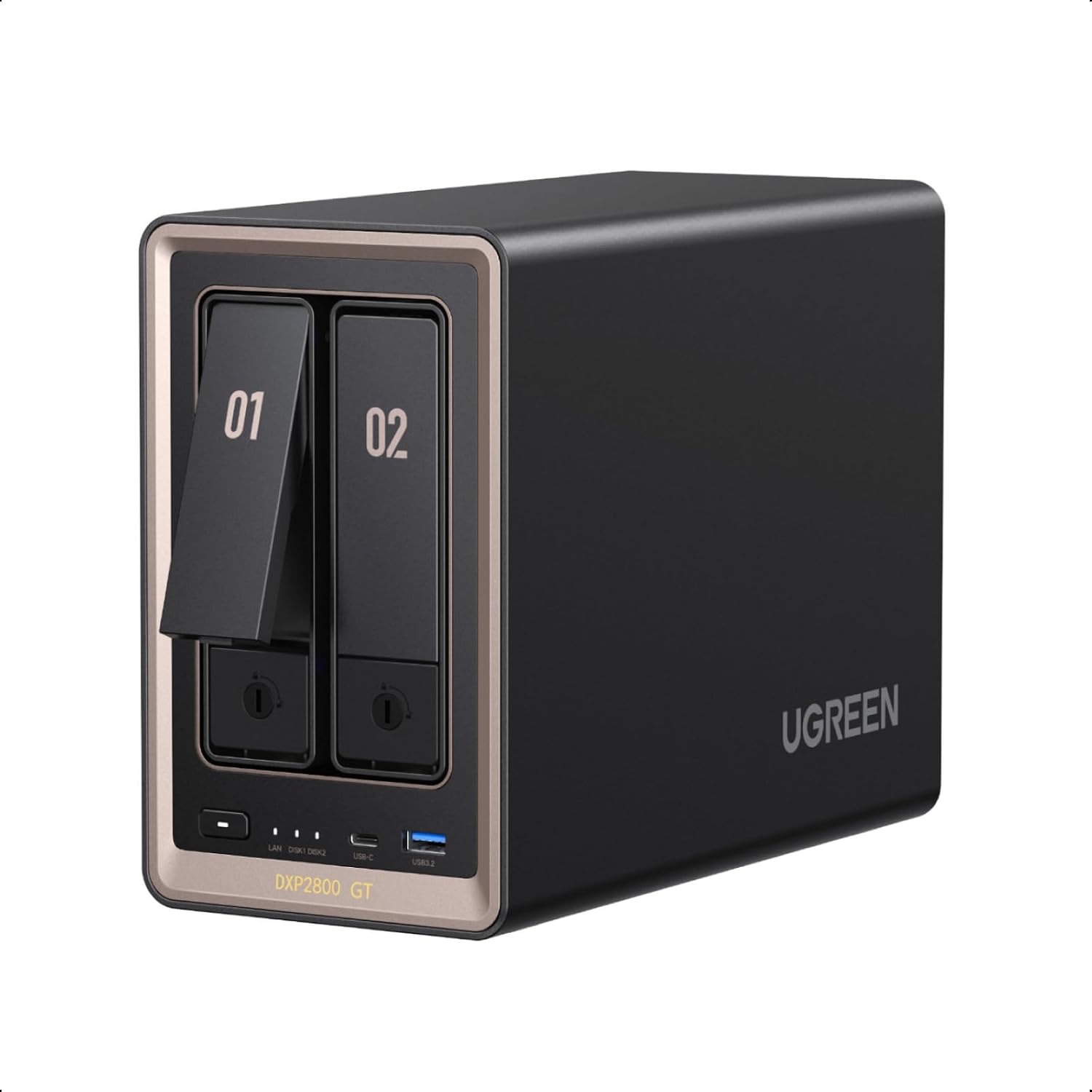
Image: Overview of the UGREEN DXP2800 GT's internal components and connectivity, including the AMD Ryzen processor, M.2 SSD slots, 10GbE LAN, and DDR4 RAM.

Image: Detailed view of the AMD Ryzen Embedded R2514 Processor, emphasizing its consistent performance.

Image: A DDR4 RAM module, illustrating the expandable memory for faster multitasking.

Image: Close-up of the dual M.2 NVMe SSD slots, designed for fast file access and caching.

Image: Diagram showing smart tiered storage with M.2 NVMe SSD slots and SATA HDD bays for efficient workflows.

Image: The UGREEN DXP2800 GT NAS with an overlay indicating support for up to 80TB of storage capacity.
UGOS Pro Operating System
UGOS Pro provides a comprehensive suite of tools and applications:
- System Control: Control Panel, SAN Manager, Task Manager, Storage.
- Files & Sync: Files, Cloud Drive, Sync & Backup, Downloads.
- Media: Photos, Music, Theater, DLNA.
- Pro Tools: Docker, Virtual Machine, Surveillance Center, Online Office.

Image: A visual representation of the UGOS Pro operating system interface, showcasing its diverse applications for system control, file management, media, and professional tools.
Access your NAS from anywhere using the UGREEN NAS app on various devices, including Windows, macOS, iOS, Android, TV, and web browsers.

Image: The UGREEN NASync DXP2800 GT connected to and accessible from various devices like laptops, tablets, and smartphones, demonstrating multi-device control.
Data Management and Sharing
- Sync & Backup: Easily sync your UGREEN NAS with computers and other UGREEN NAS devices. Perform automatic backups from your computer, UGREEN NAS, or any device supporting Rsync.
- SAN Manager: Utilize SAN Manager for storage that functions like local storage, enhancing workflow efficiency.
- Seamless Sharing: Share files with full control over read/write permissions for different users.
- Cloud Integration: Directly manage and sync files with popular cloud services like Google Drive, OneDrive, and Dropbox.

Image: Visual representation of simple syncing and automatic backup processes between the UGREEN NAS and other devices.

Image: A laptop screen showing the SAN Manager interface, demonstrating how storage works like local storage with the UGREEN NAS.

Image: A laptop screen showing user permissions for shared folders on the UGREEN NAS, illustrating seamless sharing with full control.

Image: The UGREEN NAS shown with icons for Google Drive, OneDrive, and Dropbox, indicating direct cloud management capabilities.
Media and Smart Home Features
- Surveillance Center: Connect ONVIF/RTSP IP cameras for 24/7 recording, live feeds, event review, and security video management.
- Intelligent Photo Management: Features custom learning, pet recognition, and semantic search for organizing your photo library.
- Dedicated 4K HDMI Output: Use the HDMI port to connect directly to a display for media playback or as a workstation.
- Smart Home Integration: Link and manage smart devices with Home Assistant for a 24/7 smart home hub.

Image: The UGREEN DXP2800 GT NAS alongside a smartphone displaying the Surveillance Center app, illustrating integrated control for all cameras.

Image: A detailed view of the Surveillance Center features, including integrated control, live monitoring, smart playback, and event detection.

Image: Screenshots demonstrating the intelligent photo management capabilities of the UGREEN DXP2800 GT NAS, including custom learning, pet recognition, and semantic search.

Image: Another view of the intelligent photo management features, emphasizing semantic search, custom learning, and pet recognition.
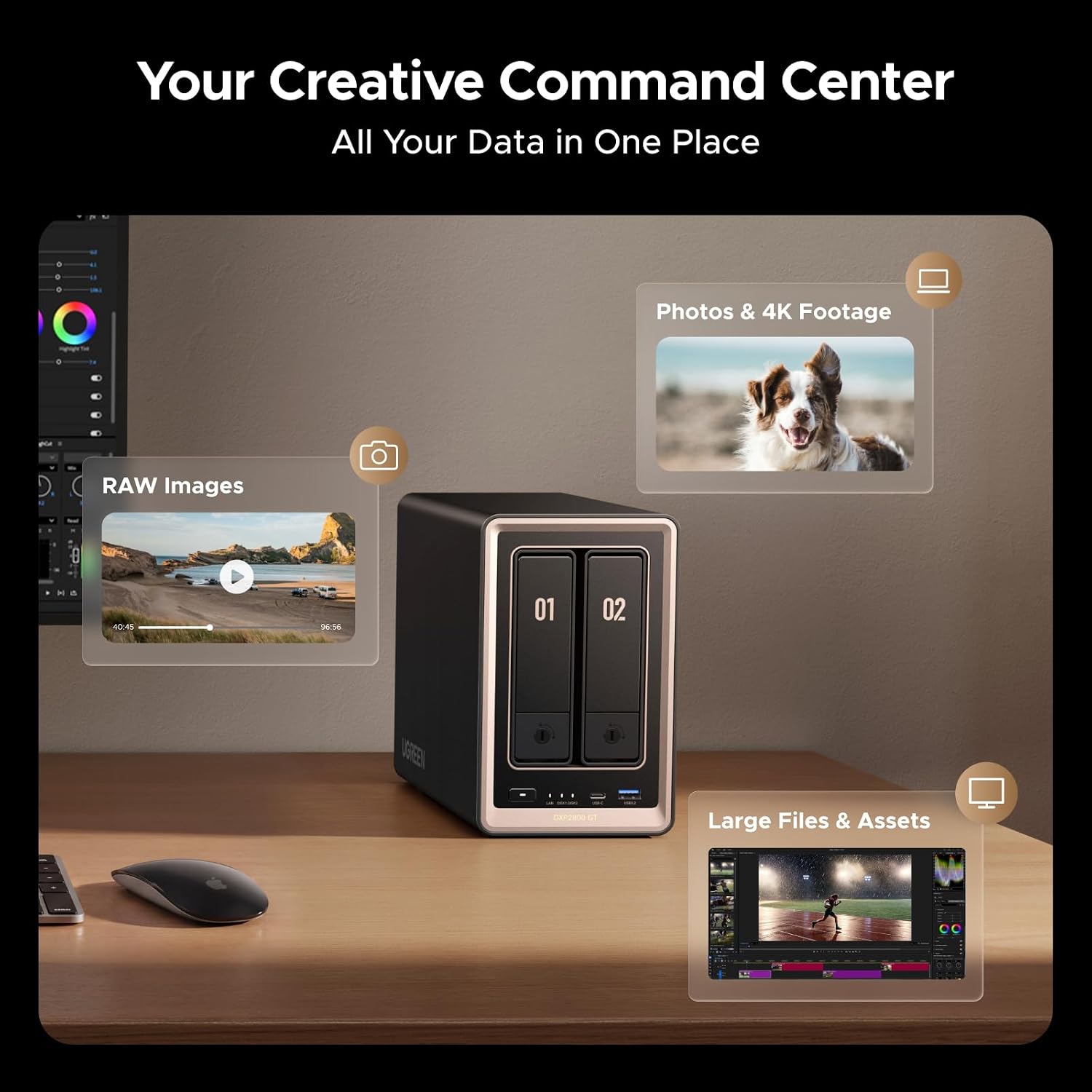
Image: A user editing video content with the UGREEN DXP2800 GT NAS, showcasing its 10GbE speed and dedicated 4K HDMI output for creative workflows.

Image: The UGREEN NAS supporting creative tasks at 10GbE speed and offering dedicated 4K HDMI output.
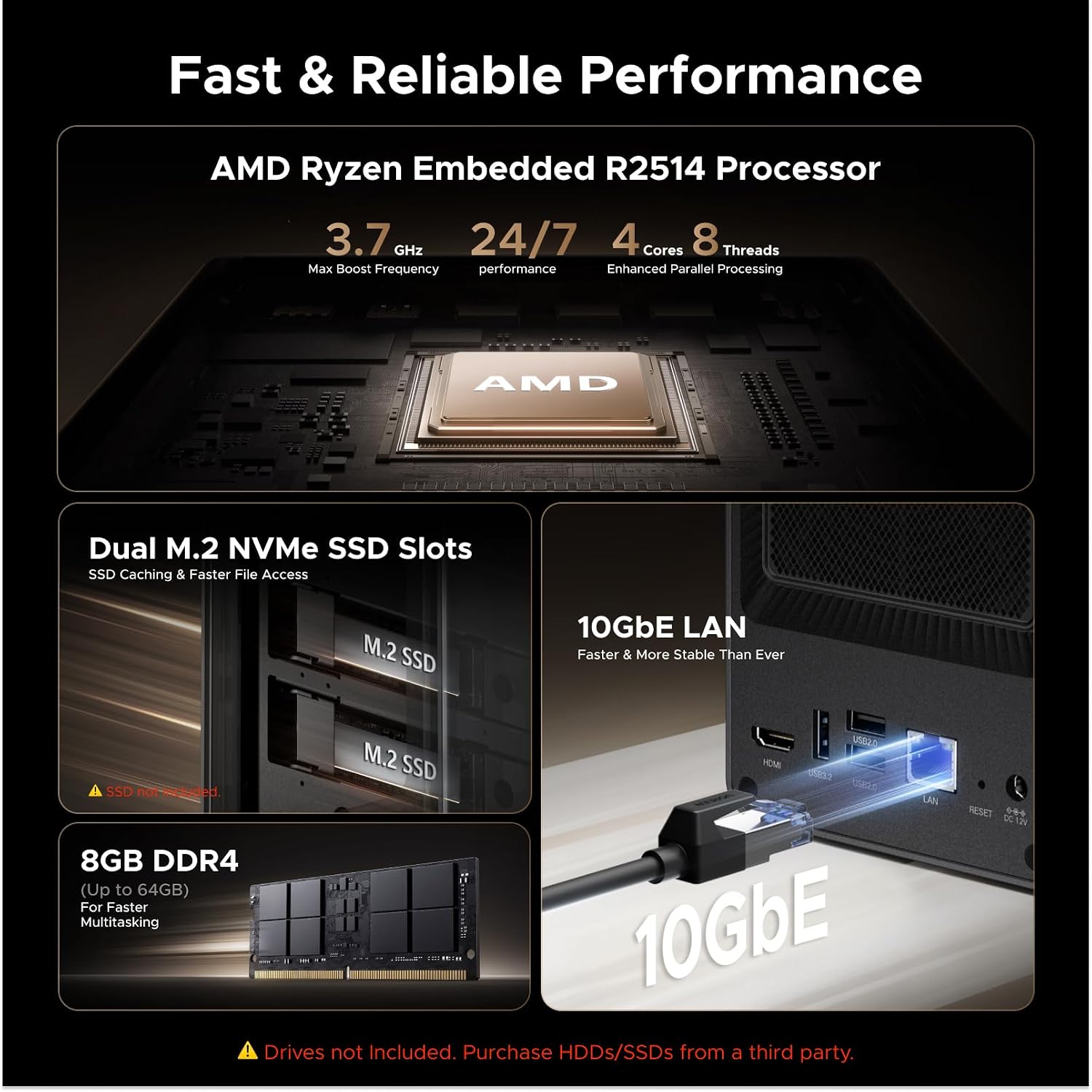
Image: The UGREEN DXP2800 GT NAS positioned as a 24/7 smart home hub, managing security footage and media.

Image: An illustration of a smart home integrated with the UGREEN NAS and Home Assistant, showcasing its 24/7 smart home readiness.
Maintenance and Data Protection
Proper maintenance and understanding of data protection features are crucial for the longevity and security of your NAS.
Data Privacy and Security
- Local Storage: Keep your data private by storing it locally at home, reducing reliance on cloud services.
- Encryption: The DXP2800 GT protects data with TLS/SSL, RSA, AES, and SHA-512 encryption technologies.
- Security Manager: Built-in Security Manager helps safeguard your data.
- RAID 1 Support: Provides redundancy to minimize data loss risk if a drive fails.
- Snapshot Recovery: Offers additional data protection through snapshot capabilities.

Image: The UGREEN DXP2800 GT NAS highlighting its data protection features, including local storage, encryption protocols, security manager, multiple RAID levels, ECC support, and snapshot recovery.
Hardware Considerations
- ECC RAM Upgrade: The DXP2800 GT supports ECC RAM upgrades to detect and correct memory errors during long-term operation. The pre-installed RAM is non-ECC; a compatible ECC RAM upgrade is required for ECC error correction (sold separately).
- Drive Compatibility: Ensure purchased HDDs/SSDs are compatible with the NAS.
Troubleshooting
If you encounter issues with your UGREEN DXP2800 GT NAS, refer to the following common troubleshooting steps:
- Device Not Powering On:
- Check if the power adapter is securely connected to both the NAS and a working power outlet.
- Ensure the power button on the NAS is pressed.
- Cannot Access NAS on Network:
- Verify the Ethernet cable is properly connected to the NAS and your router/switch.
- Check your router's DHCP client list to see if the NAS has obtained an IP address.
- Ensure your computer is on the same network as the NAS.
- Temporarily disable any firewall software on your computer to rule out blocking issues.
- Hard Drive Not Detected:
- Ensure the hard drives are correctly seated in their bays and secured.
- Check if the drives are compatible with the NAS.
- Access the UGOS Pro interface to check drive status and initialize/format new drives.
- Slow Performance:
- Verify your network connection speed. For 10GbE performance, ensure all network components (router, cables, client NIC) support 10GbE.
- Consider adding M.2 SSDs for caching to improve read/write speeds.
- Check NAS resource utilization (CPU, RAM) via the UGOS Pro interface.
For more detailed troubleshooting, refer to the official UGREEN support website or contact customer service.
Specifications
| Feature | Detail |
|---|---|
| Brand | UGREEN |
| Model Number | DXP2800GT, 2-Bay(Diskless) |
| Color | Grey |
| Size | DXP2800 GT, 2-Bay |
| Compatible Devices | Desktop, Laptop, Smartphone, Tablet, Television |
| Item Weight | 4.41 kg |
| Number of Items | 1 |
| Mounting Type | Tabletop |
| Processor | AMD Ryzen Embedded R2514 (4 cores, 8 threads, up to 3.70GHz) |
| RAM | 8GB DDR4 (expandable to 64GB, ECC support with compatible RAM) |
| Network Interface | 10GbE LAN |
| Drive Bays | 2 x SATA (3.5"/2.5" HDD/SSD), 2 x U.2 NVMe SSD compatible bays, 2 x M.2 SSD slots |
| Max Capacity | Up to 80TB |
| Video Output | HDMI 4K |
| USB Ports | USB-C (10Gbps) x1, USB-A (10Gbps) x2, USB-A (480Mbps) x2 |
Warranty Information
The UGREEN DXP2800 GT NAS comes with a 2-Year Manufacturer Warranty. This warranty covers defects in materials and workmanship under normal use. Please retain your proof of purchase for warranty claims.
For specific terms and conditions, please refer to the warranty documentation included with your product or visit the official UGREEN website.
Customer Support
UGREEN is committed to providing excellent customer service. If you have any questions, require technical assistance, or need to make a warranty claim, please contact us through the following channels:
- Online Support: Visit the official UGREEN website for FAQs, troubleshooting guides, and support resources.
- Email Support: Contact our support team via email for detailed assistance.
- 24h Specialist Support: Available for urgent inquiries.
- 30-day Free Returns: For eligible purchases.

Image: UGREEN customer support representatives, highlighting 2-year coverage, 24-hour specialist support, and 30-day free returns.
Related documentsDXP2800GT


Ask a question about this manual
Ask about setup, troubleshooting, compatibility, parts, safety, or missing instructions. Manuals+ will review the question and use this page’s manual context to help answer it.