
Introduction
This manual provides detailed instructions for the installation, operation, and maintenance of your AWESAFE Android 15 Car Radio. This unit is specifically designed for Peugeot Expert 2, Citroën Jumpy, Fiat Scudo, and Toyota Proace models manufactured between 2007 and 2016. Please read this manual thoroughly before using the product to ensure proper function and safety.
Safety Information
- Always operate the device responsibly and in accordance with local traffic laws. Distracted driving can lead to accidents.
- Do not attempt to install or repair the unit yourself if you are not qualified. Improper installation can cause damage to the vehicle or the device.
- Ensure all wiring connections are secure to prevent short circuits or electrical hazards.
- Keep the screen clean and free from obstructions to maintain clear visibility.
- Avoid exposing the unit to extreme temperatures, direct sunlight for prolonged periods, or excessive moisture.
Package Contents
Verify that all items listed below are included in your package. If any items are missing or damaged, please contact customer support.

Image: Overview of the AWESAFE car radio and its included accessories, such as cables, antennas, and tools.
- AWESAFE Android Car Radio Unit (9-inch touchscreen)
- Outer Frame / Dashboard Kit
- Power Adapter
- CANBUS Decoder
- RCA Cable Set
- External Microphone
- GPS Antenna
- USB Cables (x2)
- Radio Head / Angled Radio Line
- Reverse Camera Video Input Cable
- Screwdriver and Pry Tool

Image: A detailed layout of all components included in the AWESAFE car radio package, showing each item clearly labeled.
Setup and Installation
The AWESAFE Android Car Radio is designed for seamless integration into your vehicle's dashboard. Professional installation is recommended.
1. Pre-Installation Comparison
Observe the difference in dashboard appearance before and after installation to understand the aesthetic integration.

Image: A side-by-side comparison showing the vehicle's dashboard with the original radio (before installation) and with the new AWESAFE Android car radio installed (after installation).
2. Wiring Connections
Connect the power adapter, RCA cables, USB cables, GPS antenna, and external microphone according to the wiring diagram provided with your unit. Ensure the CANBUS decoder is correctly connected for steering wheel control integration.
3. Mounting the Unit
Carefully mount the car radio unit into the dashboard using the provided frame and tools. Ensure it is securely fastened and flush with the dashboard.
Operating Instructions
1. Power On/Off
Press and hold the power button (usually located on the front panel or within the system interface) to turn the unit on or off. A short press typically puts the unit into standby mode.
2. Touchscreen Operation
The 9-inch capacitive touchscreen responds to touch gestures similar to a smartphone. Tap to select, swipe to scroll, and pinch to zoom (where applicable, e.g., navigation maps).
3. CarPlay & Android Auto
Connect your smartphone via USB or wirelessly via Bluetooth and Wi-Fi to use CarPlay or Android Auto. This allows access to navigation, calls, messages, and music directly from the car radio screen.

Image: A visual guide demonstrating both wireless (Bluetooth and Wi-Fi) and wired (USB port) connection methods for CarPlay and Android Auto.

Image: The car radio display showing the CarPlay and Android Auto interfaces, highlighting app icons and control layouts for smartphone integration.
4. GPS Navigation
The unit supports online GPS navigation applications like G-Maps and Waze. Connect to Wi-Fi to download maps and receive real-time traffic information.

Image: The car radio screen displaying a GPS navigation map with route information and traffic updates, alongside icons indicating Wi-Fi connectivity.
5. Bluetooth Functionality
Pair your smartphone via Bluetooth for hands-free calling and wireless audio streaming. Access your phone's contacts and music library directly from the car radio.

Image: The car radio display showing a phone dialer interface and a music player, illustrating hands-free calling and Bluetooth audio streaming features.
6. FM Radio with RDS
Tune into your favorite FM radio stations. The RDS (Radio Data System) feature provides additional information such as station name and song titles where available.

Image: The car radio screen displaying the FM radio interface, showing frequency tuning and RDS information.
7. DSP Audio Processor
Utilize the integrated DSP (Digital Signal Processor) to customize your audio experience. Adjust bass, treble, and equalizer settings to optimize sound quality.

Image: The car radio screen showing the DSP audio settings interface with equalizer controls and sound field adjustments for an immersive listening experience.
8. Steering Wheel Controls (SWC)
The unit is compatible with your vehicle's original steering wheel controls, allowing you to manage audio, calls, and other functions without taking your hands off the wheel.
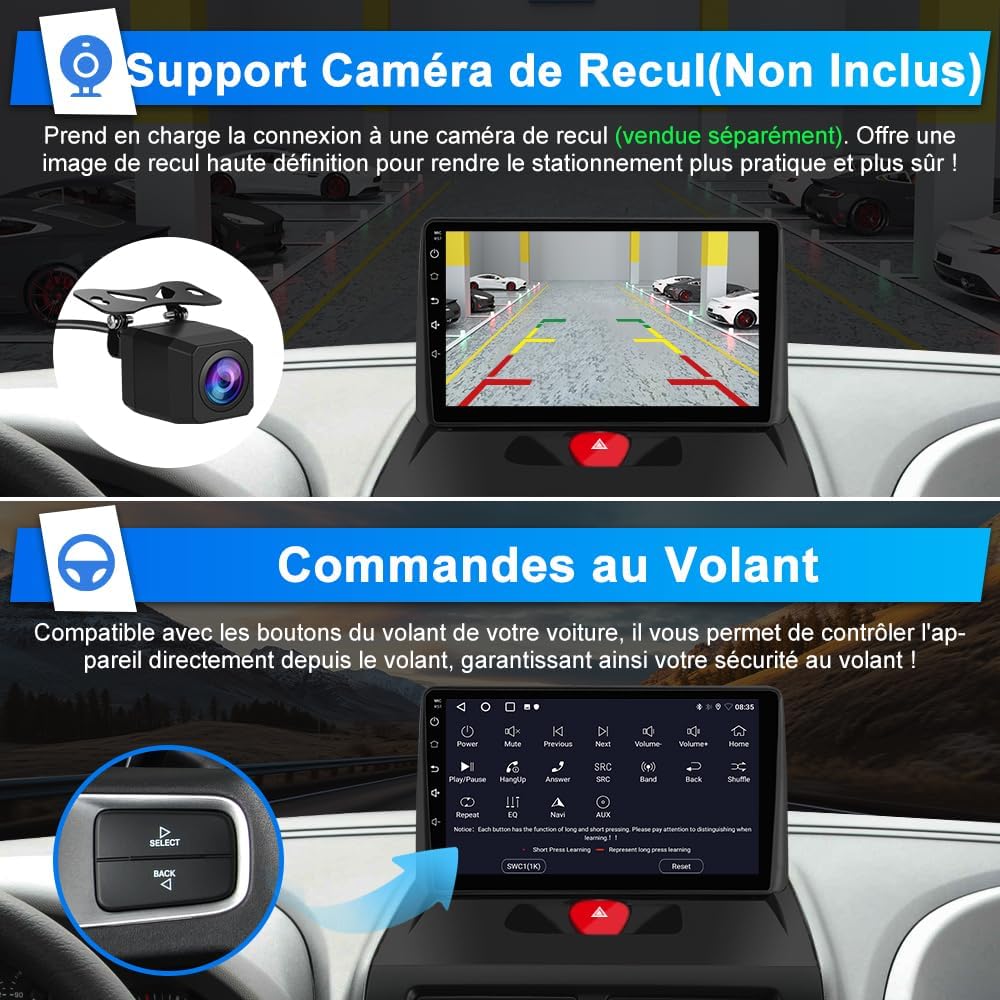
Image: The car radio display showing the steering wheel control mapping interface, with an inset image of a steering wheel control button cluster.

Image: A visual representation of how steering wheel controls interact with the car radio, showing various control buttons and their functions.
9. Rear Camera Support (Camera Not Included)
The unit supports connection to an aftermarket rear view camera (sold separately). This provides a high-definition reverse image for safer parking maneuvers.
Image: The car radio screen displaying a rear view camera feed with parking guidelines, alongside an image of a compact rear view camera.
Maintenance
- Screen Cleaning: Use a soft, lint-free cloth slightly dampened with water or a screen cleaner. Do not use abrasive cleaners or solvents.
- Software Updates: Periodically check the manufacturer's website or the unit's system settings for available software updates to ensure optimal performance and access to new features.
- General Care: Avoid placing heavy objects on the unit or exposing it to direct impacts. Keep ventilation openings clear to prevent overheating.
Troubleshooting
| Problem | Possible Cause | Solution |
|---|---|---|
| Unit does not power on. | No power supply; loose wiring. | Check power connections and vehicle's fuse box. Ensure proper wiring. |
| No sound. | Volume too low; incorrect audio source; speaker wiring issue. | Increase volume. Select correct audio source. Check speaker connections. |
| GPS signal lost or inaccurate. | GPS antenna obstructed or improperly installed. | Ensure GPS antenna has a clear view of the sky and is securely connected. |
| Bluetooth connection issues. | Device not paired; Bluetooth off on phone/unit. | Ensure Bluetooth is enabled on both devices. Re-pair the devices. |
| Steering wheel controls not working. | CANBUS not connected; incorrect configuration. | Verify CANBUS connection. Check SWC settings in the unit's menu. |
Specifications
| Feature | Detail |
|---|---|
| Brand | AWESAFE |
| Model Number | IB-FR-XT892SCEXPERTT716 |
| Operating System | Android 15 |
| RAM | 2GB |
| Storage | 64GB |
| Screen Size | 9 inches |
| Screen Type | Capacitive Touchscreen |
| Connectivity | Bluetooth, Wi-Fi, USB |
| Special Features | CarPlay, Android Auto, GPS, FM Radio (RDS), DSP Audio, Steering Wheel Control (SWC) |
| Audio Output Mode | Stereo |
| Video Encoding | AVI |
| Power Output | 45 Watts |
| Item Weight | 1800 Grams |
| Control Method | Touch |
| Compatible Vehicles | Peugeot Expert 2, Citroën Jumpy, Fiat Scudo, Toyota Proace (2007-2016) |
| UPC | 759973265564 |
Warranty and Support
Warranty Information
This AWESAFE car radio comes with a 2-year warranty. Please retain your proof of purchase for warranty claims. The warranty covers manufacturing defects and malfunctions under normal use. It does not cover damage caused by improper installation, misuse, accidents, or unauthorized modifications.
Customer Support
For technical assistance, troubleshooting, or warranty inquiries, please contact AWESAFE customer support through the retailer where you purchased the product or visit the official AWESAFE website for contact information.


