
Introduction
This manual provides essential instructions for the safe and efficient operation, maintenance, and troubleshooting of your Shark Stratos Cordless Vacuum, Model UZ800H Series. Please read this manual thoroughly before using the appliance and retain it for future reference.
The Shark Stratos Cordless Vacuum is designed for intelligent performance and powerful suction, featuring Clean Sense IQ technology that detects hidden dirt and automatically adjusts power. Its DuoClean PowerFins HairPro system ensures deep cleaning on various floor types, while the MultiFLEX wand offers versatile cleaning and compact storage.
Important Safety Instructions
WARNING: To reduce the risk of fire, electric shock, or injury, always follow basic safety precautions when using your vacuum cleaner.
- Read all instructions before using the vacuum cleaner.
- Do not use outdoors or on wet surfaces.
- Unplug from outlet when not in use and before servicing.
- Do not allow to be used as a toy. Close attention is necessary when used by or near children.
- Use only as described in this manual. Use only manufacturer's recommended attachments.
- Do not use with damaged cord or plug. If appliance is not working as it should, has been dropped, damaged, left outdoors, or dropped into water, return it to a service center.
- Do not pull or carry by cord, use cord as a handle, close a door on cord, or pull cord around sharp edges or corners. Do not run appliance over cord. Keep cord away from heated surfaces.
- Do not unplug by pulling on cord. To unplug, grasp the plug, not the cord.
- Do not handle plug or vacuum cleaner with wet hands.
- Do not put any object into openings. Do not use with any opening blocked; keep free of dust, lint, hair, and anything that may reduce air flow.
- Keep hair, loose clothing, fingers, and all parts of body away from openings and moving parts.
- Do not pick up anything that is burning or smoking, such as cigarettes, matches, or hot ashes.
- Do not use to pick up flammable or combustible liquids, such as gasoline, or use in areas where they may be present.
- Do not use without dust cup and/or filters in place.
- Turn off all controls before unplugging.
- Use extra care when cleaning on stairs.
Components Overview
Familiarize yourself with the main components of your Shark Stratos Cordless Vacuum:
- Handheld Vacuum: The main unit containing the motor, dust cup, and controls.
- MultiFLEX Wand: The flexible extension that connects the handheld vacuum to the floor nozzle.
- DuoClean PowerFins HairPro Floor Nozzle: Features two brushrolls for deep cleaning carpets and hard floors, with anti-hair wrap technology.
- Removable Battery: Provides cordless power and can be charged separately.
- Duster Crevice Tool: For cleaning tight spaces and dusting.
- Anti-Allergen Dust Brush: Designed to capture dust and allergens.
- LED Display: Shows battery life, suction level, and Clean Sense IQ performance.

Figure 1: Main components of the Shark Stratos Cordless Vacuum.
Setup and Assembly
- Unpacking: Carefully remove all components from the packaging. Ensure all parts listed in the Components Overview are present.
- Attaching the Wand: Insert the MultiFLEX wand into the DuoClean PowerFins HairPro floor nozzle until it clicks securely into place.
- Attaching the Handheld Vacuum: Slide the handheld vacuum onto the top of the MultiFLEX wand until it clicks securely.
- Charging the Battery: The battery may not be fully charged upon arrival.
- To charge while attached: Plug the charger into the charging port on the handheld vacuum.
- To charge separately: Press the battery release button and slide the battery out. Connect the charger directly to the battery.
The LED display will indicate charging status. A full charge typically takes approximately 3.5 hours.
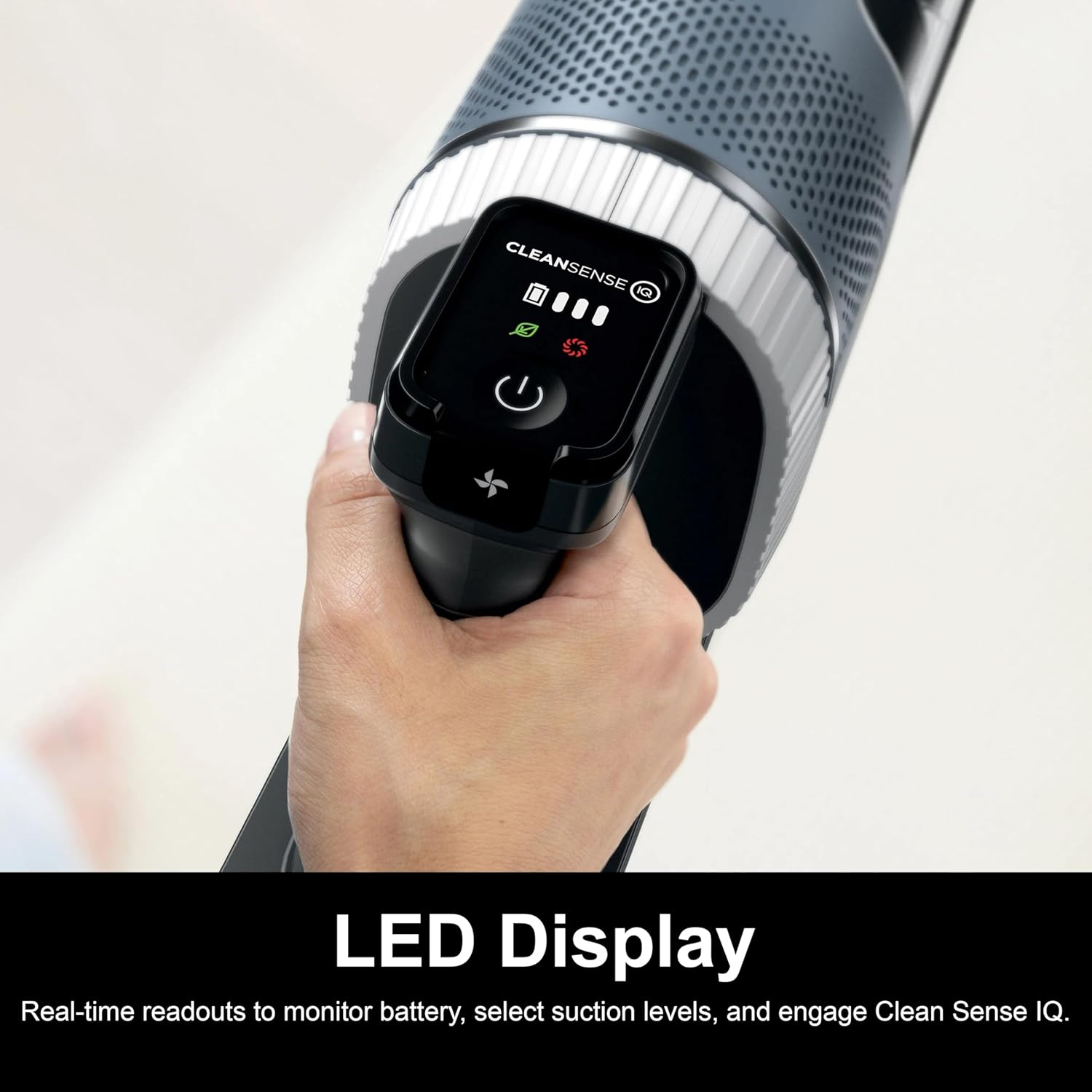
Figure 2: The removable battery of the Shark Stratos Cordless Vacuum being charged.
Video 1: Demonstrates the assembly of the Shark Stratos Cordless Vacuum, including how to attach the wand and handheld unit, and how to change attachments.
Operating Instructions
- Power On/Off: Press the power button on the handheld unit to turn the vacuum on or off.
- Clean Sense IQ Technology: The vacuum automatically detects dirt and adjusts suction power for optimal cleaning. The LED display will show the Clean Sense IQ indicator.
- Suction Modes:
- ECO Mode: Maximizes runtime for everyday cleaning.
- BOOST Mode: Maximizes suction for tough messes, using more battery power.
Adjust modes using the controls on the handheld unit as needed.
- MultiFLEX Wand Usage:
- Under Furniture: Press the MultiFLEX release button to bend the wand, allowing easy access under low-lying furniture.
- Compact Storage: Fold the wand over for freestanding, compact storage.
- Using Attachments:
- Detach the handheld vacuum from the wand.
- Attach the Duster Crevice Tool or Anti-Allergen Dust Brush directly to the handheld vacuum for targeted cleaning.

Figure 3: Operating the Shark Stratos Cordless Vacuum on various floor types.

Figure 4: Converting the Shark Stratos to a handheld vacuum for versatile cleaning.

Figure 5: Using the MultiFLEX wand to reach under furniture.
Maintenance
Emptying the Dust Cup
- Ensure the vacuum is turned off.
- Press the dust cup release latch and remove the dust cup from the handheld vacuum.
- Hold the dust cup over a trash bin and press the empty button to open the bottom flap, releasing debris.
- Close the flap securely before reattaching the dust cup.

Figure 6: Easy-empty XL dust cup ejects debris in seconds.
Cleaning Filters
Regularly clean the filters to maintain optimal suction power. Filters should be rinsed with cold water only and allowed to air dry completely for at least 24 hours before reinstallation.
- Pre-Motor Filters (Foam & Felt): Remove the dust cup. Pull out the foam and felt filters. Tap loose dirt off between washes. Rinse thoroughly and air dry.
- Post-Motor HEPA Filter: Located at the back of the handheld unit. Twist to unlock and pull out. Rinse and air dry.
Video 2: Demonstrates how to empty the dust cup and clean the filters of the Shark Stratos Cordless Vacuum.
Cleaning the Brushrolls
The DuoClean PowerFins HairPro nozzle features a self-cleaning brushroll to minimize hair wrap. However, periodically check for any debris or hair that may have accumulated and carefully remove it.

Figure 7: Close-up of the DuoClean PowerFins HairPro nozzle, highlighting its anti-hair wrap design.
Troubleshooting
| Problem | Possible Cause | Solution |
|---|---|---|
| Vacuum not turning on. | Battery not charged or not properly inserted. | Ensure battery is fully charged and securely clicked into place. |
| Loss of suction. | Clogged dust cup or filters. Obstruction in nozzle/wand. | Empty dust cup. Clean pre-motor and post-motor filters. Check for and remove any blockages. |
| Brushrolls not spinning. | Obstruction in brushroll. Vacuum is in a mode that disables brushrolls. | Clear any blockages from the brushroll. Ensure the vacuum is in an appropriate mode for brushroll operation. |
| Vacuum shuts off automatically. | Overheating due to blockage or full dust cup. Low battery. | Check for and clear blockages. Empty dust cup. Allow vacuum to cool down. Charge battery. |
If problems persist after attempting these solutions, please contact Shark Customer Support.
Specifications
- Model Name: Shark Stratos
- Model Number: UZ800H Series
- Brand: Shark
- Power Source: Battery Powered (Lithium-Ion)
- Voltage: 21.6 Volts
- Wattage: 181 watts
- Runtime: Up to 40 minutes (in ECO mode)
- Filter Type: HEPA Filter
- Capacity: 0.68 Liters
- Item Weight: 8.3 Pounds
- Item Dimensions (L x W x H): 13.66"L x 10.08"W x 44.48"H
- Special Features: Cordless, Clean Sense IQ, DuoClean PowerFins HairPro, MultiFLEX Wand, Portable
- Recommended Uses: Carpet, Hard Floor, Furniture, Rug, Bare Floor, Sofa
- Included Components: Duster Crevice Tool, Anti-Allergen Dust Brush, Pet Multi-Tool
Warranty and Support
Manufacturer Warranty: This product comes with a 90-day limited warranty from the manufacturer, SharkNinja. Please refer to your purchase documentation for full terms and conditions.
For customer support, replacement parts, or warranty inquiries, please visit the official Shark website or contact their customer service line. Ensure you have your model number (UZ800H Series) and proof of purchase available.
Online Resources: For additional information, FAQs, and video tutorials, visit the official Shark website: www.sharkclean.com


