
1. Introduction
This manual provides instructions for the assembly, operation, and maintenance of your WAMPAT Farmhouse TV Stand. This versatile 3-in-1 unit can function as a TV console, a kitchen sideboard, or an entryway console table, and includes an integrated charging station. Please read these instructions carefully before assembly and use to ensure safe and proper operation.
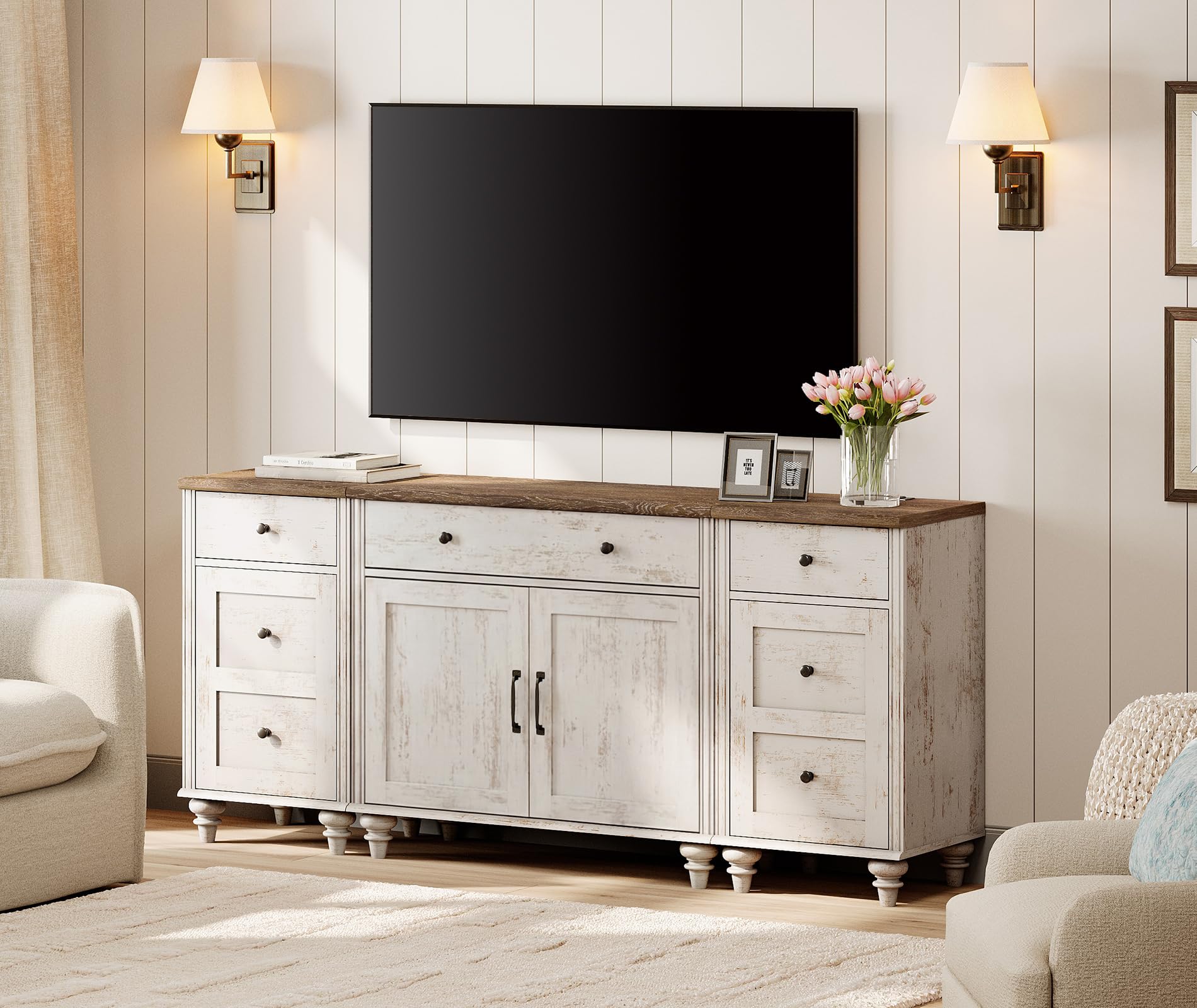
Figure 1.1: Fully assembled WAMPAT Farmhouse TV Stand.
2. Safety Information
- Always assemble the unit on a soft, clean surface to prevent scratches.
- Ensure all screws and fasteners are securely tightened before use. Periodically check and retighten as necessary.
- Do not overload the shelves or drawers. Distribute weight evenly.
- Keep small parts and packaging materials away from children and pets to prevent choking hazards.
- The unit features curved edges to minimize accidental injuries, especially in households with children.
- For the charging station, use only with compatible devices and ensure the power cable is not pinched or damaged.
3. Package Contents
Your WAMPAT Farmhouse TV Stand is shipped in three separate packages. Please ensure all packages have arrived before beginning assembly. Carefully unpack all components and verify against the included parts list (not provided in this document, refer to your physical manual) to ensure all pieces are present and undamaged.

Figure 3.1: Individual component dimensions of the TV stand.
The packages typically contain:
- Main cabinet panels and hardware
- Two side table panels and hardware
- Drawers, doors, and associated hardware
- Integrated charging station with power cable
- Assembly instructions (physical copy)
4. Setup and Assembly
Assembly of the WAMPAT Farmhouse TV Stand is designed to be straightforward. Follow the detailed step-by-step instructions provided in your physical assembly manual. It is recommended to have two people for assembly to ensure stability and ease of handling larger components.
4.1 Assembly Steps Overview:
- Unpack and Identify Parts: Lay out all panels and hardware. Match them with the parts list in your manual.
- Assemble the Main Cabinet: Follow the instructions to construct the central TV console unit.
- Assemble the Side Tables: Construct the two individual side tables. Note that one side table includes the charging station.
- Install Drawers and Doors: Attach the smooth metal drawer sliders and hang the cabinet doors.
- Connect Charging Station: Ensure the charging station is properly installed in the designated side table and the power cable is routed safely.
- Final Placement: Position the assembled units as desired. They can be used together as a large TV stand or separately as a main cabinet and two side tables.

Figure 4.1: The TV stand can be configured as a single unit or as a main cabinet with two separate side tables.
5. Operating Instructions
5.1 Using the Charging Station
One of the side tables is equipped with a charging station. To use it:
- Plug the 6.5-foot power cable into a standard wall outlet.
- The charging station provides two standard AC outlets and two USB ports.
- Connect your electronic devices (e.g., mobile phones, tablets, lamps) to the appropriate ports for charging.
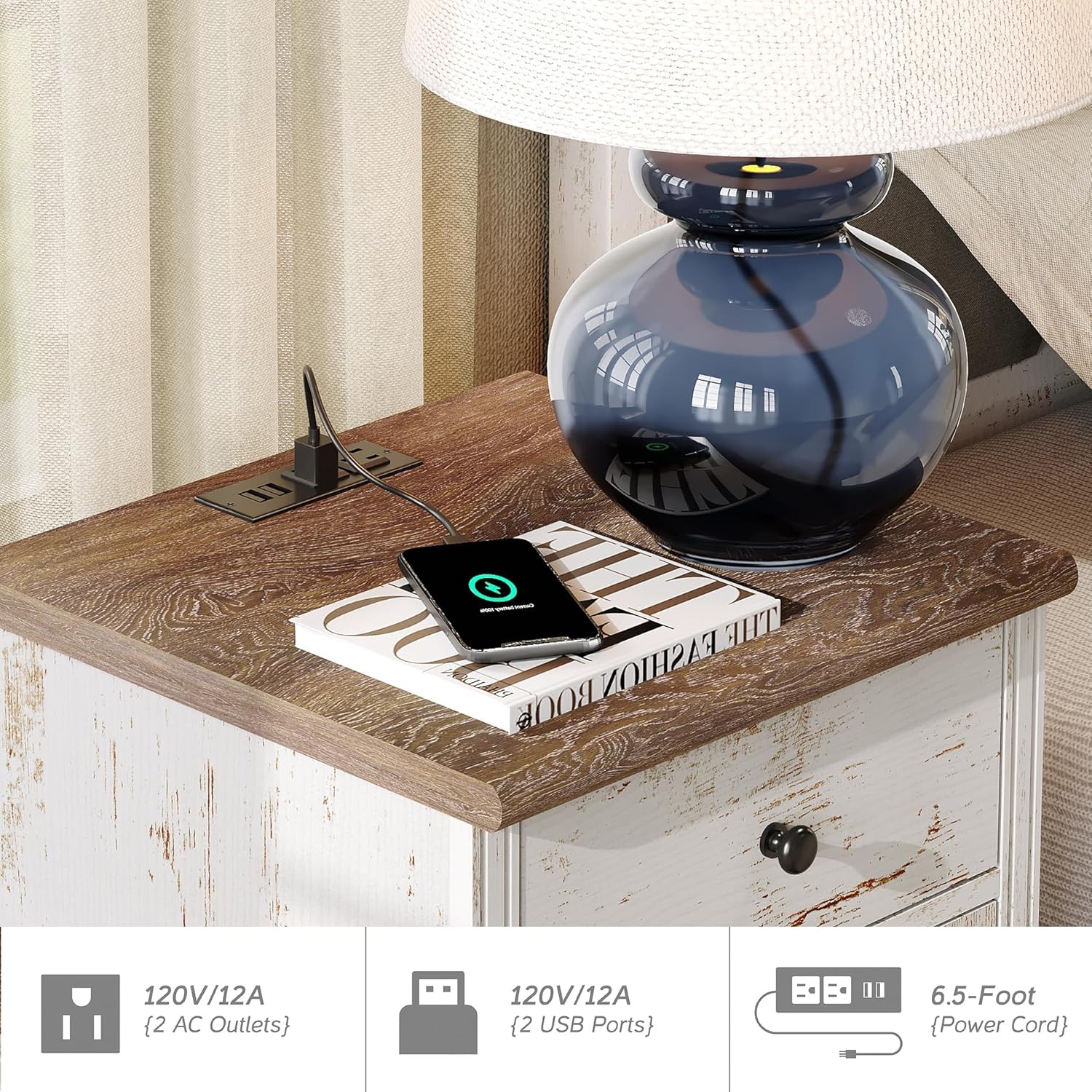
Figure 5.1: Detail of the charging station with AC and USB ports.
5.2 Storage and Display
The TV stand features three sliding drawers and three storage cabinets, offering ample space for various items:
- Drawers: Ideal for smaller items, remotes, or personal belongings. The smooth metal drawer sliders ensure easy opening and closing.
- Cabinets: Suitable for media devices, books, DVDs, or decorative items. The internal shelves provide organized storage.

Figure 5.2: Example of a side table used for storage and display.
6. Maintenance
6.1 Cleaning
The rustic white finish and distressed wood surface are designed for easy maintenance:
- Wipe the surface with a soft, damp cloth.
- Avoid using harsh chemicals or abrasive cleaners, as these can damage the finish.
- The surface is waterproof, allowing for easy cleanup of spills.

Figure 6.1: The waterproof surface allows for easy cleaning.
6.2 General Care
- Periodically check all connections and tighten any loose screws to maintain stability.
- Avoid placing extremely hot or cold items directly on the surface without protection.
- Keep the unit away from direct sunlight and excessive humidity to prevent material degradation.
7. Troubleshooting
If you encounter any issues with your WAMPAT Farmhouse TV Stand, refer to the following common solutions:
- Wobbly Unit: Ensure all screws are fully tightened. Check that the unit is placed on a level surface. Adjust the feet if applicable.
- Drawers Not Sliding Smoothly: Verify that the drawer sliders are correctly installed and aligned. Ensure no obstructions are present in the tracks.
- Charging Station Not Working: Check that the power cable is securely plugged into both the unit and a functional wall outlet. Test the outlet with another device. Ensure devices are properly connected to the AC or USB ports.
- Missing Parts: If you find any parts missing during assembly, please contact WAMPAT customer service immediately.
8. Specifications
| Feature | Detail |
|---|---|
| Model Number | W01FA097A+W11F4046A-TS-N1-US |
| Overall Dimensions (L x W x H) | 66.9 x 15.7 x 30.9 inches (170 x 40 x 78.5 cm) |
| Main Cabinet Dimensions (L x W x H) | 33.9 x 15.7 x 30.9 inches (86 x 40 x 78.5 cm) |
| Side Table Dimensions (L x W x H) | 16.5 x 15.7 x 30.9 inches (42 x 40 x 78.5 cm) |
| Material | High-grade Certified MDF (Wood) |
| Color | Rustic White |
| TV Size Compatibility | Up to 75 inches |
| Storage | 3 Sliding Drawers, 3 Storage Cabinets, 6 Shelves |
| Charging Station | 2 AC Outlets, 2 USB Ports |
| Power Cable Length | 6.5 feet |

Figure 8.1: TV size compatibility for the WAMPAT TV stand.
9. Warranty and Support
WAMPAT is committed to providing professional service and support for its products. While specific warranty details are not provided in this document, if you have any questions, concerns, or require assistance with your WAMPAT Farmhouse TV Stand, please do not hesitate to contact WAMPAT customer service. Refer to your purchase documentation or the WAMPAT official website for contact information.


