
Introduction
This manual provides essential instructions for the proper use, setup, and maintenance of your Fastrack Reflex Tunes FT3 Earbuds. Please read this guide thoroughly before using the product to ensure optimal performance and longevity.
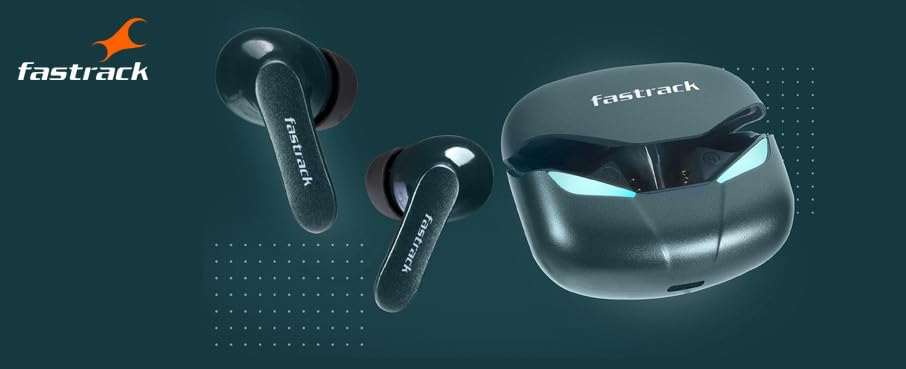
Image: Fastrack Reflex Tunes FT3 Earbuds and their charging case.
What's in the Box
Verify that all items are present in the package:
- Fastrack Reflex Tunes FT3 Earbuds (Left and Right)
- Charging Case
- USB Charging Cable
- Multiple Sizes of Ear Tips

Image: The Fastrack Reflex Tunes FT3 Earbuds package contents.
Setup
1. Charging the Earbuds and Case
Before first use, fully charge the earbuds and the charging case.
- Place the earbuds into the charging case.
- Connect the USB charging cable to the charging port on the case and to a power source.
- The indicator lights on the case will show the charging status. A full charge provides up to 24 hours of total playback time with the charging case.

Image: Earbuds inside the charging case, illustrating the 24-hour battery life.
2. Bluetooth Pairing
Follow these steps to pair your earbuds with a Bluetooth-enabled device:
- Open the charging case. The earbuds will automatically enter pairing mode.
- On your device (smartphone, tablet, laptop), go to Bluetooth settings.
- Search for available devices and select "Fastrack Reflex Tunes FT3".
- Once connected, you will hear a confirmation tone, and the indicator lights on the earbuds will change.
Operating the Earbuds
Touch Controls
The Fastrack Reflex Tunes FT3 Earbuds feature intuitive touch controls on each earbud. Specific functions may vary slightly by device or firmware version.
- Single Tap: Play/Pause music, Answer/End call.
- Double Tap (Right Earbud): Next track.
- Double Tap (Left Earbud): Previous track.
- Triple Tap: Activate voice assistant.
- Long Press (2 seconds): Reject call.
- Long Press (3 seconds): Toggle Gaming Mode (refer to Gaming Mode section).
Gaming Mode
Activate Gaming Mode for a low-latency audio experience, ideal for gaming sessions.
- To activate Gaming Mode, long press either earbud for 3 seconds until you hear a specific sound prompt.
- To deactivate, repeat the long press action.

Image: User engaging in mobile gaming with the earbuds, highlighting the Gaming Mode feature.
Environmental Noise Cancellation (ENC)
The earbuds feature Environmental Noise Cancellation to reduce ambient noise during calls, ensuring clearer communication. This feature is automatically active during calls.

Image: A user wearing the earbuds, demonstrating the Environmental Noise Cancellation feature.
Maintenance
Cleaning
To maintain optimal sound quality and hygiene:
- Gently wipe the earbuds and charging case with a soft, dry, lint-free cloth.
- Remove ear tips and clean them with mild soap and water, then dry thoroughly before reattaching.
- Avoid using abrasive materials, alcohol, or chemical cleaners.
Water Resistance (IPX6)
The Fastrack Reflex Tunes FT3 Earbuds are rated IPX6 for water resistance, meaning they are protected against powerful water jets.
- This rating makes them suitable for use during workouts and in light rain.
- Do not submerge the earbuds in water.
- Ensure the charging port is dry before charging.
Troubleshooting
| Problem | Solution |
|---|---|
| Earbuds not pairing | Ensure earbuds are charged. Turn off and on Bluetooth on your device. Forget the device in Bluetooth settings and re-pair. |
| No sound from one earbud | Place both earbuds back in the case, close it, then open again. Check if both are charged. |
| Charging issues | Check the charging cable and power adapter. Ensure the charging port on the case is clean and free of debris. |
| Low volume or poor sound quality | Adjust volume on your device. Ensure ear tips are properly sealed in your ear. Clean earbud grilles. |
Specifications
| Feature | Detail |
|---|---|
| Model Name | Reflex Tunes FT3 |
| Model Number | WFTFT3GNA03 |
| Connectivity | Wireless (Bluetooth) |
| Battery Life | Up to 24 Hours (with charging case) |
| Driver Size | 10 mm Super Bass Driver |
| Water Resistance | IPX6 (Sweat & Water Resistant) |
| Special Features | Gaming Mode (Low Latency), Environmental Noise Cancellation (ENC) |
| Control Method | Touch |
| Ear Placement | In Ear |
| Weight | 40 Grams |
| Manufacturer | Fastrack |
Warranty and Support
Your Fastrack Reflex Tunes FT3 Earbuds come with a 1-year manufacturing defect warranty. This warranty covers defects in materials and workmanship under normal use.
For warranty claims, technical support, or further assistance, please contact Fastrack customer service. Keep your proof of purchase for warranty validation.
Importer Contact Information: Imported by Titan Company Limited 3 Sipcot Industries complex, Hosur- 635126


