
Introduction
This manual provides essential information for the safe and efficient operation of your Zebronics Party FYRE 700 Portable Party Speaker. Please read this manual thoroughly before using the product and retain it for future reference.
The Zebronics Party FYRE 700 is a high-power portable party speaker designed for various audio applications, including music playback, karaoke, and live performances. It features dual 13.33 cm drivers, a wireless microphone, TWS function, multiple connectivity options, and dynamic RGB lighting.

Image: The Zebronics Party FYRE 700 speaker, showcasing its sleek design and integrated RGB lighting.
Box Contents
Verify that all items listed below are included in the package:
- DJ Speaker - 1 unit
- Remote Control - 1 unit
- Wireless Microphone - 1 unit
- Input Cable - 1 unit
- Charging Cable - 1 unit
- QR Code Guide - 1 unit
Product Features
- Powerful Audio Output: 120W RMS output with dual 13.33 cm full-range drivers for clear and strong bass.
- Extended Playback: Up to 7 hours of playback at 50% volume with LED off, supported by rapid charging.
- Karaoke and Recording: Includes a wireless microphone, supports karaoke, mic recording, and live performances.
- Comprehensive Sound Controls: Independent controls for music volume, bass, treble, microphone, guitar, and echo.
- True Wireless Stereo (TWS): Wirelessly pair two compatible speakers for an expanded stereo soundstage.
- Multiple Connectivity: Bluetooth v5.3, USB, and AUX input for versatile audio source connection.
- Dynamic RGB Lighting: 9 distinct RGB lighting modes to enhance the visual experience.
- Portability: Equipped with a convenient carry handle for easy transport.
- Remote Control: For convenient operation from a distance.

Image: Close-up view of the speaker's dual 13.33cm full-range drivers, illustrating the 120W RMS output capability.
Setup
1. Initial Charging
Before first use, fully charge the speaker using the provided charging cable. Connect the charging cable to the Type-C port on the speaker and a compatible USB power adapter (not included). The charging indicator will show the charging status.
2. Connecting the Wireless Microphone
The speaker comes with a wireless microphone. Ensure the microphone has batteries installed and is powered on. The microphone will automatically pair with the speaker when both are turned on and within range.

Image: A hand holding the wireless microphone, highlighting its use for karaoke and recording.
Operating Instructions
1. Power On/Off
Press and hold the power button on the speaker's control panel to turn the speaker on or off.
2. Bluetooth Pairing
- Turn on the speaker. It will automatically enter Bluetooth pairing mode.
- Enable Bluetooth on your smartphone or other device.
- Search for "ZEB-PARTY FYRE 700" in the list of available devices and select it to pair.
- A confirmation sound will indicate successful pairing.
3. USB Playback
Insert a USB flash drive containing MP3 audio files into the USB port. The speaker will automatically detect and begin playing music from the USB drive.
4. AUX Input
Connect an external audio source (e.g., laptop, MP3 player) to the AUX input port using the provided input cable. The speaker will switch to AUX mode automatically.
5. Karaoke and Mic Recording
Use the wireless microphone for karaoke. Connect a guitar to the 6.3mm guitar input if desired. Adjust microphone and guitar volumes using the dedicated controls on the speaker's panel.

Image: Detailed view of the speaker's input ports (6.3mm Mic In, Guitar In, Type-C, AUX In, USB) and the included remote control and carry handle.
6. TWS Function (True Wireless Stereo)
To pair two Party FYRE 700 speakers for a stereo experience:
- Ensure both speakers are powered on and not connected to any Bluetooth device.
- On one speaker, press the TWS button. It will emit a sound indicating it's searching for another speaker.
- The two speakers will automatically connect. A confirmation sound will indicate successful TWS pairing.
- Connect your device via Bluetooth to the primary speaker. Audio will now play in stereo across both speakers.

Image: Two Zebronics Party FYRE 700 speakers visually linked, representing the True Wireless Stereo (TWS) pairing function.
7. Sound Controls
Use the control panel on top of the speaker or the remote control to adjust:
- Music Volume: Increase or decrease the overall music playback volume.
- Bass/Treble: Adjust the low and high frequencies of the music.
- Mic/Guitar Volume: Control the volume of connected microphones and guitars.
- Echo: Adjust the echo effect for the microphone.
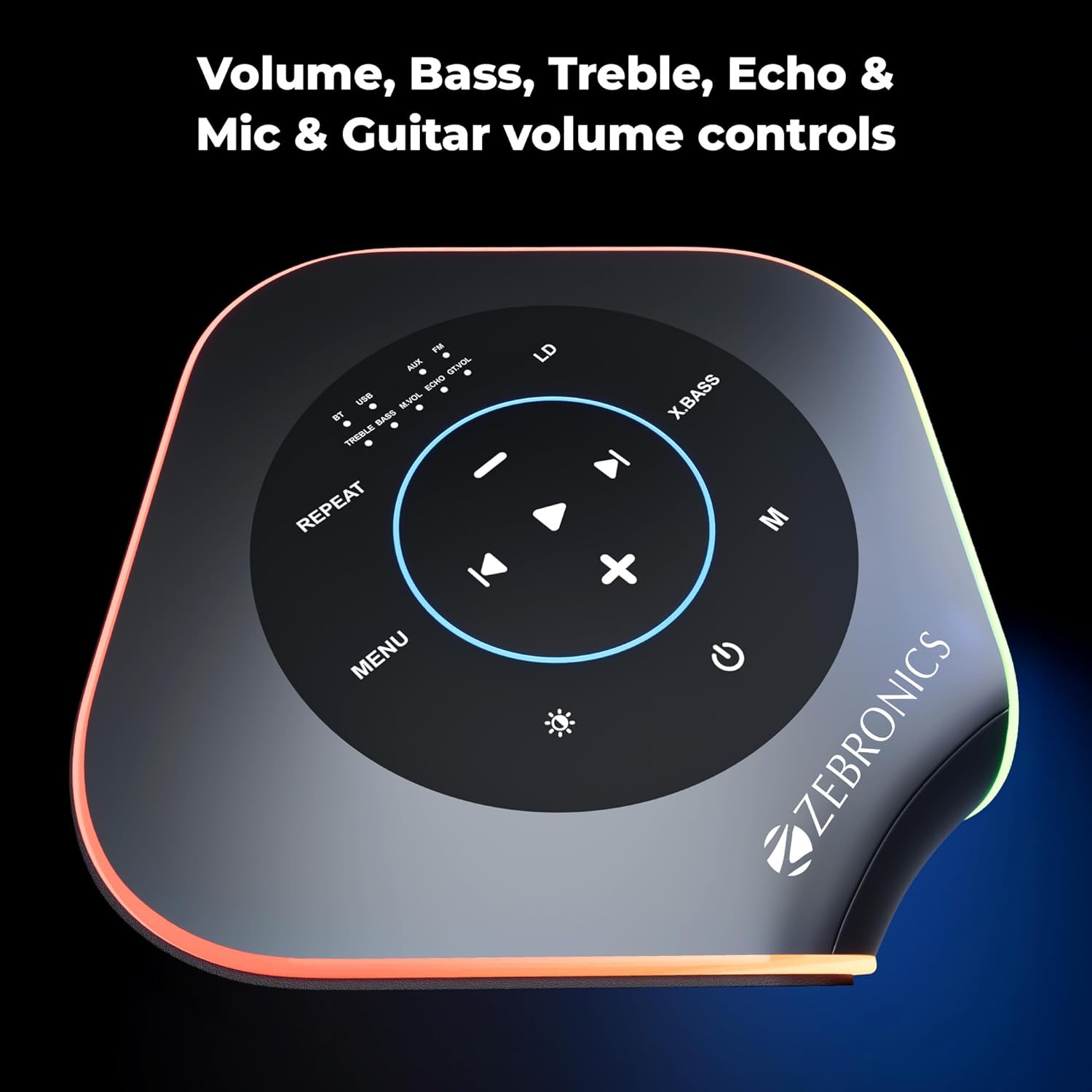
Image: Overhead view of the speaker's control panel, showing buttons for volume, bass, treble, echo, and mic/guitar controls.
8. RGB Lighting Modes
The speaker features 9 dynamic RGB lighting modes. Press the dedicated RGB button on the control panel or remote to cycle through the different lighting effects.

Image: Multiple views of the Zebronics Party FYRE 700 speaker, demonstrating the variety of its 9 RGB lighting modes.
Maintenance
- Clean the speaker with a soft, dry cloth. Do not use abrasive cleaners or solvents.
- Avoid exposing the speaker to water, moisture, or extreme temperatures.
- Store the speaker in a cool, dry place when not in use.
- Do not attempt to disassemble or repair the speaker yourself. Contact authorized service personnel for assistance.
Troubleshooting
| Problem | Possible Cause | Solution |
|---|---|---|
| No power | Battery is depleted. | Charge the speaker using the provided charging cable. |
| No sound | Volume is too low or muted. Incorrect input source selected. | Increase volume. Ensure correct input mode (Bluetooth, USB, AUX) is selected. |
| Bluetooth not connecting | Speaker is not in pairing mode. Device is too far. | Ensure speaker is in pairing mode. Move device closer to the speaker. Disconnect from other devices. |
| Microphone not working | Microphone is off or batteries are low. Microphone volume is low. | Turn on the microphone and check batteries. Increase microphone volume on the speaker. |
Specifications
| Feature | Detail |
|---|---|
| Output Power | 120W RMS |
| Driver Size | Dual 13.33 cm full-range drivers |
| Playback Time | Up to 7 hours (at 50% volume with LED off) |
| Connectivity | Bluetooth v5.3, USB, AUX |
| Microphone Input | Wireless Mic, 6.3mm Mic In |
| Guitar Input | 6.3mm Guitar In |
| RGB Modes | 9 modes |
| Power Source | Corded Electric (for charging) |
| Frequency Response | 18000 KHz |
| Impedance | 4 Ohms |
| Dimensions (L x W x H) | 23.5 x 23.5 x 50 Centimeters |
| Weight | 6000 Grams |
| Model Number | ZEB |
Warranty and Support
Warranty Information
The Zebronics Party FYRE 700 comes with a 1-year carry-in warranty. For warranty claims, please carry the product to an authorized service center.
Manufacturer Contact Information
Zebronics India Pvt Ltd.
No.13/7, Smith Road, Royapettah,
Chennai-600002, Tamil Nadu, India
For further assistance or support, please refer to the QR Code Guide included in your package or visit the official Zebronics website.


