
Introduction
This manual provides detailed instructions for the installation, operation, and maintenance of your aosu T2 Ultra 4K Solar Security Camera System. This system offers comprehensive home security with advanced features and local storage, eliminating the need for monthly subscription fees.
The aosu T2 Ultra system includes 4K TrueColor Night Vision, AI detection and tracking, 360° Pan & Tilt capabilities, and expandable local storage up to 1TB via the aosuBase. The cameras are solar-powered for continuous operation and feature easy, wireless installation.

Image: aosu T2 Ultra 6-Cam Kit with aosuBase. This image displays the complete security camera system, including multiple solar-powered cameras and the central aosuBase unit.
Package Contents
Verify that all components are present in your package:
- aosu T2 Ultra 4K Solar Security Cameras (quantity varies by kit, e.g., 6 for 6-Cam Kit)
- aosuBase Home Security Hub
- Detachable Solar Panels
- Mounting Brackets and Screws
- USB-C Charging Cables
- Quick Start Guide
Setup and Installation
1. aosuBase Setup
- Connect the aosuBase to power using the provided adapter.
- Connect the aosuBase to your home router via an Ethernet cable for initial setup.
- Download the aosu app from your mobile device's app store.
- Follow the in-app instructions to create an account and add your aosuBase by scanning the QR code on the device.
2. Camera Installation
The aosu T2 Ultra cameras are designed for easy, wireless installation. Ensure the camera is fully charged before mounting, or connect the solar panel for continuous power.
- Choose a Location: Select an outdoor location that provides optimal viewing angles and receives sufficient sunlight for the solar panel. The detachable solar panel allows for flexible placement to maximize sun exposure without compromising the camera's view.
- Mount the Camera: Use the provided mounting bracket and screws to securely attach the camera to a wall or eave.
- Connect Solar Panel: Attach the detachable solar panel to the camera or mount it nearby, ensuring the USB-C cable is securely connected and the waterproofing rubber seal is in place.
- Pair with aosuBase: Follow the in-app instructions to pair each camera with your aosuBase. This typically involves pressing a sync button on the camera and following prompts in the app.

Image: Detachable Solar Panel. This image illustrates the flexibility of mounting the solar panel separately from the camera to optimize sunlight exposure.
Video: aosu T2 Ultra 4K Smart Home Security Cameras System Overview. This video provides a general overview of the aosu T2 Ultra system, including setup and key features.
Operating Instructions
Live View and Recording
- Access live camera feeds through the aosu app.
- Recordings are automatically triggered by motion detection and stored locally on the aosuBase.
- View up to 4 cameras simultaneously for comprehensive monitoring.
4K TrueColor Night Vision
The cameras feature 4K resolution with TrueColor Night Vision, providing clear, vibrant footage even in low-light conditions without the need for a spotlight.

Image: 4K TrueColor Night Vision. This image demonstrates the camera's ability to capture vivid, natural color details in low-light conditions.
360° Pan & Tilt and AI Detection
Each camera offers 360° Pan & Tilt coverage. Combined with Triple AI Detection (radar, PIR, and AI analysis), the system accurately identifies real threats and tracks movement, minimizing false alerts.
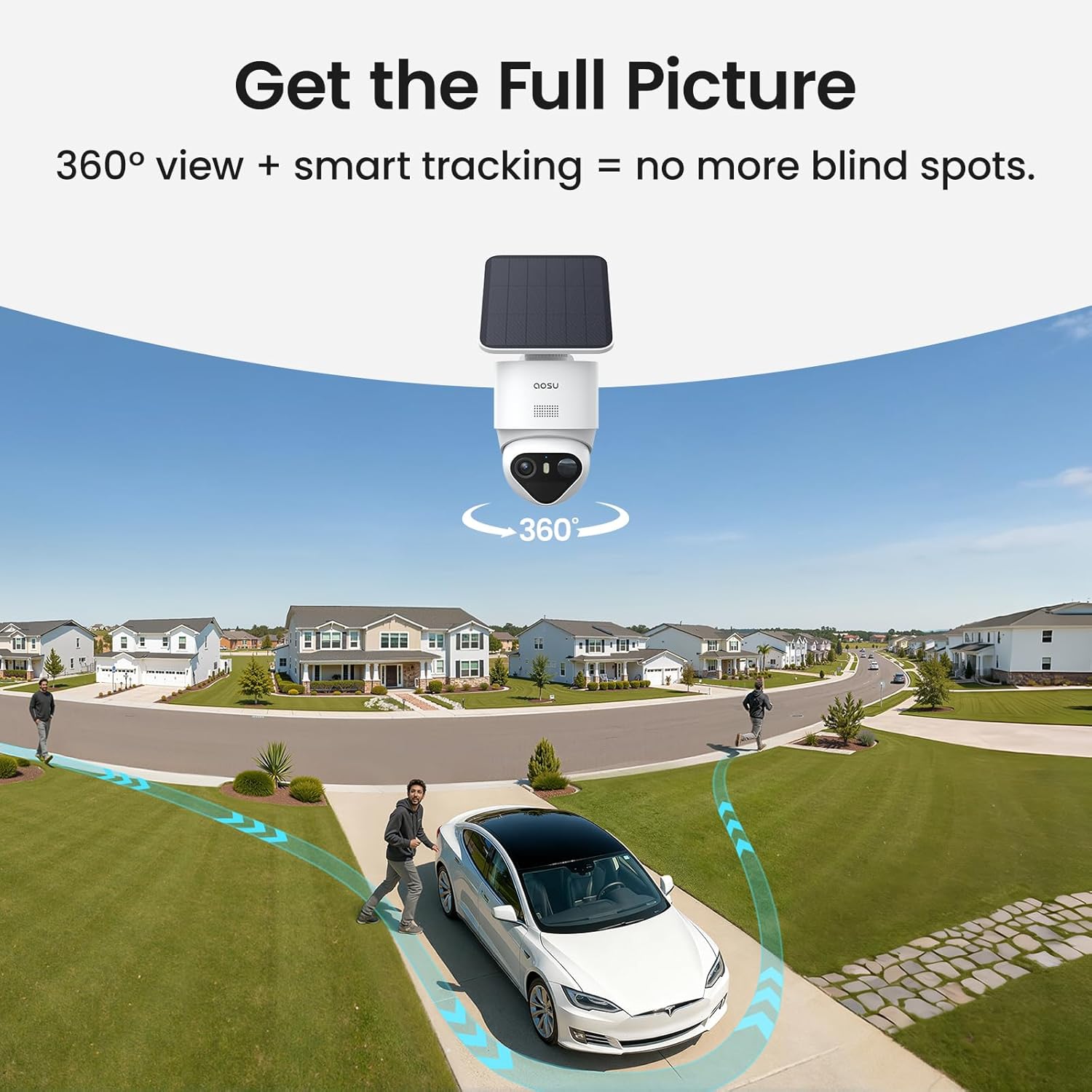
Image: 360° View + Smart Tracking. This image illustrates the camera's wide coverage and ability to track subjects across its field of view.

Image: Triple Detection, Precise Alerts. This image visually explains how radar, PIR, and AI work together for accurate motion detection.
Multi-Camera Tracking
The system connects clips from different cameras into a single, complete video, providing a continuous view of an event as it moves across your property.
Two-Way Audio
Communicate with visitors or deter intruders using the built-in two-way audio feature via the aosu app.
Local Storage
The aosuBase includes 32GB of built-in storage, expandable up to 1TB with a microSD card (not included), ensuring all video recordings are stored locally and securely without subscription fees.
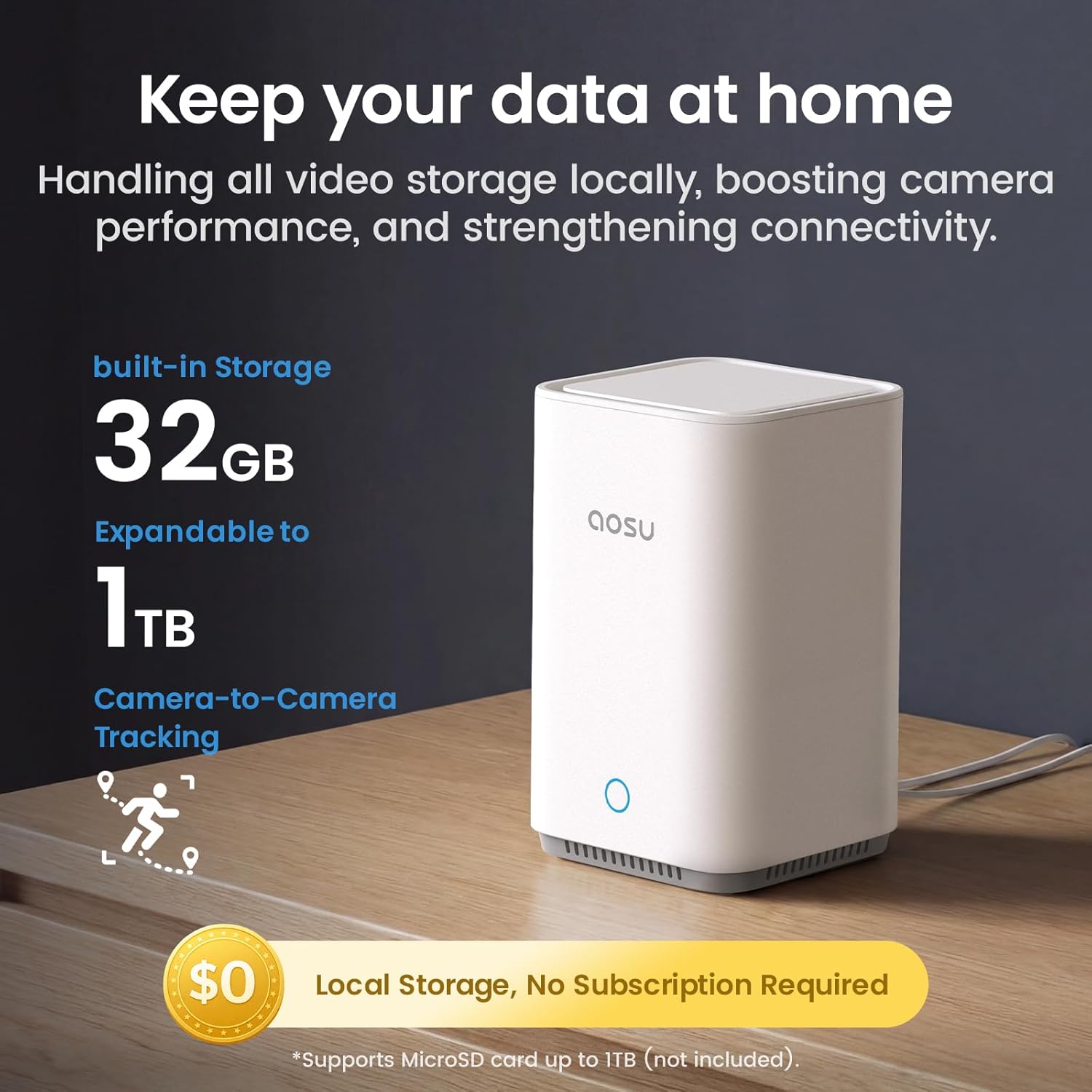
Image: Keep Your Data at Home. This image shows the aosuBase unit and highlights its local storage capabilities, expandable to 1TB.
Maintenance
Solar Panel Care
- Regularly clean the solar panel surface to ensure maximum sunlight absorption. Dust, dirt, or debris can reduce charging efficiency.
- Ensure the solar panel is not obstructed by leaves, branches, or other objects.
Battery Management
- The cameras are designed for continuous operation with solar power. In periods of low sunlight, the internal battery will power the camera.
- Monitor battery levels via the aosu app. If battery levels consistently drop, check the solar panel's placement and cleanliness.
- For extended periods without sunlight, cameras can be temporarily charged via their USB-C port.
Firmware Updates
Periodically check the aosu app for available firmware updates for both the aosuBase and cameras. Updates provide performance improvements and new features.
Troubleshooting
| Issue | Possible Solution |
|---|---|
| Camera not connecting to aosuBase | Ensure both devices are powered on and within range. Restart both the camera and aosuBase. Check Wi-Fi signal strength. |
| Poor video quality | Check network connection speed. Ensure camera lens is clean. Adjust camera placement for optimal lighting. |
| Solar panel not charging | Verify the solar panel is clean and receiving direct sunlight. Check the USB-C connection to the camera. |
| Frequent false alerts | Adjust motion detection sensitivity in the app. Define activity zones to exclude high-traffic areas. |
| No audio or poor audio quality | Check microphone and speaker settings in the app. Ensure there are no obstructions near the microphone/speaker. |
Specifications
| Feature | Detail |
|---|---|
| Model Name | aosu T2 Ultra |
| Model Number | C9X11 |
| Video Capture Resolution | 4K (8 MP Effective Still Resolution) |
| Viewing Angle | 360 Degrees (Pan & Tilt) |
| Optical Zoom | 6x |
| Night Vision | TrueColor Night Vision (Starlight), 7 Meters Range |
| Power Source | Solar Powered, Battery Powered |
| Connectivity Technology | Wireless (Wi-Fi, Bluetooth) |
| Local Storage | 32 GB (Built-in), Expandable up to 1 TB (MicroSD) |
| Indoor/Outdoor Usage | Outdoor |
| Water Resistance Level | IP65 Waterproof |
| Controller Type | Amazon Alexa, Google Assistant, Android, iOS |
| Item Dimensions | 40.6 x 35.3 x 16.5 Centimetres |
Warranty and Support
Manufacturer Warranty: 1 Year Manufacturer Warranty.
For technical support, warranty claims, or further assistance, please contact aosu customer service through their official website or the support section within the aosu app.
Online Resources:
- aosu Official Store on Amazon
- Refer to the aosu app for the latest FAQs and troubleshooting guides.


