
Introduction
This manual provides detailed instructions for the safe and efficient use of your Monster S380 Portable Bluetooth Speaker. Please read this manual thoroughly before operating the device and retain it for future reference. The Monster S380 delivers 40W stereo sound, features Bluetooth 6.0, offers up to 20 hours of playtime, supports TWS pairing, and is IPX6 waterproof, making it suitable for various environments.
Product Overview
The Monster S380 Portable Bluetooth Speaker is engineered for a powerful audio experience with versatile features. Below are some key highlights and visual representations of the speaker's capabilities.
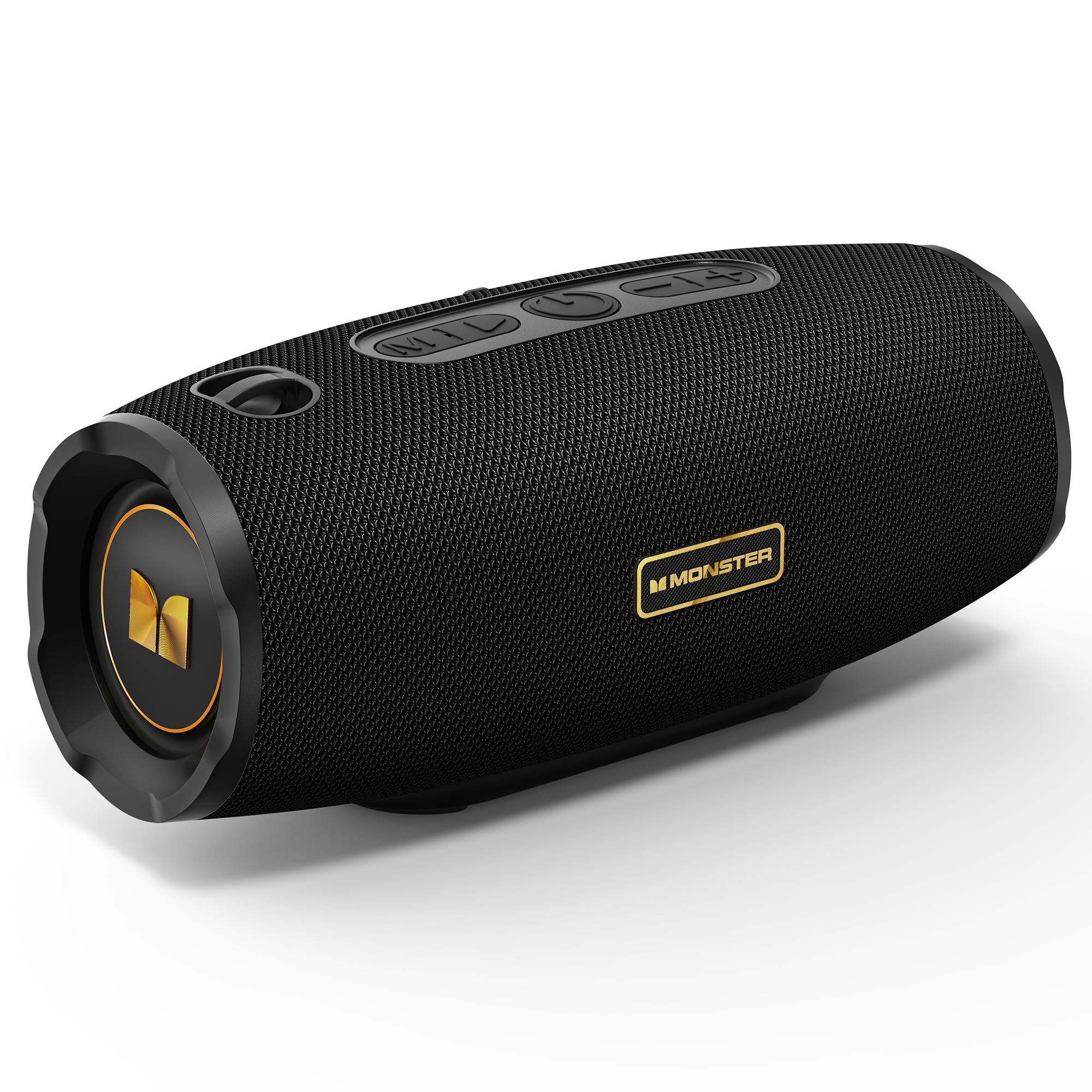
Figure 1: Monster S380 Portable Bluetooth Speaker. This image displays the overall design of the speaker, highlighting its compact and robust build.

Figure 2: Monster S380 Speaker with 40W Pure Monster Sound. This image illustrates the speaker's internal components, emphasizing its 40W audio output for clear and deep bass.

Figure 3: Monster S380 Speaker featuring Bluetooth 6.0 for stable connection. The image highlights the advanced Bluetooth 6.0 technology, ensuring a reliable and fast wireless connection.

Figure 4: Two Monster S380 Speakers demonstrating TWS Pairing. This image shows two speakers connected wirelessly for a synchronized stereo sound experience.

Figure 5: Monster S380 Speaker highlighting 20H Long Playtime. The image emphasizes the extended battery life, allowing for up to 20 hours of music playback.

Figure 6: Monster S380 Speaker showcasing IPX6 Waterproof rating. This image depicts the speaker in a water-resistant environment, demonstrating its IPX6 protection against splashes and rain.

Figure 7: Monster S380 Speaker with Portable Lanyard Design. The image shows the speaker with its integrated lanyard, emphasizing its portability for outdoor activities.
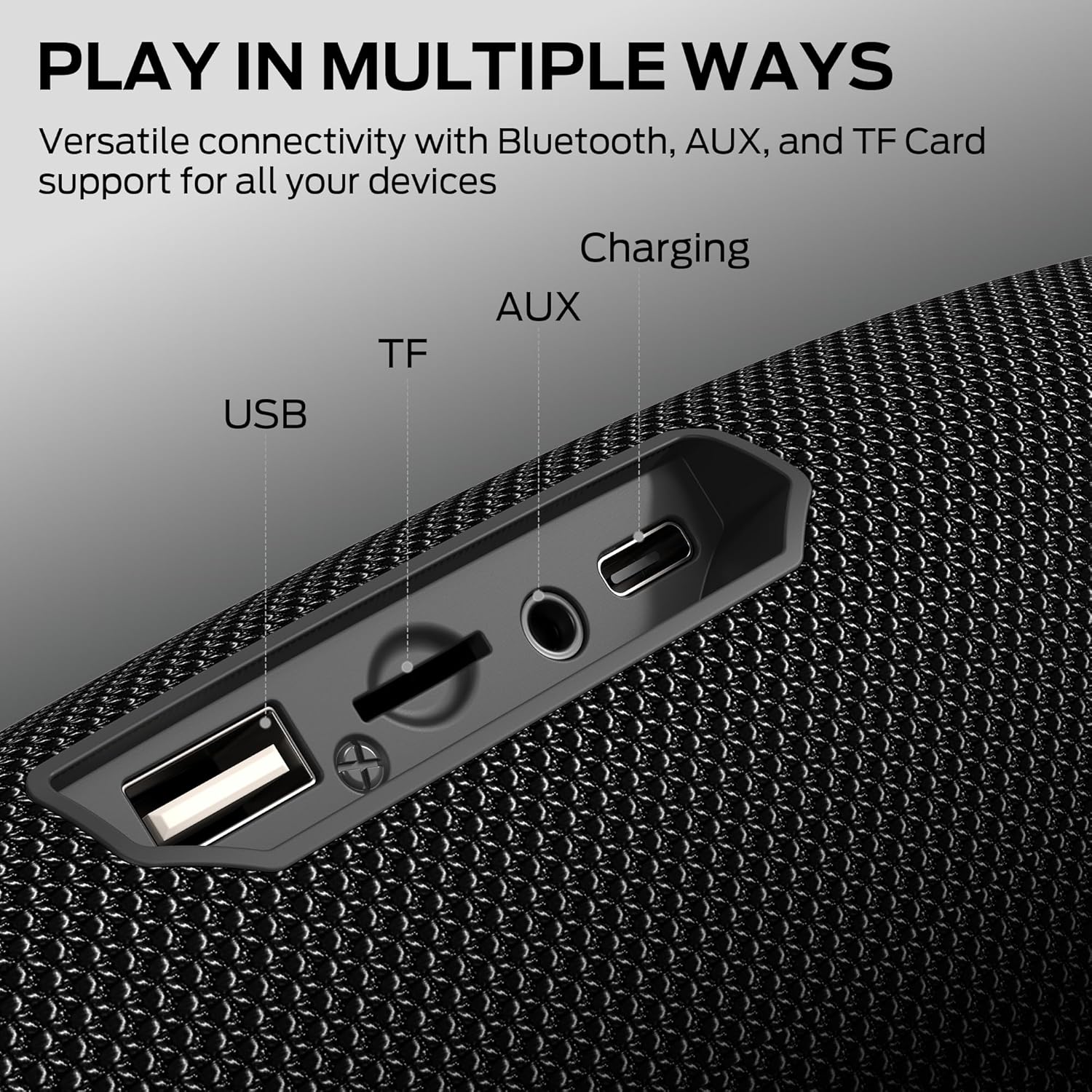
Figure 8: Monster S380 Speaker with multiple connectivity options (USB, TF, AUX, Charging). This image details the various input ports available on the speaker, including USB, TF card, AUX, and charging.
Video 1: Overview of Monster Portable Bluetooth Speakers. This video provides a general overview of Monster's portable Bluetooth speaker line, showcasing features and design.
Video 2: Demonstration of Bluetooth Wireless Speakers. This video demonstrates the wireless capabilities of Bluetooth speakers, including pairing and audio playback.
Package Contents
Ensure all items are present upon unboxing:
- Monster S380 Speaker × 1
- USB-C Charging Cable × 1
- AUX-in Cable × 1
- Quick Start Guide × 1
- Portable Rope × 1

Figure 9: Contents of the Monster S380 Speaker box. This image shows all the items included in the product packaging.
Controls and Indicators
Familiarize yourself with the speaker's control panel and ports:

Figure 10: Monster S380 Speaker button layout and functions. This image clearly labels each button on the speaker's control panel and its corresponding function.
- Power Button (⏻): Press and hold to power on/off.
- Play/Pause Button (▶): Press to play or pause audio.
- Volume Down / Previous Track Button (-): Press to decrease volume. Press and hold to go to the previous track.
- Volume Up / Next Track Button (+): Press to increase volume. Press and hold to go to the next track.
- Mode Button (M): Press to switch between input modes (Bluetooth, AUX, TF Card, USB).
- Lighting Control Button (⚙): Press to cycle through different lighting modes.
- USB-C Charging Port: For charging the speaker.
- AUX-in Port: For wired audio connection.
- TF Card Slot: For playing music directly from a TF card.
- USB Port: For playing music directly from a USB drive.
Setup
Charging the Speaker
- Open the protective rubber flap on the back of the speaker to reveal the charging port.
- Connect the provided USB-C charging cable to the speaker's USB-C port.
- Connect the other end of the USB-C cable to a compatible USB power adapter (not included).
- The charging indicator light will illuminate to show charging status. Once fully charged, the indicator light will change or turn off.
Power On/Off
- To power on, press and hold the Power Button (⏻) for approximately 2-3 seconds until you hear an audible prompt and the indicator lights activate.
- To power off, press and hold the Power Button (⏻) for approximately 2-3 seconds until you hear an audible prompt and the indicator lights turn off.
Bluetooth Pairing
- Ensure the speaker is powered on and in Bluetooth mode. If not, press the Mode Button (M) to switch to Bluetooth mode. The Bluetooth indicator light will flash, indicating it's ready for pairing.
- On your mobile device (smartphone, tablet, laptop), enable Bluetooth and search for available devices.
- Select "Monster S380" from the list of devices.
- Once successfully paired, the Bluetooth indicator light on the speaker will stop flashing and remain solid. You will also hear a confirmation tone.
True Wireless Stereo (TWS) Pairing
TWS pairing allows you to connect two Monster S380 speakers for a synchronized, 60W stereo sound experience.
- Ensure both Monster S380 speakers are powered on and in Bluetooth mode, but not yet connected to any device.
- On one of the speakers (this will be your primary speaker), press and hold the Play/Pause Button (▶) for 2-3 seconds. The speaker will emit a tone, indicating it's searching for another TWS speaker.
- The second speaker will automatically connect to the primary speaker. Once connected, both speakers will emit a confirmation tone, and their indicator lights will synchronize.
- Now, connect your mobile device to the primary speaker via Bluetooth as described in the Bluetooth Pairing section. Audio will play in stereo across both speakers.
Operating Instructions
Playback Controls
- Play/Pause: Press the Play/Pause Button (▶).
- Volume Adjustment: Press the Volume Up (+) or Volume Down (-) buttons.
- Next Track: Press and hold the Volume Up (+) button.
- Previous Track: Press and hold the Volume Down (-) button.
Connectivity Options
The Monster S380 supports multiple audio input methods:
- Bluetooth: Connect wirelessly to your device.
- AUX-in: Use the provided 3.5mm AUX cable to connect to devices without Bluetooth. Press the Mode Button (M) to select AUX mode.
- TF Card: Insert a TF (MicroSD) card with audio files into the TF card slot. The speaker will automatically switch to TF card mode and begin playback.
- USB: Insert a USB flash drive with audio files into the USB port. The speaker will automatically switch to USB mode and begin playback.
Hands-Free Calling
When connected to a smartphone via Bluetooth, the built-in microphone allows for hands-free calling:
- Answer Call: Press the Play/Pause Button (▶).
- End Call: Press the Play/Pause Button (▶) again.
- Reject Call: Press and hold the Play/Pause Button (▶).
Lighting Modes
The speaker features dynamic RGB lighting. Press the Lighting Control Button (⚙) to cycle through various light effects or turn them off.
Maintenance
Waterproofing (IPX6)
The Monster S380 is IPX6 water-resistant, meaning it can withstand strong jets of water. However, it is not designed for submersion. Ensure the rubber flap covering the ports is securely closed before exposing the speaker to water to maintain its water resistance.
Cleaning
Wipe the speaker with a soft, damp cloth. Do not use abrasive cleaners or solvents, as these may damage the surface.
Storage
Store the speaker in a cool, dry place away from direct sunlight and extreme temperatures. If storing for an extended period, charge the battery periodically to maintain its lifespan.
Troubleshooting
- No Power: Ensure the battery is charged. Connect the speaker to a power source using the USB-C cable.
- Cannot Pair via Bluetooth: Make sure the speaker is in Bluetooth pairing mode (flashing indicator light). Ensure your device's Bluetooth is enabled and within range. Try restarting both the speaker and your device.
- No Sound: Check the volume levels on both the speaker and your connected device. Ensure the correct input mode is selected (Bluetooth, AUX, TF Card, USB).
- Poor Sound Quality: Move the speaker closer to your Bluetooth device to reduce interference. Ensure there are no obstructions between the speaker and the device.
- TWS Pairing Failure: Ensure both speakers are not connected to any other Bluetooth device before attempting TWS pairing. Try resetting both speakers and repeating the TWS pairing steps.
Specifications
| Feature | Description |
|---|---|
| Brand | Monster |
| Model Name | MS62153 |
| Speaker Type | Portable Speaker |
| Speaker Maximum Output Power | 40 Watts |
| Connectivity Technology | Bluetooth |
| Bluetooth Version | 6.0 |
| Bluetooth Range | 33 Feet |
| Playtime | Up to 20 hours (Note: Feature bullets state 15H, title states 20H. Using 20H as per title.) |
| Water Resistance Level | IPX6 Water Resistant |
| Special Features | 30W Loud Stereo Sound (Note: Title states 40W, feature bullets state 30W. Using 40W as per title), Support AUX/TF Card/USB, True Wireless Stereo, Built-in Mic, Hands-Free Calling, Skin-Friendly Touch |
| Power Source | Battery Powered (1 AA battery included) |
| Material | Plastic |
| Color | Black |
| Item Weight | 1.92 pounds |
| Product Dimensions | 1"D x 1"W x 1"H |
Warranty and Support
The Monster S380 Portable Bluetooth Speaker comes with a Limited Warranty. For detailed warranty information, product support, or service inquiries, please refer to the contact information provided in the Quick Start Guide or visit the official Monster website.


