
1. Product Overview
The Monster S380 is a portable Bluetooth speaker designed to deliver high-quality audio with a powerful 40W stereo sound output. It features advanced Bluetooth 6.0 for stable connectivity, TWS (True Wireless Stereo) pairing for an immersive experience, and a long-lasting 20-hour battery life. Its IPX6 waterproof rating makes it suitable for various environments, including outdoor use. The speaker also includes a built-in microphone for hands-free calling and supports multiple input interfaces such as AUX and TF card.

Image 1.1: The Monster S380 Portable Bluetooth Speaker, showcasing its sleek design.
2. What's in the Box
Please check the contents of your package to ensure all items are present:
- Monster S380 Bluetooth Speaker ×1
- USB-C Charging Cable ×1
- AUX-in Cable ×1
- Portable Rope ×1
- Quick Start Guide ×1
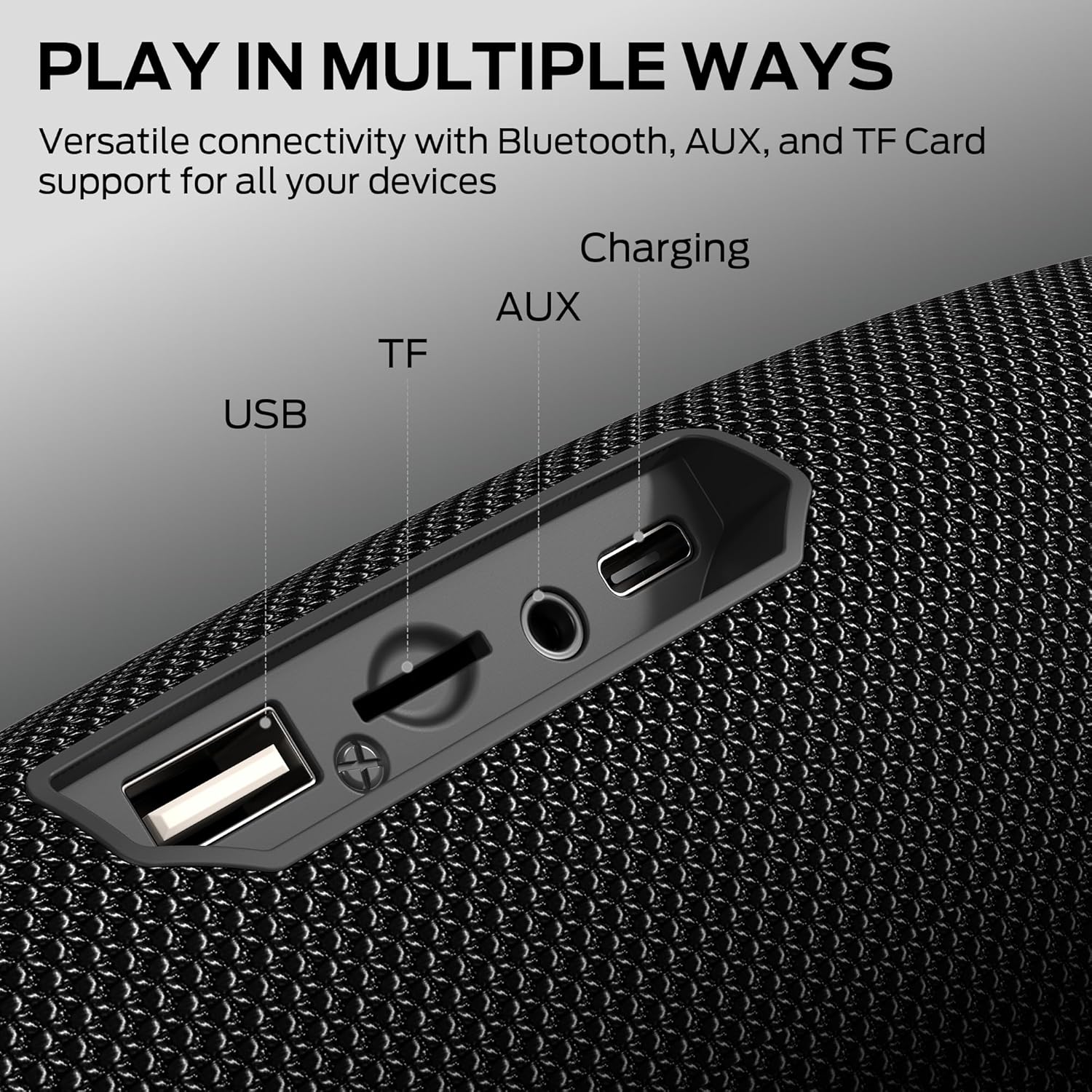
Image 2.1: All included accessories and the Monster S380 speaker as packaged.
3. Product Controls
The Monster S380 speaker features intuitive controls located on the top panel for easy access to various functions:
- Mode Switching (M button): Press to cycle through input modes (Bluetooth, AUX, TF Card).
- Play/Pause (> button): Press to play or pause audio.
- Power On/Off (Power button): Press and hold to power the speaker on or off.
- Volume Down / Previous Song (- button): Press to decrease volume. Press and hold to go to the previous track.
- Volume Up / Next Song (+ button): Press to increase volume. Press and hold to go to the next track.

Image 3.1: Diagram illustrating the function of each button on the Monster S380 speaker.
4. Setup
4.1. Charging the Speaker
Before first use, fully charge the speaker. Connect the provided USB-C charging cable to the speaker's charging port and the other end to a compatible USB power adapter (not included). The charging indicator light will show the charging status.
4.2. Powering On/Off
Press and hold the Power button (⏻) for approximately 3 seconds to turn the speaker on or off. A sound prompt will indicate the power status.
4.3. Bluetooth Pairing
To connect your device via Bluetooth:
- Ensure the speaker is powered on and in Bluetooth pairing mode (indicated by a flashing blue LED).
- On your device (smartphone, tablet, etc.), enable Bluetooth and search for available devices.
- Select "Monster S380" from the list of devices.
- Once connected, the LED indicator will turn solid blue, and a confirmation sound will play.

Image 4.1: Visual representation of the speaker's advanced Bluetooth 6.0 connectivity.
4.4. TWS (True Wireless Stereo) Pairing
For an enhanced stereo experience, you can pair two Monster S380 speakers together:
- Ensure both S380 speakers are powered on and not connected to any other Bluetooth device.
- On one speaker, press and hold the Play/Pause button for 3-5 seconds until you hear a pairing tone. This speaker will become the primary unit.
- The two speakers will automatically connect to each other. Once connected, a confirmation tone will sound, and the LED indicators on both speakers will synchronize.
- Now, connect your device to the primary speaker via Bluetooth as described in section 4.3. Both speakers will play audio in stereo.

Image 4.2: Two Monster S380 speakers paired together for a True Wireless Stereo experience.
5. Operation
5.1. Playing Audio
The Monster S380 offers multiple ways to play your audio:
- Bluetooth: After successful pairing (Section 4.3), simply start playing audio from your connected device.
- AUX-in: Connect an audio device using the provided 3.5mm AUX cable to the speaker's AUX port. The speaker will automatically switch to AUX mode, or you can manually select it using the Mode button.
- TF Card: Insert a TF (MicroSD) card with audio files into the designated slot. The speaker will automatically detect the card and begin playback, or you can select TF Card mode using the Mode button.

Image 5.1: Close-up view of the speaker's multi-input interfaces, including USB, TF card, AUX, and charging ports.
5.2. Hands-Free Calling
When connected via Bluetooth, the built-in microphone allows for hands-free calls:
- Answer/End Call: Press the Play/Pause button once to answer an incoming call or end an ongoing call.
- Reject Call: Press and hold the Play/Pause button for 2 seconds to reject an incoming call.
- Redial: Double-press the Play/Pause button to redial the last number.

Image 5.2: The Monster S380 speaker facilitating a hands-free call while connected to a smartphone and laptop.
5.3. IPX6 Waterproof Feature
The Monster S380 is rated IPX6 waterproof, meaning it can withstand powerful water jets. It is protected against splashing water from any angle. This makes it suitable for use near pools, beaches, or in rainy conditions. Note: While IPX6 rated, it is not designed for submersion in water.

Image 5.3: The Monster S380 speaker demonstrating its IPX6 waterproof capability near a pool.
5.4. Portable Design
The speaker includes a portable lanyard, allowing for easy carrying and attachment to backpacks or other gear, making it ideal for travel and outdoor activities.

Image 5.4: The Monster S380 speaker attached to a backpack via its portable lanyard, highlighting its portability.
6. Maintenance
To ensure the longevity and optimal performance of your Monster S380 speaker, follow these maintenance guidelines:
- Cleaning: Use a soft, damp cloth to wipe the speaker's surface. Avoid using harsh chemicals, cleaning solvents, or abrasive cleaners, as these may damage the finish or internal components.
- Storage: When not in use for extended periods, store the speaker in a cool, dry place away from direct sunlight and extreme temperatures.
- Charging: Always use the provided USB-C charging cable or a certified equivalent. Do not attempt to charge the speaker if it is wet.
- Water Exposure: While IPX6 waterproof, always ensure the port cover is securely closed before exposing the speaker to water. After exposure to water, wipe the speaker dry before charging.
7. Troubleshooting
If you encounter issues with your Monster S380 speaker, refer to the following common problems and solutions:
| Problem | Possible Cause | Solution |
|---|---|---|
| Speaker does not power on. | Low battery. | Charge the speaker using the provided USB-C cable. |
| Cannot pair via Bluetooth. | Speaker is not in pairing mode or already connected to another device. | Ensure the speaker is in Bluetooth pairing mode (flashing blue LED). Disconnect from any other device. Turn off and on your device's Bluetooth. |
| No sound or low volume. | Volume too low on speaker or connected device; incorrect input mode. | Increase volume on both the speaker and your device. Press the 'M' button to ensure the correct input mode (Bluetooth, AUX, TF Card) is selected. |
| TWS pairing fails. | Speakers are too far apart or already connected to other devices. | Ensure both speakers are within close proximity and not connected to any other Bluetooth devices before initiating TWS pairing. |
| Sound distortion. | Volume too high; low battery. | Reduce the volume. Charge the speaker. |
8. Specifications
Key technical specifications for the Monster S380 Bluetooth Speaker:
| Feature | Detail |
|---|---|
| Model Name | MS62153 |
| Brand | Monster |
| Speaker Type | Outdoor |
| Material | Plastic |
| Connectivity Technology | Bluetooth 6.0, Auxiliary, USB, TF Card |
| Audio Output Mode | Stereo |
| Speaker Maximum Output Power | 40 Watts |
| Playtime | Up to 20 hours |
| Waterproof Rating | IPX6 |
| Built-in Microphone | Yes (for hands-free calling) |
| Product Dimensions | 8D x 21W x 8H Centimetres |
| Weight | 880 g |
| Power Source | Battery Powered (1 AA battery included) |
9. Warranty and Support
The Monster S380 Bluetooth Speaker comes with a limited warranty. For detailed information regarding warranty coverage, terms, and conditions, please refer to the warranty card included in your product packaging or visit the official Monster website. For technical support, troubleshooting assistance, or service inquiries, please contact Monster customer support through their official channels.