
Introduction
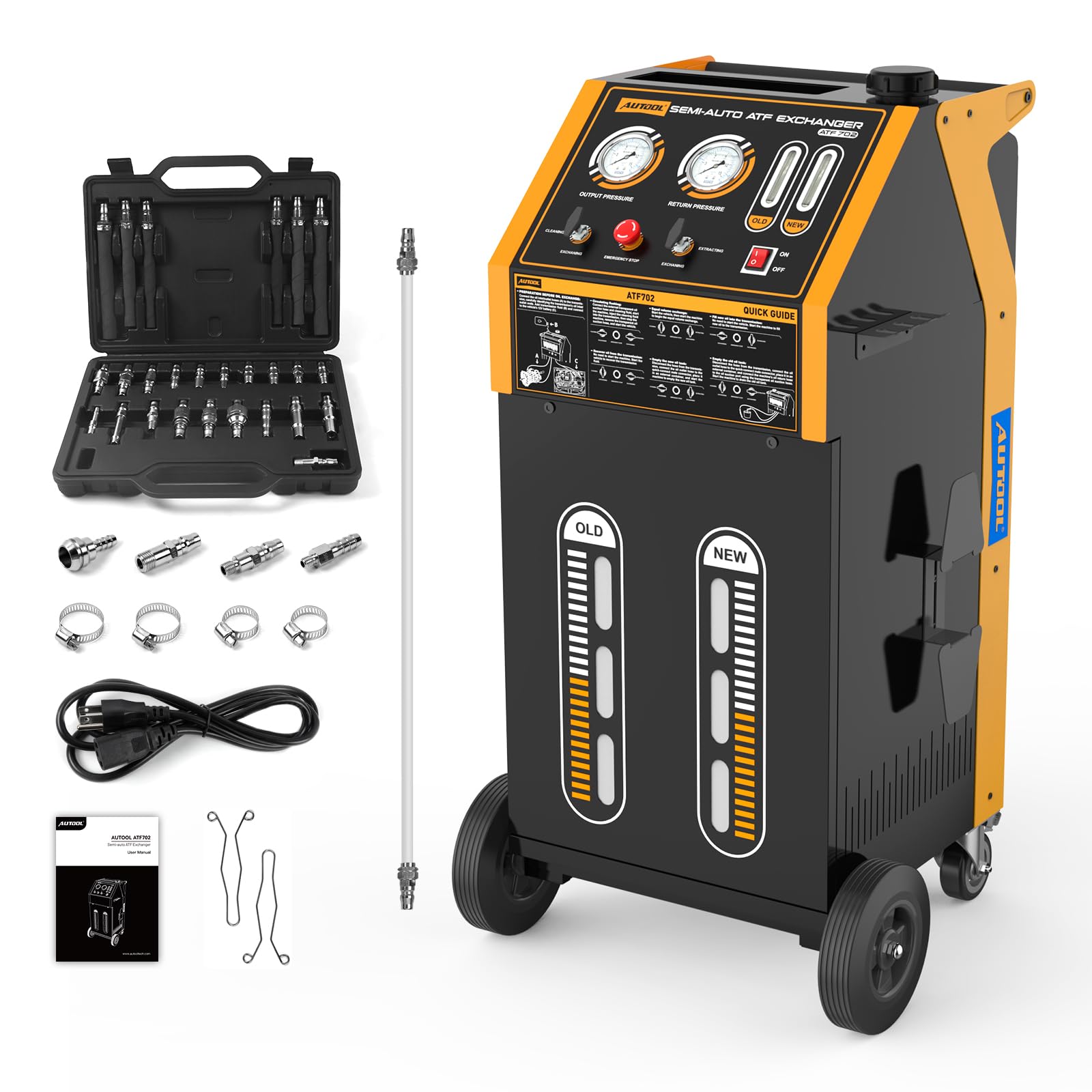
The AUTOOL ATF702 Automatic Transmission Fluid Exchanger is designed for efficient and thorough replacement of automatic transmission fluid. This machine performs circulation cleaning and oil replacement for the transmission, torque converter, and radiator lines, ensuring a high oil replacement rate and extending the service life of the transmission. This manual provides detailed instructions for its setup, operation, maintenance, and specifications.
Setup
Before operating the AUTOOL ATF702, ensure proper setup of the machine and connections to the vehicle.
Unpacking and Initial Inspection
- Carefully remove the ATF702 unit and all accessories from the packaging.
- Verify that all components listed in the packing list are present. The package typically includes the transmission flush machine and various adapters.
- Inspect the unit for any visible damage that may have occurred during transit.
Mobility and Placement
The ATF702 is designed for mobility with 360° rotation casters, allowing easy positioning in the workshop.

Connecting to the Vehicle
The unit utilizes quick-connect fittings for transmission radiator lines, compatible with a wide range of European, American, and Japanese vehicle models. Ensure secure connections to prevent leaks.
- Identify the transmission radiator lines on the vehicle.
- Select the appropriate quick-connect adapters from the provided kit.
- Connect the machine's hoses to the vehicle's transmission lines using the adapters. Ensure connections are firm and leak-free.
- Verify connection prompts on the machine for safe usage.

Operating Instructions
The ATF702 offers both circulating cleaning and equal-volume exchange modes for comprehensive fluid replacement.
Control Panel Overview
Familiarize yourself with the control panel for efficient operation.

- Outlet Pressure Gauge: Displays the pressure of fluid being pumped out.
- Return Pressure Gauge: Displays the pressure of fluid returning to the unit.
- Old/New Oil Observation Windows: Allows visual comparison of old and new transmission fluid color and clarity.
- Flush/Exchange Valve: Controls the mode of operation (Flush or Exchange).
- Extract/Exchange Valve: Controls fluid extraction or exchange.
- Emergency Stop Switch: Immediately halts all operations for safety.
- Power Switch: Turns the unit ON/OFF.
Circulating Cleaning Mode
This mode serves as a pre-treatment to remove accumulated metal debris and sludge contaminants from the transmission system.
- Ensure the machine is correctly connected to the vehicle's transmission lines.
- Set the appropriate valves on the control panel for "Circulating Flushing" (refer to Figure 5 for visual guidance on valve positions).
- Start the machine and allow it to circulate fresh oil through the transmission lines.
- Monitor the oil observation windows to assess the cleaning progress.
- During the cleaning process, it is recommended to shift gears for 10-20 seconds in each gear to ensure thorough cleaning of all transmission components.

Video 1: Demonstration of the AUTOOL ATF702 Automatic Transmission Fluid Exchanger in operation, including the cleaning process and gear shifting recommendations.
Equal-Volume Exchange Mode
This mode enables simultaneous, dynamic replacement of old and new oil in equal volumes, ensuring a high replacement rate (exceeding 90%) with an exchange error of less than 0.2kg.
- After circulating cleaning, switch the valves to the "Equal-Volume Exchange" setting (refer to Figure 6 for valve positions).
- The machine will automatically exchange old fluid for new fluid, maintaining precise volume control.
- Monitor the dual viewing windows to observe the change in oil color from old to new.
- The process is complete when the new oil observation window shows clear, fresh fluid.

Quick Change of ATF
The entire cleaning and oil change process can be completed efficiently, with change efficiency approaching 100%.

Working Modes Overview
The ATF702 supports various working modes for different scenarios.

Maintenance
Proper maintenance ensures the longevity and optimal performance of your AUTOOL ATF702.
Independent Convenient Drainage
The unit supports separate new oil filling or used oil recovery, and features built-in new/used oil drum emptying for easy oil grade changes and compliant waste oil disposal.
- Adding New Oil Separately: Set the left valve to "FLUSH" and the right valve to "EXCHANGE". Turn on the equipment power and shut off the vehicle engine.
- Recovering Old Oil Separately: Set the left valve to "EXCHANGE" and the right valve to "EXTRACT". Turn off the equipment power and start the vehicle engine.
- Draining the New Oil Drum: Set the left valve to "FLUSH" and the right valve to "EXCHANGE". Connect the outlet hose to the adapter and insert it into an external container. Start the equipment to drain the new oil drum.
- Draining the Old Oil Drum: Set the left valve to "EXCHANGE" and the right valve to "EXTRACT". Connect the transparent hose. Attach the outlet hose to the adapter and place it into an external waste oil collection container.


Troubleshooting
This section provides general guidance for common issues. For complex problems, please contact customer support.
- No Power: Ensure the power cable is securely connected and the power switch is in the ON position. Check the fuse located on the unit.
- No Fluid Flow: Verify that all hoses are correctly connected and not kinked. Check fluid levels in both new and old oil tanks. Ensure the vehicle's engine is running if required for the specific operation mode.
- Inaccurate Exchange: Confirm that the machine is on a level surface. Check for any blockages in the fluid lines.
- Leaks: Inspect all hose connections and adapters for tightness. Replace any damaged O-rings or hoses.
Specifications
Key technical specifications for the AUTOOL ATF702 Automatic Transmission Fluid Exchanger.
| Feature | Specification |
|---|---|
| Manufacturer | AUTOOL |
| Model | ATF702 |
| Power Supply | DC 12V |
| Pressure Gauge | 10kg/cm² |
| Oil Return Hose Length | 2.5m |
| Oil Outlet Hose Length | 2.5m |
| Exchange Error | < 0.2kg |
| Maximum Power | < 150W |
| Oil Tank Capacity | 20L (each) |
| Noise Level | < 70dB |
| Item Weight | 128.9 pounds |
| Package Dimensions | 48 x 23.6 x 22.8 inches |


Warranty Information
The AUTOOL ATF702 comes with a 3-year warranty. This warranty covers any quality problems or defects. In case of a defect, AUTOOL will provide a new replacement or parts to ensure customer satisfaction without delay.
Customer Support
For any needs, questions, or technical assistance regarding your AUTOOL ATF702, please do not hesitate to contact our customer support team. We are committed to providing lifetime product support and will respond to your inquiries within 24 hours.
Please refer to your product packaging or the official AUTOOL website for the most current contact information.


