
1. Introduction
Thank you for choosing the SUNLU Filament Dryer S4. This device is designed to efficiently dry 3D printer filaments, improving print quality and preventing common issues caused by moisture absorption. The S4 features a large capacity for up to four spools, rapid heating, multiple safety mechanisms, and intelligent humidity control. Please read this manual thoroughly before operating the device to ensure safe and optimal performance.
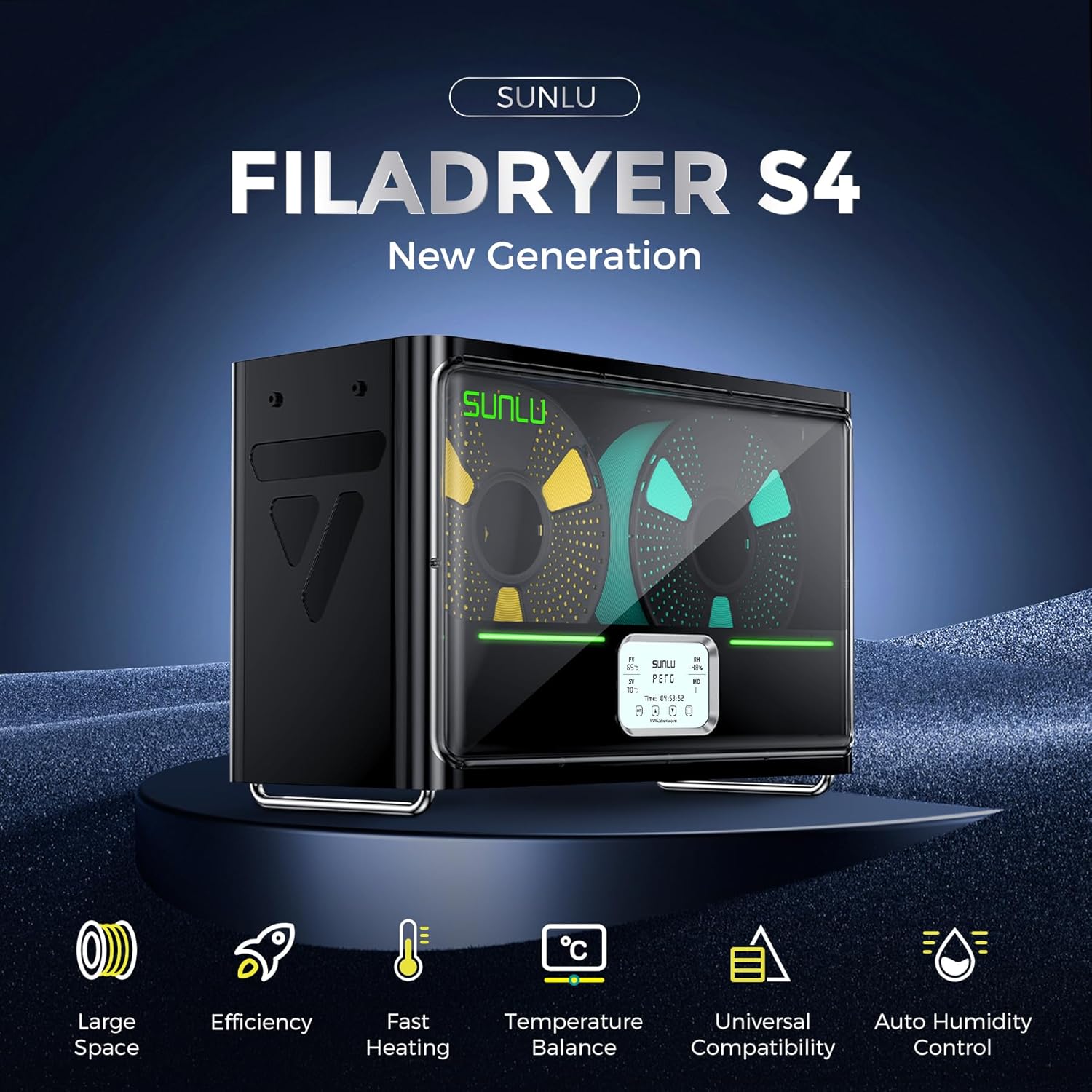
Image 1.1: The SUNLU Filament Dryer S4, showcasing its sleek design and digital display.
2. Safety Instructions
To prevent injury or damage to the device, always adhere to the following safety precautions:
- Ensure the power supply voltage matches the requirements specified on the device label.
- Do not operate the device with wet hands or in damp environments.
- Keep the device away from flammable materials and heat sources.
- Do not block ventilation openings during operation.
- Unplug the device from the power outlet before cleaning or maintenance.
- Do not attempt to disassemble or repair the device yourself. Contact qualified service personnel for assistance.
- Keep out of reach of children.
- The device operates at elevated temperatures. Avoid touching internal components during or immediately after operation.
3. Product Overview
3.1 Key Features
- Large Capacity: Accommodates up to four 1KG spools of 3D printer filament simultaneously.
- Fast Heating: Equipped with a 350W PTC heater, reaching 50°C from 25°C in approximately 30 minutes.
- Triple Security: Features PTC, temperature switch, and software protection for enhanced operational safety.
- Uniform Drying: Three built-in fans ensure consistent temperature distribution (within ±3°C) for thorough filament drying.
- Smart Auto Humidity Control: Automatically starts drying when humidity is between 30% and 50%, and stops when below 25% to prevent over-drying.
3.2 Components
The SUNLU Filament Dryer S4 consists of the main drying unit, a power adapter, and a user manual. The main unit includes:
- Filament drying chamber with spool holders.
- Digital display panel for temperature, humidity, and time settings.
- Control buttons (SET, Up, Down, Power).
- Ventilation openings and internal fans.
- Power input port.
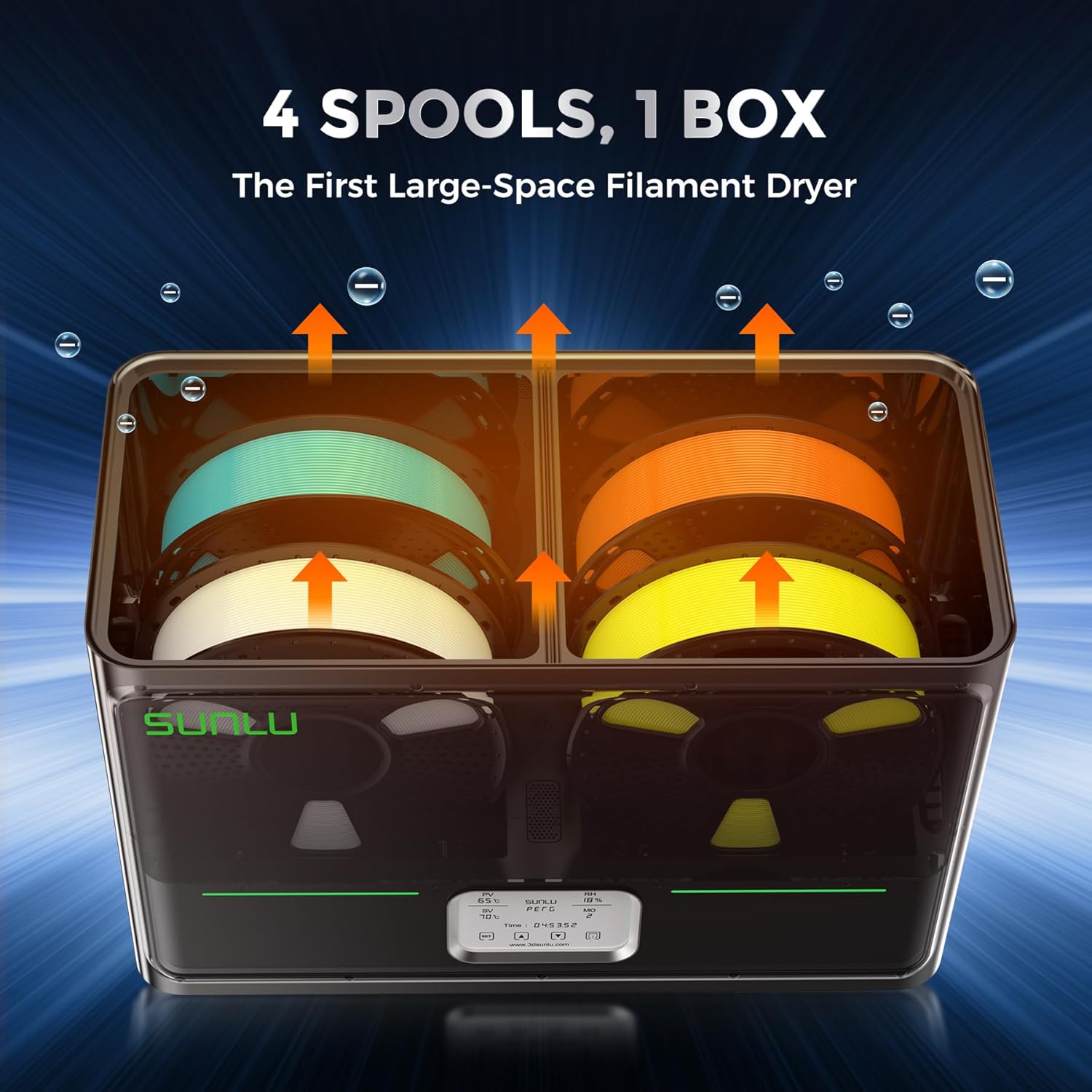
Image 3.1: The S4 dryer accommodating four spools of filament, illustrating its large capacity.

Image 3.2: Visual comparison of a 3D print made with wet filament versus one made with dried filament, highlighting improved surface quality.
4. Setup
- Unpacking: Carefully remove the SUNLU Filament Dryer S4 from its packaging. Retain the packaging for future storage or transport.
- Placement: Place the dryer on a stable, level, and heat-resistant surface. Ensure there is adequate clearance around the device for proper ventilation. Avoid placing it near water sources or in direct sunlight.
- Power Connection: Connect the provided power adapter to the power input port on the back of the dryer, then plug the adapter into a suitable electrical outlet.
- Initial Power On: Press the power button on the control panel to turn on the device. The display will illuminate.
5. Operating Instructions
5.1 Loading Filament
- Open the lid of the filament dryer.
- Place up to four spools of filament onto the designated spool holders inside the drying chamber. Ensure the filament can unroll freely.
- Close the lid securely.
5.2 Setting Drying Parameters
The S4 offers various settings for optimal drying. Use the control panel to adjust parameters.
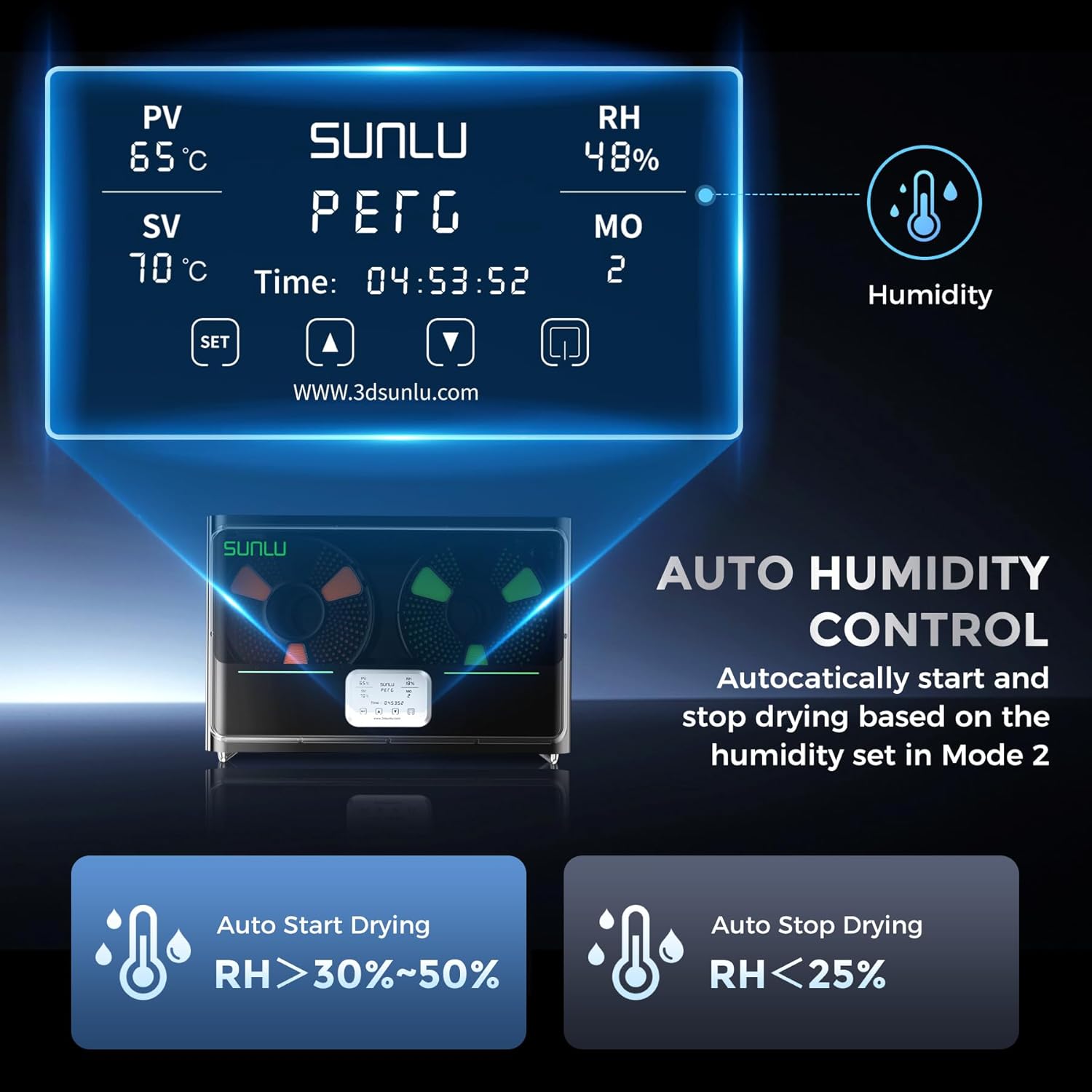
Image 5.1: The S4's digital display, illustrating the humidity and temperature control interface.
- Temperature Setting (SV): Press the SET button to enter temperature adjustment mode. Use the Up and Down arrows to set the desired drying temperature. Press SET again to confirm. The current temperature (PV) will be displayed.
- Drying Time Setting: After setting the temperature, press SET again to adjust the drying duration. Use the Up and Down arrows to set the desired hours. Press SET to confirm.
- Humidity Control Mode (MO): The S4 features an automatic humidity control mode (Mode 2). In this mode, the dryer will automatically start drying when the internal humidity is between 30% and 50% Relative Humidity (RH) and stop when it drops below 25% RH. This prevents excessive drying.
Note: Recommended drying temperatures and times vary by filament type. Refer to filament manufacturer guidelines for optimal settings.
5.3 Starting and Stopping Drying
- Once parameters are set, the dryer will begin heating and drying automatically.
- To stop the drying process manually, press and hold the power button until the device powers off.
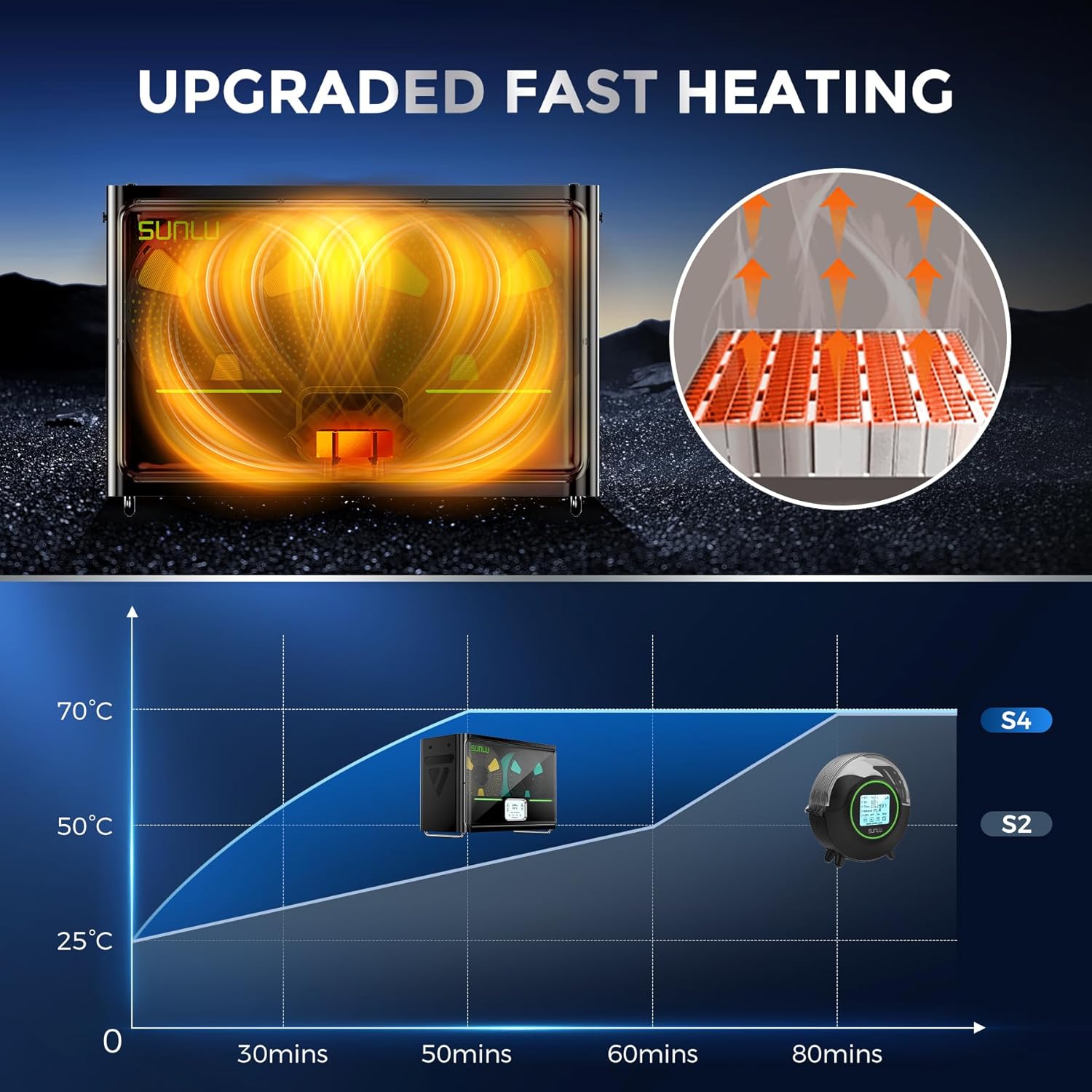
Image 5.2: A graph illustrating the S4's rapid heating capability, reaching target temperatures significantly faster than previous models.

Image 5.3: An illustration of the three internal fans working to ensure uniform heat distribution and drying throughout the chamber.
6. Maintenance
Regular maintenance ensures the longevity and optimal performance of your SUNLU Filament Dryer S4.
- Cleaning:
- Before cleaning, always unplug the device from the power outlet and allow it to cool completely.
- Wipe the exterior with a soft, dry cloth. For stubborn stains, a slightly damp cloth can be used, followed by immediate drying.
- Do not use abrasive cleaners, solvents, or immerse the device in water.
- Ensure ventilation openings are free from dust and debris. Use a soft brush or compressed air if necessary.
- Storage: When not in use for extended periods, store the dryer in a cool, dry place, away from direct sunlight and dust.
7. Troubleshooting
If you encounter issues with your SUNLU Filament Dryer S4, refer to the following common problems and solutions:
| Problem | Possible Cause | Solution |
|---|---|---|
| Device does not power on. | No power supply; loose connection; faulty power adapter. | Check power cable connection. Ensure outlet is functional. Try a different outlet. |
| Filament not drying effectively. | Incorrect temperature/time settings; lid not closed properly; heavily saturated filament. | Verify settings against filament type. Ensure lid is sealed. Extend drying time for very wet filament. |
| Display shows error code. | Internal sensor issue; overheating protection activated. | Power off the device, wait 5 minutes, then restart. If error persists, contact support. |
| Unusual noise during operation. | Obstruction in fan; device not on a stable surface. | Ensure no foreign objects are near fan vents. Place on a flat, stable surface. |

Image 7.1: An illustration detailing the S4's triple security system, including PTC, temperature switch, and software protection.
8. Specifications
| Feature | Detail |
|---|---|
| Model | SUNLU S4 Filament Dryer |
| Capacity | Up to 4 x 1KG filament spools |
| Heating Power | 350W PTC Heater |
| Heating Speed | 25°C to 50°C in approx. 30 minutes |
| Temperature Uniformity | ±3°C (due to triple fans) |
| Humidity Control | Auto start (30-50% RH), Auto stop (<25% RH) |
| Security Features | PTC, Temperature Switch, Software Protection |
| Material Compatibility | PLA, ABS, PETG, Nylon, etc. (all common 3D printing filaments) |
| ASIN | B0G3X18BRP |
9. Warranty and Support
SUNLU products are manufactured to high-quality standards. For warranty information and technical support, please refer to the warranty card included with your product or visit the official SUNLU website. Please have your product model (S4) and purchase information ready when contacting support.
Official Website: www.3dsunlu.com


