
1. Introduction
Thank you for choosing the Toputure TEB4 Folding Home Exercise Bike. This manual provides essential information for the safe assembly, operation, and maintenance of your new fitness equipment. Please read this manual thoroughly before use and keep it for future reference. This exercise bike is designed to offer a versatile and effective workout experience in the comfort of your home, featuring 5-in-1 workout modes, 16 levels of magnetic resistance, and smart app connectivity.
2. Important Safety Information
Before starting any exercise program, consult with your physician. This is especially important for individuals over the age of 35 or those with pre-existing health conditions.
- Always wear appropriate exercise attire and footwear.
- Ensure the exercise bike is placed on a flat, stable surface.
- Keep children and pets away from the equipment during use.
- The maximum user weight capacity for this bike is 140 kg (308 lbs). Do not exceed this limit.
- Inspect the bike for any loose parts or damage before each use. Do not use if damaged.
- Adjust the seat and handlebars to a comfortable and safe position before beginning your workout.
- Stop exercising immediately if you feel faint, dizzy, or experience pain.
3. Package Contents
Your Toputure TEB4 Exercise Bike package includes the following components:
- Main Frame (70% pre-assembled)
- Seat and Backrest
- Handlebars
- LCD Monitor
- Pedals with Straps
- Resistance Bands
- Assembly Tool Kit
- User Manual

Image: All components included in the package for the Toputure TEB4 Exercise Bike.
4. Assembly Instructions
Your Toputure TEB4 Exercise Bike arrives 70% pre-assembled to simplify the setup process. The remaining assembly can typically be completed in about 30 minutes using the included tool kit.
- Unpack Components: Carefully remove all parts from the packaging and lay them out. Check against the package contents list to ensure everything is present.
- Attach Stabilizers: Secure the front and rear stabilizer bars to the main frame using the provided bolts and tools.
- Install Pedals: Attach the left and right pedals to their respective cranks. Note that pedals are often marked 'L' and 'R' and thread in opposite directions.
- Mount Seat and Backrest: Slide the seat post into the main frame and secure it at your desired height. Attach the backrest to the seat support.
- Attach Handlebars and Monitor: Secure the handlebars to the main post. Connect the LCD monitor to the handlebar assembly and plug in any necessary sensor cables.
- Connect Resistance Bands: If desired, attach the resistance bands to the designated points on the frame.
- Final Check: Ensure all bolts are tightened and the bike is stable before first use.
For detailed visual guidance, please refer to the online video tutorials available on the Toputure support website or by scanning the QR code on the product packaging.
5. Operating Instructions
5.1. Powering On the Monitor
The LCD monitor will automatically power on when you begin pedaling or press any button. It is powered by batteries (not included, typically AAA). To conserve battery life, the monitor will automatically shut off after a period of inactivity.
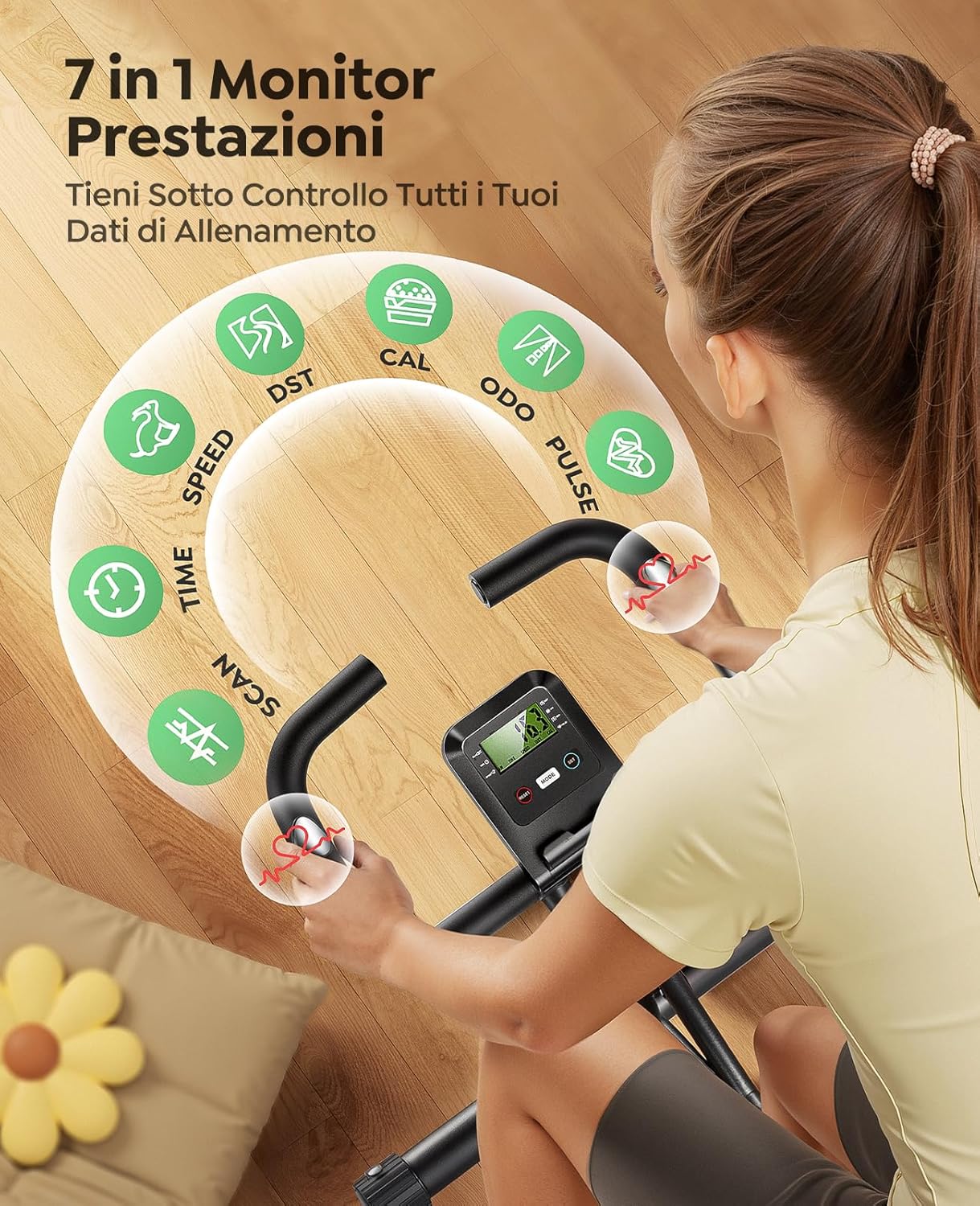
Image: LCD Monitor displaying workout data.
5.2. Adjusting Resistance
The Toputure TEB4 features 16 levels of magnetic resistance. To adjust the intensity of your workout, simply turn the resistance knob located on the main frame. Turn clockwise for higher resistance and counter-clockwise for lower resistance.
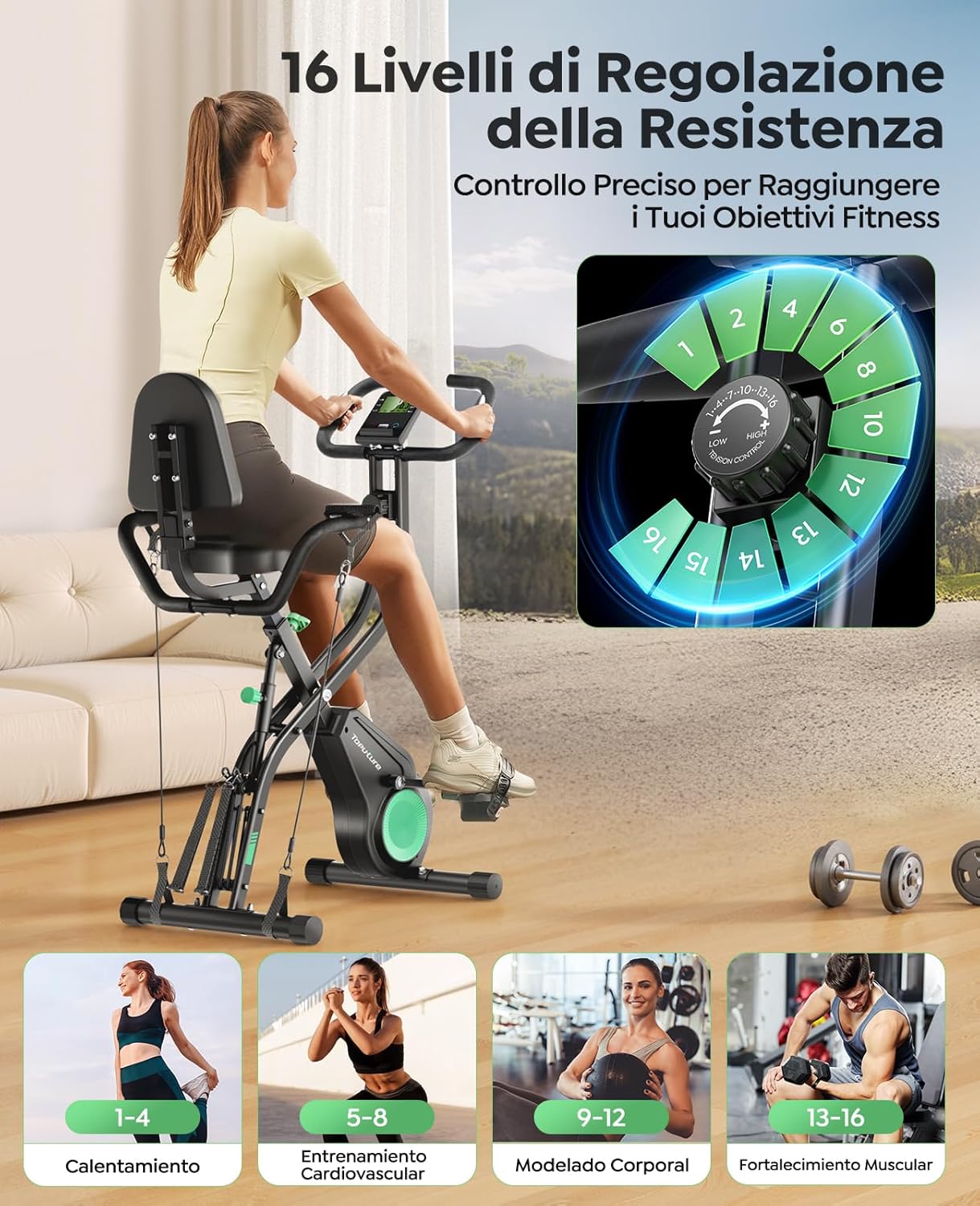
Image: Resistance adjustment knob with 16 levels.
5.3. Using the LCD Monitor
The multi-function LCD monitor displays real-time workout data to help you track your progress:
- TIME: Duration of your current workout.
- SPEED: Current cycling speed.
- RPM: Revolutions Per Minute (pedal cadence).
- DISTANCE: Distance covered during the current workout.
- CALORIES: Estimated calories burned.
- PULSE: Your heart rate, measured by the hand pulse sensors on the handlebars.
- SCAN: Automatically cycles through all metrics.
Use the 'MODE' button to select which metric is displayed or to activate the 'SCAN' function. The 'RESET' button clears all workout data. The 'SET' button is used for setting target values (e.g., target time, distance, or calories) if available on your monitor model.
5.4. App Connectivity
Enhance your training with interactive virtual workouts by connecting your Toputure TEB4 to popular fitness apps via Bluetooth. The bike is compatible with Fitshow, Zwift, and Kinomap.
- Download App: Download your preferred fitness app (Fitshow, Zwift, or Kinomap) from your device's app store.
- Enable Bluetooth: Ensure Bluetooth is enabled on your smartphone or tablet.
- Pair Device: Open the fitness app and follow the in-app instructions to connect to your Toputure TEB4 Exercise Bike. The bike should appear as a discoverable device.
- Start Workout: Once connected, you can enjoy interactive training, track your progress, and participate in virtual routes.

Image: App connectivity for interactive workouts.
5.5. 5-in-1 Multifunctional Workout Modes
The Toputure TEB4 offers five distinct workout modes to target various muscle groups and provide a comprehensive fitness experience:
- Vertical Cycling: Standard upright cycling for cardiovascular fitness.
- Racing Cycling: A more aggressive, forward-leaning posture simulating road cycling.
- Horizontal Cycling: A reclined position with back support, ideal for comfort and lower back relief.
- Arm Exercises: Utilize the integrated resistance bands to perform upper body workouts while seated.
- Leg Stretching: Use the resistance bands for lower body stretching and flexibility exercises.

Image: Demonstrating the 5-in-1 workout modes.
5.6. Adjusting Seat and Handlebars
For optimal comfort and exercise efficiency, adjust the seat and handlebars to your body height.
- Seat Adjustment: The seat can be adjusted to 7 different positions. Loosen the adjustment knob below the seat, slide the seat to the desired height (suitable for users 150-195 cm / 4'11"-6'5"), and tighten the knob securely. The extra-large padded seat and ergonomic backrest ensure comfort during longer sessions.
- Handlebar Adjustment: The handlebars can also be adjusted for optimal reach and comfort. Loosen the adjustment knob, set to desired height, and tighten.

Image: Comfortable seat, ergonomic backrest, transport wheels, and anti-slip pedals.
5.7. Folding and Storage
The Toputure TEB4 is designed for easy folding and storage, making it ideal for small spaces.
- Fold the Frame: Locate the folding knob (often green) on the main frame. Loosen or pull the knob as instructed in the assembly guide to allow the frame to fold.
- Secure in Folded Position: Once folded, ensure the frame is securely locked in its compact position.
- Move and Store: Use the integrated transport wheels on the front stabilizer to easily move the folded bike to your desired storage location.

Image: Folded dimensions and transport wheels for easy storage.
6. Maintenance
Regular maintenance ensures the longevity and safe operation of your exercise bike.
- Cleaning: Wipe down the bike with a damp cloth after each use to remove sweat and dust. Avoid abrasive cleaners.
- Inspection: Periodically check all bolts, nuts, and moving parts for tightness. Tighten any loose fasteners.
- Lubrication: No specific lubrication is typically required for magnetic resistance bikes, but refer to the detailed assembly guide for any specific recommendations.
- Storage: Store the bike in a dry, cool place away from direct sunlight and extreme temperatures.
7. Troubleshooting
If you encounter any issues with your Toputure TEB4 Exercise Bike, refer to the following common problems and solutions:
| Problem | Possible Cause | Solution |
|---|---|---|
| Monitor not displaying data | Dead batteries; Loose sensor cable; Inactivity | Replace batteries; Check sensor cable connection; Start pedaling to activate. |
| Unusual noise during operation | Loose bolts; Friction from moving parts | Check and tighten all assembly bolts; Ensure no parts are rubbing. |
| Resistance not changing | Resistance cable issue; Internal mechanism fault | Check if the resistance cable is properly connected and not kinked. If the issue persists, contact customer support. |
| Bike feels unstable | Uneven surface; Loose stabilizer bolts | Ensure the bike is on a level surface. Adjust the leveling caps on the stabilizer bars. Tighten all stabilizer bolts. |
If you cannot resolve the issue using the information above, please contact Toputure customer support for assistance.
8. Specifications
- Model Number: TEB4
- Product Dimensions (Unfolded): 116 x 21 x 39 cm (45.7 x 8.3 x 15.4 inches)
- Item Weight: 19 kg (41.9 lbs)
- Maximum User Weight: 140 kg (308 lbs)
- Recommended User Height: 150-195 cm (4'11"-6'5")
- Material: Reinforced Steel
- Resistance Mechanism: Magnetic
- Resistance Levels: 16
- Power Source: Pedal-powered (for monitor)
- Special Features: 5-in-1 Multifunctional Design, Bluetooth App Connectivity (Fitshow, Zwift, Kinomap), LCD Monitor, Heart Rate Sensors, Foldable Design, Transport Wheels.
9. Warranty and Support
The Toputure TEB4 Exercise Bike comes with a 24-month warranty, which includes free parts replacement. This warranty covers manufacturing defects and ensures your peace of mind.
For any questions, technical assistance, or warranty claims, please contact Toputure customer service. Our dedicated team is ready to assist you.
Contact Information: Please refer to the contact details provided on the Toputure official website or your purchase documentation.


