
Introduction
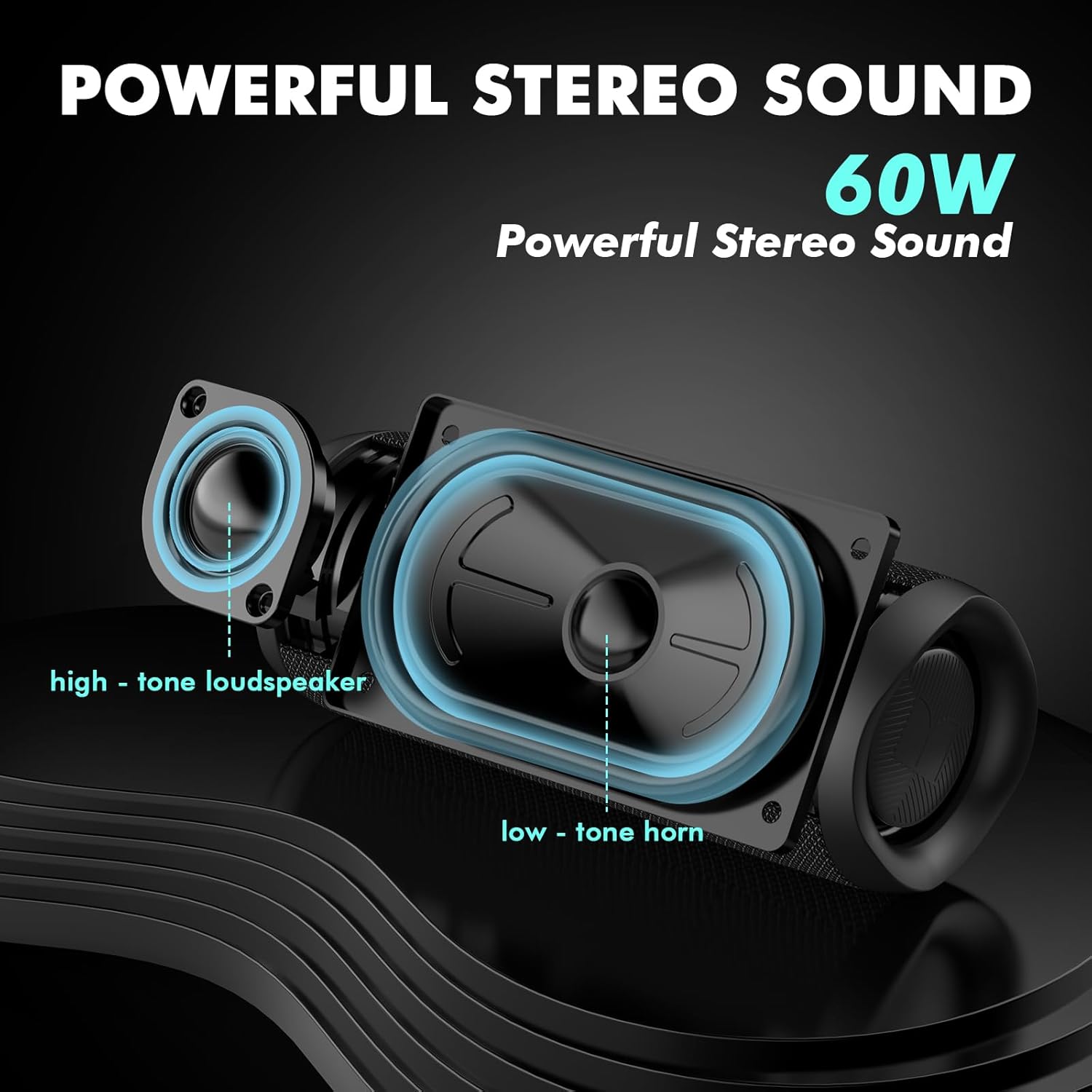
Thank you for choosing the Monster S620 Bluetooth Speaker. This portable outdoor speaker features 60W True Wireless Stereo sound, IPX8 waterproof rating, Bluetooth 5.4 connectivity, and a built-in microphone for hands-free calls. This manual provides essential information for setting up, operating, and maintaining your speaker to ensure optimal performance and longevity.
Package Contents
Please check the package for the following items:
- Monster S620 Bluetooth Speaker
- USB-C Charging Cable
- Quick Start Guide
Product Overview
Speaker Components and Features
The Monster S620 is designed for robust audio performance and portability. It features a durable exterior and strategically placed components for optimal sound delivery.

Control Panel and Connectivity
The speaker features an intuitive control panel for easy operation and supports multiple audio input modes.

Setup Guide
1. Charging the Speaker
Before first use, fully charge the speaker. Connect the provided USB-C charging cable to the speaker's charging port and the other end to a USB power adapter (not included) or a computer's USB port. The charging indicator light will show the charging status and turn off once fully charged.
2. Power On/Off
- To power on: Press and hold the Power button for approximately 2-3 seconds until you hear an audible prompt and the indicator light illuminates.
- To power off: Press and hold the Power button again for approximately 2-3 seconds until you hear an audible prompt and the indicator light turns off.
3. Bluetooth Pairing
The Monster S620 uses Bluetooth 5.4 for fast and stable connections.
- Ensure the speaker is powered on and in Bluetooth pairing mode (the Bluetooth indicator light will flash).
- On your device (smartphone, tablet, computer), enable Bluetooth and search for available devices.
- Select "Monster S620" from the list of devices.
- Once connected, the Bluetooth indicator light will become solid, and you will hear a confirmation sound.
The speaker will automatically attempt to reconnect to the last paired device when powered on, if it is within range (up to 33 feet).
Operating Instructions
Music Playback
- Play/Pause: Press the Play/Pause button once.
- Volume Up: Press the Volume + button.
- Volume Down: Press the Volume - button.
- Next Track: Press and hold the Volume + button.
- Previous Track: Press and hold the Volume - button.
True Wireless Stereo (TWS) Pairing
You can pair two Monster S620 speakers together to achieve a 120W True Wireless Stereo sound experience.
- Ensure both Monster S620 speakers are powered on and not connected to any Bluetooth device.
- On one speaker, press the TWS button (often indicated by a chain link icon). The speaker will enter TWS pairing mode.
- The two speakers will automatically connect to each other. You will hear a confirmation sound once TWS pairing is successful.
- Now, connect your device to one of the speakers via Bluetooth as described in the "Bluetooth Pairing" section. Both speakers will play audio in stereo.

Hands-Free Calling
With its built-in microphone, the Monster S620 allows you to answer calls directly through the speaker when connected to your smartphone.
- Answer Call: Press the Play/Pause button once when a call comes in.
- End Call: Press the Play/Pause button once during a call.
- Reject Call: Press and hold the Play/Pause button for 2 seconds when a call comes in.

TF Card Playback
Insert a TF (MicroSD) card loaded with audio files into the designated slot. The speaker will automatically switch to TF card mode and begin playback. Use the same playback controls as for Bluetooth audio.
Maintenance
Cleaning
Wipe the speaker with a soft, damp cloth. Do not use abrasive cleaners, alcohol, or chemical solvents, as these may damage the surface or internal components. Ensure the charging port cover is securely closed before cleaning or exposing to water.
Water Resistance (IPX8)
The Monster S620 is IPX8 waterproof, meaning it can withstand immersion in water up to 1 meter for 30 minutes. This makes it suitable for use in showers, by the pool, or at the beach. However, it is not designed for prolonged submersion or use in saltwater. Always ensure the charging port cover is tightly sealed before exposing the speaker to water.

Troubleshooting
| Problem | Solution |
|---|---|
| Speaker does not power on. | Ensure the speaker is charged. Connect it to a power source using the USB-C cable. |
| Cannot pair via Bluetooth. | Ensure the speaker is in pairing mode (flashing Bluetooth indicator). Turn off and on your device's Bluetooth. Move the speaker closer to your device. |
| No sound or low volume. | Check volume levels on both the speaker and your connected device. Ensure the speaker is properly paired. |
| TWS pairing fails. | Ensure both speakers are not connected to any other Bluetooth device. Place them close to each other and try pairing again. |
| Sound distortion. | Reduce the volume on both the speaker and your device. Ensure the speaker is not too far from the connected device. |
Specifications
| Model Name: | MS62120 |
| Bluetooth Version: | 5.4 |
| Output Power: | 60W (120W in TWS mode) |
| Waterproof Rating: | IPX8 |
| Frequency Response: | 80 Hz |
| Connectivity: | Bluetooth, TF Card |
| Control Method: | Touch |
| Power Source: | Battery Powered |
| Product Dimensions: | 8.4D x 8.4W x 21.8H Centimetres |
| Item Weight: | 734 Grams |
Safety Information
Please read and follow these safety guidelines to prevent damage to your speaker or personal injury:
- Do not disassemble, repair, or modify the speaker. This may void the warranty and pose safety risks.
- Keep the speaker away from extreme temperatures, direct sunlight, and open flames.
- Avoid dropping or subjecting the speaker to strong impacts.
- Do not expose the speaker to corrosive liquids.
- Ensure the charging port is dry before connecting the charging cable.
- Use only the provided or a certified USB-C charging cable.
- Keep out of reach of children.
Warranty and Support
For warranty information, technical support, or customer service inquiries, please refer to the official Monster website or contact your retailer. Please retain your proof of purchase for warranty claims.


