
1. Product Overview
The GENMAX GM4500iSAD is a 4500W peak, dual-fuel silent inverter generator designed for reliable power in various settings, including home backup, job sites, and outdoor camping. It features ultra-lightweight construction, a CO detector for safety, and is EPA compliant. This generator offers the flexibility to operate on either gasoline or propane, providing stable and clean power suitable for sensitive electronics.
- Dual Fuel Capability: Operates on gasoline (4500 peak watts / 4000 rated watts) or propane (4000 peak watts / 3600 running watts).
- Clean Inverter Technology: Produces pure sine wave power (≤3% Total Harmonic Distortion) safe for sensitive electronics.
- Ultra-Quiet Operation: Runs as quiet as 62 dB(A) at 25% load, making it ideal for noise-sensitive environments.
- Portable Design: Weighs only 49.2 pounds with a compact design for easy transport and storage.
- Multiple Outlets: Equipped with 1x120V AC TT-30R RV-ready outlet, 1xduplex 120V AC 5-20R household outlets, 1x12V cigarette lighter port, and 1xUSB-C & USB-A adapter.
- Safety Features: Includes a CO Detector, low oil shutdown, and overload protection.
2. Safety Information
Always read and understand this manual before operating the generator. Failure to follow instructions can result in serious injury or death.
- Carbon Monoxide Hazard: Generators produce carbon monoxide (CO) gas, which is colorless and odorless. Operating the generator indoors or in partially enclosed spaces can lead to fatal CO poisoning. ALWAYS operate the generator outdoors in a well-ventilated area, far away from windows, doors, and vents.
- Fire Hazard: Gasoline and propane are highly flammable. Refuel only when the engine is off and cool. Do not smoke near the generator. Store fuel in approved containers in a well-ventilated area away from ignition sources.
- Electrical Shock Hazard: Never operate the generator in wet conditions. Ensure proper grounding. Do not touch bare wires or receptacles.
- Hot Surfaces: The generator's engine and muffler become very hot during operation and remain hot for some time after shutdown. Avoid touching hot surfaces to prevent burns.
- Proper Grounding: Always ground the generator before operation to prevent electrical shock.
- Children and Pets: Keep children and pets away from the generator at all times.
3. What's in the Box
Your GENMAX GM4500iSAD generator package includes the following items:
- GENMAX GM4500iSAD Inverter Generator
- Cigarette Lighter to USB-C&A Adapter (1)
- Dual-Purpose Screwdriver (1)
- LPG Hose (1)
- Oil Funnel (1)
- Spark Plug Socket Wrench (1)
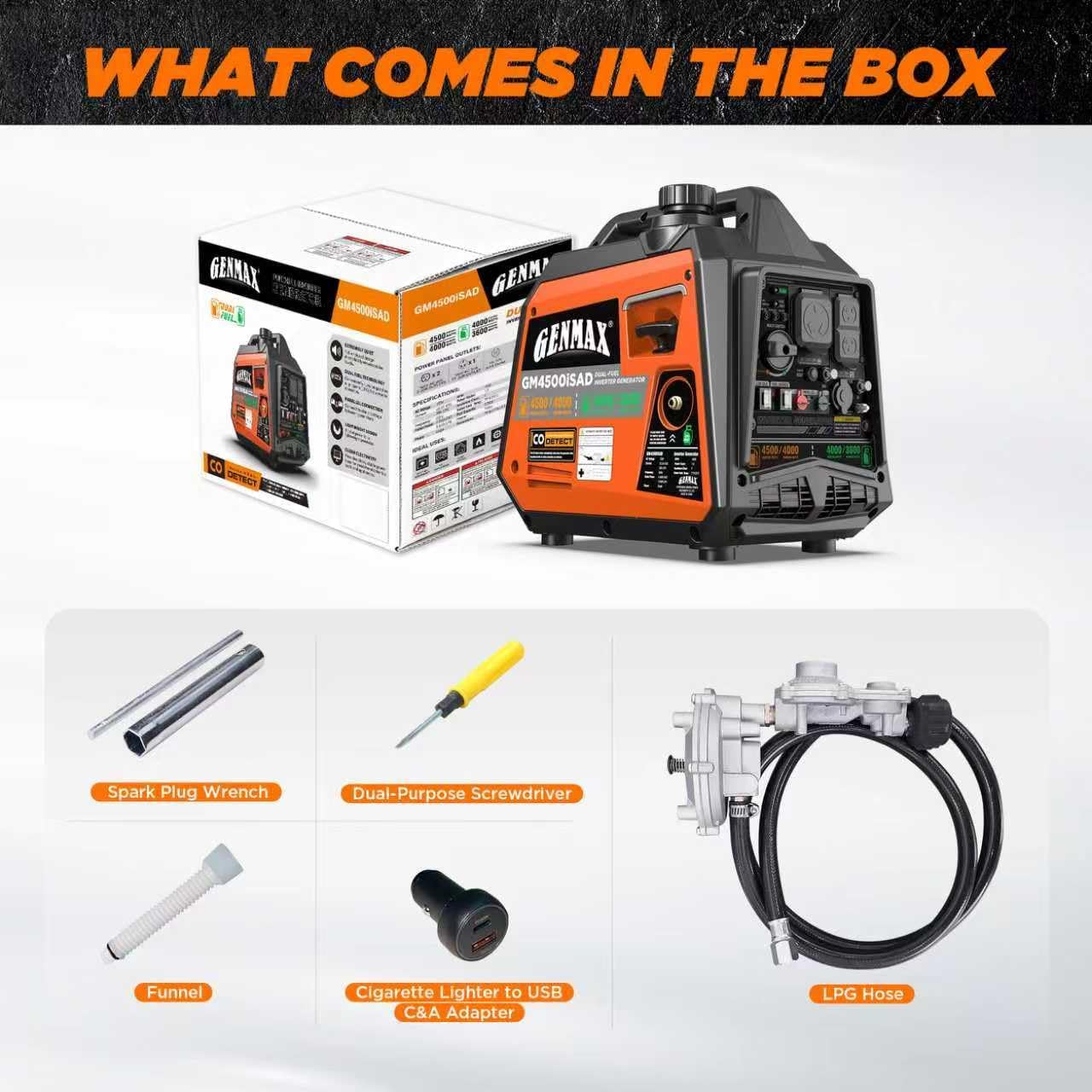
Figure 1: Included accessories with the GENMAX GM4500iSAD generator.
4. Setup
Before starting your generator, ensure it is placed on a flat, level surface outdoors in a well-ventilated area.
4.1 Add Engine Oil
The generator is shipped without engine oil. You must add the correct amount of oil before first use.
- Remove the oil fill cap/dipstick.
- Using the provided oil funnel, slowly add 0.45 liters (15.2 fl. oz.) of SAE 10W-30 engine oil.
- Check the oil level with the dipstick; it should be at the upper limit.
- Securely replace the oil fill cap/dipstick.
4.2 Add Fuel
The GM4500iSAD is a dual-fuel generator and can run on gasoline or propane.
4.2.1 Gasoline
- Ensure the generator is off and cool.
- Unscrew the fuel cap.
- Carefully pour unleaded gasoline (minimum 87 octane) into the fuel tank. Do not overfill.
- Securely replace the fuel cap.

Figure 2: Adding gasoline to the generator.
4.2.2 Propane (LPG)
- Ensure the generator is off.
- Connect one end of the provided LPG hose to the generator's LPG inlet.
- Connect the other end of the LPG hose to a standard propane tank.
- Ensure all connections are tight to prevent leaks.

Figure 3: Connecting the generator to a propane tank.
4.3 Connect Battery (for Electric Start)
The generator's internal battery may need to be connected for electric start functionality. Refer to the manual for specific battery connection instructions.
5. Control Panel Overview
Familiarize yourself with the control panel components for safe and efficient operation.

Figure 4: GENMAX GM4500iSAD Control Panel.
- Main Switch: ON/OFF switch for the generator.
- Digital Display Center: Shows hours run, voltage output, load level, fuel level, and alerts (overload, low oil, CO).
- Low Idle Switch: Engages or disengages Low Idle Mode for fuel efficiency.
- Engine Start/Stop Button: For electric starting and stopping the engine.
- Fuel Source Selector: Dial to select between Gasoline and LPG.
- AC 120V 30A (TT-30R) Outlet: RV-ready outlet.
- AC 120V 20A (5-20R) Outlets: Standard household outlets.
- DC 12V Cigarette Lighter Port: For 12V DC devices.
- USB-C & USB-A Adapter: For charging portable electronic devices.
- Circuit Breakers: Protects against overload.
- CO Alert: Indicator for carbon monoxide detection.
- Parallel Connectors: For connecting two compatible generators in parallel.
- Ground Terminal: For proper grounding of the generator.
6. Operating Instructions
6.1 Starting the Generator
The GM4500iSAD offers multiple starting methods: manual (recoil), electric, and remote start.
6.1.1 Pre-Start Checklist
- Ensure the generator is on a level surface outdoors.
- Check engine oil level.
- Ensure sufficient fuel (gasoline or propane) is available.
- Disconnect all electrical loads from the outlets.
- Ensure the generator is properly grounded.
6.1.2 Electric Start
- Turn the Main Switch to the 'ON' position.
- Select the desired fuel type (Gasoline or LPG) using the Fuel Source Selector.
- Press and hold the 'ENGINE START/STOP' button until the engine starts.
6.1.3 Remote Start
- Turn the Main Switch to the 'ON' position.
- Select the desired fuel type (Gasoline or LPG) using the Fuel Source Selector.
- Press the 'START' button on the remote key fob.
6.1.4 Recoil (Manual) Start
- Turn the Main Switch to the 'ON' position.
- Select the desired fuel type (Gasoline or LPG) using the Fuel Source Selector.
- Pull the recoil starter handle firmly and steadily until the engine starts.
6.2 Low Idle Mode
Engage the 'Low Idle' switch to activate eco mode. This feature automatically adjusts engine speed to match the load, improving fuel efficiency and reducing noise when less power is required.
6.3 Connecting Electrical Devices
Once the generator is running stably, you can connect your electrical devices to the appropriate outlets. Ensure the total wattage of connected devices does not exceed the generator's running wattage.
6.4 Stopping the Generator
- Disconnect all electrical loads from the outlets.
- Press and hold the 'ENGINE START/STOP' button until the engine shuts down.
- Turn the Main Switch to the 'OFF' position.
- If using propane, close the valve on the propane tank.
7. Maintenance
Regular maintenance is crucial for the longevity and optimal performance of your generator. Always perform maintenance when the generator is off and cool.
- Check Engine Oil: Before each use, check the engine oil level and top up if necessary.
- Change Engine Oil: Change the engine oil after the first 20 hours of operation, and then every 100 hours or every 6 months thereafter.
- Clean Air Filter: Inspect and clean the air filter every 50 hours or more frequently in dusty conditions. Replace if damaged.
- Inspect Spark Plug: Inspect the spark plug every 100 hours. Clean or replace as needed.
- Fuel System: If storing the generator for an extended period, drain the gasoline from the fuel tank and carburetor to prevent fuel degradation.
8. Troubleshooting
Refer to this section for common issues and their solutions.
| Problem | Possible Cause | Solution |
|---|---|---|
| Engine will not start | No fuel / Incorrect fuel type selected | Add fuel / Select correct fuel type |
| Engine will not start | Low engine oil | Add engine oil to the correct level |
| Engine will not start | Spark plug faulty or dirty | Inspect, clean, or replace spark plug |
| No power output | Circuit breaker tripped | Reset the circuit breaker |
| No power output | Overload condition | Reduce electrical load |
| CO Alert indicator on | High carbon monoxide levels detected | Move generator to a well-ventilated outdoor area immediately |
9. Specifications
| Feature | Specification |
|---|---|
| Model Name | GM4500iSAD |
| Brand | GENMAX |
| Starting Wattage (Gasoline) | 4500 Watts |
| Running Wattage (Gasoline) | 4000 Watts |
| Starting Wattage (Propane) | 4000 Watts |
| Running Wattage (Propane) | 3600 Watts |
| Fuel Type | Dual Fuel (Gasoline/Propane) |
| Engine Type | 145cc 4-Stroke OHV |
| Engine Power Maximum | 4.5 Kilowatts |
| Item Weight | 49.2 Pounds |
| Product Dimensions | 19.1"L x 11.2"W x 17.9"H |
| Total Power Outlets | 5 (1xTT-30R, 2x5-20R, 1x12V, 1xUSB-C/A) |
| Special Feature | CO Sensor, Low Idle Mode, Parallel Capability |
| Ignition System Type | Manual (Recoil), Electric, Remote Start |
| EPA Compliant | Yes |
10. Warranty and Support
The GENMAX GM4500iSAD generator includes a 3-Year Limited Warranty. For any product issues, usage questions, or technical support, please contact GENMAX customer service. Detailed contact information can be found in the warranty card included with your product or on the official GENMAX website.
11. Product Media
11.1 Product Images
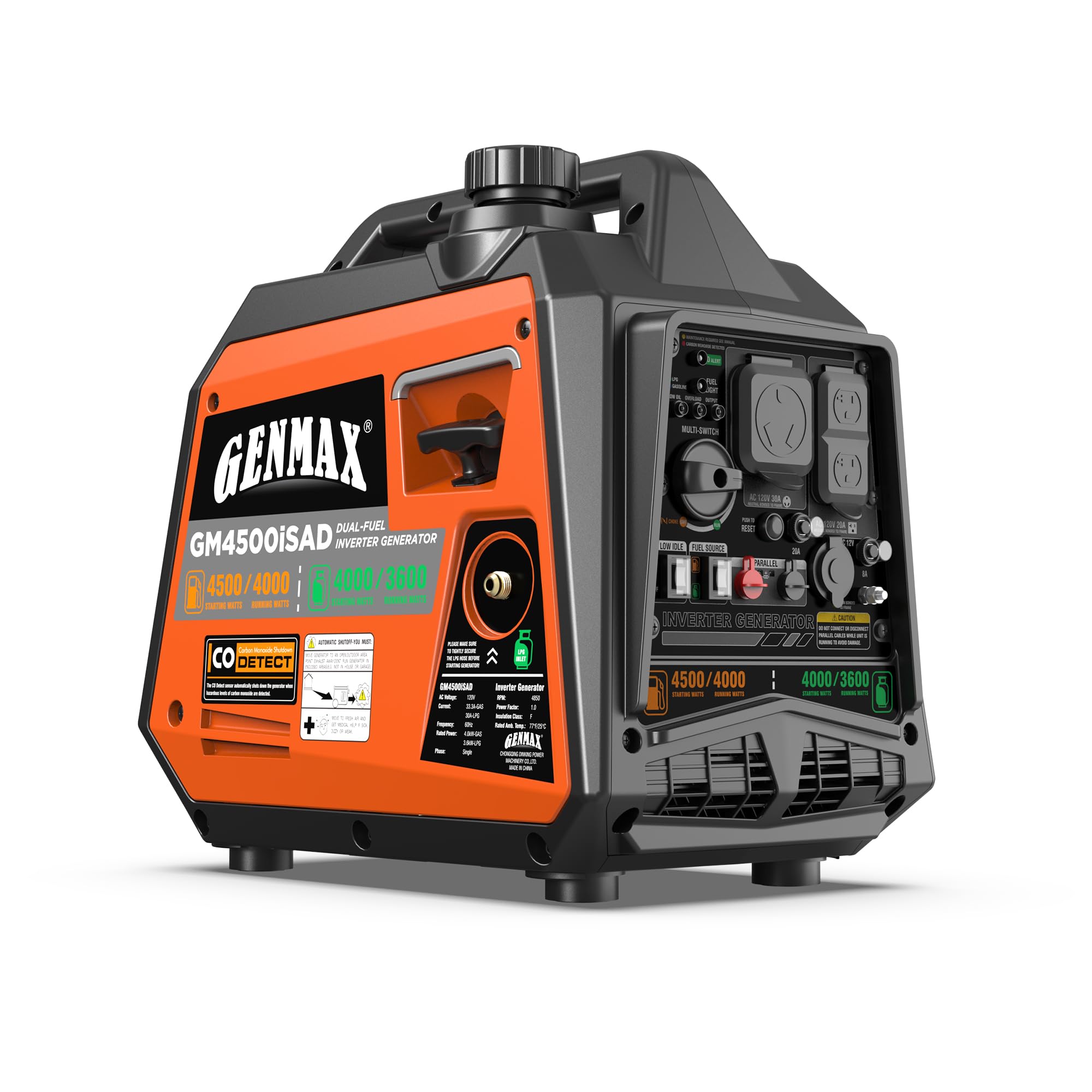
Figure 5: GENMAX GM4500iSAD Dual-Fuel Inverter Generator.

Figure 6: Portability of the GM4500iSAD generator.

Figure 7: Quiet operation of the GM4500iSAD generator.
11.2 Official Product Videos
Video 1: An overview of the GENMAX Portable Generator, highlighting its features and benefits. This video is provided by Victoria Alexander-Thompson, a seller.


