
1. Product Overview
The Timex Men's Triathlon 44mm Digital Watch is designed for durability and functionality. It features a lightweight carbon fiber case, a chronograph for precise timing, a countdown timer, 200-lap memory, and an alarm. The watch is equipped with a comfortable silicone strap and an INDIGLO backlight for visibility in low-light conditions. It is water-resistant up to 100 meters.
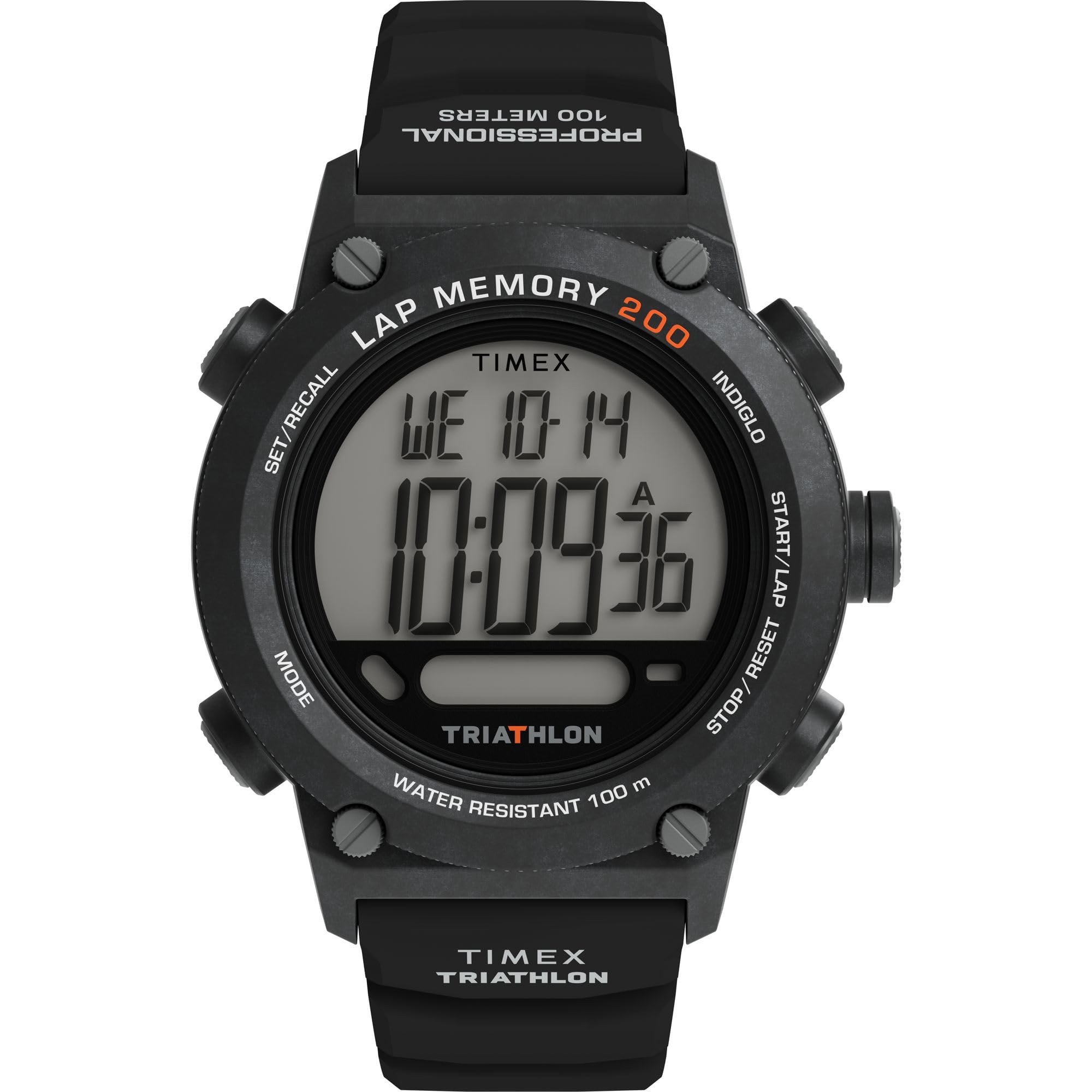
2. Setup
2.1 Initial Time and Date Setting
To set the time and date, refer to the buttons on the side of your watch. Typically, a 'MODE' button cycles through functions, and 'SET' or 'ADJUST' buttons are used to modify values. Consult the detailed instructions provided with your watch for specific button functions.

2.2 Strap Adjustment and Sizing
The silicone strap is designed for comfort and adjustability. To ensure a proper fit, adjust the buckle to a comfortable position on your wrist. The watch should be snug but not too tight, allowing for proper blood circulation.

2.3 Watch Sizing Guide
For assistance in determining the correct watch size for your wrist, please refer to the official Timex Sizing Chart video below. A proper fit ensures comfort and optimal performance.
3. Operating Instructions
3.1 Basic Time Display
The watch defaults to displaying the current time and date. Ensure the watch is in the standard time mode to view this information.

3.2 Chronograph Function
To use the stopwatch (chronograph) function, press the 'MODE' button until the chronograph display appears. Use the 'START/LAP' button to begin and pause timing, and the 'RESET' button to clear the timer. The watch can store up to 200 lap times.
3.3 Countdown Timer
Activate the countdown timer via the 'MODE' button. Set the desired countdown duration using the adjustment buttons. The watch will alert you when the countdown is complete.
3.4 Alarm Setting
Access the alarm setting mode using the 'MODE' button. Set your desired alarm time. Ensure the alarm is activated to sound at the set time.
3.5 INDIGLO Backlight
Press the 'INDIGLO' button (usually located on the top left of the watch face) to illuminate the display for easy reading in low-light conditions. The backlight will remain active for a few seconds.
3.6 Water Resistance
This watch is water-resistant up to 100 meters (330 feet). It is suitable for swimming and snorkeling but not for scuba diving. Do not operate buttons underwater to maintain water resistance integrity.
4. Maintenance
4.1 Cleaning Your Watch
Regularly clean your watch with a soft, damp cloth. For the silicone strap, mild soap and water can be used. Avoid harsh chemicals or abrasive materials that could damage the watch finish or strap.
4.2 Battery Replacement
The watch is powered by a CR2016 battery. When the display dims or functions become erratic, it may be time for a battery replacement. It is recommended to have the battery replaced by a qualified watch technician to ensure proper sealing and maintain water resistance.

4.3 Water Resistance Care
To preserve the water resistance of your watch, avoid exposing it to extreme temperature changes (e.g., hot showers followed by cold water). Ensure the crown and pushers are fully depressed before exposing the watch to water.
5. Troubleshooting
5.1 Display is Dim or Blank
If the display is dim or blank, the battery may need replacement. Refer to section 4.2 for battery replacement recommendations.
5.2 Buttons Are Unresponsive
Ensure the watch is not in a locked mode. If buttons remain unresponsive, a soft reset may be required. This typically involves holding down a combination of buttons; consult the full manual for your specific model if this issue persists.
5.3 Time Inaccuracy
If the watch is losing or gaining time significantly, the battery might be low, or the internal module may require service. Consider battery replacement first.
6. Specifications
| Feature | Detail |
|---|---|
| Model Name | TW5M66900VQ |
| Case Diameter | 44 Millimeters |
| Case Material | Polycarbonate |
| Band Material | Silicone |
| Band Width | 22 Millimeters |
| Display Type | Digital |
| Movement Type | Quartz |
| Water Resistance Depth | 100 Meters |
| Crystal Type | Acrylic |
| Power Source | Battery Powered |
| Item Weight | 0.22 Kilograms (7.76 ounces) |
7. Warranty and Support
7.1 Limited Warranty
Your Timex watch is covered by a limited warranty against manufacturing defects. Please retain your proof of purchase. For specific warranty terms and conditions, refer to the warranty information included with your original packaging or visit the official Timex website.
7.2 Customer Support
For further assistance, technical support, or service inquiries, please visit the official Timex website or contact their customer service department. Contact information can typically be found on the Timex website or in the documentation accompanying your watch.


