
Introduction
The VTOMAN Jump 100 is a compact and lightweight portable power station designed to provide reliable power for various electronic devices. Featuring an 88.8Wh LiFePO4 battery, a 100W AC outlet (200W surge), 65W USB-C Power Delivery, and two USB-A ports, it is suitable for camping, outdoor activities, work, and home emergency backup. This manual provides essential information for safe and efficient operation of your device.
Safety Information
- Battery Conservation: To prevent unnecessary power drain and extend battery life, always disable the AC output by long-pressing the AC Button (3-5 seconds) after use. The AC circuit remains active when enabled and will gradually deplete battery capacity even without connected devices.
- Battery Management System (BMS): The device is equipped with an advanced BMS that provides built-in protection against overcharging, overheating, and short-circuits.
- Operating Environment: Avoid exposing the device to extreme temperatures, direct sunlight for prolonged periods, or high humidity.
- Ventilation: Ensure proper ventilation during use to prevent overheating. Do not block the ventilation openings.
- Water Exposure: This device is not waterproof. Avoid contact with water or other liquids.
Package Contents
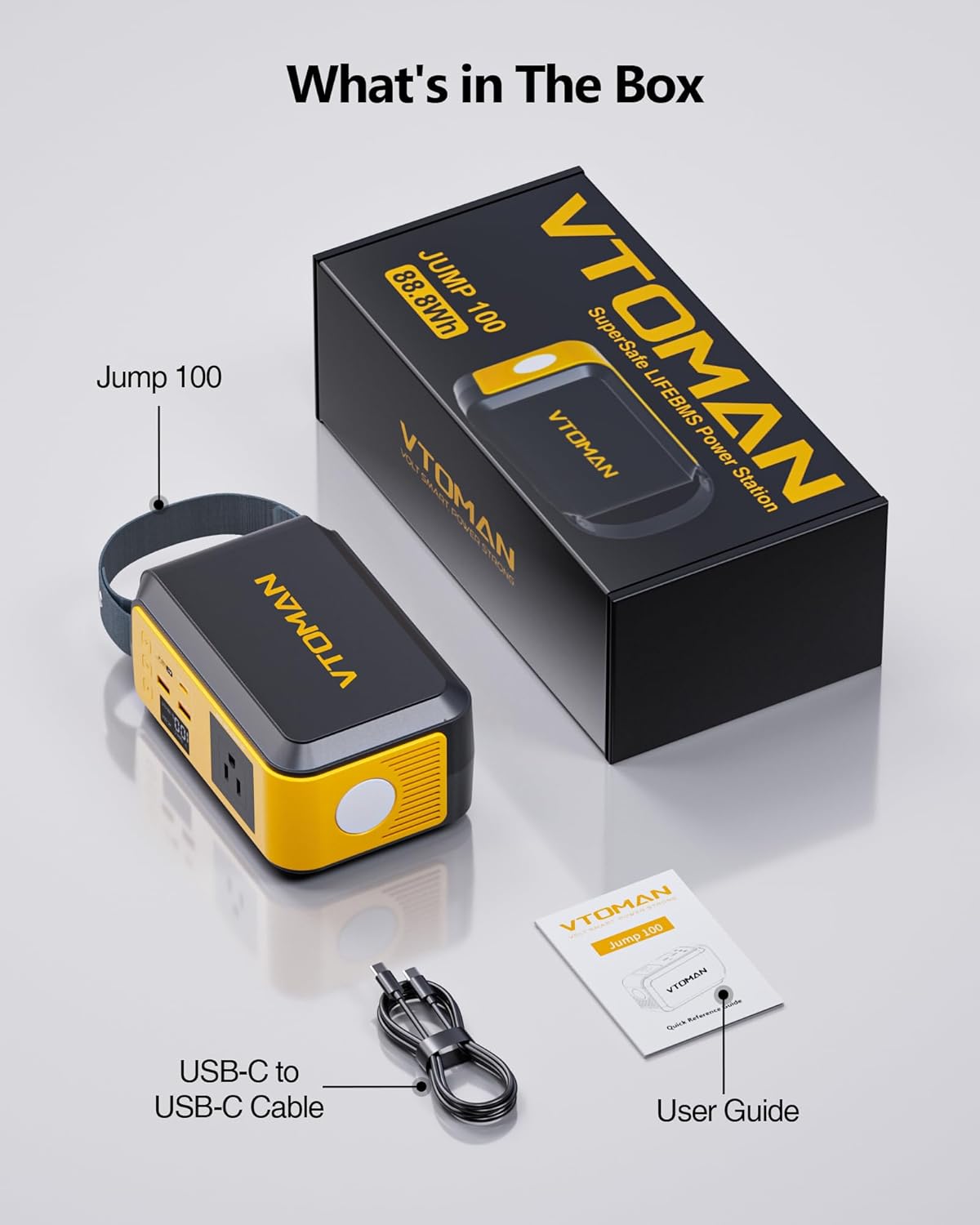
Please check the package contents upon receipt to ensure all items are present:
- 1x VTOMAN Jump 100 Portable Power Station
- 1x USB-C to USB-C Cable
- 1x User Manual

Product Overview and Interface
Familiarize yourself with the various ports, buttons, and display elements of your Jump 100 Portable Power Station:
- AC Output (120V/100W/50-60Hz): Standard AC outlet for powering household appliances.
- USB 1 Output (5V/2.4A 12W): Standard USB-A port.
- USB 2 Output (5V/2.4A 12W): Standard USB-A port.
- Type-C Output PD65W (Max): USB-C port supporting Power Delivery for fast charging compatible devices.
- LED Lighter: Built-in light with multiple modes.
- On/Off Button: Powers the unit on or off.
- AC Button: Activates or deactivates the AC output. Long-press to turn off.
- Light Button: Controls the LED light modes.
- Display: Shows battery level, Type-C output status, AC output status, and USB output status.
Setup
Before first use, it is recommended to fully charge your VTOMAN Jump 100.
- Initial Charging: Connect the provided USB-C to USB-C cable to the Type-C port on the Jump 100 and to a compatible 65W PD wall charger (not included). The unit can be fully charged from 0 to 100% in approximately 1.4 hours.
- Power On: Press the On/Off button to power on the device. The LED display will illuminate, showing the current battery level.

Operating Instructions
Charging the Jump 100
- AC Wall Charging: Use a 65W PD wall charger connected to the USB-C port for rapid charging.
- Solar Charging: Connect a compatible solar panel (Type-C 65W) to the USB-C input port. Charging times will vary based on sunlight intensity.
- Car Charging: Connect the device to a car charger via the USB-C port.
Using AC Output
- Press the On/Off button to power on the unit.
- Press the AC button to activate the AC output. The AC OUT indicator on the display will light up.
- Plug your device into the AC outlet. The Jump 100 provides 100W continuous power with a 200W surge capacity.
- After use, long-press the AC button (3-5 seconds) to disable the AC output and conserve battery.
Using USB Outputs
- Press the On/Off button to power on the unit.
- Connect your devices to the USB-A (5V/2.4A) or USB-C (PD 65W) ports. The corresponding USB OUT or Type-C OUT indicator will appear on the display.
- The USB ports are always active when the unit is powered on.
LED Light Function
- Press the Light button to cycle through the three brightness modes: Low (0.6W, up to 128 hours), Medium (0.8W, up to 96 hours), and High (1.2W, up to 64 hours).
- Press the Light button again to turn off the LED light.

Product Usage Demonstrations
Video: Demonstrates the VTOMAN Jump 100 Portable Power Station in various outdoor settings, showcasing its ability to power laptops, speakers, and other devices for creative work and entertainment.
Video: Highlights the Jump 100 88.8Wh Solar Generator's portability and solar charging capabilities during hiking and camping trips, emphasizing its use for powering cameras and other essentials.
Video: Showcases the unboxing, charging, and various applications of the Jump 100 Portable Power Station, including its suitability for travel and everyday use.
Maintenance
- Battery Care: The Jump 100 uses a durable LiFePO4 battery rated for 3000+ cycles to 80% capacity. For optimal battery health, avoid completely draining the battery frequently.
- Storage: When storing the power station for extended periods, ensure it is charged to approximately 50-80% and store it in a cool, dry place away from direct sunlight. Recharge every 3-6 months to maintain battery health.
- Cleaning: Use a dry, soft cloth to clean the exterior of the device. Do not use harsh chemicals or abrasive materials.
Troubleshooting
- Device Not Turning On: Ensure the battery is charged. If the battery is depleted, connect it to a power source.
- AC Output Not Working: Confirm the AC output is activated by pressing the AC button. Check if the connected device's power consumption exceeds the 100W limit (or 200W surge).
- Slow Charging: Ensure you are using a 65W PD compatible charger for optimal charging speed via the USB-C port. Check the charging cable for damage.
- Overheating: If the device feels excessively hot, disconnect all loads and allow it to cool down in a well-ventilated area. Ensure ventilation ports are not blocked.
Specifications
| Feature | Specification |
|---|---|
| Brand | VTOMAN |
| Model Name | Jump 100 |
| Battery Type | LiFePO4 |
| Capacity | 88.8Wh |
| AC Output | 100W (200W Surge), 110V (AC) |
| USB-C Input/Output | 65W Power Delivery (PD) |
| USB-A Output | 2x 5V/2.4A (12W total) |
| LED Light Modes | Low (0.6W), Medium (0.8W), High (1.2W) |
| Dimensions | 6.89"L x 3.35"W x 4.67"H |
| Item Weight | 2.36 lbs |
| Cycle Life | 3000+ cycles to 80% capacity |
| UPC | 717504135588 |
Warranty and Support
The VTOMAN Jump 100 Portable Power Station comes with a 2-Year Manufacturer's Warranty. For warranty claims, technical support, or any inquiries, please contact VTOMAN customer service through their official website or the retailer where the product was purchased.


