
1. Introduction
Thank you for choosing the FEZIBO Electric Standing Desk. This manual provides essential information for the safe and efficient assembly, operation, and maintenance of your new height-adjustable desk. Please read these instructions carefully before use and retain them for future reference.
The FEZIBO electric standing desk is designed to enhance your workspace with its robust construction, silent operation, and convenient height memory functions. It supports various working styles, from sitting to standing, promoting a healthier and more dynamic work environment.
2. Safety Information
Important Safety Instructions:
- This product is an electrically adjustable height desk. Exercise caution during use.
- Do not exceed the specified weight limit of 80 kg (176 lbs). Overloading may cause damage or injury.
- Ensure the desk is properly secured and stable before placing items on it or adjusting its height.
- Keep children and pets away from the desk during height adjustments to prevent accidents.
- Do not operate the desk if the power cord or plug is damaged. Contact customer support for assistance.
- Avoid placing liquids directly on the control panel or motor components.
- Regularly check all screws and bolts to ensure they are tight.
- Do not disassemble or modify the desk's electrical components.

Environmental and safety certifications for the FEZIBO Electric Standing Desk.
3. Package Contents
Before assembly, please verify that all components are present and undamaged. If any parts are missing or damaged, contact customer support.
- Desktop (Walnut, 120x60cm)
- Desk Frame (Black)
- Legs and Feet
- Control Panel with LED Display
- Power Adapter and Cable
- Assembly Hardware (screws, bolts, etc.)
- Assembly Tools (Note: All assembly tools are NOT included as per specifications, but basic tools like an Allen wrench might be. A screwdriver or drill is recommended for easier assembly.)
- User Manual
4. Setup and Assembly
Assembly is designed to be straightforward, typically taking around 30 minutes. Follow the steps below for proper setup.
- Unpack Components: Carefully remove all parts from the packaging. Lay them out on a clean, soft surface to prevent scratches. Verify all parts against the package contents list.
- Assemble Desk Frame: Attach the legs to the crossbar, ensuring all connections are secure. The frame is constructed from industrial steel for enhanced stability.
- Attach Feet: Secure the feet to the bottom of the desk legs.
- Mount Desktop: Carefully place the desktop onto the assembled frame. Align the pre-drilled holes on the desktop with the frame. Secure the desktop using the provided screws. Caution: Do not overtighten screws to avoid damaging the desktop. Some holes may not be pre-drilled, which is normal for versatile assembly.
- Install Control Panel: Attach the control panel to the underside of the desktop in the designated area.
- Connect Cables: Connect the motor cables and power cable to the control panel and power adapter. Ensure all connections are firm.
- Cable Management: Use any provided cable ties or clips to manage cables neatly, preventing them from interfering with desk movement.
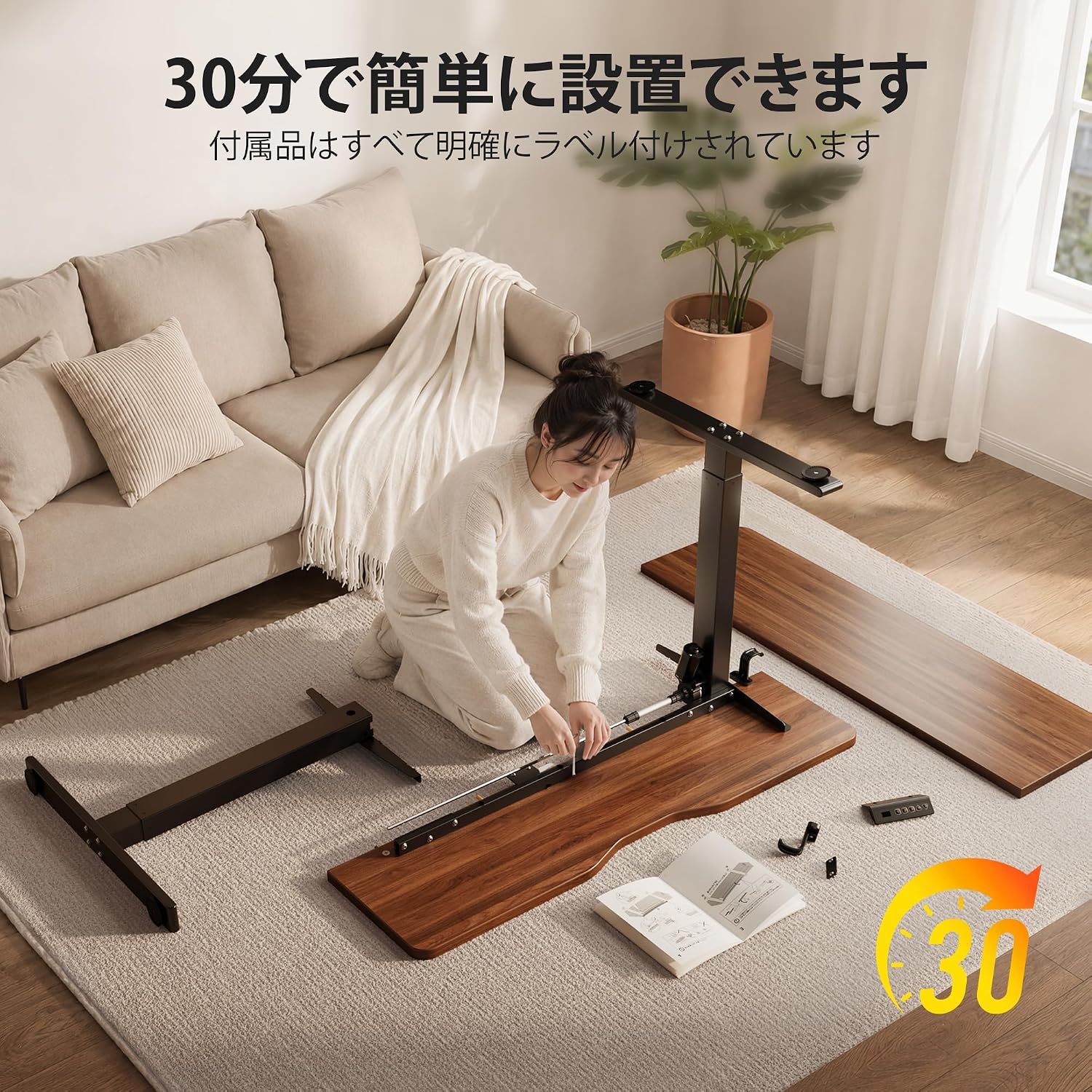
The assembly process is designed for ease, with clearly labeled parts for quick setup.

The reinforced T-shaped frame and industrial steel construction ensure enhanced stability at any height.
5. Operating Instructions
The FEZIBO Electric Standing Desk features an intuitive control panel for easy height adjustment and memory functions.

Intuitive control panel with LED display, height adjustment, memory presets, and safety features.
Height Adjustment:
- Press the Up (▲) arrow button to raise the desk.
- Press the Down (▼) arrow button to lower the desk.
- The LED display will show the current height in centimeters. The desk adjusts smoothly and silently, with noise levels below 45dB.

Enjoy a quiet workspace with the desk's silent motor, operating at less than 45dB.
Memory Presets:
The control panel allows you to save three preferred height settings.
- Adjust the desk to your desired height using the Up/Down buttons.
- Press the "M" button (or "SET" if labeled differently) once. The display will flash.
- Immediately press one of the number buttons ("1", "2", or "3") to save the current height to that preset.
- To recall a saved height, simply press the corresponding number button ("1", "2", or "3"). The desk will automatically adjust to the saved position.
Child Lock Function:
To prevent accidental adjustments, especially in households with children, activate the child lock.
- To Lock: Press and hold the "1" and "2" buttons simultaneously for 3 seconds. The display may show "LOC" or a lock icon.
- To Unlock: Press and hold the "1" and "2" buttons simultaneously again for 3 seconds. The display will return to showing the height.
6. Maintenance
Regular maintenance ensures the longevity and optimal performance of your FEZIBO Electric Standing Desk.
- Cleaning: Wipe the desktop and frame with a soft, damp cloth. Avoid harsh chemicals or abrasive cleaners.
- Cable Check: Periodically inspect all cables for any signs of wear or damage. Ensure they are not pinched or tangled.
- Fastener Check: Every few months, check all screws and bolts to ensure they are securely tightened.
- Motor Care: The motor is designed for maintenance-free operation. Do not attempt to lubricate or open the motor housing.
7. Troubleshooting
If you encounter any issues with your desk, refer to the following common troubleshooting steps:
| Problem | Possible Cause | Solution |
|---|---|---|
| Desk does not move. | Power cable disconnected, child lock active, motor overload. | Check power connections. Deactivate child lock. Unplug for 10 minutes, then reconnect. Reduce load on desk. |
| Desk moves unevenly or makes unusual noise. | Loose fasteners, obstruction, uneven weight distribution. | Check and tighten all screws. Remove any obstructions. Distribute weight evenly on the desktop. |
| Height memory function not working. | Incorrect saving procedure. | Refer to "Memory Presets" section for correct saving steps. |
| Desk stops during adjustment. | Anti-collision feature activated, motor overheating. | Check for obstructions under or around the desk. Allow motor to cool down for 20 minutes before resuming operation. |
If the problem persists after trying these solutions, please contact FEZIBO customer support.
8. Specifications
| Feature | Detail |
|---|---|
| Brand | FEZIBO |
| Model Number | YJJF-SD0001-120DWA-02 |
| Desk Type | Electric Standing Desk |
| Desktop Dimensions (W x D) | 120 cm x 60 cm (47.2 in x 23.6 in) |
| Height Adjustment Range | 72 cm - 118 cm (28.3 in - 46.5 in) |
| Color | Walnut desktop, Black frame |
| Base Material | Metal (Industrial Steel) |
| Weight Capacity | 80 kg (176 lbs) |
| Noise Level | ≤ 45 dB |
| Features | Electric height adjustment, 3 memory presets, Child lock, Anti-collision system, Silent operation |
| Assembly Tools Included | No (Basic tools may be included, but a screwdriver/drill is recommended) |
| Certifications | EPA, CARB, CE (Power safety certifications: ETL, UL, PSE) |

Detailed dimensions and height adjustment range of the desk.

The desk is tested for reliability, supporting up to 80kg and enduring 50,000 lift cycles.
9. Warranty and Support
FEZIBO provides a warranty for this product against defects in materials and workmanship under normal use. For specific warranty terms and conditions, please refer to the warranty card included with your product or visit the official FEZIBO website.
For technical support, troubleshooting assistance, or to inquire about replacement parts, please contact FEZIBO customer service through the retailer where you purchased the product or via the contact information provided on the FEZIBO brand store page on Amazon.
FEZIBO Brand Store: Visit FEZIBO Store on Amazon.co.jp


