
1. Introduction
This manual provides essential information and instructions for the safe and efficient use of your XIAOMI Redmi 15C 4G LTE smartphone. Please read this manual thoroughly before using your device to ensure optimal performance and longevity. Keep this manual for future reference.
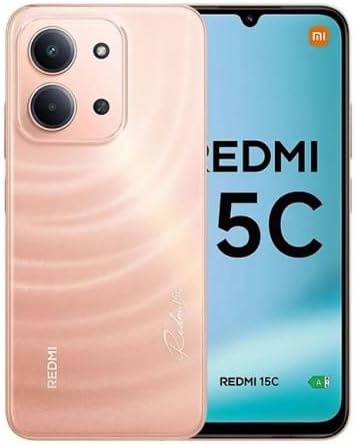
Figure 1: XIAOMI Redmi 15C Smartphone. This image displays the front and back of the Redmi 15C in Twilight Orange, highlighting its design and camera module.
2. What's in the Box
Upon opening your XIAOMI Redmi 15C package, verify that all items are present:
- XIAOMI Redmi 15C Smartphone
- 33W Wall Charger
- USB Type-C Cable (Adapter)
- Phone Case
- SIM Ejector Tool (may be included)
- Quick Start Guide (may be included)
3. Setup
3.1. SIM Card and MicroSD Card Installation
The Redmi 15C supports Dual Nano SIM cards and one MicroSD card for expanded storage.
- Locate the SIM card tray on the side of your device.
- Insert the SIM ejector tool into the small hole next to the tray and press firmly until the tray pops out.
- Place your Nano SIM card(s) and/or MicroSD card into the designated slots on the tray, ensuring the gold contacts face downwards. Refer to the diagram on the tray for correct orientation.
- Carefully reinsert the tray into the phone until it clicks into place.
Important Carrier Compatibility Information:

Figure 2: Carrier Compatibility. This chart indicates that the Redmi 15C is compatible with T-Mobile, Mint, Tello, Ultra, and other networks outside the USA. It is NOT compatible with Verizon, AT&T, Xfinity, Boost, Virgin, Visible, Cricket, or other CDMA carriers.
For USA users, this device is primarily compatible with T-Mobile, Mint, and Tello networks. It supports 4G VoLTE worldwide. Please verify compatibility with your specific carrier before use.
3.2. Initial Power On and Setup
- Press and hold the Power button until the XIAOMI logo appears.
- Follow the on-screen prompts to select your language, region, and connect to a Wi-Fi network.
- Sign in with your Google account or create a new one to access Google services and the Play Store.
- Set up security features such as a PIN, pattern, password, fingerprint, or AI face unlock.
4. Operating Your Device
4.1. Display Features
The Redmi 15C features a 6.9-inch FHD+ DotDisplay with a resolution of 720x1600 pixels. Key display characteristics include:
- Refresh Rate: Up to 120Hz (adjustable up to 144Hz for supported applications).
- Touch Sampling Rate: Up to 288Hz for responsive interaction.
- Brightness: 700 nits (typical), 850 nits (HBM).
- Eye Comfort: TÜV Rheinland Low Blue Light, Circadian Friendly, and Flicker Free Certified for reduced eye strain.
4.2. Camera Usage
The device is equipped with a 50MP AI dual camera system on the rear and an 8MP front camera.
- Rear Camera: 50MP main lens (f/1.8) with an auxiliary lens. Supports 1080p HD video recording at 30 fps.
- Front Camera: 8MP lens (f/2.0). Features include filmCamera, HDR mode, Soft-light ring, Portrait mode, and Time-lapse. Supports 1080p HD video recording at 30 fps.
To access the camera, tap the Camera icon on your home screen or lock screen. Select modes like Photo, Video, Portrait, or More for additional options.
4.3. Battery and Charging
The Redmi 15C is powered by a 6000mAh (typical) battery and supports 33W turbo charging.
- Use the included 33W wall charger and USB Type-C cable for optimal charging speed.
- Avoid using non-certified chargers or cables to prevent damage to the device.
- The device is designed for worry-free use for up to 2 days on a single charge under typical usage conditions.
4.4. Connectivity
Your device offers various connectivity options:
- Cellular: Dual Nano SIM support for 4G LTE (FDD and TDD bands).
- Wi-Fi: Supports 2.4GHz and 5GHz Wi-Fi networks.
- Bluetooth: Bluetooth 5.1 for connecting wireless accessories.
- GPS: Integrated GPS, AGPS, GLONASS, Beidou, and Galileo for precise location services.
- Audio Jack: Standard 3.5mm headphone jack.
4.5. Security Features
Enhance your device security with:
- Rear Fingerprint Sensor: Unlock your phone quickly and securely using your fingerprint.
- AI Face Unlock: Use facial recognition to unlock your device.
- PIN/Pattern/Password: Standard lock screen security options.
5. Maintenance
5.1. Software Updates
Regularly update your device's operating system (Xiaomi HyperOS based on Android 15) to ensure optimal performance, security, and access to new features.
- Go to Settings > About phone > System update to check for and install available updates.
- Ensure your device has sufficient battery charge and a stable internet connection before starting an update.
5.2. Cleaning Your Device
To clean your Redmi 15C:
- Use a soft, lint-free cloth.
- Avoid using harsh chemicals, abrasive cleaners, or compressed air.
- The device has an IP64 dust and water resistance rating, meaning it is protected from dust ingress and splashing water from any direction. However, it is not waterproof; avoid submerging it in water.
5.3. Storage Management
Your device comes with 256GB of internal storage and 8GB of RAM. You can expand storage using a MicroSD card.
- Regularly clear cache and unnecessary files to maintain performance.
- Manage applications and media files to optimize storage space.
6. Troubleshooting
This section addresses common issues you might encounter with your Redmi 15C.
6.1. Device Not Powering On
- Ensure the battery is charged. Connect the charger and wait a few minutes before attempting to power on.
- Press and hold the Power button for at least 10-15 seconds to force a restart.
6.2. Poor Network Signal or No Service
- Check if your SIM card is correctly inserted.
- Verify that your carrier is compatible with the device (refer to Section 3.1).
- Restart the device.
- Go to Settings > SIM cards & mobile networks and ensure your SIM is enabled and network settings are correct.
6.3. Battery Draining Quickly
- Reduce screen brightness.
- Close unused applications running in the background.
- Disable Wi-Fi, Bluetooth, or GPS when not in use.
- Check battery usage in Settings > Battery to identify power-consuming apps.
6.4. Apps Crashing or Freezing
- Clear the cache of the problematic app (Settings > Apps > [App Name] > Storage > Clear cache).
- Update the app to its latest version from the Google Play Store.
- If the issue persists, uninstall and reinstall the app.
7. Specifications
Detailed technical specifications for the XIAOMI Redmi 15C (Model 25078RA3EL):
| Feature | Specification |
|---|---|
| Model Name | Redmi 15C (25078RA3EL) |
| Operating System | Xiaomi HyperOS based on Android 15 |
| Processor | Octa Core Helio G81 (2.0GHz) |
| GPU | Mali-G52 MC2 |
| Display | 6.9-inch FHD+ DotDisplay |
| Resolution | 720 x 1600 pixels |
| Refresh Rate | Up to 120Hz (144Hz for supported apps) |
| RAM | 8 GB |
| Internal Storage | 256 GB |
| Expandable Storage | MicroSD (dedicated slot) |
| Rear Camera | 50MP Main (f/1.8) + Auxiliary lens |
| Front Camera | 8MP (f/2.0) |
| Battery Capacity | 6000 mAh (typical) |
| Charging | 33W Turbo Charging (USB Type-C) |
| Connectivity | 4G LTE, Wi-Fi (2.4GHz/5GHz), Bluetooth 5.1, GPS (AGPS, GLONASS, Beidou, Galileo) |
| SIM Type | Dual Nano SIM |
| Audio Jack | 3.5mm |
| Sensors | Rear Fingerprint Sensor, AI Face Unlock, Proximity sensor, Ambient light sensor, Accelerometer |
| Dimensions | 7 x 4 x 2 inches (Package) |
| Weight | 6 ounces |
| Dust and Water Resistance | IP64 |
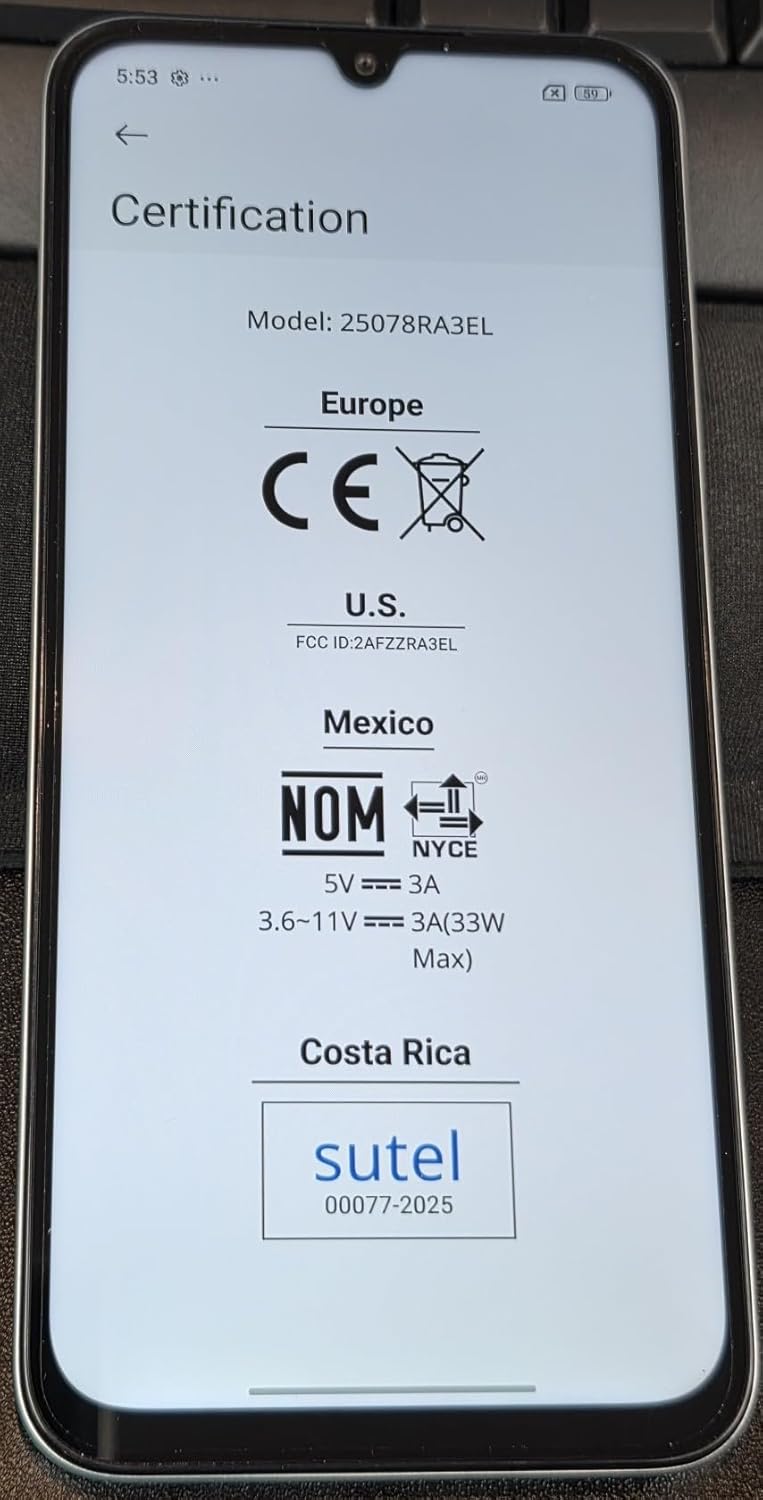
Figure 3: Device Certifications. This image displays the regulatory compliance information for the Redmi 15C, including CE for Europe, FCC ID: 2AFZZRA3EL for the U.S., NOM for Mexico, and Sutel for Costa Rica.
8. Safety Information
Please observe the following safety guidelines:
- Do not attempt to disassemble or modify the device.
- Use only approved chargers and accessories.
- Avoid exposing the device to extreme temperatures, direct sunlight, or liquids.
- Dispose of the device and its battery responsibly according to local regulations.
- Maintain a safe distance from medical devices when using the phone.
9. Warranty and Support
For warranty information and customer support, please refer to the warranty card included in your product package or visit the official XIAOMI website. You can also contact XIAOMI customer service for assistance with your Redmi 15C.
Manufacturer: Xiaomi
Model Number: Redmi 15C (25078RA3EL)
Date First Available: August 7, 2025
For further assistance, please visit the Official XIAOMI Store on Amazon.


