
Important Safety Information
- Read and heed these instructions.
- Do not use this product near water.
- Clean only with a dry cloth.
- Check the voltage of your local mains supply.
- Do not block any ventilation openings. Install under the manufacturer's instructions.
- Do not install near any heat sources such as radiators, heat registers, stoves, or other apparatus (including amplifiers) that produce heat.
- Only use attached merits/accessories specified by the manufacturer.
- Unplug this product during lightning storms and long-time disuse.
- Refer all servicing to qualified service personnel.
Package Contents
The Donner MAMP4 5.1 Channel Audio Amplifier package includes:
- Donner MAMP4 Stereo Receiver
- Remote Control
- FM Antenna
- User Manual
Setup Guide
1. Connecting Speakers and Subwoofer
The MAMP4 amplifier supports a 5.1 channel setup, allowing connection of 5 speakers and 1 subwoofer. Ensure correct polarity (+/-) when connecting speakers.

Image: Diagram showing the 5.1 channel speaker and subwoofer connections on the rear panel of the Donner MAMP4 amplifier.

Image: Detailed view of the rear panel of the Donner MAMP4 amplifier, highlighting speaker terminals and various input/output ports.
2. Connecting Audio Sources
The amplifier offers multiple input options for various audio sources:
- Bluetooth 5.3: For wireless audio streaming from compatible devices.
- USB: Connect a USB drive (up to 64 GB) for direct music playback.
- RCA: Connect devices like CD/DVD players or other audio equipment.
- AC-3: For surround sound input.
- Optical/Coaxial: Digital audio inputs for smart TVs and other digital sources.
- AUX IN: General auxiliary input.
- FM Radio: Connect the included FM antenna for radio reception.
- Microphone Inputs (2x 1/4''): For karaoke or public address.

Image: Front panel of the Donner MAMP4 amplifier showing various input options including USB, AUX, and microphone jacks, along with Bluetooth and FM indicators.
3. Power Connection
Connect the power cord to a wall outlet. Ensure the unit is turned off before making any connections.
4. Initial Power On
Press the Power button on the front panel to turn the amplifier on. The LED display will illuminate.

Image: The Donner MAMP4 amplifier integrated into a home theater setup, demonstrating its role in enhancing stereo and surround sound.
Operating Instructions
1. Input Selection
Use the 'MODE' button on the front panel or the 'INPUT' button on the remote control to cycle through available input modes: Bluetooth, USB, FM, RCA, AC-3, Optical, Coaxial, and AUX.
2. Volume and EQ Control
Adjust the master volume using the large knob on the front panel or the 'VOL+/-' buttons on the remote. The amplifier features independent controls for Treble, Midrange, and Bass on both the unit and the remote, allowing for customized sound profiles. The MAMP4 automatically saves your mode selection, volume, and EQ settings for convenience.
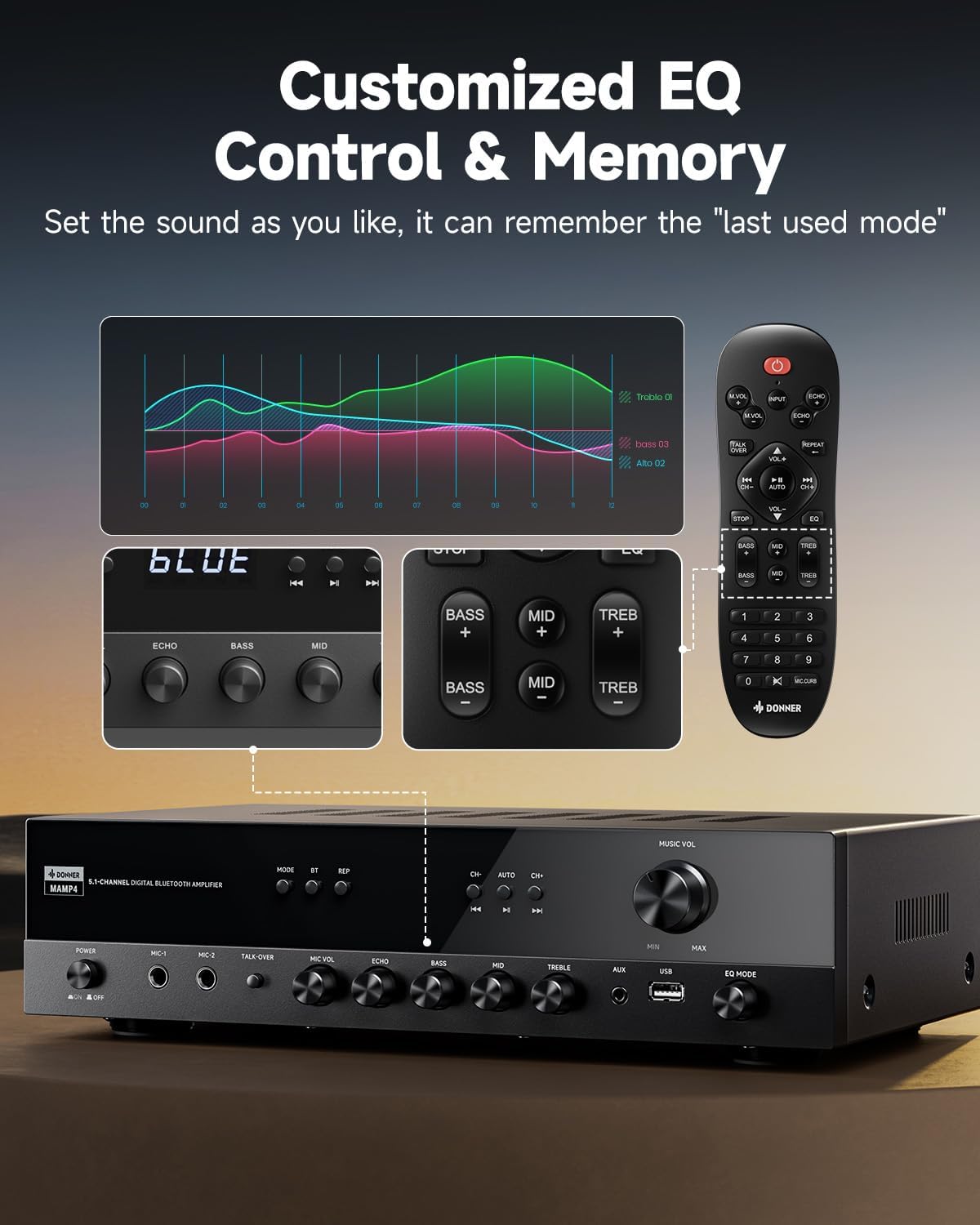
Image: Close-up of the Donner MAMP4 amplifier's front panel and remote control, illustrating the customizable EQ settings for bass, mid, and treble, and the memory function.
3. Bluetooth Pairing
Select 'Bluetooth' mode. On your device, search for 'DONNER MAMP4' and pair. Use the Play/Pause button or Prev/Next buttons on the remote to control playback.
4. FM Radio Operation
In FM mode, you can quickly select your preferred FM frequency by entering the numbers directly using the remote control. Use the 'CH+/-' buttons for automatic channel search.

Image: The Donner MAMP4 amplifier with its remote control, demonstrating the ease of selecting FM frequencies by direct numerical input.
5. Microphone Functions
The amplifier includes dual 1/4'' microphone jacks. Adjust microphone volume and echo effect using dedicated knobs. The 'Talk Over' function lowers background music for clearer voice output during events or speeches.
6. Remote Control
The upgraded remote control provides full functionality, including treble, midrange, bass, echo, and Talkover settings in any input mode.

Image: Comparison of the new and old style remote controls for the Donner amplifier, highlighting the expanded functionality of the upgraded remote for input selection, EQ, echo, and Talkover.
7. Product Summary Video
Video: A product summary video for the Donner amplifier, showcasing its features and functionalities.
8. Donner 5.1 Channel Stereo Receiver Overview
Video: An official overview video from DonnerDirect, detailing the features and benefits of the Donner 5.1 Channel Stereo Receiver.
Maintenance
To ensure the longevity and optimal performance of your Donner MAMP4 amplifier, follow these maintenance guidelines:
- Cleaning: Use a soft, dry cloth to clean the exterior of the unit. Avoid liquid cleaners or abrasive materials.
- Ventilation: Ensure that all ventilation openings on the amplifier are clear and unobstructed to prevent overheating.
- Storage: If the unit will not be used for an extended period, unplug the power cord from the outlet.
- Remote Control Batteries: Replace batteries in the remote control as needed. Dispose of used batteries properly according to local regulations.
Troubleshooting
If you encounter issues with your Donner MAMP4 amplifier, refer to the following common solutions:
- No Power: Ensure the power cord is securely plugged into both the amplifier and a working wall outlet. Check the power switch on the front panel.
- No Sound: Verify that the correct input source is selected. Check all speaker and audio source connections for proper seating and polarity. Adjust volume levels.
- Hissing Sound in Standby: The MAMP4 has optimized noise reduction with added relays. If a persistent hissing sound occurs, ensure all connections are secure and try unplugging the unit for a few minutes before reconnecting.
- Bluetooth Pairing Issues: Ensure the amplifier is in Bluetooth mode and your device's Bluetooth is enabled and discoverable. Try restarting both devices.
- FM Radio Reception Poor: Ensure the FM antenna is properly connected and extended. Try repositioning the antenna for better signal.
- Microphone Not Working: Ensure microphones are securely plugged into the correct jacks. Adjust 'MIC VOL' and 'ECHO' knobs.
For persistent issues, please contact Donner customer support or refer to qualified service personnel.
Specifications
| Feature | Description |
|---|---|
| Model | MAMP4 |
| Output Power (RMS) | L/R Speakers: 60W/4R; Surround & Center Speakers: 25W × 3 |
| Channels | 5.1 Channel |
| Bluetooth Version | 5.3 |
| USB Support | Up to 64 GB |
| Audio Inputs | 1 RCA, 1 AC-3, 2 Mic-in, AUX IN, Optical, Coaxial |
| FM Radio Frequency | 76-108 MHz |
| EQ Control | Treble, Midrange, Bass (independent adjustment) |
| Special Features | Talk Over function, Settings Memory, Low Noise Design |
| Product Dimensions | 9.76 x 14.96 x 3.86 inches |
| Item Weight | 13.2 pounds |
Warranty & Support
For warranty information, technical support, or any inquiries regarding your Donner MAMP4 amplifier, please contact Donner customer service.
- Manufacturer: Donner
- After-sales service E-mail: service@donnermusic.com
- Professional Assistance: Refer all servicing to qualified service personnel.


