
1. Introduction
Thank you for choosing the Frienhund Automatic Dual Pet Feeder. This device is designed to provide scheduled and controlled feeding for your pets, ensuring they receive appropriate portions even when you are away. Featuring a 7-liter capacity, dual stainless steel bowls, and a programmable timer with a slow feeding mode, this feeder promotes healthy eating habits and convenience for multi-pet households. Please read this manual thoroughly before use to ensure proper operation and maintenance.

The Frienhund Automatic Dual Pet Feeder provides ample personal space for two pets to eat simultaneously, preventing food guarding and competition.
2. Product Components
Before setting up your feeder, please ensure all components are present and in good condition:
- 1 x Automatic Pet Feeder Unit
- 2 x Stainless Steel Bowls
- 1 x Power Adapter
- 1 x Nylon Braided Data Cable
- 1 x Mounting Screw Kit (for wall mounting)
- 1 x Desiccant Bag
- 1 x User Manual

Detailed view of all components included in the package.
3. Setup
3.1 Power Supply
The feeder supports dual power supply options: a 5V DC power adapter for daily use and 3 D-cell batteries (not included) for backup in case of power outages. It is recommended to use both for continuous operation.
- Connect the power adapter to the feeder and a wall outlet.
- For battery backup, open the battery compartment at the bottom of the feeder and insert 3 D-cell batteries, ensuring correct polarity.

The feeder offers dual power supply for uninterrupted feeding.
3.2 Filling the Food Hopper
The feeder has a large 7-liter capacity food hopper, suitable for various dry food types up to 15mm in size.
- Open the lid of the food hopper.
- Pour dry pet food into the hopper. Ensure the food level does not exceed the MAX line.
- Close the lid securely to maintain food freshness.

The 7L food hopper can hold approximately 2.55 kg of dry food, suitable for multiple pets.
4. Operating Instructions
The feeder features a 2.4-inch high-definition screen for intuitive control. Refer to the tutorial video for visual guidance on button functions and settings.
Official tutorial video demonstrating the setup and operation of the Frienhund Automatic Pet Feeder.
4.1 System Time Setting
To adjust the system time (e.g., to 6:15 AM):
- Short press the Time button to enter system time setting mode.
- Adjust the hour using the + or - buttons. Click OK to confirm and move to minutes.
- Adjust the minutes using the + or - buttons. Click OK to confirm. The device will emit a prompt tone, and the system time is set.
Refer to video segment 0:03 - 0:26 for visual instructions.
4.2 Feeding Schedule Settings
You can set up to 6 meals per day, with 1 to 9 portions per meal.
- Short press the Plan button to enter feeding schedule setting mode.
- Adjust the hour for Meal 1 using + or -. Click OK to confirm.
- Adjust the minutes for Meal 1 using + or -. Click OK to confirm.
- Adjust the number of portions for Meal 1 (1-9) using + or -. Click OK to confirm. Meal 1 setup is complete.
- Repeat steps 1-4 to configure Meals 2 through 6.
- Long press OK to return to the main interface. The feeding schedule is now active.
Refer to video segment 0:32 - 2:19 for visual instructions.
4.3 Slow Feeding Mode
The slow feeding mode helps prevent pets from eating too quickly, reducing bloating and regurgitation. When activated, each portion of food is dispensed one minute apart during scheduled meals.
- To activate/deactivate: Press and hold the SLOW button for 2 seconds. The "SLOW" icon will appear/disappear on the screen.
Refer to video segment 2:47 - 2:55 for visual instructions.

The slow feeding mode helps prevent digestive issues by dispensing food gradually.
4.4 Manual Feeding
You can manually dispense food at any time outside of the scheduled meals.
- Short press the Manual Feeding button to release one portion of food.
- Long press the Manual Feeding button to continuously release food until the button is released.
Refer to video segment 2:20 - 2:34 for visual instructions.
4.5 Keypad Lock
To prevent accidental changes to settings by pets or children, you can lock the keypad.
- Press and hold the Keypad Lock button for 2 seconds to lock or unlock all buttons. A lock icon will appear/disappear on the screen.
Refer to video segment 2:35 - 2:46 for visual instructions.
5. Maintenance and Cleaning
Regular cleaning ensures hygiene and extends the life of your feeder. The feeder features a detachable design for easy and thorough cleaning.
- Unplug the feeder and remove any remaining food from the hopper.
- Detach the food hopper and the stainless steel bowls from the main unit.
- The stainless steel bowls are dishwasher safe. The detachable hopper can be hand-washed with mild soap and water.
- Wipe the main unit with a damp cloth. Do not immerse the main unit in water.
- Ensure all parts are completely dry before reassembling and refilling.

The feeder's detachable design and dishwasher-safe bowls make cleaning simple and hygienic.
6. Safety Information
To ensure the safety of your pets and the longevity of the device, please observe the following:
- Keep the feeder on a stable, level surface. The triangular stable structure and optional wall-mounting kit help prevent overturning.
- The power cable is a nylon braided anti-bite design to protect against pet chewing. However, always monitor your pet to ensure they do not damage the cable.
- Ensure the food hopper lid is securely closed to maintain food freshness and prevent moisture ingress. A desiccant bag can be placed in the designated compartment to absorb moisture.
- Only use dry pet food with a size of less than 15mm. Larger kibble may cause blockages.
- The transparent food hopper allows for easy monitoring of food levels.

The nylon braided power cord is designed to resist pet chewing, enhancing safety.
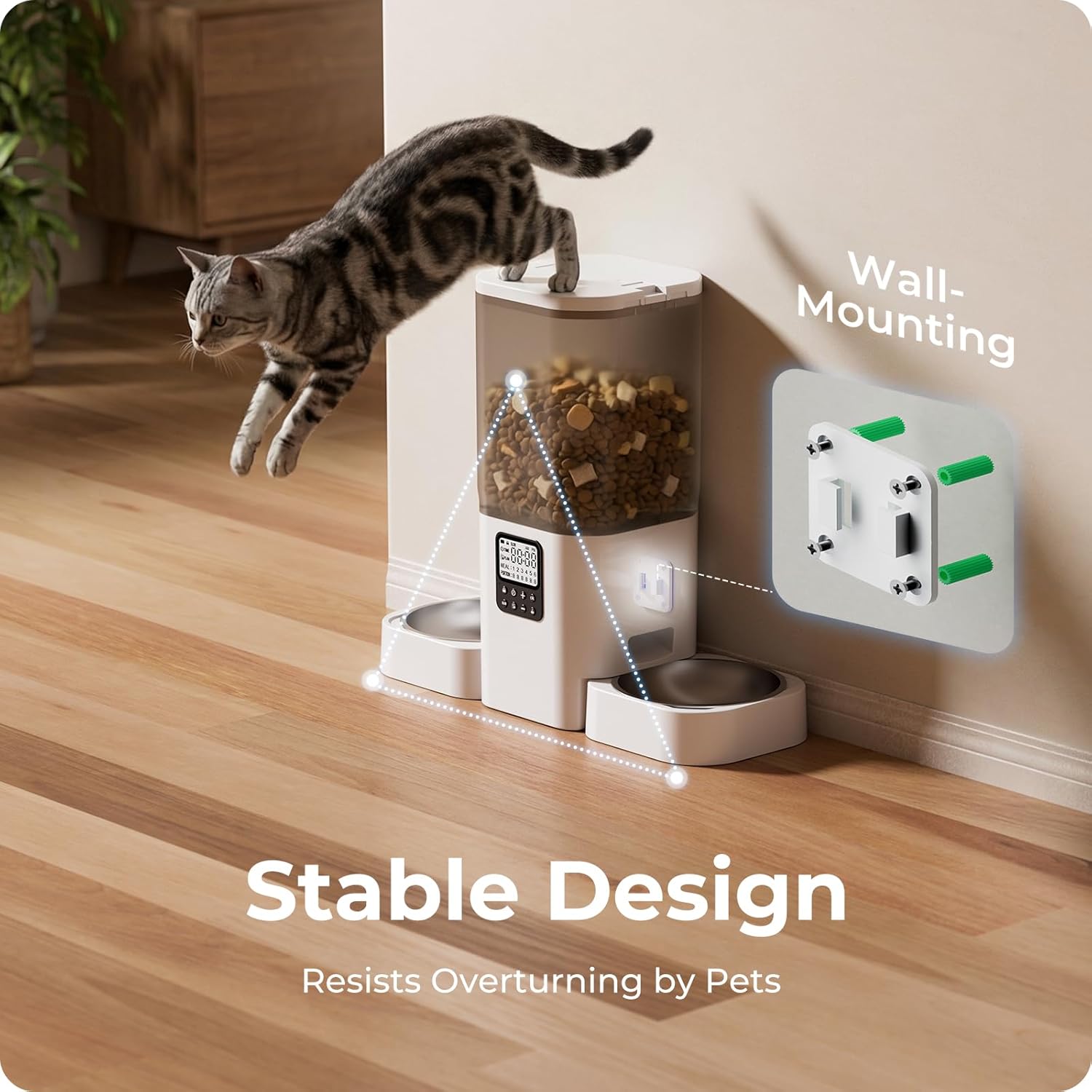
The stable design and optional wall-mounting prevent the feeder from being overturned by active pets.

The feeder's lid features moisture-proofing and freshness-locking mechanisms to keep food dry and fresh.
7. Troubleshooting
| Problem | Possible Cause | Solution |
|---|---|---|
| Food not dispensing | Food hopper empty; food stuck; power issue. | Refill hopper; check for blockages (use suitable kibble size); ensure power adapter is connected or batteries are installed. |
| Incorrect feeding times/portions | Incorrect schedule settings; system time incorrect. | Re-program feeding schedule; adjust system time. |
| Keypad unresponsive | Keypad is locked. | Press and hold the Keypad Lock button for 2 seconds to unlock. |
| Food not fresh | Lid not sealed; desiccant needs replacement. | Ensure lid is securely closed; replace desiccant bag regularly. |
The feeder is compatible with various dry food types, including freeze-dried, multi-pieced, dry kibble, and air-dried food, provided they are between 5-15mm in size. This flexibility helps prevent food blockages.

The feeder supports various types of dry food within the recommended size range.
8. Specifications
- Model Number: ACF200W
- Material: Stainless Steel, Acrylonitrile Butadiene Styrene (BPA-free)
- Capacity: 7 Liters (approx. 2.55 kg / 29 cups)
- Dimensions (L x W x H): 47 x 18 x 40 cm
- Weight: 1.86 kg
- Power Source: 5V DC Power Adapter (included), 3 x D-Cell Batteries (not included)
- Special Features: Automatic, Portion Control, Slow Feeding, Timer, Programmable, Detachable, Dishwasher Safe Bowls, Anti-bite Cable, Stable Design, Wall-mountable
- Target Species: Cats, Small to Medium Dogs
9. Warranty and Support
Frienhund offers a 1-year warranty for this automatic pet feeder. If you encounter any issues or have questions, please contact our customer support team. We provide 24/7 online service to assist you.
- Warranty Duration: 1 Year
- Support: 24/7 Online Service
- Contact: Refer to your purchase platform or the contact information provided in the packaging for email or phone support.

Frienhund offers 24/7 online support for any product inquiries or assistance.


